1. Вовед
This manual provides detailed instructions for the installation, operation, and maintenance of your VANBAR 2-in-1 Android Car Wireless Adapter. This device converts your car's wired Apple CarPlay or Android Auto system into a wireless connection, enhancing convenience and user experience.
2. Информации за безбедност
- Не обидувајте се да го расклопите или менувате уредот.
- Чувајте го уредот подалеку од вода, влага и екстремни температури.
- Ensure the device is securely placed to avoid obstruction while driving.
- Operate the device responsibly and avoid distractions while driving.
3. Содржина на пакетот
Ве молиме проверете го пакувањето за следните ставки:
- VANBAR 2-in-1 Wireless Adapter (Model: Carplay01)
- USB-A до USB-C адаптерски кабел
- Упатство за употреба (овој документ)
4. Производот завршиview
The VANBAR 2-in-1 Wireless Adapter is a compact device designed to enable wireless Apple CarPlay and Android Auto in compatible vehicles. It features a durable alloy casing for efficient heat dissipation and includes both USB-A and USB-C connectivity options.

Image 4.1: VANBAR 2-in-1 Wireless Adapter showing USB-A and USB-C connectivity. The adapter is a small black square with a USB cable attached, and an additional USB-C adapter is shown.

Image 4.2: Diagram illustrating the internal structure of the adapter, highlighting the glass and metal alloy components for excellent heat dissipation.
5. Упатства за поставување
Следете ги овие чекори за првично поставување:
- Поврзете го адаптерот:
Plug the VANBAR wireless adapter into your car's USB port that supports wired Apple CarPlay or Android Auto. Use the provided USB-C adapter if your car has a USB-C port.
- Спарете преку Bluetooth:
On your smartphone, enable Bluetooth and Wi-Fi. Пребарај за the adapter's Bluetooth name (e.g., "VANBAR-XXXX") and pair with it. Confirm any pairing requests on your phone and car display.
- Автоматско поврзување:
Once paired, the adapter will automatically connect to your phone via Wi-Fi to initiate Apple CarPlay or Android Auto. The car's display should switch to the CarPlay or Android Auto interface.

Image 5.1: Visual guide for connecting the adapter to the car's USB port, pairing via Bluetooth, and the automatic connection process.
6. Упатства за работа
After successful setup, the adapter will automatically connect to your smartphone when you start your car. You can then use Apple CarPlay or Android Auto wirelessly.
- Навигација: Use your preferred navigation apps directly on your car's display.
- Музика и медиуми: Stream music, podcasts, and audiobooks.
- Повици и пораки: Make and receive calls, and send/receive messages using voice commands or the car's interface.
- Гласовна контрола: Utilize Siri (for Apple CarPlay) or Google Assistant (for Android Auto) for hands-free operation.

Слика 6.1: На пр.ample of a car display showing multiple CarPlay functions simultaneously, including navigation, music playback, and an incoming call.

Image 6.2: Illustration of different control methods for the car's infotainment system, including touchscreen, steering wheel buttons, and a central rotary knob.
7. Компатибилност
This wireless adapter is designed for vehicles equipped with factory-wired Apple CarPlay or Android Auto. It supports:
- Возила: Compatible with most car models from 2015 onwards that have wired CarPlay/Android Auto.
- Паметни телефони:
- Apple CarPlay: Requires iPhone with iOS 10 or later.
- Android Auto: Requires Android phone with Android 11 or later.
For detailed compatibility lists, please refer to the official resources:
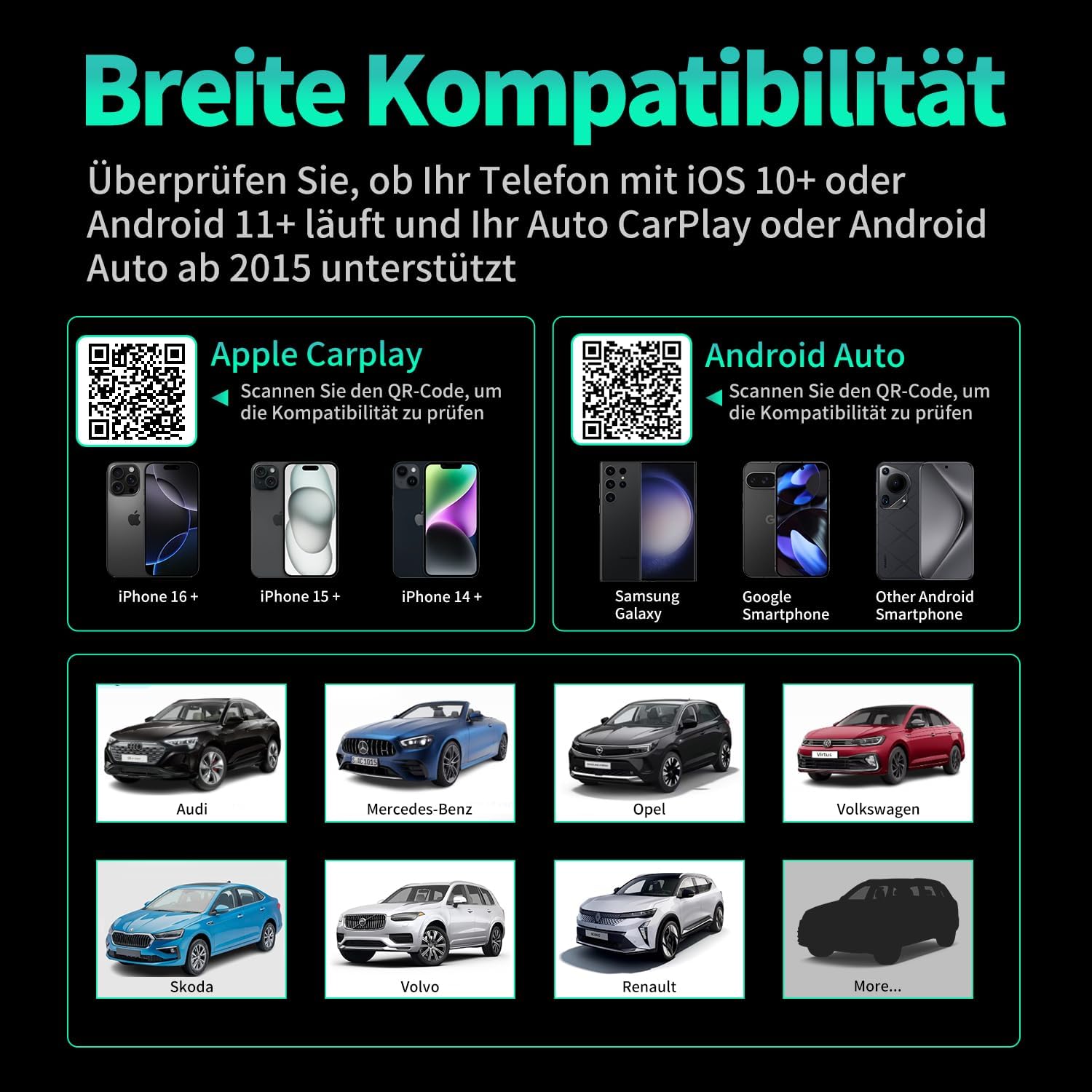
Слика 7.1: Компатибилност прекуview displaying supported iPhone models (14+, 15+, 16+), Samsung Galaxy, Google, and other Android smartphones, along with car brands like Audi, Mercedes-Benz, Opel, Volkswagen, Skoda, Volvo, and Renault.
8. Одржување
- Чистење: Избришете го уредот со мека, сува крпа. Не користете течни средства за чистење или абразивни материјали.
- Складирање: Чувајте го уредот на ладно и суво место кога не го користите подолг временски период.
- Ажурирања на фирмверот: Проверете го производителот webпериодично проверувајте ја страницата за достапни ажурирања на фирмверот за да обезбедите оптимални перформанси и компатибилност.
9 Смена на проблеми
| Проблем | Можна причина | Решение |
|---|---|---|
| Adapter not connecting to car. | Incorrect USB port, car not compatible, loose connection. | Ensure the adapter is plugged into the correct USB port that supports wired CarPlay/Android Auto. Verify car compatibility. Re-plug the adapter firmly. |
| Phone not connecting to adapter. | Bluetooth/Wi-Fi off, incorrect pairing, phone OS not supported. | Ensure Bluetooth and Wi-Fi are enabled on your phone. Forget previous Bluetooth connections and re-pair. Check phone OS version for compatibility (iOS 10+, Android 11+). |
| Повремена врска или застој. | Interference, weak signal, outdated firmware. | Ensure no other devices are causing Wi-Fi interference. Try restarting both the car's infotainment system and your phone. Check for firmware updates. |
| CarPlay/Android Auto не се стартува. | CarPlay/Android Auto not enabled in car settings, app issues. | Check your car's infotainment settings to ensure CarPlay/Android Auto is enabled. Restart your phone and the car's system. |
10. Спецификации
| Број на модел | Carplay01 |
| Бренд | ВАНБАР |
| Технологија за поврзување | Bluetooth 5.0, Wi-Fi (2.4 GHz + 5 GHz), USB |
| Компатибилни уреди | Smartphones (iOS 10+, Android 11+) |
| Тип на конектор | USB Type A, USB Type C (with adapter) |
| Димензии на производот | 1 x 5.5 x 4.5 cm |
| Тежина на ставката | 12 гр |
| Боја | Црното |
| Посебни карактеристики | Wireless Android Auto, Wireless Apple CarPlay, GPS Navigation, Spotify, iHeart Radio support |
11. Гаранција и поддршка
For warranty information and technical support, please refer to the official VANBAR webлокација или директно контактирајте ја нивната служба за корисници. Зачувајте ја сметката за купување за гаранциски барања.