
1. Вовед
The FSP VITA GM 850W Power Supply is designed to provide stable and efficient power for your computer system. Featuring 80 PLUS Gold certification, a fully modular design, and advanced protection features, it is suitable for a wide range of applications, including gaming and professional workstations. This manual provides essential information for the proper installation, operation, and maintenance of your power supply unit.

Слика 1.1: Од горе надолу view of the FSP VITA GM 850W Power Supply, showcasing its compact design and fan grill.
2. Информации за безбедност
Ве молиме прочитајте ги и разберете ги сите безбедносни упатства пред да го инсталирате или ракувате со напојувањето. Непочитувањето на ова може да резултира со телесни повреди или оштетување на вашата опрема.
- Не го отворајте напојувањето casing. Висок волуменtages are present inside, even when the unit is unplugged. There are no user-serviceable parts inside. Opening the casing ќе ја поништи гаранцијата.
- Инсталирајте го напојувањето во добро проветрено место, подалеку од извори на топлина, директна сончева светлина и влага.
- Проверете дали напојувањето е поврзано со заземјен штекер.
- Use only the modular cables provided with this power supply. Using incompatible cables may cause damage to the PSU and connected components.
- Пред инсталација или одржување, секогаш исклучувајте го кабелот за наизменична струја од ѕидниот штекер.
- Avoid placing objects on top of the power supply or blocking its ventilation openings.
3. Содржина на пакетот
Проверете дали сите артикли се присутни во вашиот пакет:
- FSP VITA GM 850W Power Supply Unit
- Modular Cable Set (including 12V-2x6 PCIe cable)
- Кабел за напојување со наизменична струја
- Завртки за монтирање
- Упатство за употреба (овој документ)
4. Производот завршиview
The FSP VITA GM 850W features a fully modular design, allowing for clean cable management and improved airflow within your PC case. Key components include the main power unit, a 120mm hydraulic bearing fan for cooling, and various modular connectors for system components.
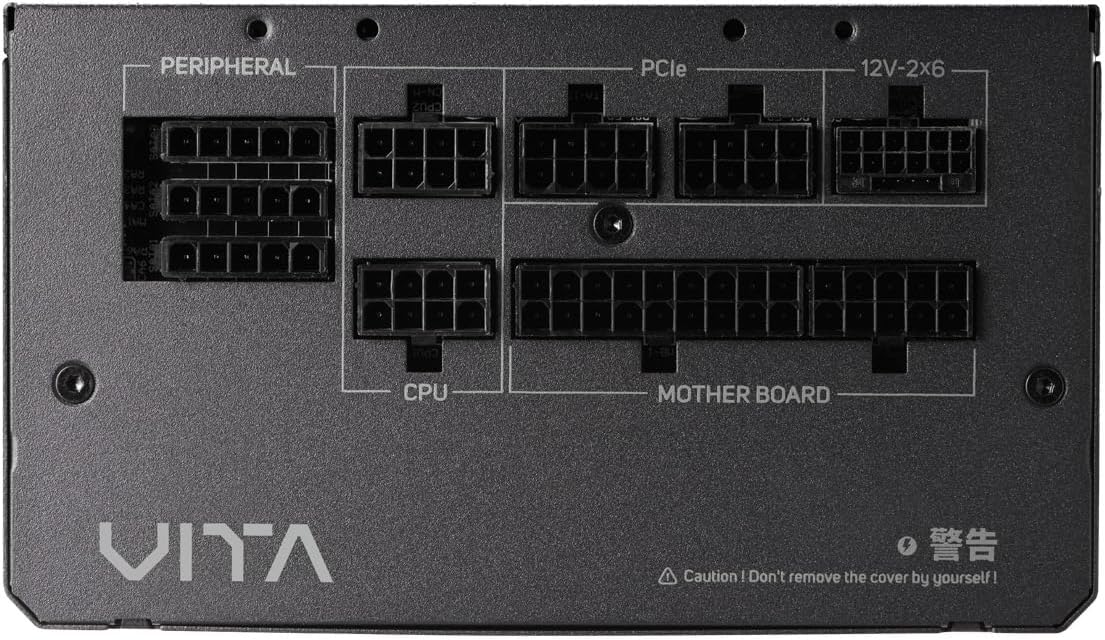
Слика 4.1: Крупен план view of the modular connector panel on the FSP VITA GM 850W Power Supply, showing labeled ports for Motherboard, CPU, PCIe, Peripheral, and 12V-2x6.
4.1. Modular Connectors
The power supply features clearly labeled ports for connecting various components:
- Матична плоча: Main 24-pin ATX connector.
- Процесор: 8-pin (4+4 pin) EPS connectors for CPU power.
- PCIe: 8-pin (6+2 pin) connectors for graphics cards.
- 12V-2x6: Dedicated 12V-2x6 connector for high-power PCIe 5.1 graphics cards.
- Периферен уред: Connectors for SATA and Molex devices.
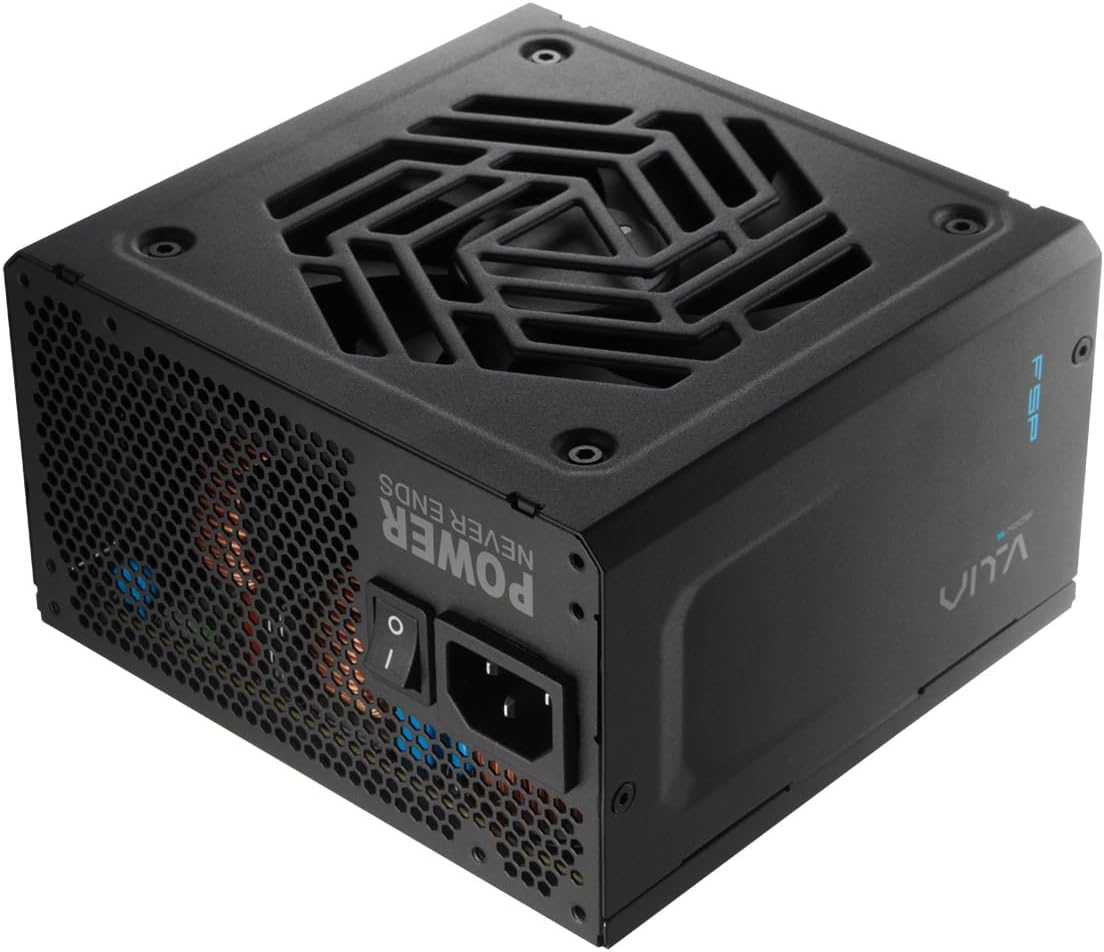
Слика 4.2: Задна страна view of the FSP VITA GM 850W Power Supply, showing the AC power inlet, power switch, and ventilation grille.
5. Поставување и инсталација
Follow these steps to properly install your FSP VITA GM 850W Power Supply into your computer system.
5.1. Физичка инсталација
- Осигурајте се дека вашиот компјутер е исклучен од струја и исклучен од штекерот.
- Отворете го куќиштето на компјутерот за да пристапите до местото за монтирање на напојувањето.
- Carefully place the FSP VITA GM 850W Power Supply into the designated bay, ensuring the fan faces the correct direction for optimal airflow (typically facing downwards if there's a bottom vent, or inwards if mounted at the top).
- Прицврстете го напојувањето на куќиштето со помош на испорачаните завртки за монтирање.
5.2. Кабелски врски
Connect the necessary modular cables to your power supply and system components. Only connect the cables you need to minimize clutter and improve airflow.

Image 5.1: Diagram illustrating the various modular cables included with the FSP VITA GM 850W Power Supply, including Motherboard, CPU, PCIe 6+2 Pin, PCIe 12V-2x6, SATA, and SATA/Molex cables, along with their approximate lengths in millimeters.
- Connect the 24-pin ATX cable from the power supply to the motherboard.
- Connect the 8-pin (4+4 pin) EPS cable(s) from the power supply to the CPU power connector(s) on the motherboard.
- For graphics cards, connect the appropriate 8-pin (6+2 pin) PCIe cables or the 12V-2x6 cable (for compatible PCIe 5.1 GPUs) from the power supply to the graphics card(s).
- Connect SATA power cables to your storage drives (HDDs, SSDs) and other SATA-powered devices.
- Connect Molex cables to any peripheral devices that require them.
- Ensure all cable connections are secure and properly seated.
- Затворете ја кутијата за компјутер.
- Connect the AC power cord to the power supply and then to a grounded wall outlet.
6. Упатства за работа
Once installed, operating your FSP VITA GM 850W Power Supply is straightforward.
6.1. Вклучување/исклучување
- Ensure the power switch on the rear of the power supply is in the 'ON' (I) position.
- Притиснете го копчето за вклучување на куќиштето на компјутерот за да го стартувате системот.
- To power off, shut down your operating system normally. For complete power disconnection, switch the power supply to the 'OFF' (O) position and unplug the AC cord.
6.2. Efficiency and Fan Operation
The VITA GM 850W is 80 PLUS Gold certified, meaning it operates with over 90% efficiency at typical loads. This reduces wasted energy, heat generation, and noise. The integrated 120mm HYB fan is designed for quiet and efficient cooling, adjusting its speed based on the power supply's temperature and load to maintain optimal performance and acoustics.

Image 6.1: Graph illustrating the fan speed (RPM) and acoustic noise (dBA) of the 120mm HYB fan in the FSP VITA GM 850W Power Supply across different load percentages, demonstrating quiet operation at lower loads.
7. Одржување
Правилното одржување обезбедува долготрајност и оптимални перформанси на вашето напојување.
- Чистење: Periodically clean the exterior of the power supply and its fan grille to prevent dust buildup. Use a soft, dry cloth or compressed air. Ensure the power supply is unplugged before cleaning.
- Проток на воздух: Осигурајте се дека отворите за влез и излез на напојувањето не се блокирани. Добриот проток на воздух е клучен за ефикасно ладење.
- Управување со кабли: Maintain tidy cable management within your PC case to promote better airflow and prevent cables from interfering with the power supply fan.
8 Смена на проблеми
If you encounter issues with your FSP VITA GM 850W Power Supply, refer to the following common problems and solutions.
8.1. Чести проблеми
- Без моќност:
- Проверете дали кабелот за наизменична струја е безбедно поврзан и со напојувањето и со ѕидниот штекер.
- Ensure the power switch on the PSU is in the 'ON' (I) position.
- Проверете дали штекерот работи со вклучување на друг уред.
- Check all modular cable connections to the motherboard and components.
- Нестабилност на системот/случајни исклучувања:
- This could indicate an overloaded system or a component issue. Ensure your system's power requirements do not exceed 850W.
- Check for proper ventilation and ensure the power supply fan is spinning. Overheating can trigger protection mechanisms.
- Проверете дали сите кабелски врски се безбедни.
- Гласен шум од вентилаторот:
- Ensure the power supply's fan intake/exhaust is not obstructed.
- Clean any dust buildup on the fan blades or grille.
- High system load will naturally increase fan speed. If noise is excessive at low loads, contact support.
8.2. Заштитни карактеристики
The FSP VITA GM 850W Power Supply includes several protection features to safeguard your system:
- OVP (Пренапонtagд Заштита): Shuts down the PSU if output voltages exceed a safe level.
- OCP (Заштита од прекумерна струја): Shuts down the PSU if current on a single rail exceeds a safe level.
- OPP (Overpower Protection): Shuts down the PSU if the total power draw exceeds its maximum wattage.
- УВП (Андерволtagд Заштита): Shuts down the PSU if output voltages drop below a safe level.
- SCP (Заштита од краток спој): Shuts down the PSU in case of a short circuit on any output rail.
- OTP (Overtemperature Protection): Shuts down the PSU if internal temperatures become too high.

Image 8.1: Diagram illustrating the comprehensive protection features of the FSP VITA GM 850W Power Supply, including OVP, OCP, OPP, NLO, OTP, SCP, UVP, and SIP.
If any of these protections are triggered, the power supply will shut down. Disconnect the AC power, check your system for faults, and then reconnect power to attempt a restart.
9. Спецификации
Detailed technical specifications for the FSP VITA GM 850W Power Supply:
| Карактеристика | Спецификација |
|---|---|
| Име на моделот | VITA-850GM |
| Бренд | ВМФ |
| Излезен Ватtage | 850 вати |
| 80 ПЛУС Сертификација | Злато |
| Форма фактор | ATX |
| Димензии (Д x Ш x В) | 140 x 150 x 86 mm (5.5 x 5.9 x 3.4 инчи) |
| Тежина на ставката | 3.1 килограми (6.82 фунти) |
| Метод на ладење | Air (120mm HYB Fan) |
| Кондензатори | 105°C Japanese Bulk Capacitors |
| Тип на конектор | ATX, PCI Express (Full Modular) |
| Компатибилни уреди | Computer, Gaming Console |
| Карактеристики на заштита | OVP, OCP, SCP, OPP, UVP, OTP, NLO, SIP |
10. Гаранција
The FSP VITA GM 850W Power Supply comes with a 10 година гаранција from the date of purchase. This warranty covers defects in materials and workmanship under normal use. Please retain your proof of purchase for warranty claims. The warranty does not cover damage caused by improper installation, accident, abuse, misuse, natural disaster, insufficient or excessive electrical supply, abnormal mechanical or environmental conditions, or any unauthorized disassembly, repair, or modification.
11. Поддршка
For technical assistance, troubleshooting beyond this manual, or warranty inquiries, please visit the official FSP website or contact FSP customer support. You can often find FAQs, driver downloads, and contact information on the manufacturer's support pages.
За повеќе информации, посетете: FSP Official Store on Amazon


