
1. Вовед
The VTech Allô Bébé Magic Messages Interactive Toy Phone is designed to engage and educate young children aged 9 months to 3 years. This interactive toy features voice recording, voice-changing effects, light-up buttons, and introduces basic concepts like colors, animals, and numbers through playful interaction. It encourages imaginative play and early developmental skills.

Слика 1.1: напред view of the VTech Allô Bébé Magic Messages Interactive Toy Phone in blue.
2. Карактеристики на производот
- Voice Recording Function: Allows parents or children to record short messages.
- Ефекти на менувачот на глас: Apply fun effects to recorded voices.
- Interactive Number Buttons: 10 light-up buttons introduce colors, animals, and numbers.
- Musical Content: Includes 6 songs and various melodies.
- Карактеристики на осветлување: The dog's face and number buttons illuminate with sounds and interactions.
- Контрола на јачината на звукот: Adjustable sound level for quiet play.
- Автоматско исклучување: Заштедува траење на батеријата.
- Издржлив дизајн: Built to withstand typical child's play.
3. Содржина на пакетот
По отварањето на пакувањето, проверете дали се присутни сите потребни елементи:
- 1 x VTech Allô Bébé Magic Messages Toy Phone (Blue)
- 3 x LR03-AAA Batteries (pre-installed)

Image 3.1: The VTech Allô Bébé Magic Messages Toy Phone in its original packaging.
4. Поставување
4.1. Инсталација/замена на батерија
The toy phone comes with 3 LR03-AAA batteries pre-installed. To replace them:
- Пронајдете ја преградата за батерии на задната страна на играчката.
- Using a screwdriver, loosen the screw on the battery cover.
- Отстранете го капакот.
- Insert 3 new LR03-AAA batteries, ensuring correct polarity (+/-).
- Вратете го капакот на батеријата и добро затегнете ја завртката.
Warning: Do not mix old and new batteries. Do not mix alkaline, standard (carbon-zinc), or rechargeable (nickel-cadmium) batteries. Remove batteries during long periods of non-use.
4.2. Првично вклучување
Once batteries are installed, locate the On/Off switch, usually on the side or back of the device. Slide it to the 'On' position to begin play.
5. Упатства за работа
5.1. Вклучување/исклучување и контрола на јачината на звукот
The toy features a power switch and a volume control switch, typically located on the side. Adjust the volume to your preferred level (low/high).
5.2. Recording Messages
To record a message:
- Притиснете го Копче за снимање (often indicated by a microphone icon).
- Speak clearly into the microphone located on the toy.
- Притиснете го копчето Снимај повторно за да го прекинете снимањето.
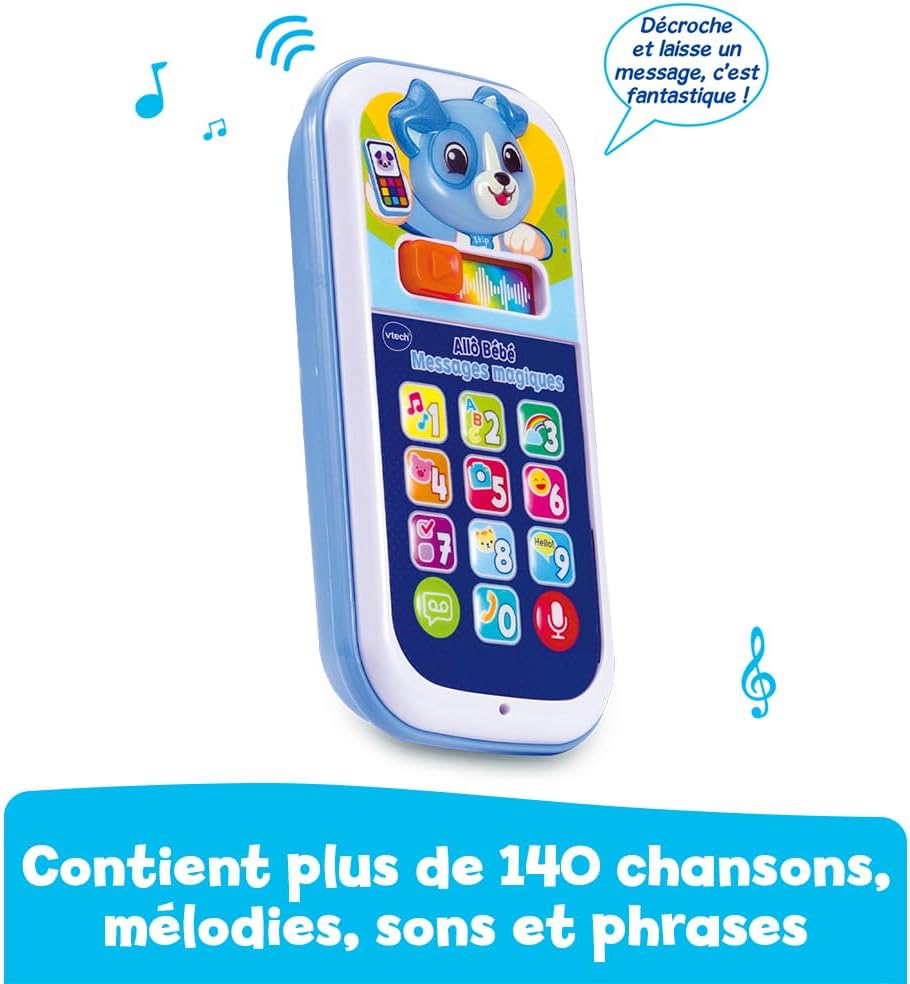
Image 5.1: A woman demonstrating how to record a message on the toy phone.
5.3. Playing Messages
The toy has a dedicated voicemail button that flashes when a new message is available. To listen to recorded messages:
- Притиснете го Voicemail button (often indicated by an envelope or play icon). The button will flash when a message is waiting.
- The recorded message will play back.

Image 5.2: A child listening to a message on the toy phone.
5.4. Applying Voice Effects
After recording a message, you can add fun effects:
- Лизгајте го magic slider (usually located near the screen) to the right.
- This will apply various voice effects or transform the voice into a song.

Image 5.3: A child interacting with the voice effects feature.
5.5. Interactive Play with Number Buttons
Pressing the 10 numbered buttons will trigger lights, sounds, and phrases that introduce colors, animals, and numbers. The dog's face on the screen will also light up in rhythm with the sounds.

Image 5.4: A child engaging in interactive play with the toy phone.
5.6. Music and Melodies
The toy includes 6 songs and various melodies. These will play during different interactions or when specific buttons are pressed, enhancing the play experience.

Image 5.5: The toy phone features a variety of songs and melodies.
6. Одржување
6.1. Чистење
To clean the toy, wipe it with a slightly damp cloth. Do not immerse the toy in water or use harsh cleaning agents. Ensure the toy is completely dry before use.
6.2. Складирање
Store the toy in a cool, dry place away from direct sunlight. If the toy will not be used for an extended period, remove the batteries to prevent leakage.
7 Смена на проблеми
- Toy not turning on:
- Проверете дали прекинувачот за вклучување/исклучување е во положба „Вклучено“.
- Осигурајте се дека батериите се правилно инсталирани со точен поларитет.
- Replace old batteries with new LR03-AAA batteries.
- Low or no sound:
- Check the volume control switch and ensure it is not set to the lowest setting.
- Replace batteries, as low battery power can affect sound output.
- Светлата не работат:
- Заменете ги батериите.
- Recording/playback issues:
- Ensure you are pressing the correct buttons for recording and playback.
- Speak clearly and close to the microphone during recording.
- Заменете ги батериите.
8. Спецификации
| Димензии на производот (Д x Ш x В) | 7.1 x 3.1 x 14 cm |
| Тежина | 185 грама |
| Препорачана возраст | 9 месеци - 3 години |
| Образовна вредност | Promotes speech development and familiarization with sounds and animal names. |
| Language (Toy Content) | француски |
| Број на модел | 80-620965 |
| Потребни се батерии | Да |
| Вклучени батерии | Yes (3 x LR03-AAA Alkaline) |
| Главен материјал | Пластика |
| Боја | Blue (Multicolor) |
| ASIN | B0DP2X64SM |
9. Информации за безбедност
No specific safety warnings were provided for this product beyond standard toy safety guidelines. Always supervise children during play. Regularly inspect the toy for any damage or loose parts that could pose a choking hazard. Discard the toy if it becomes damaged.
10. Гаранција и поддршка
For warranty information and customer support, please refer to the documentation included with your purchase or visit the official VTech website. You can also contact VTech customer service for assistance with product inquiries or technical support.
Официјален претставник на VTech Webсајт: www.vtech.com