
Вовед
The YDS-USB1A-GC1054 V1.0 is a compact 1-megapixel USB camera module designed for various applications requiring high-speed, 720P resolution imaging. This module features a 1/4" GC1054 image sensor and a fixed-focus M12 lens, making it suitable for integration into small devices. It offers plug-and-play functionality via USB 2.0 and is UVC compliant, ensuring broad compatibility with different operating systems.
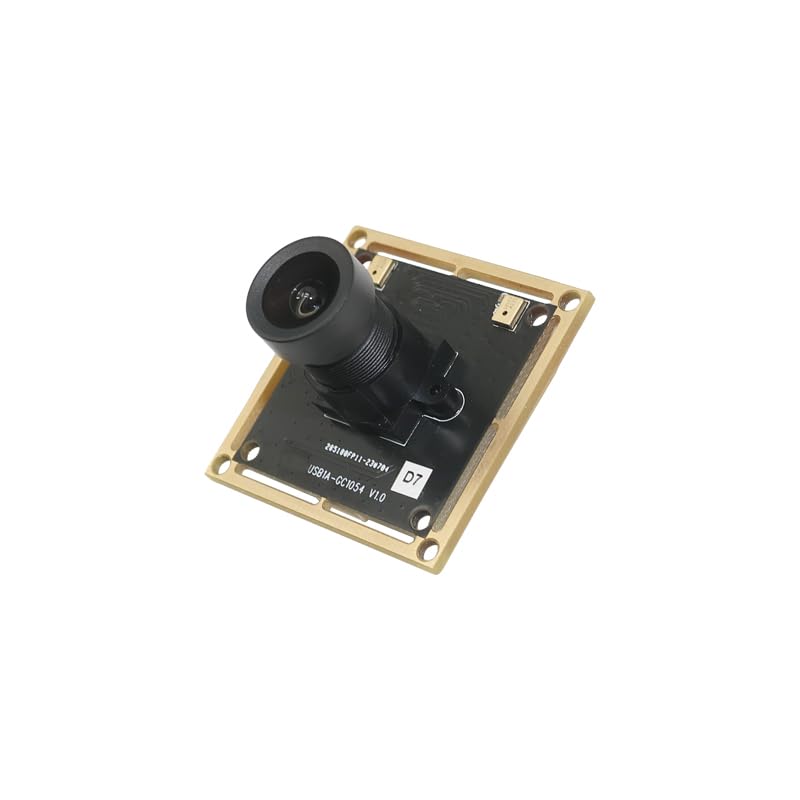
Слика: Страна view of the YDS-USB1A-GC1054 V1.0 USB camera module, showing the lens assembly extending from the PCB.
Клучни карактеристики
- Резолуција: 720P (1280 x 720 pixels) with GC1054 sensor.
- Поврзување: High-speed USB 2.0, Plug and Play.
- Излезен формат: MJPG.
- Моќност: Ниска потрошувачка на енергија.
- Дизајн: Компактна големина.
- Компатибилност: UVC compliant with Windows, Linux, and macOS.
- Дополнителна поддршка: USB OTG (On-The-Go) support.
Содржина на пакетот
Проверете дали сите артикли се присутни во вашиот пакет:
- YDS-USB1A-GC1054 V1.0 Camera Module
- USB Cable (if included in your specific kit)

Слика: Под агол view of the YDS-USB1A-GC1054 V1.0 USB camera module, showing the lens and the square PCB with mounting holes.
Инструкции за поставување
- Поврзете го USB-кабелот: If your module came with a separate USB cable, connect one end to the USB port on the camera module.
- Поврзете се со домаќинскиот уред: Plug the other end of the USB cable into an available USB 2.0 port on your computer (Windows, Linux, macOS) or compatible device (e.g., Raspberry Pi, Android device with OTG support).
- Инсталација на драјвери: The camera module is UVC (USB Video Class) compliant. This means that in most modern operating systems (Windows XP SP2/SP3, Vista, 7, 8, 10, 11, Android, Mac OS, Linux), drivers will be installed automatically upon connection. No manual driver installation is typically required.
- Потврдете ја врската: After connecting, the operating system should recognize the camera. You can verify this in your device manager (Windows) or system information (macOS/Linux).
Упатства за работа
Once connected and recognized by your system, the camera module can be used with various camera applications.
- Select Camera Input: Open your preferred camera software (e.g., AMCAP, Webкамера Viewer, VLC Player, OBS Studio, or built-in camera applications). In the software settings, select the "YDS-USB1A-GC1054 V1.0" or similar name as your video input device.
- Прилагодете ги поставките: Most camera applications allow you to adjust video settings such as resolution, brightness, contrast, saturation, white balance, and exposure. The module supports auto-control for saturation, contrast, acutance, white balance, and exposure.
- Фиксен фокус: This module features a fixed-focus lens. Manual focus adjustment is not required or possible. Ensure your subject is within the optimal focal range for clear images.
- Оптимални перформанси: For best performance, ensure adequate lighting in your environment.

Слика: Горе view of the YDS-USB1A-GC1054 V1.0 USB camera module, showing the lens and the main components on the PCB.
Одржување
- Чистење: Use a soft, dry cloth to gently clean the lens and the module's surface. Avoid using liquid cleaners or abrasive materials.
- Складирање: When not in use, store the camera module in a clean, dry, and dust-free environment.
- Ракување: Handle the module by its edges to avoid touching the lens or electronic components.
- Температура: Operate and store the module within the specified operating temperature range of -30°C to +80°C.

Слика: Долу view of the YDS-USB1A-GC1054 V1.0 USB camera module, displaying the electronic components and connectors on the PCB.
Решавање проблеми
- Камерата не е откриена:
- Ensure the USB cable is securely connected to both the module and the host device.
- Обидете се со друга USB порта на вашиот компјутер.
- Тестирајте со друг USB кабел доколку е достапен.
- Рестартирајте го компјутерот или уредот домаќин.
- Check your device manager (Windows) or system information (macOS/Linux) to see if the device is listed.
- Нема слика или црн екран:
- Verify that the correct camera is selected in your camera application settings.
- Ensure there is sufficient lighting in the environment.
- Close other applications that might be using the camera.
- Лош квалитет на сликата:
- Clean the lens gently with a soft, dry cloth.
- Ensure the subject is within the optimal focal range for the fixed-focus lens.
- Adjust brightness, contrast, and exposure settings in your camera software.
- Проверете дали има соодветно осветлување.
- Наизменична врска:
- Ensure the USB connection is stable and not loose.
- Avoid using excessively long or unshielded USB extension cables.
- Check for power fluctuations if using a USB hub.
Спецификации
| Број на модел | YDS-USB1A-GC1054 V1.0 |
| Сензор за слика | GC1054 |
| Тип на сензор | CMOS, 1/4" |
| Ефективна сепак резолуција | 0.9 MP |
| Резолуција за снимање видео | 1280 x 720 (720p) |
| Големина на пиксели | 3.0 µm x 3.0 µm |
| Тип на објектив | M12 Fixed Focus, 650nm IR Cut |
| EFL (Effective Focal Length) | 3.75 мм |
| View Агол | 79.0° (DFOV), 67.0° (HFOV), 38° (VFOV) |
| Максимална решетка | 2.15 f |
| Поврзување | USB 2.0 |
| Излезен формат | МЈПГ |
| Влез волуменtage | DC 5V |
| Работна струја | Макс 500mA |
| Работна температура | -30°C до +80°C |
| Големина на PCB | 38.00 x 38.00 мм (1.5" x 1.5") |
| Димензии на објективот | 13.00 x 13.00 x 24.31 mm |
| Системска компатибилност | Windows XP (SP2, SP3), Vista, 7, 8, 10, 11, Android, Mac OS, Linux, or OS with UVC Driver (e.g., Raspberry Pi by USB Port) |
| Софтверска компатибилност | AMCAP, Webкамера Viewer, V4L2 Controls, Contacam, VLC Player, MotionEye OS, iSpy, ZoneMinder, Yawcam |
Гаранција и поддршка
Овој производ доаѓа со а 1 години гаранција as specified by the manufacturer, YDSCAM.
For technical support or warranty claims, please contact the seller, YingDeShun Co. Ltd., through the platform where the product was purchased. Ensure you have your purchase details and model number (YDS-USB1A-GC1054 V1.0) available when contacting support.