
1. Вовед
Welcome to the user manual for your Nothing Phone (3a). This guide provides detailed instructions on setting up, operating, maintaining, and troubleshooting your device to ensure optimal performance and user experience.

Figure 1.1: The Nothing Phone (3a) showcasing its unique transparent back design and Glyph Interface.
2. Поставување
2.1. Откачување и првична проверка
Upon receiving your Nothing Phone (3a), carefully open the packaging and inspect the contents. Ensure all items listed in the "What's in the Box" section are present and undamaged.
- Nothing Phone (3a) device
- USB-C кабел
- Исфрлач на фиока за SIM
- Pre-applied Screen Protector
2.2. Вметнување на SIM картичката
- Пронајдете го држачот за SIM-картичка од страната на телефонот.
- Вметнете ја алатката за исфрлање на фиоката на SIM-картичката во малата дупка до фиоката и цврсто притиснете додека фиоката не испадне.
- Ставете ја/ги вашата/ги нано-SIM картичка/и во лежиштето со златните контакти свртени надолу.
- Внимателно вратете го држачот за SIM картичка во телефонот додека не кликне на своето место.
2.3. Волшебник за почетно вклучување и поставување
Press and hold the power button on the right side of the phone until the Nothing logo appears. Follow the on-screen instructions to complete the initial setup, including language selection, Wi-Fi connection, Google account sign-in, and data transfer.
3. Operating Your Nothing Phone (3a)
3.1. Nothing OS 3.1 Overview
The Nothing Phone (3a) runs on Nothing OS 3.1, an intuitive and customizable Android-based operating system. It features functional adaptations for an optimized user experience.

Figure 3.1: Visual representation of Nothing OS 3.1's customizable interface.
3.2. Систем на камери
The Nothing Phone (3a) is equipped with an advanced camera system designed to capture high-quality photos and videos.
- Главна камера: 50-MP OIS (Optical Image Stabilization) main camera for detailed and stable shots.
- Телефото камера: 50-MP telephoto lens with up to 30x Ultra Zoom for capturing distant subjects.
- Ултра широка камера: 8-MP ultra-wide-angle lens for expansive landscape and group shots.
- Предна камера: 32-MP front camera for sharp selfies and video calls.

Figure 3.2: Detailed breakdown of the Phone (3a)'s Elite Camera System components.

Figure 3.3: Illustration of the telephoto zoom lens technology and its capability to capture distant scenes.
3.3. Essential Key and Essential Space
The Essential Key is a new physical button on the side of your device. A short press captures screen content, while a long press allows you to record voice notes, ideas, and inspirations. The Essential Space organizes your captures and provides personalized suggestions.

Figure 3.4: The Essential Key and its integration with the Essential Space for content organization.
3.4. Интерфејс на глиф
The Glyph Interface on the back of the phone provides unique LED light and sound notifications for calls, messages, and other alerts, offering a distinct visual and auditory experience.

Figure 3.5: The Glyph Interface on the rear of the Nothing Phone (3a), demonstrating its illuminated patterns.
4. Одржување
4.1. Управување со батерии
The Nothing Phone (3a) features a 5,000 mAh battery with 50W fast charging. To maximize battery lifespan:
- Избегнувајте екстремни температури.
- Користете го испорачаниот USB-C кабел за полнење.
- Избегнувајте често целосно празнење на батеријата.

Figure 4.1: Visual representation of the 5,000 mAh battery capacity.
4.2. Чистење на вашиот уред
Use a soft, lint-free cloth to clean the screen and back of your phone. For stubborn smudges, slightly dampИзмијте ја крпата со вода. Избегнувајте употреба на груби хемикалии или абразивни материјали.
4.3. Софтверски ажурирања
Редовно проверувајте и инсталирајте ажурирања на софтверот за да се осигурате дека вашиот уред ги има најновите функции, безбедносни закрпи и подобрувања на перформансите. Одете до Поставки > Систем > Ажурирање на софтвер за да проверите дали има ажурирања.
5 Смена на проблеми
5.1. Чести проблеми и решенија
| Прашање | Можна причина | Решение |
|---|---|---|
| Телефонот не се вклучува | Слаба батерија, пад на софтверот | Charge the phone for at least 30 minutes. Perform a forced restart by holding the power button for 10-15 seconds. |
| Апликациите паѓаат или замрзнуваат | App bug, insufficient RAM, outdated software | Clear app cache/data. Close background apps. Update the app or phone software. |
| Слабо траење на батеријата | High screen brightness, background apps, network issues | Adjust screen brightness. Close unused apps. Disable unnecessary features like GPS/Bluetooth. |
5.2. Фабрички ресетирање
If issues persist, a factory reset may be necessary. This will erase all data on your phone, so ensure you have backed up important information. Navigate to Поставки > Систем > Опции за ресетирање > Избриши ги сите податоци (фабричко ресетирање).
6. Спецификации
Key technical specifications for the Nothing Phone (3a) (Model: A059).
| Карактеристика | Детал |
|---|---|
| Име на моделот | Ништо телефон (3а) |
| Број на модел | A059 |
| Оперативен систем | Андроид 15, ништо OS 3.1 |
| Приказ | 6.77-inch Flexible FHD+ AMOLED, 120 Hz, 1.07 billion colors |
| Процесор | Snapdragon 7s Gen 3 (2.5 GHz, 8-core) |
| RAM меморија | 12 GB (up to 20GB RAM Boost) |
| Складирање | 256 GB |
| Главна камера | 50-MP OIS |
| Телефото камера | 50-MP (30x Ultra Zoom) |
| Ултраширока камера | 8-МП |
| Предна камера | 32-МП |
| Батерија | 5,000 mAh (брзо полнење од 50W) |
| Димензии | 7.75 x 0.83 x 16.35 cm |
| Тежина | 201 грама |
| Отпорност на вода/прашина | IP64 |
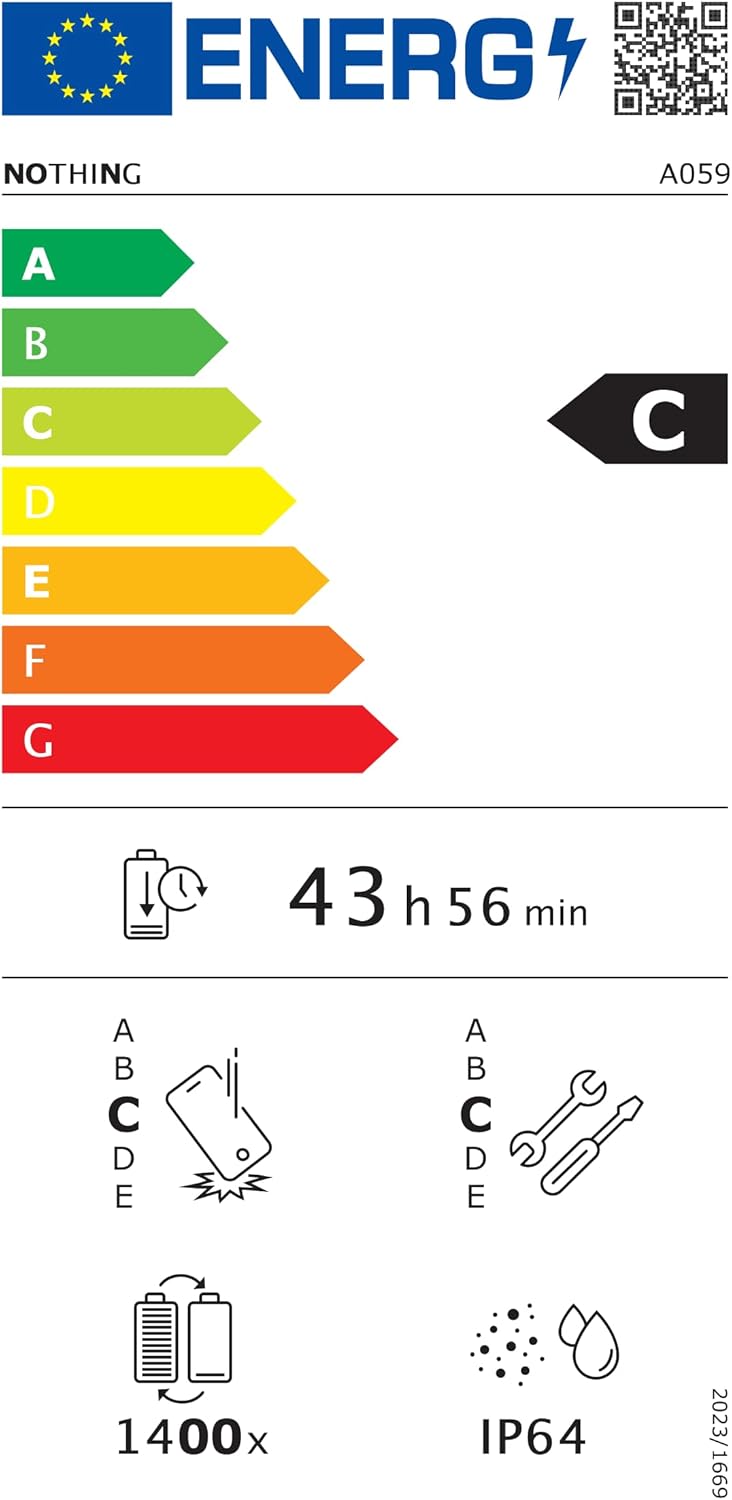
Figure 6.1: EU Energy Label for Nothing Phone (3a), indicating energy efficiency and IP64 rating. More details available at eprel.ec.europa.eu/qr/2179652.
7. Гаранција и поддршка
Your Nothing Phone (3a) comes with a manufacturer's warranty. Please refer to the warranty card included in your product packaging for specific terms and conditions.
For further assistance, technical support, or warranty claims, please visit the official Nothing support webвеб-страница или контактирајте ја нивната служба за корисници. Можете да најдете повеќе информации на Продавница „Ништо“ на Амазон.