
Вовед
The Anderic RRTR171B Replacement Ceiling Fan Remote Control is designed to restore full functionality to specific ceiling fan systems. This remote is a direct replacement for original TR171B (FCC ID KUJCE10205) and UC7222T434 models. It is engineered to operate exclusively with ceiling fans equipped with the MR77A receiver, commonly found in select Home Decorators Collection and Hampton Bay fan models, including 68-inch Altura ceiling fans. This manual provides instructions for proper setup, operation, and maintenance.
Компатибилност
Овој далечински управувач е не универзално. It is designed to work only with specific ceiling fan systems. Verify your existing remote model number and receiver compatibility before use.
- Compatible Original Remotes: TR171B, UC7222T434, or remotes with FCC ID KUJCE10205.
- Компатибилен ресивер: MR77A receiver.
- Common Fan Models: Select Home Decorators Collection and Hampton Bay fans, including 68-inch Altura ceiling fans.
This remote will не pair with other Hampton Bay, Hunter, Harbor Breeze, or similar fans that do not use the specified original remotes or the MR77A receiver.
Инструкции за поставување
1. Инсталација на батерија
The Anderic RRTR171B remote requires one 23A 12-volt battery (not included).
- Лоцирајте го капакот на преградата за батерии на задниот дел од далечинскиот управувач.
- Лизгајте го капакот.
- Insert one 23A 12-volt battery, ensuring the correct polarity (+ and -).
- Заменете го капакот на преградата за батерии.
2. Dip Switch Pairing
The remote features an internal dip switch panel inside the battery compartment. These switches must match the settings on your ceiling fan's MR77A receiver for proper operation.
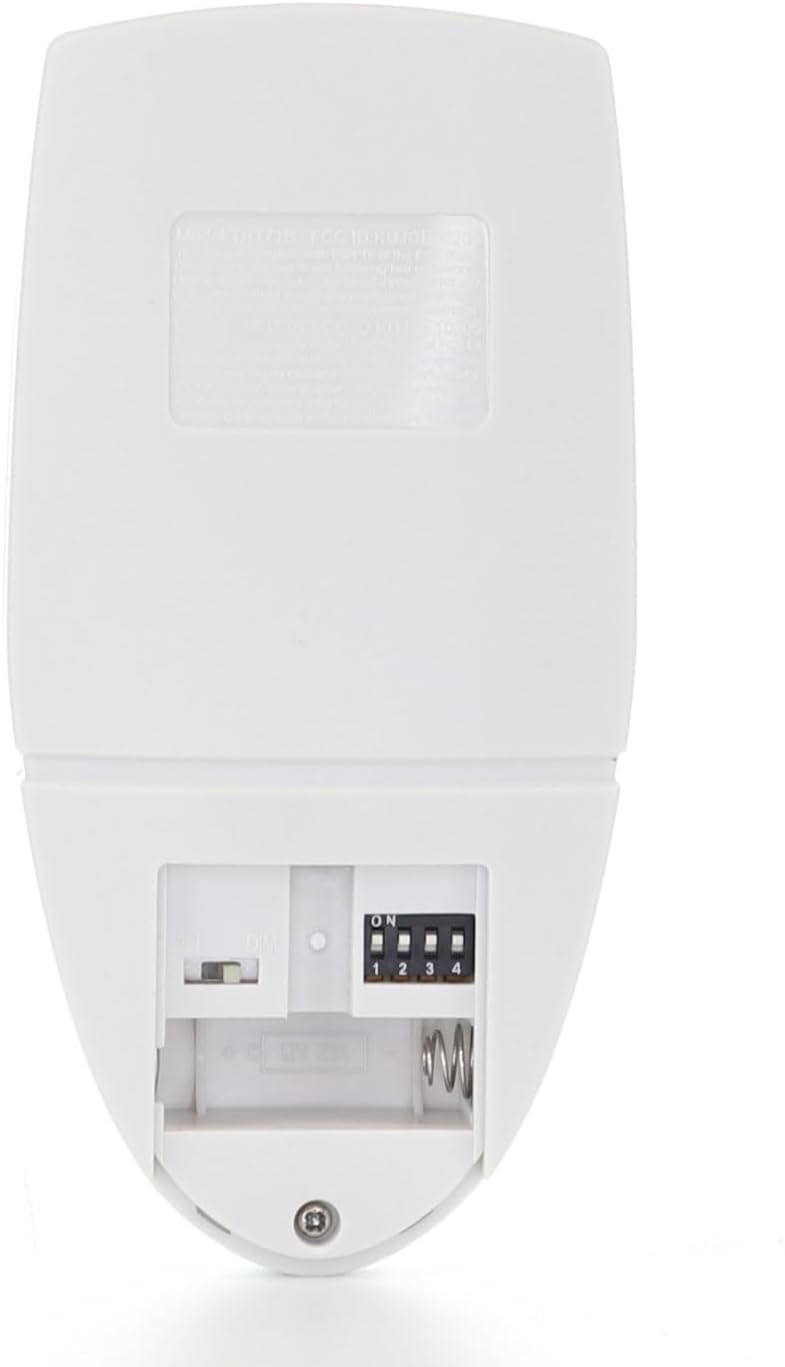
Image: Back of the Anderic RRTR171B remote control, showing the battery compartment and the dip switch panel. The switches are numbered 1 through 4, with an 'ON' indicator. The battery slot for a 12V 23A battery is also visible.
- With the battery compartment open, locate the dip switches.
- Identify the dip switch settings on your existing MR77A receiver (usually located in the fan's canopy).
- Adjust the dip switches on the Anderic RRTR171B remote to exactly match the settings of your MR77A receiver.
- Once matched, perform a power reset: Turn off the power to the ceiling fan at the circuit breaker for at least 30 seconds, then restore power.
- Тестирајте го далечинскиот управувач.
Упатства за работа
The Anderic RRTR171B remote provides comprehensive control over your compatible ceiling fan and light functions.
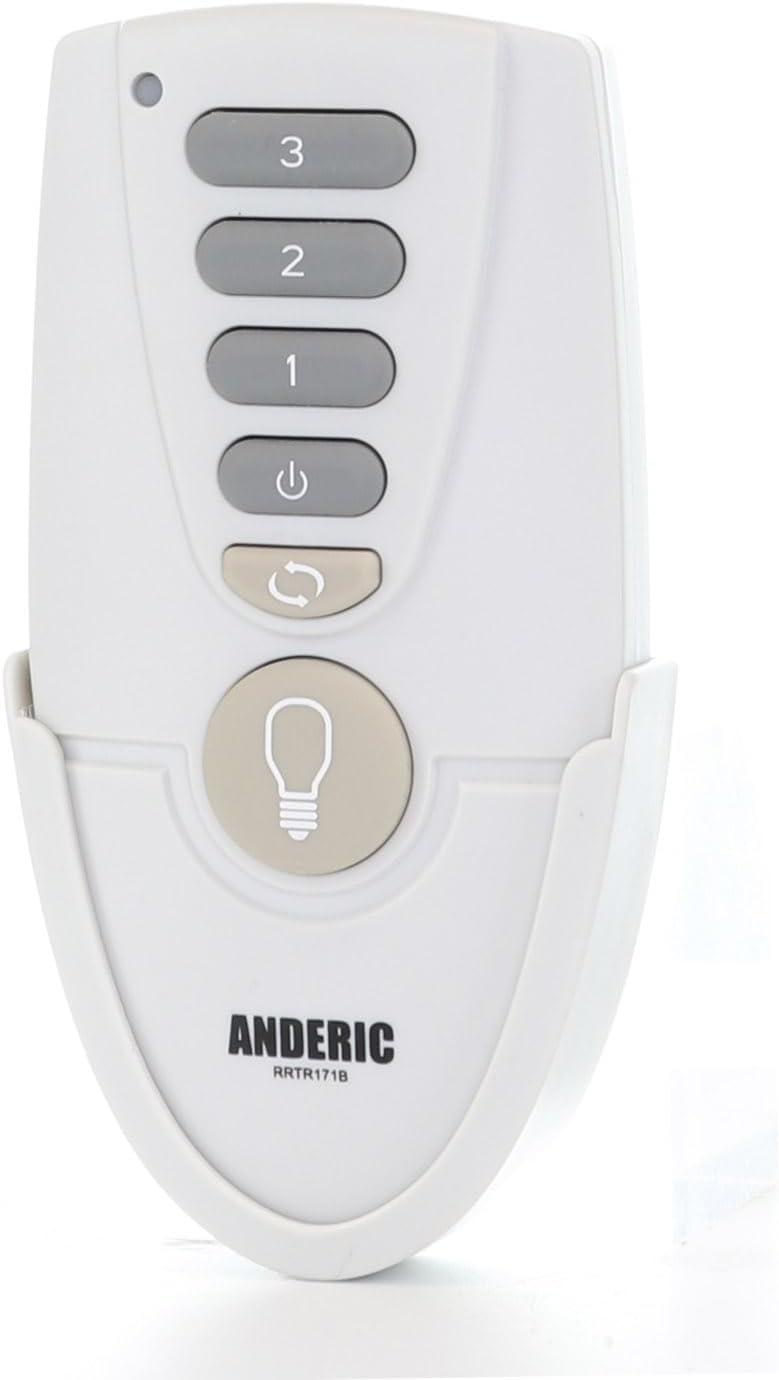
Слика: напред view of the Anderic RRTR171B remote control. Buttons include '3' (High), '2' (Medium), '1' (Low) for fan speed, a power button, a reverse button, and a large light bulb button for light control.
- Контрола на брзината на вентилаторот:
- Притиснете '3' for High fan speed.
- Притиснете '2' for Medium fan speed.
- Притиснете '1' for Low fan speed.
- Притиснете го Копче за напојување (circle with vertical line) to turn the fan off.
- Обратна функција: Притиснете го Копче за обратна насока (curved arrow) to change the direction of the fan blades. This function is useful for seasonal air circulation (downward airflow for cooling, upward airflow for heat distribution).
- Контрола на светлина:
- Притиснете го Копче за светло (light bulb icon) to turn the light on or off.
- To dim the light, press and hold the Копче за светло. Release when the desired brightness is reached. (Requires dimmable bulbs and compatible fixture).
Одржување
Замена на батеријата
If the remote control's range decreases or it becomes unresponsive, the battery may need to be replaced. Follow the battery installation steps outlined in the Setup Instructions section.
- Always use a fresh 23A 12-volt battery.
- Отстранете ги старите батерии одговорно во согласност со локалните прописи.
Решавање проблеми
- Далечинското не реагира:
- Check if the battery is installed correctly and is not depleted. Replace if necessary.
- Verify that the dip switch settings on the remote exactly match those on your fan's MR77A receiver.
- Perform a power reset by turning off the fan's power at the circuit breaker for 30 seconds, then restoring it.
- Ensure the remote is within the operational range (up to 30 feet).
- Светлината не се затемнува:
- Confirm that your light bulbs are dimmable and compatible with your fan's lighting fixture.
- Ensure you are pressing and holding the Light button to activate the dimming function.
- Fan or light functions are intermittent:
- Ова може да укажува на слаба батерија. Заменете ја батеријата.
- Check for any obstructions between the remote and the fan receiver.
- Remote does not pair or control the fan at all:
- Re-confirm that your fan system uses an MR77A receiver and that your original remote was a TR171B, UC7222T434, or FCC ID KUJCE10205. This remote is not universal.
- Ensure the dip switches are set identically on both the remote and the receiver.
Спецификации
| Бренд | Андерик |
| Име на моделот | RRTR171B |
| Број на модел | RRTR171B |
| Тип на батерија | 12-volt 23A battery (not included) |
| Технологија за поврзување | Radio Frequency (433.9 MHz) |
| Број на копчиња | 6 |
| Максимален опсег | 30 стапки |
| Димензии на ставката (Д x Ш x В) | 6"Д x 2"Ш x 1"В |
Гаранција и поддршка
Информации за гаранцијата
This Anderic product comes with a 1 ГОДИНИ ОГРАНИЧЕНО гаранција.
Поддршка за корисници
For further assistance, troubleshooting, or warranty claims, please contact Anderic customer support. You can find more information and contact details by visiting the Anderic Store.