
1. Вовед
Thank you for choosing the JUNJIEUNVO Q16 Wireless Translation Earbuds. These open-ear design earbuds offer a comfortable listening experience, advanced Bluetooth 5.4 connectivity, IPX5 waterproof rating, and support for real-time language translation across over 100 countries. This manual provides detailed instructions on how to set up, operate, and maintain your earbuds to ensure optimal performance.
2. Содржина на пакетот
Ве молиме проверете го пакувањето за следните ставки:
- JUNJIEUNVO Q16 Wireless Translation Earbuds (Left and Right)
- Случај за полнење
- Упатство за употреба
- Charging Cable (USB-C, not always included, please check packaging)
3. Производот завршиview
The Q16 earbuds feature an open-ear design for comfort and situational awareness, housed in a compact charging case. The case includes a digital display for battery status.

Слика 3.1: Q16 Earbuds in their charging case, showing the left (L) and right (R) indicators along with the digital battery display.

Слика 3.2: The open-ear design of the Q16 earbuds, emphasizing comfort and awareness of surroundings.

Слика 3.3: Diagram illustrating the directional sound transmission technology, designed to protect privacy and reduce sound leakage.
4. Поставување
4.1 Полнење на слушалките и футролата
Before first use, fully charge the earbuds and the charging case. The charging case has a 500mAh battery, and each earbud has a 40mAh battery. A full charge takes approximately 1.5 hours.
- Connect the charging cable (typically USB-C) to the charging port on the case and to a USB power source.
- The digital display on the charging case will show the charging progress.
- Place the earbuds into the charging case. Ensure they are correctly seated; the case will indicate if they are charging.
4.2 Спарување преку Bluetooth
The Q16 earbuds use Bluetooth 5.4 for a stable and efficient connection. The pairing process is automatic upon opening the case.
- Ensure your smartphone or device's Bluetooth is turned on.
- Отворете го капакот на кутијата за полнење. Слушалките автоматски ќе влезат во режим на спарување.
- On your device, search for Bluetooth devices and select "Q16" from the list.
- Откако ќе се поврзете, ќе слушнете тон за потврда и слушалките ќе бидат подготвени за употреба.
- For subsequent connections, simply open the charging case, and the earbuds will automatically reconnect to the last paired device.
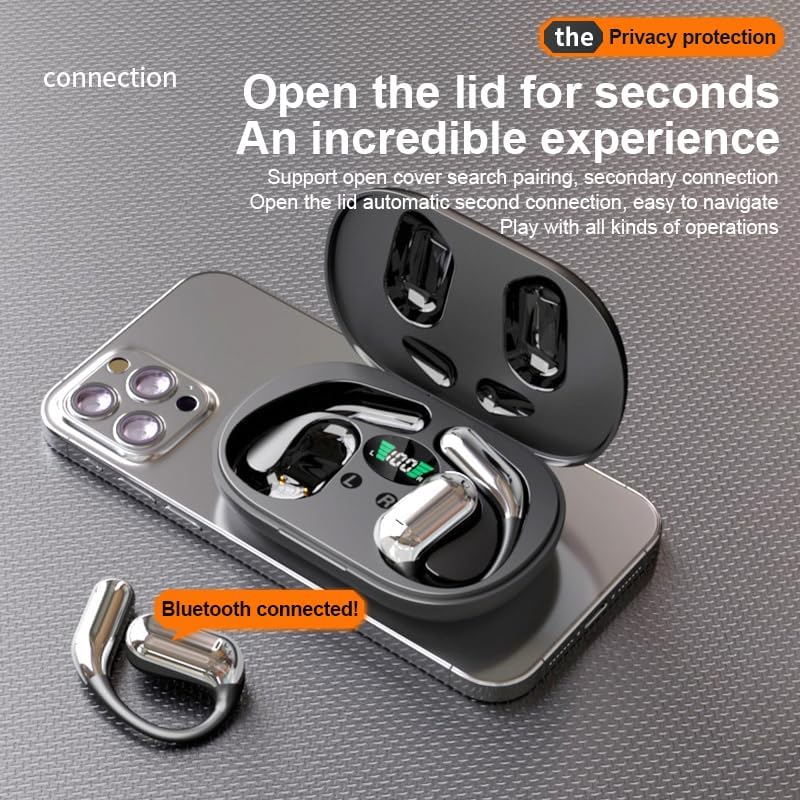
Слика 4.1: The Q16 earbuds connected to a smartphone, indicating successful Bluetooth pairing.
5. Упатства за работа
5.1 Вклучување/исклучување
- Вклучување: Отворете го капакот на кутијата за полнење и слушалките автоматски ќе се вклучат.
- Исклучено: Вратете ги слушалките во кутијата за полнење и затворете го капакот. Тие автоматски ќе се исклучат и ќе почнат да се полнат.
5.2 Репродукција на музика
(Specific touch controls are not detailed in the provided product data. The following are common gestures; refer to the manufacturer's official app or website for precise controls.)
- Пушти/Пауза: Допрете на која било слушалка еднаш.
- Следна песна: Допрете двапати на десната слушалка.
- Претходна песна: Допрете двапати на левата слушалка.
- Контрола на јачината на звукот: (Typically a long press or triple tap, specific action not provided. Adjust via your connected device if not available on earbuds.)

Слика 5.1: Illustration of the panoramic stereo surround sound feature, enhancing the audio experience.
5.3 Управување со повици
- Одговори/заврши повик: Допрете на која било слушалка еднаш.
- Одбијте го повикот: Долго притискајте на која било слушалка 2 секунди.
5.4 Language Translation Function
The Q16 earbuds support real-time translation for over 100 languages. This feature typically requires a dedicated translation application on your paired smartphone.
- Download and install the recommended translation app (refer to product packaging or manufacturer's website for app details) on your smartphone.
- Ensure the earbuds are connected to your smartphone via Bluetooth.
- Open the translation app and follow its instructions to initiate real-time translation. The earbuds will act as your audio input/output device for the translation.
5.5 IPX5 водоотпорна оценка
The earbuds are rated IPX5 waterproof, meaning they are resistant to splashing water from any direction. This makes them suitable for sports and outdoor activities. Note: The charging case is not waterproof. Avoid exposing the charging case to water.
6. Одржување и грижа
- Чистење: Нежно избришете ги слушалките и кутијата за полнење со мека, сува крпа што не остава влакненца. Не користете груби хемикалии или абразивни материјали.
- Складирање: Кога не ги користите, чувајте ги слушалките во нивната кутија за полнење за да ги заштитите и да ги држите наполнети. Чувајте ги на ладно и суво место, подалеку од екстремни температури.
- Избегнувајте вода: While the earbuds are IPX5 waterproof, avoid submerging them in water. The charging case is not waterproof.
- Нега на батеријата: За да го продолжите траењето на батеријата, избегнувајте често целосно празнење на слушалките и кутијата за полнење. Полнете ги редовно, дури и ако не се во постојана употреба.
7 Смена на проблеми
| Проблем | Решение |
|---|---|
| Слушалките не се спаруваат со уредот. |
|
| Нема звук од слушалките. |
|
| Слушалките не се полнат. |
|
| Функцијата за превод не работи. |
|
8. Спецификации
| Карактеристика | Детал |
|---|---|
| Име на моделот | YYK-Q16 |
| Bluetooth верзија | V5.4 + EDR |
| Чип | Blue Flood |
| Поддржани протоколи | AVRCP V1.6, A2DP V1.3, HFP V1.7 (Simultaneous LE and BR / EDR) |
| Usage/Playback Time | Приближно 8 часа (при 80% волумен) |
| Време на мирување | 80 часа |
| Време на полнење | Приближно 1.5 часа |
| Безжично растојание | 10 метри |
| Капацитет на батеријата Ербуд | 40 mAh (секој) |
| Капацитет на батеријата на кутијата за полнење | 500 mAh |
| Водоотпорен рејтинг | IPX5 (само слушалки) |
| Поддршка за превод | Над 100 јазици |
| Поставување на увото | On Ear (Open-ear design) |
| Импеданса | 32 оми |
| Нето Тежина | 84 г (вкупно) |
9. Гаранција и поддршка
For warranty information and customer support, please refer to the documentation included with your purchase or visit the official JUNJIEUNVO webстраница. Доколку наидете на проблеми што не се опфатени во ова упатство, ве молиме контактирајте го нашиот тим за корисничка поддршка за помош.
Производител: UNVO
Бренд: JUNJIEUNVO