
Masajoy Spark 06
Masajoy Wireless Headset User Manual
Модел: Spark 06
Вовед
The Masajoy Wireless Headset with Mic for Work (Model: Spark 06) is designed to provide clear and reliable audio communication for various professional and personal uses. Featuring multiple connection modes, AI noise cancellation, and a comfortable design, this headset is ideal for business video conferencing, online courses, and call center environments.

Figure 1: Masajoy Wireless Headset and included accessories.
Што има во кутијата
Ве молиме проверете дали сите компоненти се присутни во пакувањето:
- Wireless Headset with Mic for Work
- USB A / C Dongle
- USB C to 3.5MM Cable
- Кабел за полнење тип C
- Упатство за употреба
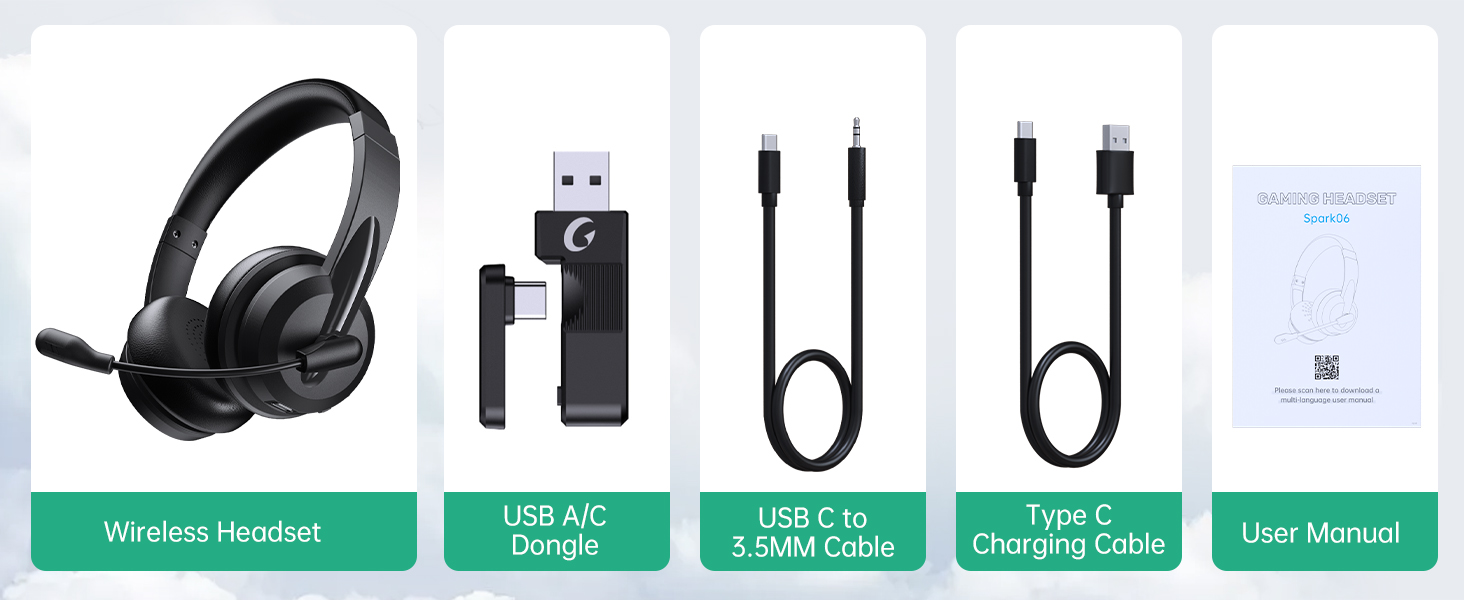
Слика 2: Содржина на пакувањето.
Поставување
Полнење на слушалките
Before first use, fully charge the headset. Connect the Type C Charging Cable to the headset's charging port and the other end to a USB power source (e.g., computer USB port, wall adapter). The charging indicator light will show the charging status.
- Време на целосно полнење: приближно 2.5 часа
- Време на разговор: до 30 часа
- Време на репродукција на музика: до 25 часа

Figure 3: Long Battery Life for Extended Use.
Режими на поврзување
The Masajoy headset supports three connection modes:
-
Bluetooth V5.3 Connection:
For wireless connection to Bluetooth-enabled devices (e.g., smartphones, laptops). Ensure the headset is in pairing mode (refer to operating instructions for details). Пребарај за "Spark 06" in your device's Bluetooth settings and connect.
-
2.4G Wireless (USB A/C Dongle):
For wireless connection to computers without Bluetooth or for a dedicated connection. Plug the USB A or USB C dongle into an available USB port on your computer. The headset will automatically connect to the dongle.
-
Wired 3.5mm Audio Cable:
For a wired connection to devices with a 3.5mm audio jack. Connect one end of the USB C to 3.5MM Cable to the headset's USB-C port and the other end to your device's 3.5mm audio jack. This mode is useful when battery is low or for devices that do not support wireless connections.

Figure 4: Dual Connection Options (Bluetooth & 2.4G Wireless).
NOTE: This headset does not support dual device connection simultaneously.
Упатства за работа
Вклучување/исклучување
- To Power On: Press and hold the Power button until you hear a voice prompt.
- To Power Off: Press and hold the Power button until you hear a voice prompt.
Контрола на јачината на звукот
Use the volume control buttons located on the headset to adjust the listening volume.
AI Noise Cancelling Microphone
The headset features advanced AI noise cancellation to reduce background noise during calls. This feature enhances clarity for the listener.
NOTE: This AI Noise Cancelling feature is only available when connected via Bluetooth.

Figure 5: AI Noise Cancelling in action.
Функција за исклучување на микрофонот
To mute the microphone, simply rotate the microphone boom to the upright position. A voice prompt will confirm "MIC mute". To unmute, rotate the microphone boom back down.

Figure 6: Microphone Mute Control by Rotation.
Удобност и дизајн
The headset is designed for all-day wear with protein memory foam ear cups that are soft and breathable, preventing overheating. The adjustable and expandable headband ensures a comfortable fit for most head shapes.

Figure 7: Comfortable and Breathable Design.
Спецификации
| Карактеристика | Детал |
|---|---|
| Име на моделот | Искра 06 |
| Технологија за поврзување | Wireless (Bluetooth V5.3, 2.4G), Wired (3.5mm) |
| Контрола на бучава | AI Noise Cancellation (Bluetooth mode only), Passive Noise Cancellation |
| Живот на батеријата (време за разговор) | До 30 часа |
| Траење на батеријата (репродукција на музика) | До 25 часа |
| Време на полнење | Прибл. 2.5 часа |
| Опсег | Up to 36 feet (11 meters) for Bluetooth |
| Големина на драјвер за аудио | 40 милиметри |
| Чувствителност на микрофонот | 43 dB |
| Џек за слушалки | USB-C (for charging/wired audio) |
| Компатибилни уреди | PC, Mac, Laptop, Chromebook, tablet, smartphones, MP3 players, PS5, PS4, Xbox one, gaming systems with an aux port |
| Материјал | Faux Leather, Polycarbonate (PC), Metal, Acrylonitrile Butadiene Styrene (ABS) |
| Тежина на ставката | 10.2 унци |
| Боја | Црното |
Одржување
- Чистење: Користете мека, сува крпа за чистење на слушалките. Не користете абразивни средства за чистење или растворувачи.
- Складирање: Чувајте ги слушалките на ладно и суво место, подалеку од директна сончева светлина и екстремни температури.
- Нега на батеријата: За да го продолжите траењето на батеријата, избегнувајте често целосно празнење на слушалките. Полнете ги редовно, дури и ако не ги користите подолг период.
- Ракување: Avoid dropping the headset or subjecting it to strong impacts. Do not twist or bend the microphone boom excessively beyond its intended rotation.
Решавање проблеми
| Проблем | Можна причина | Решение |
|---|---|---|
| Слушалките не се вклучуваат. | Слаба батерија. | Charge the headset fully using the provided Type C charging cable. |
| Не може да се поврзе преку Bluetooth. | Headset not in pairing mode; device Bluetooth off; out of range. | Ensure headset is in pairing mode. Turn Bluetooth on your device. Move headset closer to the device (within 36 feet). |
| Нема звук од слушалките. | Volume too low; incorrect audio output selected on device; headset not connected. | Increase headset volume. Check device's audio output settings. Re-establish connection. |
| Микрофонот не работи. | Microphone muted; incorrect input device selected; AI Noise Cancellation issue. | Ensure microphone boom is not in the upright (muted) position. Check device's microphone input settings. Note that AI Noise Cancellation is only active in Bluetooth mode. |
| Poor sound quality / static. | Interference; out of range; low battery. | Move away from other wireless devices. Move closer to the connected device. Charge the headset. |
Гаранција и поддршка
Masajoy products are designed for reliability and performance. For warranty information and technical support, please refer to the official Masajoy website or contact customer service using the details provided in the original product packaging or purchase receipt.
Можете исто така да ја посетите Masajoy Store on Amazon за повеќе информации за производот и ресурси за поддршка.
Ask a question about this manual
Ask about setup, troubleshooting, compatibility, parts, safety, or missing instructions. Manuals+ will review the question and use this page’s manual context to help answer it.