
1. Вовед
This manual provides detailed instructions for the setup, operation, maintenance, and troubleshooting of your Yeabomy Smart Bluetooth Glasses E13C. Please read this manual thoroughly before using the product to ensure proper function and longevity.

A pair of black smart Bluetooth sunglasses, viewед од агол, прикажаноasing the integrated technology in the temples.
2. Производот завршиview
2.1 Содржина на пакетот
Проверете дали сите артикли се присутни во пакувањето:
- Smart Bluetooth Glasses (E13C)
- Кабел за магнетно полнење
- Крпа за чистење
- Eyeglasses Storage Bag
- Куќиште за очила
- Упатство за употреба (овој документ)
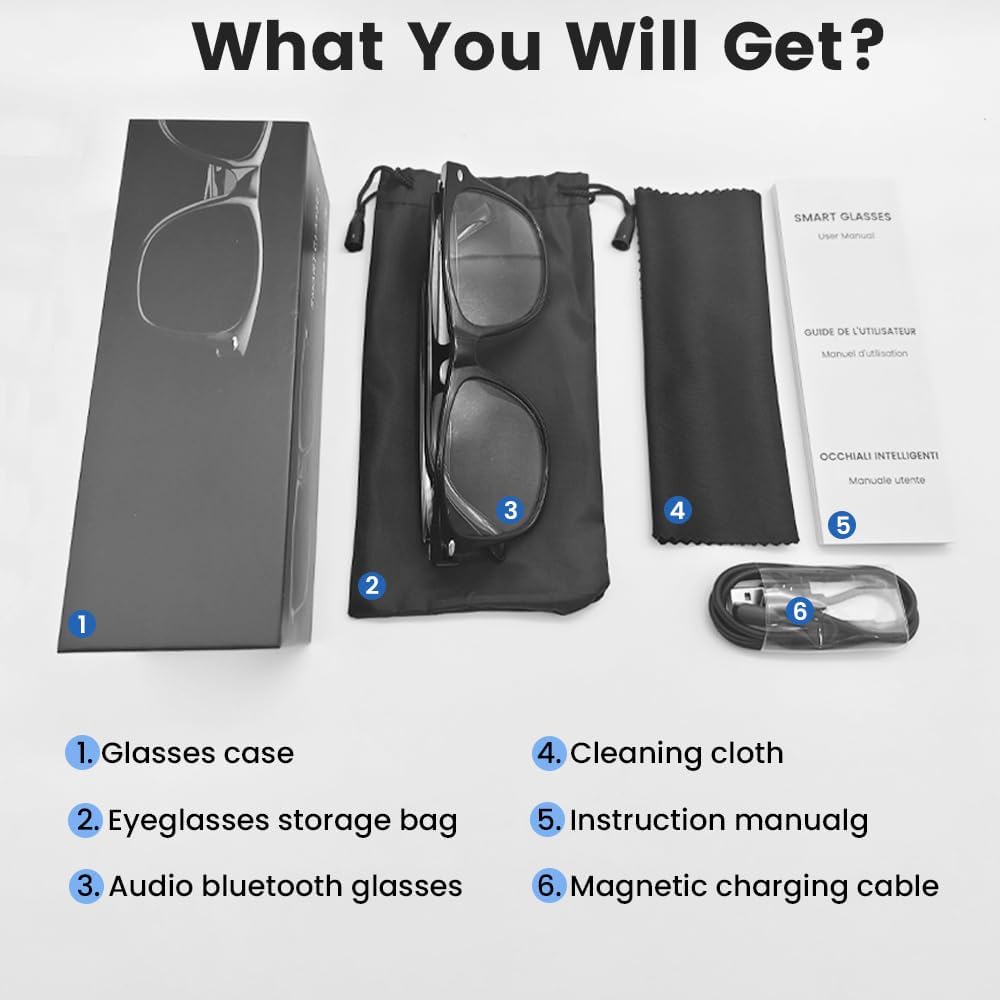
An image displaying the package contents: a glasses case, an eyeglasses storage bag, the audio Bluetooth glasses, a cleaning cloth, an instruction manual, and a magnetic charging cable.
2.2 Клучни карактеристики
- Интелигентна гласовна контрола: Operate functions using voice commands.
- Поларизирани леќи: Effective blue light filtering and 100% UV protection. Lenses are replaceable with prescription lenses.
- Широка компатибилност: Connects with various devices including smartphones (Android, iOS) and computers via Bluetooth 5.4.
- Спарување во еден чекор: Automatic reconnection to the last paired device.
- Водоотпорен (IPX5): Отпорен на потење и дожд.
- Лесен дизајн: Weighs approximately 27g for comfortable extended wear.
- Dual Magnetic Charging: Efficient and secure charging.
- Интуитивни контроли на допир: For media playback, calls, and voice assistant activation.
3. Поставување
3.1 Полнење на очилата
Before first use, fully charge the smart glasses. Use the provided magnetic charging cable.
- Connect the magnetic charging cable to the charging contacts on the temple of the glasses.
- Поврзете го USB крајот од кабелот со стандарден USB адаптер за напојување (не е вклучен) или USB порт на компјутер.
- The indicator light will show yellow during charging.
- Charging is complete when the indicator light turns green. A full charge takes approximately 1.5 hours.
The glasses provide approximately 4-6 hours of media playback and over 300 hours of standby time on a full charge.

An illustration showing the magnetic charging cable connecting to the glasses' temple, with indicators for charging (yellow light) and fully charged (green light). Battery capacity, charging time, playback time, and calling time are also displayed.
3.2 Спарување преку Bluetooth
To connect your smart glasses to a device:
- Проверете дали очилата се наполнети и вклучени.
- Овозможете Bluetooth на вашиот паметен телефон или друг уред.
- Пребарај за available Bluetooth devices. The glasses will appear as "E13".
- Select "E13" to pair. Once paired, the glasses will automatically reconnect to this device when powered on and within range (up to 33 feet).

A person wearing the smart glasses while running, with a smartphone screen showing Bluetooth settings and the glasses (E13) connected. The image highlights the 33ft Bluetooth 5.4 transmission range and voice control functionality.
4. Упатства за работа
4.1 Вклучување/исклучување
- Вклучување: Long touch the control area for 5 seconds.
- Исклучено: Long touch the control area for 5 seconds.
4.2 Допрете Контроли
The smart glasses feature intuitive touch controls located on the temples:
- Пушти/Паузирај музика: Once-Tap
- Следна песна: Twice-Tap
- Претходна песна: Twice-Tap
- Одговори на повикот: Once-Tap
- Заврши повик: Once-Tap
- Активирајте го гласовниот асистент: Long Touch for 2 seconds
- Фотографија од далечина: Double click to control your smartphone's camera.

A diagram illustrating the touch control gestures on the smart glasses for various functions: pick up calls, turn on music, open navigation, take photos, previous/next track, play/pause, voice assistant, answer/hang up calls, and power on/off.
4.3 Гласовна контрола
After activating the voice assistant (Long Touch for 2 seconds), you can use voice commands for various functions, such as:
- Making calls (e.g., "Call [Contact Name]")
- Playing music (e.g., "Play [Song Title]")
- Испраќање пораки
- Opening navigation
5. Одржување
- Чистење: Користете ја приложената крпа за чистење за нежно да ги избришете леќите и рамката. Избегнувајте груби хемикалии или абразивни материјали.
- Отпорност на вода: The glasses are IPX5 water-resistant, meaning they can withstand sweat and light rain. Do not submerge them in water or expose them to strong jets of water.
- Складирање: When not in use, store the glasses in the provided eyeglasses storage bag or glasses case to protect them from scratches and dust.
- Температура: Avoid exposing the glasses to extreme temperatures (hot or cold) as this can affect battery life and electronic components.

A pair of smart glasses resting on a surface, emphasizing their lightweight design (27g) and comfort for extended wear. A magnified inset shows the dual magnetic charging contacts.
6 Смена на проблеми
- Не може да се вклучи: Ensure the glasses are fully charged. Connect to the magnetic charging cable and check the indicator light.
- Не може да се спари со уред:
- Проверете дали Bluetooth е овозможен на вашиот уред.
- Make sure the glasses are within the 33-foot Bluetooth range.
- Turn the glasses off and on again, then try pairing.
- Заборавете го уредот од поставките за Bluetooth на вашиот телефон и обидете се повторно да го спарите.
- Без звук/Слаба јачина на звук:
- Check the volume settings on both the glasses (if applicable via touch control) and your connected device.
- Проверете дали очилата се правилно поврзани преку Bluetooth.
- Confirm that the audio output on your device is set to the smart glasses.
- Контролите на допир не реагираат: Ensure the glasses are powered on and connected. Try restarting the glasses.
7. Спецификации
| Модел | E13C |
| Бренд | Yeabomy |
| Технологија за поврзување | Bluetooth 5.4 |
| Компатибилност на оперативниот систем | Android, iOS Devices |
| Посебни карактеристики | Music Player, Phone Call, Voice Control, UV Protection, Polarized Lenses, Remote Photography |
| Капацитет на батеријата | 1 Amp Hours (80mAh per temple) |
| Време на полнење | Прибл. 1.5 часа |
| Continuous Playback Time (Music) | Прибл. 5 часа |
| Continuous Calling Time | Прибл. 4 часа |
| Време на мирување | Над 300 часа |
| Тежина на ставката | 0.07 фунти (приближно 27 г) |
| Отпорност на вода | IPX5 |
| Димензии на пакетот | 6.65 x 2.4 x 2.24 инчи |
| Големина на екранот | 1.96 инч (видлива дијагонала на екранот) |
| Капацитет за складирање на меморија | 128 MB |
| GPS | Нема GPS |

An image detailing the physical dimensions of the smart glasses, including lens width, frame width, and temple length. It also shows various face shapes (oval, triangle, round, square, diamond) indicating suitability.
8. Гаранција и поддршка
For warranty information or technical support, please refer to the contact details provided with your purchase documentation or visit the official Yeabomy webстраница. Зачувајте го доказот за купување за какви било гаранциски побарувања.