
Вовед
Thank you for choosing the JUNJIEUNVO BT1638 Over-Ear Wireless Headphones. This manual provides detailed instructions for the proper use, setup, and maintenance of your headphones. Please read this manual thoroughly before using the product to ensure optimal performance and longevity.

Image: The JUNJIEUNVO BT1638 Over-Ear Wireless Headphones in blue, showcasing their design and padded headband.
Содржина на пакетот
Ве молиме проверете го пакувањето за следните ставки:
- JUNJIEUNVO BT1638 Over-Ear Wireless Headphones
- USB-C кабел за полнење
- Аудио кабел од 3.5 мм AUX
- Упатство за употреба (овој документ)
Поставување
1. Полнење на слушалките
Пред првата употреба, наполнете ги слушалките целосно. Целосното полнење трае приближно 2 часа.
- Поврзете го USB-C кабелот за полнење со приклучокот за полнење на слушалките.
- Поврзете го другиот крај од USB-C кабелот со компатибилен USB извор на напојување (на пр., USB порт на компјутер, адаптер за ѕид).
- The indicator light will show charging status (e.g., red for charging, blue/off for fully charged). Refer to the LED indicator section for details.
2. Вклучување/исклучување
- Вклучување: Притиснете и задржете го копчето за вклучување приближно 3 секунди додека индикаторската ламбичка не трепка.
- Исклучено: Притиснете го и држете го копчето за вклучување приближно 3 секунди додека индикаторската ламбичка не се изгасне.
3. Bluetooth спарување
The headphones use Bluetooth 5.0 for wireless connectivity, offering a range of up to 33 feet (10 meters).
- Проверете дали слушалките се исклучени.
- Притиснете го и држете го копчето за вклучување околу 5-7 секунди додека индикаторската ламба не трепка наизменично црвена и сина, што укажува на режим на спарување.
- На вашиот уред (паметен телефон, таблет, лаптоп), овозможете Bluetooth и пребарајте достапни уреди.
- Select "BT1638" or "JUNJIEUNVO BT1638" from the list of found devices.
- Once connected, the indicator light will typically flash blue slowly or remain solid blue.
- Ако се побара лозинка, внесете „0000“.
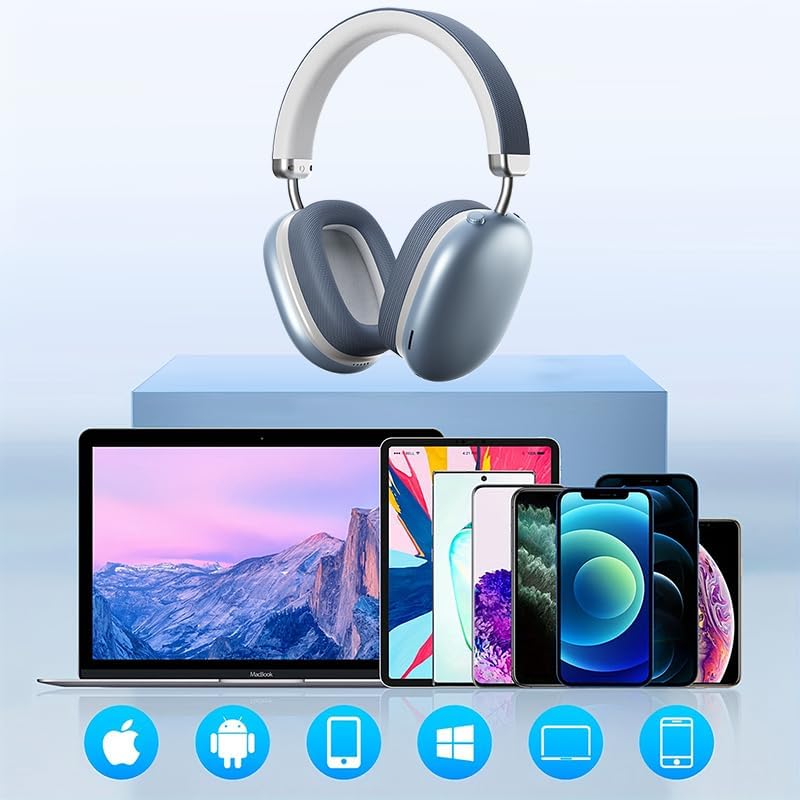
Image: The BT1638 headphones shown with a variety of compatible devices including laptops, smartphones, and tablets, illustrating broad connectivity.
Упатства за работа
1. Основни контроли
The headphones feature button and touch controls for various functions.
- Копче за вклучување: Вклучи/исклучи, влези во режим на спарување.
- Зголемување на јачината на звукот/Следна песна: Кратко притискање за зголемување на јачината на звукот, долго притискање за следната песна.
- Намалување на јачината на звукот/Претходна песна: Кратко притискање за намалување на јачината на звукот, долго притискање за претходна песна.
- Multi-function Button (MFB) / Touch Control:
- Пушти/Пауза: Едно притискање.
- Одговори/заврши повик: Single press during an incoming call.
- Одбијте го повикот: Притиснете и задржете 2 секунди за време на дојдовен повик.
- Активирајте го гласовниот асистент: Двоен притискање.
2. Аудио репродукција
Enjoy high-fidelity (HIFI) sound quality and immersive surround sound with your BT1638 headphones.

Image: The BT1638 headphones, emphasizing their HIFI sound quality and extended battery life of up to 40 hours.

Image: The BT1638 headphones displaying Hi-Res Wireless Audio and LDAC compatibility, indicating advanced audio capabilities.
3. Пасивно поништување на бучава
The over-ear design and cushioned ear cups provide passive noise cancellation, reducing ambient sounds for a more focused listening experience.

Image: A visual representation comparing sound waveforms before and after noise reduction, demonstrating the effectiveness of the headphones' passive noise cancellation.
4. Жична врска (AUX)
For situations where Bluetooth is not available or preferred, you can connect the headphones using an AUX cable.
- Plug one end of the 3.5mm AUX cable into the headphone's AUX port.
- Plug the other end into your audio source's 3.5mm audio jack.
- Слушалките автоматски ќе се префрлат во жичен режим.
5. Удобност и прилагодување
The BT1638 headphones feature an adjustable headband and rotatable earcups for a comfortable and secure fit.

Слика: Крупен план view illustrating the adjustable telescopic headband and earcups that can rotate 90 degrees, allowing for a customized and comfortable fit.

Image: The soft earmuffs of the BT1638 headphones, designed for comfortable and smooth listening experiences.
Одржување
Соодветната грижа ќе го продолжи животниот век и перформансите на вашите слушалки.
- Чистење: Use a soft, dry, lint-free cloth to clean the surfaces of the headphones. Do not use harsh chemicals, cleaning solvents, or strong detergents.
- Ушни перничиња: The memory foam and fabric ear cushions can be gently wiped with a slightly damp cloth if necessary, then allowed to air dry completely.
- Складирање: Кога не ги користите, чувајте ги слушалките на ладно и суво место, подалеку од директна сончева светлина и екстремни температури.
- Избегнувајте влага: These headphones are not water-resistant. Avoid exposure to water, rain, or excessive humidity.
- Ракувајте со внимание: Избегнувајте испуштање на слушалките или нивно изложување на силни удари.
Решавање проблеми
| Проблем | Можна причина | Решение |
|---|---|---|
| Слушалките не се вклучуваат. | Слаба батерија. | Полнете ги слушалките најмалку 30 минути. |
| Не може да се спари со уредот. | Слушалките не се во режим на спарување; Bluetooth е исклучен на уредот; уредот е предалеку. | Ensure headphones are in pairing mode (flashing red/blue). Turn on Bluetooth on your device. Move device closer to headphones (within 33 feet). |
| Нема звук или има ниска јачина на звук. | Јачината на звукот е прениска; неточен аудио извор; слушалките не се поврзани. | Increase volume on both headphones and connected device. Ensure headphones are properly paired or AUX cable is fully inserted. |
| Прекината врска. | Пречки; уредот е предалеку; слаба батерија. | Move closer to the connected device. Avoid strong electromagnetic interference. Ensure headphones are sufficiently charged. |
Спецификации
| Карактеристика | Детал |
|---|---|
| Име на моделот | SY-BT1638 |
| Технологија за поврзување | Bluetooth, AUX |
| Технологија на безжична комуникација | Bluetooth, безжичен |
| Bluetooth верзија | 5.0 |
| Опсег на Bluetooth | 33 стапки (10 метри) |
| Тип на драјвер за аудио | Динамичен драјвер |
| Големина на драјвер за аудио | 40 милиметри |
| Фреквентен одговор | 20 Hz (долна граница) |
| Чувствителност | 102 dB |
| Импеданса | 32 Ом |
| Контрола на бучава | Пасивно поништување на шум |
| Тип на контрола | Безжичен |
| Контролен метод | Допир, копче |
| Време на полнење | 2 часа |
| Траење на батеријата | Up to 40 Hours (playback) |
| Материјал | Fabric, Memory Foam, Metal |
| Тежина на ставката | 12 унци (приближно 340 г) |
| Ниво на отпорност на вода | Не е водоотпорен |
| Компатибилни уреди | Лаптопи, паметни телефони, таблети |
Информации за гаранцијата
Specific warranty details for the JUNJIEUNVO BT1638 headphones are typically provided with your purchase documentation or on the manufacturer's official webстраница. Ве молиме задржете го доказот за купување за какви било гаранциски побарувања.
Generally, products are covered against defects in materials and workmanship for a specified period from the date of purchase. This warranty usually does not cover damage caused by misuse, accidents, unauthorized modifications, or normal wear and tear.
Поддршка за корисници
If you encounter any issues or have questions not covered in this manual, please contact JUNJIEUNVO customer support. You can typically find contact information on the product packaging, the official JUNJIEUNVO webлокација или преку вашиот продавач.
When contacting support, please have your product model (SY-BT1638) and proof of purchase readily available.