1. Вовед
This manual provides detailed instructions for the installation, operation, and maintenance of the QUASAR X99 H5 Motherboard. The X99 H5 is a robust solution designed for workstations and servers, supporting LGA 2011-3 socket processors, including Intel Xeon V3/V4 series. It features DDR4 REG ECC memory support in a Dual Channel configuration, ensuring reliable stability and high performance for demanding applications such as rendering, virtualization, and intensive data processing.
Key features include PCIe 16X slots for expansion, an M.2 NVMe slot for high-speed storage, and multiple SATA 3.0 ports for additional drives. High-speed USB 3.0 ports are also integrated for rapid data transfer and peripheral connectivity. Its well-planned layout simplifies system assembly and maintenance, while quality components contribute to operational longevity and stability.
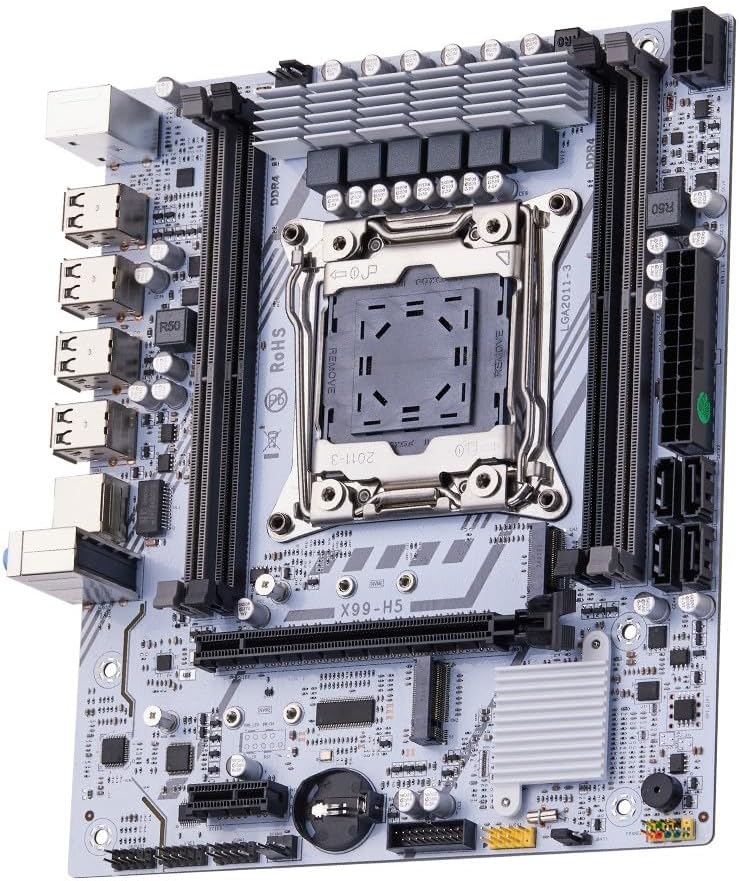
Слика 1.1: Готовоview of the QUASAR X99 H5 Motherboard. This image displays the full motherboard, highlighting its compact and efficient design, including the CPU socket, memory slots, and various expansion ports.
2. Информации за безбедност
Please read all safety instructions carefully before installing or operating the motherboard. Failure to follow these guidelines may result in personal injury, damage to the product, or damage to other components.
- Секогаш исклучувајте го напојувањето од ѕидниот штекер пред да инсталирате или отстраните било кои компоненти.
- Носете антистатички ремен за зглоб или често допирајте заземјен метален предмет за да го испразните статичкиот електрицитет пред да ја допрете матичната плоча или другите компоненти.
- Држете ја матичната плоча за нејзините рабови за да избегнете допирање на чувствителните компоненти.
- Обезбедете соодветна вентилација во куќиштето на компјутерот за да спречите прегревање.
- Не ја изложувајте матичната плоча на влага или екстремни температури.
- Да се чува подалеку од дофат на деца.
3. Поставување и инсталација
3.1. Идентификација на компоненти
Familiarize yourself with the various components and connectors on the motherboard before beginning installation.

Figure 3.1: Labeled diagram of the QUASAR X99 H5 Motherboard. This image indicates the location of key components such as the CPU socket, DDR4 memory slots, PCIe slots, M.2 NVMe slot, SATA ports, USB ports, and power connectors.
- LGA 2011-3 CPU Socket: For Intel Xeon V3/V4 processors.
- DDR4 Memory Slots (4x): Supports DDR4 REG ECC memory up to 128GB.
- PCIe 16X Slots: За графички картички и други картички за проширување.
- M.2 NVMe Slot: For high-speed solid-state drives.
- SATA 3.0 порти: For connecting traditional hard drives and SSDs.
- 24-пински ATX конектор за напојување: Главен влез за напојување.
- 8-pin CPU Power Connector: Additional power for the CPU.
- USB 3.0/2.0 порти: For peripheral connectivity.
- Гигабитна етернет порта: За мрежно поврзување.
- Аудио приклучоци: За аудио влез/излез.
- PS/2 порти: За застарена тастатура и глушец.
3.2. Список за проверка пред инсталацијата
- Compatible CPU (Intel Xeon V3/V4 series, LGA 2011-3 socket).
- Compatible DDR4 REG ECC memory modules.
- ATX power supply unit.
- Computer case with ATX form factor support.
- Storage devices (M.2 NVMe SSD, SATA SSD/HDD).
- Graphics card (if CPU does not have integrated graphics or for dedicated performance).
- Screwdriver set, anti-static wrist strap.
3.3. Чекори за инсталација
- Подгответе го случајот: Инсталирајте го I/O штитот во задниот отвор на куќиштето на компјутерот.
- Инсталирајте го процесорот:
- Отворете го механизмот за задржување на сокетот на процесорот.
- Внимателно порамнете го процесорот со приклучокот, осигурувајќи се дека триаголната ознака на процесорот се совпаѓа со ознаката на приклучокот.
- Нежно ставете го процесорот во приклучокот без да го форсирате.
- Затворете го механизмот за задржување за да го обезбедите процесорот.
- Инсталирајте го ладилникот на процесорот: Нанесете термичка паста (доколку не е претходно нанесена) и инсталирајте го ладилникот на процесорот според упатствата на производителот. Поврзете го кабелот за вентилаторот на процесорот со CPU_FAN конекторот на матичната плоча.
- Инсталирајте мемориски модули:
- Отворете ги клиповите на слотовите за DDR4 меморија.
- Порамнете го засекот на меморискиот модул со клучот во слотот.
- Press down firmly on both ends of the module until the clips snap into place. For Dual Channel configuration, refer to the motherboard's silkscreen for recommended slot pairing (e.g., A1 and B1).
- Монтирајте ја матичната плоча: Carefully place the motherboard into the computer case, aligning it with the standoffs. Secure the motherboard with screws.
- Инсталирајте уреди за складирање:
- For M.2 NVMe SSDs: Insert the M.2 SSD into the M.2 slot and secure it with the provided screw.
- For SATA drives: Connect SATA data cables from the motherboard's SATA ports to your drives. Connect power cables from the PSU to your drives.
- Инсталирајте картички за проширување: Insert graphics cards or other PCIe expansion cards into the appropriate PCIe slots and secure them with the case's retention mechanism.
- Поврзете го напојувањето:
- Connect the 24-pin ATX power cable from the PSU to the motherboard.
- Connect the 8-pin CPU power cable from the PSU to the motherboard.
- Поврзете ги каблите на предниот панел: Connect the power button, reset button, HDD LED, power LED, and front panel USB/audio cables to their respective headers on the motherboard. Refer to the motherboard's silkscreen or a detailed diagram for correct pin assignments.
- Поврзете периферни уреди: Поврзете го мониторот, тастатурата, глувчето и другите периферни уреди со задните I/O порти.

Слика 3.2: Одблиску view of the rear I/O panel of the QUASAR X99 H5 Motherboard. This image shows the PS/2 ports for keyboard and mouse, multiple USB ports, the Ethernet port, and the audio jacks.
4. Упатства за работа
4.1. Прво стартување и поставување на BIOS-от
- After connecting all components and power, press the power button on your computer case.
- За време на процесот на стартување, постојано притискајте го копчето ДЕЛ or F2 key (common BIOS entry keys) to enter the BIOS/UEFI setup utility. The exact key may vary; check your screen for prompts.
- In the BIOS, verify that all installed components (CPU, RAM, storage drives) are detected correctly.
- Конфигурирајте го редоследот на стартување за да дадете приоритет на медиумот за инсталација на оперативниот систем (USB-уред или DVD).
- Зачувајте ги промените и излезете од BIOS-от. Системот ќе се рестартира.
4.2. Инсталација на оперативен систем
Follow the instructions provided with your operating system (e.g., Windows, Linux) to complete the installation process. Ensure you install all necessary drivers for the motherboard's chipsets, network adapter, audio, and any other integrated components. Drivers are typically available on the manufacturer's website or included on a driver disc.
4.3. Инсталација на драјвери
For optimal performance and stability, install the latest drivers for your motherboard. These typically include:
- Драјвери за чипсет
- LAN (Ethernet) драјвери
- Аудио драјвери
- USB Drivers (if specific ones are required)
- Драјвери за SATA/NVMe складирање
Visit the manufacturer's support website for the X99 H5 motherboard to download the most current drivers.
5. Одржување
Редовното одржување помага да се обезбеди долготрајност и оптимални перформанси на вашата матична плоча и систем.
- Отстранување прашина: Periodically clean dust from inside your computer case, especially from fans, heatsinks, and the motherboard surface. Use compressed air or a soft brush. Ensure the system is powered off and unplugged before cleaning.
- Ажурирања на BIOS/UEFI: Проверете го производителот webстраница за ажурирања на BIOS/UEFI. Ажурирањата можат да ја подобрат компатибилноста, стабилноста и перформансите. Внимателно следете ги упатствата за ажурирање за да избегнете оштетување на матичната плоча.
- Ажурирања на возачот: Keep your system drivers updated to the latest versions.
- Управување со кабли: Осигурајте се дека внатрешните кабли се уредно поставени за да се подобри протокот на воздух и да се спречат пречки.
- Контрола на животната средина: Operate the system in a clean, dry, and well-ventilated environment. Avoid extreme temperatures and humidity.
6 Смена на проблеми
Овој дел нуди решенија за вообичаени проблеми со кои може да се соочите.
| Проблем | Можна причина | Решение |
|---|---|---|
| Системот не се вклучува. | No power, loose connections, faulty PSU. | Check power cable, 24-pin and 8-pin power connectors. Ensure PSU switch is ON. Test PSU if possible. |
| Нема приказ на мониторот. | Loose graphics card, faulty RAM, incorrect monitor input. | Reseat graphics card and RAM modules. Check monitor cable and input source. Test with one RAM stick. |
| Системот се рестартира неочекувано. | Прегревање, нестабилна струја, неисправни компоненти. | Check CPU cooler installation. Ensure adequate case ventilation. Verify PSU stability. Run memory diagnostic. |
| Оперативниот систем не е пронајден. | Incorrect boot order, unformatted drive, faulty drive. | Check BIOS boot order. Ensure storage drive is properly connected and formatted with an OS. |
| USB-уредите не се препознаваат. | Missing drivers, faulty port, device issue. | Install/update USB drivers. Try different USB ports. Test device on another system. |
If issues persist, consult the manufacturer's support resources or a qualified technician.
7. Спецификации
| Карактеристика | Детал |
|---|---|
| Бренд | Generic (Manufactured by Machinist) |
| Серија на модели | X99 H5 |
| Сокет на процесорот | LGA 2011-3 |
| Компатибилни процесори | Intel Xeon V3/V4 series |
| Мемориска технологија | DDR4 REG ECC |
| Мемориски слотови | 4 x DDR4 DIMM slots (Dual Channel) |
| Max Memory Supported | 128 GB |
| Брзина на мемориски часовник | Up to 3200 MHz (actual speed depends on CPU and memory modules) |
| Интерфејси за складирање | 1 x M.2 NVMe slot, Multiple SATA 3.0 ports |
| Слотови за проширување | PCIe 16X slots (number not specified, but typically at least one) |
| Вмрежување | 1 x гигабитна етернет порта |
| USB порти | USB 3.0 and USB 2.0 ports (number not specified, but typically multiple) |
| Аудио | Integrated Audio Jacks |
| Форма фактор | ATX (Dimensions: 30.5 x 24.4 cm) |
| Тежина на производот | 1 килограми |
8. Гаранција и поддршка
За информации за гаранцијата и техничка поддршка, ве молиме погледнете ја документацијата што е приложена со вашата нарачка или посетете ја официјалната канцеларија на производителот. webстраница. Зачувајте го доказот за купување за гаранциски побарувања.
Typical support resources include:
- Online FAQs and Knowledge Base
- Driver and BIOS Download Section
- Customer Service Contact Information (Email/Phone)
When contacting support, please have your motherboard model (X99 H5) and any relevant error messages or system configurations ready.


