
1. Вовед
This manual provides instructions for the safe and efficient use of your Brother CP2160F Computerized Sewing Machine. Please read this manual thoroughly before operating the machine to ensure proper function and to prevent damage or injury. Keep this manual in a safe place for future reference.
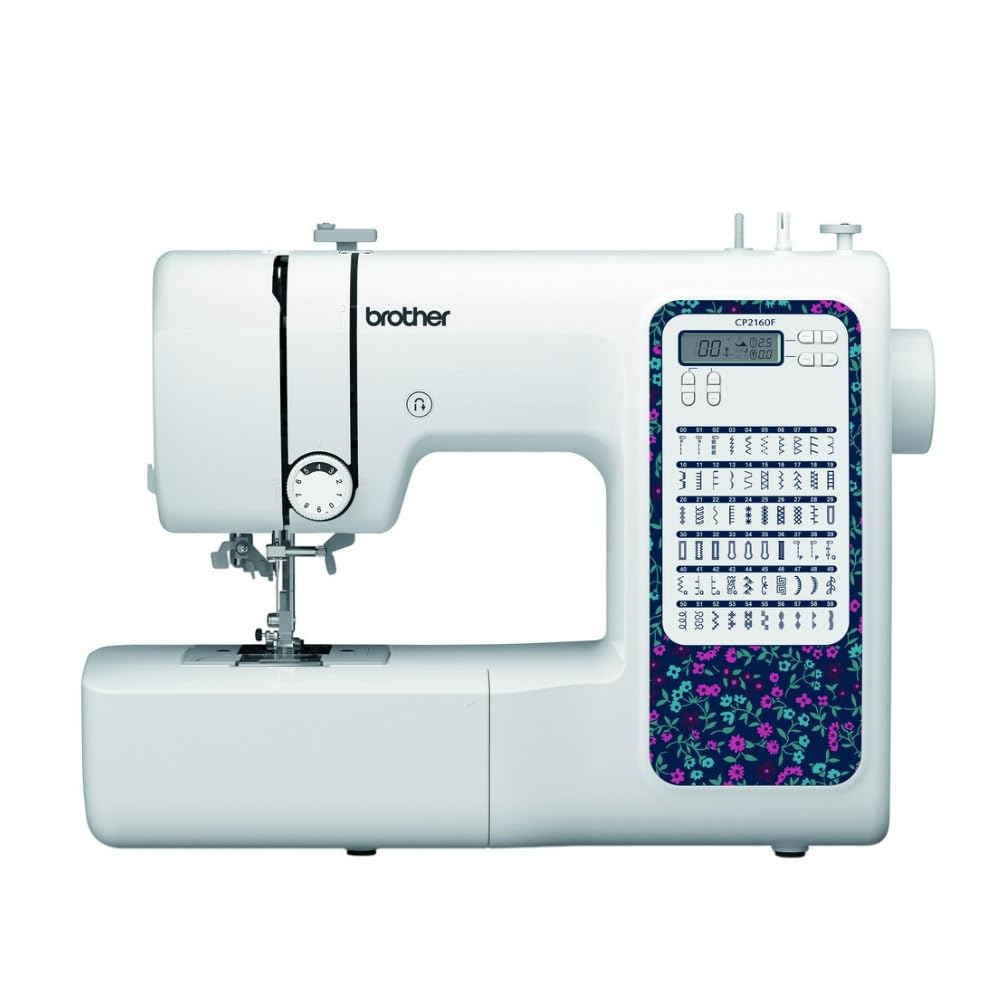
Figure 1: Brother CP2160F Computerized Sewing Machine. This image shows the overall view of the sewing machine, highlighting its compact design and the LCD screen for stitch selection.
2. Важни безбедносни инструкции
Кога користите електричен апарат, секогаш треба да се следат основните безбедносни мерки, вклучувајќи го следново:
- Прочитајте ги сите упатства пред да ја користите оваа машина за шиење.
- Држете ги прстите подалеку од сите подвижни делови. Потребна е посебна грижа околу иглата на машината за шиење.
- Секогаш користете ја соодветната плоча за игла. Погрешната плоча може да предизвика кршење на иглата.
- Turn the sewing machine off when making any adjustments in the needle area, such as threading the needle, changing the needle, threading the bobbin, or changing the presser foot.
- Секогаш исклучувајте ја машината за шиење од штекерот кога ги отстранувате капаците, подмачкувате или кога правите други прилагодувања за сервисирање на корисникот споменати во упатството за употреба.
- Никогаш не паѓајте или вметнувајте предмет во кој било отвор.
- Не користете на отворено.
- Не работете каде што се користат аеросоли (спреј) производи или каде што се дава кислород.
- За да го исклучите, свртете ги сите контроли во положбата за исклучување, а потоа извадете го приклучокот од штекерот.
3. Содржина на пакетот
Проверете дали сите компоненти се присутни во пакувањето:
- Brother CP2160F Computerized Sewing Machine
- Кабел за напојување
- Контролер на стапалото
- Accessory Bag (containing bobbins, needle set, twin needle, screwdriver, spool caps, extra spool pin, seam ripper, cleaning brush)
- 7 Sewing Feet: Buttonhole foot, Zipper foot, Blind stitch foot, Button sewing foot, Overcasting foot, Monogramming foot, Zigzag foot (on machine)
- Упатство за употреба (овој документ)
4. Поставување
4.1 Поврзување за напојување
- Поставете ја машината на стабилна, рамна површина.
- Insert the machine plug into the jack on the right side of the machine.
- Insert the power supply plug into a standard electrical outlet.
- Turn on the main power switch, located on the right side of the machine. The LCD screen will illuminate.
4.2 Намотување на макарата
- Ставете калем од конец на иглата за калем.
- Guide the thread through the upper thread guide and around the pre-tension disc.
- Place an empty bobbin onto the bobbin winder shaft and push it to the right.
- Wrap the thread clockwise around the bobbin a few times.
- Press the foot controller (or Start/Stop button) to begin winding. The machine will stop automatically when the bobbin is full.
- Cut the thread, push the bobbin winder shaft to the left, and remove the wound bobbin.
4.3 Threading the Machine (Upper Thread)
- Подигнете ја рачката на ногата на притискачот.
- Ставете калем од конец на иглата за калем.
- Водете го конецот низ горната водилка за конец.
- Follow the numbered threading path indicated on the machine, ensuring the thread passes through the tension discs and takes up lever.
- Use the advanced needle threading system: Lower the presser foot, lower the needle, then push down the needle threader lever to engage it. Guide the thread through the hook and release the lever.
- Pull the thread loop through the needle eye.
4.4 Инсталација на игла
- Исклучете го напојувањето на машината.
- Олабавете ја иглата клamp screw by turning it counter-clockwise.
- Отстранете ја старата игла.
- Вметнете ја новата игла со рамната страна свртена кон задниот дел од машината, туркајќи ја нагоре колку што може повеќе.
- Затегнете ја иглата clamp зашрафете безбедно.
5. Операција
5.1 Избор на бод
The CP2160F features 60 built-in stitches. Use the stitch selector buttons (usually '+' and '-') to navigate through the stitch patterns displayed on the LCD screen. The recommended stitch length and width will be displayed automatically, but can be adjusted if desired.
5.2 Automatic Buttonholes
This machine includes 7 auto-size buttonhole styles. Attach the buttonhole foot. Place the button you wish to match into the buttonhole foot's holder. Select the desired buttonhole stitch. The machine will automatically sew a buttonhole to the correct size.
5.3 Free-Arm Sewing
To convert to free-arm sewing, slide off the accessory box located at the front of the machine. This exposes the free arm, ideal for sewing cylindrical items like cuffs, sleeves, and pant hems.
5.4 Шиење дебели ткаенини
The CP2160F's robust feed system and fixed needle bar are designed to handle thick materials such as denim and tweed. Ensure you use the correct needle type and size for the fabric thickness to prevent needle breakage and ensure smooth feeding.
5.5 Using Included Sewing Feet
The machine comes with seven specialized sewing feet. Refer to the specific stitch instructions for which foot to use. To change a presser foot:
- Подигнете ја иглата и стапалото за притискање.
- Press the black lever at the back of the presser foot holder to release the current foot.
- Align the new foot with the pin on the presser foot holder and lower the presser foot lever until it snaps into place.
6. Одржување
6.1 Чистење на машината
Редовното чистење помага во одржување на оптимални перформанси. Секогаш исклучувајте ја машината од струја пред чистење.
- Хранење кучиња: Remove the needle plate and use the cleaning brush to remove lint and dust from the feed dogs and bobbin area.
- Hook Race: Carefully remove the bobbin case and clean the hook race area with the brush.
- Надворешност: Wipe the exterior surfaces with a soft, dry cloth. Do not use liquid cleaners or harsh chemicals.
Note: This machine does not require user lubrication.
7 Смена на проблеми
Пред да контактирате со корисничката поддршка, повторноview these common issues and their solutions:
| Проблем | Можна причина | Решение |
|---|---|---|
| Паузи за игла | Incorrect needle size/type for fabric; bent needle; needle not fully inserted; pulling fabric while sewing. | Use correct needle; replace bent needle; re-insert needle correctly; guide fabric gently. |
| Прескокнати шевови | Needle bent or dull; incorrect needle insertion; improper threading; wrong needle for fabric. | Replace needle; re-insert needle; re-thread machine; use appropriate needle. |
| Thread jams | Improper threading; lint in bobbin case; bobbin wound unevenly. | Re-thread machine; clean bobbin area; re-wind bobbin evenly. |
| Машината не се вклучува | Power cord not connected; power switch off; electrical outlet issue. | Check power cord connections; ensure switch is ON; test outlet with another appliance. |
8. Спецификации
- Модел: Brother CP2160F
- Број на бодови: 60 Вградени конци
- Дупки за копчиња: 7 One-step auto-size buttonholes
- Навојувач за игла: Advanced Needle Threading System
- Прикажи: LCD екран
- Sewing Area: Free-arm capability
- Систем за напојување: Exceptional feed for thick fabrics
- Included Feet: 7 (Buttonhole, Zipper, Blind Stitch, Button Sewing, Overcasting, Monogramming, Zigzag)
- Боја: Бело
- Материјал: Метал, пластика
- Димензии на производот (Д x Ш x В): 6.65" x 12.2" x 16.26"
- Тежина на ставката: 226 унци (приближно 14.1 фунти)
- Извор на енергија: Електричен со кабел
- UPC: 196271536956
9. Поддршка за корисници и гаранција
For technical assistance, warranty information, or service inquiries, please contact Brother customer support. Refer to the official Brother webстраницата или документацијата вклучена во вашата нарачка за најактуелните контакт информации и гарантните услови.
Поддршка преку Интернет: www.brother-usa.com/support
Забелешка: Гарантните услови може да се разликуваат во зависност од регионот и продавачот. Зачувајте го доказот за купување за гаранциски барања.