1. Вовед
This manual provides essential information for the proper installation, operation, and maintenance of your Generic 25-foot High-Speed HDMI Cable with Ethernet. This cable is designed to deliver high-quality digital video and audio signals between compatible devices, supporting advanced features such as Ethernet data connectivity, Audio Return Channel (ARC), and 3D content.
2. Карактеристики
- Пренос на податоци со голема брзина: Supports high bandwidth for resolutions up to 4K and beyond.
- Ethernet Data Connectivity: Allows for internet connection sharing among compatible devices without a separate Ethernet cable.
- Аудио повратен канал (ARC): Enables a TV to send audio data upstream to an A/V receiver or surround sound system, reducing the need for a separate audio cable.
- 3D поддршка: Compatible with 3D video formats.
- Висококвалитетна градба: Produced with high-grade materials for reliable performance and durability.
3. Производот завршиview
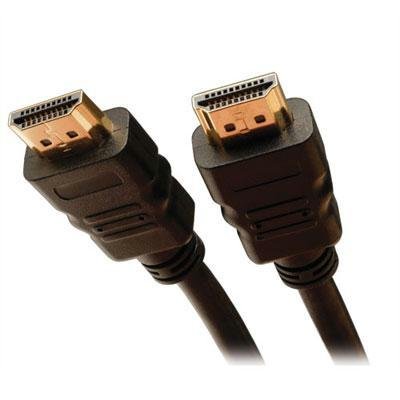
The image above displays the Generic 25-foot High-Speed HDMI Cable with Ethernet. It features standard HDMI Type A connectors on both ends, designed for secure and reliable connections. The cable is constructed to support the latest HDMI specifications, ensuring optimal signal integrity over its 25-foot length.
4. Упатства за поставување
Следете ги овие чекори за да го поврзете вашиот HDMI кабел:
- Идентификувајте ги портите: Лоцирајте го излезниот HDMI порт на вашиот изворен уред (на пр., Blu-ray плеер, играчка конзола, компјутер) и влезниот HDMI порт на вашиот уред за прикажување (на пр., телевизор, монитор, проектор).
- Извор на поврзување: Внимателно вметнете го едниот крај од HDMI кабелот во HDMI излезниот порт на вашиот изворен уред. Уверете се дека е целосно поставен.
- Поврзување на дисплеј: Внимателно вметнете го другиот крај од HDMI кабелот во HDMI влезниот порт на вашиот уред за прикажување. Уверете се дека е целосно поставен.
- Уреди за вклучување: Вклучете го и изворниот уред и уредот за прикажување.
- Изберете влез: На вашиот уред за прикажување, користете го далечинскиот управувач или менито на екранот за да го изберете точниот HDMI влезен извор (на пр., HDMI 1, HDMI 2) што одговара на портата што сте ја користеле.
Забелешка: For optimal performance, ensure both devices are powered off before connecting or disconnecting the cable.
5. Упатства за работа
Once the HDMI cable is correctly connected and the input source is selected on your display device, the cable operates automatically. It will transmit digital video and audio signals from your source device to your display. If your devices support HDMI Ethernet Channel (HEC) and Audio Return Channel (ARC), these features will also function automatically when enabled on your devices.
- Видео: The cable supports various video resolutions, including 1080p, 4K, and 3D content, depending on the capabilities of your connected devices.
- Аудио: High-quality digital audio, including multi-channel surround sound, will be transmitted.
- Етернет: If both connected devices support HEC, they can share an internet connection without additional Ethernet cables.
6. Одржување и грижа
To ensure the longevity and optimal performance of your HDMI cable, follow these maintenance guidelines:
- Ракувајте со внимание: Avoid bending the cable sharply or putting excessive strain on the connectors.
- Одржувајте чисто: Use a soft, dry cloth to gently wipe the cable and connectors if they become dusty. Do not use liquid cleaners directly on the connectors.
- Правилно складирање: When not in use, coil the cable loosely. Avoid tight coiling or kinking, which can damage internal wires.
- Избегнувајте екстремни услови: Не го изложувајте кабелот на екстремни температури, директна сончева светлина подолг период или прекумерна влага.
7 Смена на проблеми
If you encounter issues with your HDMI cable, consider the following troubleshooting steps:
- Нема слика/звук:
- Проверете дали кабелот е безбедно поврзан со двата уреди.
- Verify that the correct HDMI input is selected on your display device.
- Try connecting the cable to a different HDMI port on your display device.
- Test the cable with another HDMI-compatible device to rule out issues with the source or display.
- Restart both the source and display devices.
- Poor Picture Quality (Flickering, Static):
- Проверете дали има физичко оштетување на кабелот или конекторите.
- Ensure the cable is not running near sources of strong electromagnetic interference.
- Намалете ја резолуцијата или стапката на освежување на изворниот уред за да видите дали проблемот продолжува.
- No Ethernet/ARC Functionality:
- Confirm that both connected devices support HDMI Ethernet Channel (HEC) and Audio Return Channel (ARC) and that these features are enabled in their settings.
- Consult the user manuals of your source and display devices for specific instructions on enabling these features.
8. Технички спецификации
| Спецификација | Детал |
|---|---|
| ASIN | B0F8172RB8 |
| Производител | Главна 212 |
| Датум прв на располагање | 8 ноември 2023 година |
9. Гаранција и поддршка
For information regarding warranty coverage or technical support for your Generic 25-foot High-Speed HDMI Cable with Ethernet, please refer to the documentation provided at the point of purchase or contact the retailer directly. Specific warranty terms and support procedures may vary.


