
Bagotte A21
Bagotte Robot Vacuum and Mop Model A21 User Manual
Вашиот водич за поставување, работа и одржување
1. Важни безбедносни инструкции
Please read this user manual carefully before using the Bagotte Robot Vacuum and Mop Model A21. Keep this manual for future reference.
- Овој апарат може да го користат деца на возраст од 8 години и повеќе и лица со намалени физички, сетилни или ментални способности или недостаток на искуство и знаење доколку им се дадени надзор или инструкции за користење на апаратот на безбеден начин и ги разбираат вклучените опасности .
- Децата не смеат да си играат со апаратот. Чистењето и одржувањето на корисникот не смеат да го вршат деца без надзор.
- Користете само оригинален адаптер за напојување што го обезбедува производителот.
- Не го користете роботот во средини со отворен пламен или кршливи предмети.
- Ensure the charging station is placed on a level surface against a wall, with no obstacles within 1 meter on either side and 2 meters in front.
- Before cleaning, remove power cords, small objects, and any items that could entangle the robot.
- Не го потопувајте роботот или неговите електронски компоненти во вода.
- Исклучете го роботот и исклучете ја станицата за полнење од струја пред да вршите какво било одржување или чистење.
2. Содржина на пакетот
По распакувањето, проверете дали сите компоненти се присутни и во добра состојба.

Image: All items included in the Bagotte Robot Vacuum A21 package.
- A21 Robot Vacuum Cleaner * 1
- Charging Station * 1
- Remote Control (2 AAA batteries included) * 1
- Адаптер за напојување * 1
- 2-in-1 Water Tank * 1
- Странични четки * 2
- Mop Holder * 1
- Mop Cloth * 2
- Hepa Filters * 1
- Четка за чистење * 1
- Упатство за употреба * 1
3. Производот завршиview
The Bagotte A21 is a 3-in-1 robot vacuum designed for vacuuming, sweeping, and mopping. It features a slim design, powerful suction, and multiple control options.

Image: Bagotte Robot Vacuum A21 main unit and accessories.
Компоненти на главната единица
- Горниот капак: Power button, Wi-Fi indicator.
- Преден браник: Сензори за судир.
- Странични четки: За чистење на рабови и агли.
- Погонски тркала: For movement.
- Контејнер за ѓубре/резервоар за вода: Integrated unit for dry and wet cleaning.
- Полнење контакти: За автоматско полнење.
- Bottom Sensors: Cliff sensors to prevent falls.
4. Поставување
4.1 Поставување на станица за полнење
Place the charging station against a wall on a hard, level surface. Ensure there are no obstacles within 1 meter (3.3 feet) to the left and right, and 2 meters (6.6 feet) in front of the charging station. This allows the robot to return for charging without obstruction.

Image: Robot vacuum returning to its charging station.
4.2 Почетно полнење
Connect the power adapter to the charging station and plug it into a wall outlet. Place the robot onto the charging station, ensuring the charging contacts align. For first-time use, charge the robot for at least 6 hours to ensure the battery is fully conditioned.
4.3 Инсталирање на странични четки
Attach the side brushes to the corresponding posts on the bottom of the robot until they click into place. Ensure the brushes are securely fastened.
4.4 Installing the 2-in-1 Water Tank/Dustbin
To use the mopping function, fill the water tank with clean water. Attach the mop cloth to the mop holder, then slide the mop holder onto the water tank. Insert the combined 2-in-1 water tank/dustbin unit into the back of the robot until it clicks securely.

Image: Components for 3-in-1 cleaning functionality.
5. Упатства за работа
5.1 Вклучување/исклучување
- Вклучување: Press and hold the power button on the robot for a few seconds until the indicator light turns on.
- Исклучено: Притиснете го и држете го копчето за вклучување неколку секунди додека индикаторската ламбичка не се изгасне.
5.2 Режими на чистење
The robot offers four cleaning modes to suit different needs:

Image: Illustration of different cleaning modes.
- Автоматско чистење: Роботот автоматски чисти по систематски образец.
- Чистење на места: Роботот чисти одредена област во спирален модел за концентрирано чистење.
- Чистење на рабовите: Роботот чисти по ѕидовите и рабовите на мебелот.
- Рачно чистење: Control the robot's direction using the remote control or app.
5.3 App Control (Tuya Smart App)
Download the Tuya Smart app from your smartphone's app store. Follow the in-app instructions to connect your robot to your home's 2.4GHz Wi-Fi network. The app allows for advanced control and scheduling.
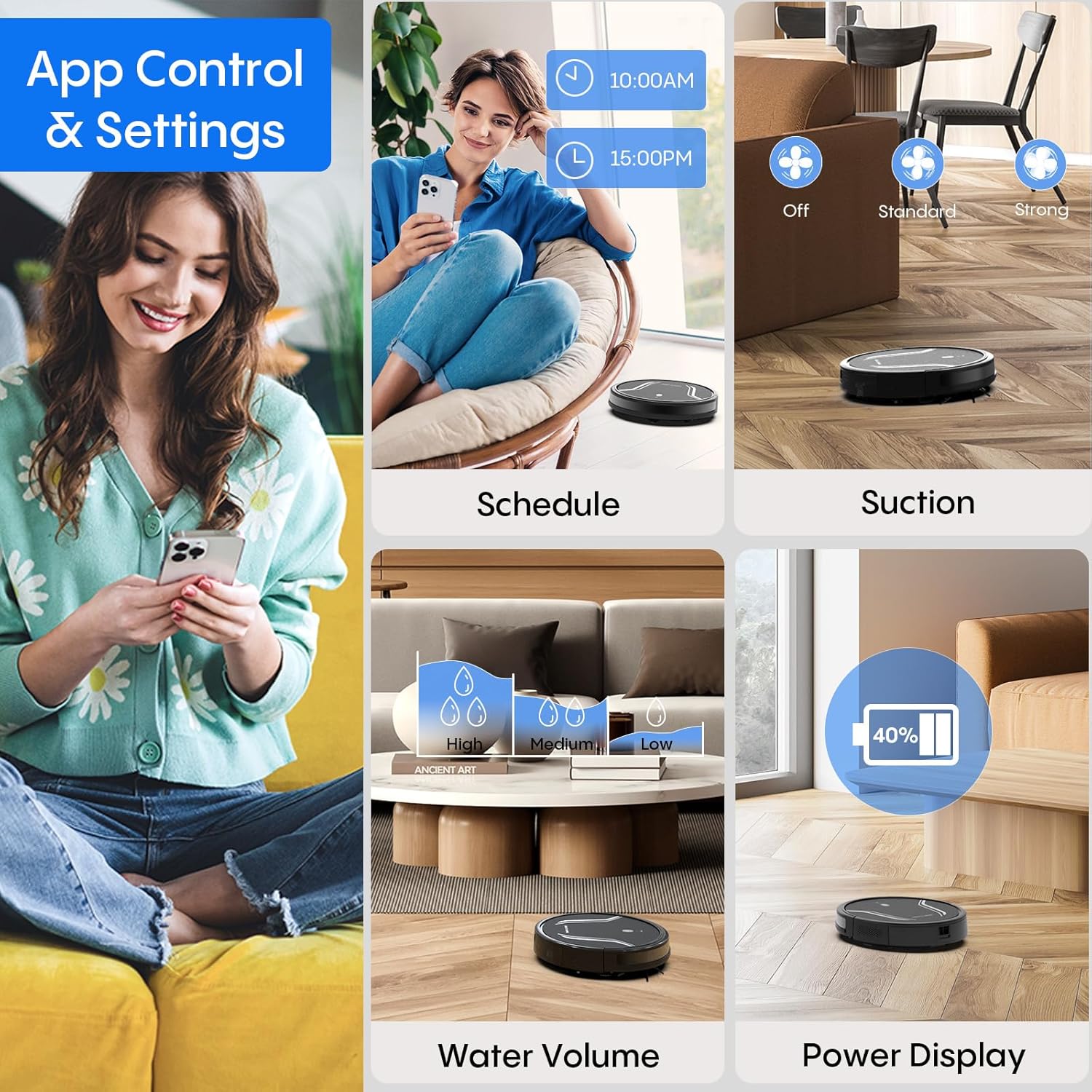
Image: App control interface for the robot vacuum.
- Закажување: Поставете одредено време за автоматско чистење на роботот.
- Режими на чистење: Select desired cleaning modes.
- Моќ на вшмукување: Adjust suction levels (e.g., Standard, Strong).
- Волумен на вода: Control water flow for mopping (e.g., Low, Medium, High).
- Статус на батеријата: Monitor the robot's battery level.
- Пронајди го мојот робот: Locate the robot if it gets stuck or lost.
Далечински управувач 5.4
Use the included remote control to manually direct the robot, start/pause cleaning, select cleaning modes, and send it back to the charging station.
5.5 Гласовна контрола (Alexa/Google Assistant)
Once connected to the Tuya Smart app, you can link your robot to Amazon Alexa or Google Assistant for voice commands. For example, say "Alexa, turn on the robot."

Image: Robot vacuum controlled via voice command.
5.6 Автоматско полнење
When the battery level is low, the robot will automatically return to its charging station to recharge. You can also manually send it back using the app or remote control.
6. Одржување
Редовното одржување обезбедува оптимални перформанси и го продолжува животниот век на вашиот роботски правосмукалка.
6.1 Празнење на корпата за отпадоци
Press the release button to remove the 2-in-1 water tank/dustbin unit. Open the dustbin cover and empty its contents into a trash bin. It is recommended to empty the dustbin after each cleaning cycle.
6.2 Чистење на филтри
Remove the HEPA filter and sponge filter from the dustbin. Tap them gently to remove dust. The filters are not washable and should be replaced every 3-6 months, depending on usage.
6.3 Чистење на странични четки
Periodically check the side brushes for tangled hair or debris. Carefully remove any obstructions. If brushes are worn or damaged, replace them with new ones.
6.4 Сензори за чистење
Wipe the cliff sensors (located on the bottom of the robot) and the charging contacts (on both the robot and charging station) with a clean, dry cloth. This ensures proper navigation and charging.
6.5 Cleaning Mop Cloth and Water Tank
After each mopping session, remove the mop cloth and wash it thoroughly. Allow it to air dry completely before reattaching. Empty any remaining water from the water tank and rinse it out. Ensure the water tank is dry before storage.
7 Смена на проблеми
Доколку наидете на проблеми со вашата роботска правосмукалка, погледнете ги следните вообичаени проблеми и решенија:
| Проблем | Можна причина | Решение |
|---|---|---|
| Роботот не се вклучува | Слаба батерија; Копчето за вклучување не е правилно притиснато | Charge the robot; Press and hold the power button until the indicator lights up. |
| Роботот не се полни | Charging contacts are dirty; Charging station not powered | Clean charging contacts on both robot and station; Ensure power adapter is plugged in. |
| Роботот често се заглавува | Too many obstacles; Cliff sensors are dirty | Clear the cleaning area of loose cables and small objects; Clean cliff sensors. |
| Лоши перформанси за чистење | Dustbin full; Filters clogged; Side brushes worn | Empty dustbin; Clean or replace filters; Clean or replace side brushes. |
| Функцијата за бришење не работи | Water tank empty; Mop cloth not attached; Water flow setting too low | Fill water tank; Attach mop cloth correctly; Adjust water flow setting in the app. |
| Не може да се поврзе на Wi-Fi | Incorrect Wi-Fi password; Not 2.4GHz network; Robot too far from router | Verify password; Ensure router is 2.4GHz; Move robot closer to router during setup. |
8. Спецификации
| Карактеристика | Детал |
|---|---|
| Број на модел | A21 |
| Димензии на производот | 15 x 12.5 x 4 инчи |
| Тежина на ставката | 7.24 фунти |
| Моќ на вшмукување | До 5000Pa |
| Капацитет на прашина во кутија | 250mL (integrated with water tank) |
| Капацитет на резервоар за вода | 200mL (integrated with dust box) |
| Контролни методи | App, Remote Control, Voice Control (Alexa/Google Assistant) |
| Компатибилност со Wi-Fi | Само 2.4 GHz |
| Автоматски карактеристики | Auto-recharge, Obstacle avoidance, Fall prevention |
9. Гаранција и поддршка
Bagotte provides a 12-month service warranty for the Robot Vacuum and Mop Model A21. For technical support, warranty claims, or any questions regarding your product, please contact Bagotte customer service through the official webстраницата или вашата платформа за купување.
Please have your model number (A21) and purchase information ready when contacting support.
Ask a question about this manual
Ask about setup, troubleshooting, compatibility, parts, safety, or missing instructions. Manuals+ will review the question and use this page’s manual context to help answer it.