1. Вовед
This manual provides comprehensive instructions for the safe and effective operation of your Jumper T14 2.4GHz ELRS Radio Controller. Please read this manual thoroughly before using the device to ensure proper setup, optimal performance, and to prevent damage or injury. Keep this manual for future reference.
2. Информации за безбедност
Always operate the radio controller in a safe and responsible manner. Failure to follow safety guidelines can result in property damage, serious injury, or even death.
- Животна средина: Operate in open areas, away from people, animals, and obstacles. Avoid flying near power lines, roads, or crowded places.
- Безбедност на батеријата: Use only recommended batteries. Do not overcharge or over-discharge. Store batteries in a fireproof bag.
- Проверки пред лет: Always perform a thorough pre-flight check of your aircraft and radio controller before each use.
- Фирмвер: Keep your radio controller's firmware updated to the latest stable version for optimal performance and security.
- Вода и влага: Keep the radio controller away from water and high humidity.
- Деца: This product is not a toy. Keep out of reach of children under 16 years of age. Adult supervision is required for minors.
3. Производот завршиview
The Jumper T14 is a compact and ergonomic 2.4GHz ELRS radio controller designed for FPV drones and other RC applications. It features CNC Hall Gimbals, an OLED screen, and runs on EdgeTX firmware.
3.1. Radio System Components

Слика 3.1: Detailed diagram of the Jumper T14 Radio Controller, highlighting key components and controls on the front, back, and side views. This includes switches, dials, gimbals, screen, module compartment, and charging port.
- Преден панел:
- VS-M CNC Hall Gimbals: High-precision gimbals for smooth control.
- 2.42" OLED Screen: Clear display for EdgeTX interface.
- Копче за вклучување: За вклучување/исклучување на уредот.
- Switches (2-position, 3-position): Configurable for various functions.
- Dials (S1, S2): Rotary controls for fine adjustments.
- Копчиња за скратување: For adjusting stick trims.
- SYS копче: Пристап до системското мени.
- Копче СТРАНИЦА: Page navigation.
- Копче за RTN: Return/back button.
- Светла за индикатори за статус: Provide operational feedback.
- Заден панел:
- Standard JR Module Compartment: For external RF modules.
- External Cooling Fan: Helps dissipate heat from internal components.
- Фиока за батерија: Ја сместува батеријата.
- Side/Top Panel:
- USB-C 10W Fast Charging Port: За полнење и поврзување со податоци.
- Копче DFU: Device Firmware Upgrade mode button.
- Trainer Port: For connecting to a simulator or another radio.
- Моментален прекинувач: Spring-loaded switch.
- Latching Switch: Stays in position until toggled.
- Adjustable and Foldable Antenna: За пренос на сигнал.
- Reserved Antenna DIY Port: For custom antenna modifications.
- Рачка со преклопување: For portability and comfortable grip.
3.2. Key Features Visuals
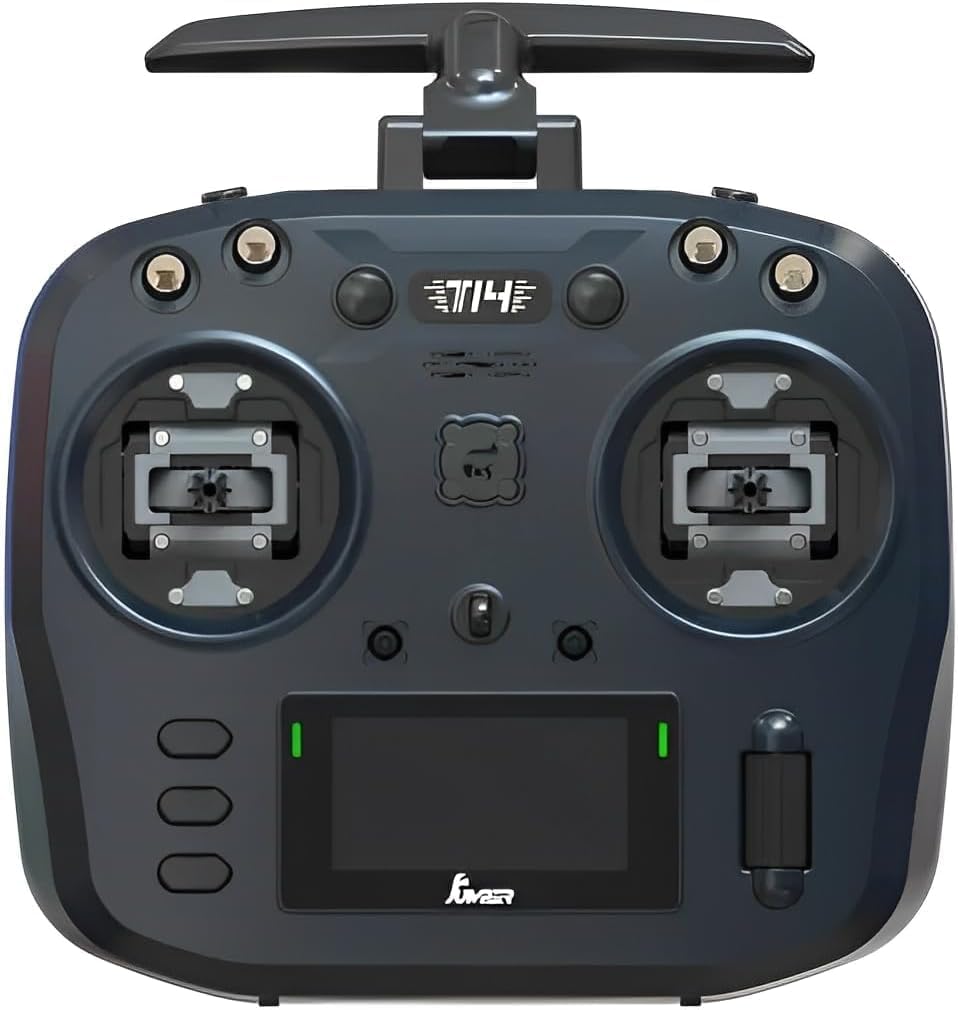
Слика 3.2: Предна страна view of the Jumper T14, showcasing the dual gimbals, OLED screen, and various control switches and dials.

Слика 3.3: Заден дел view of the Jumper T14, showing the JR module bay, cooling fan, and battery compartment cover.

Слика 3.4: Detail of the USB-C port, used for charging the internal battery and connecting to a computer for firmware updates or simulator use.

Слика 3.5: Illustration highlighting the precision CNC Hall Sensor Gimbals, which provide accurate and durable control inputs.
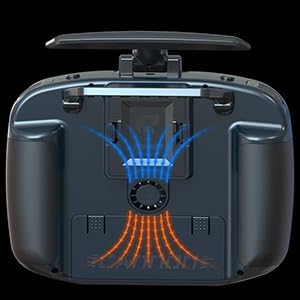
Слика 3.6: Diagram illustrating the internal cooling fan system, designed to maintain optimal operating temperatures for the internal electronics.

Слика 3.7: View of the bi-directional foldable antennas, which can be adjusted for optimal signal transmission and folded for compact storage.
4. Поставување
4.1. Инсталација и полнење на батеријата
The Jumper T14 uses a rechargeable battery (not specified in input, assuming common RC battery types like 18650 or LiPo). Ensure the battery is fully charged before first use.
- Отворете го капакот на преградата за батерии на задната страна од радиото.
- Insert the battery, ensuring correct polarity if applicable.
- Добро затворете го капакот на преградата за батерии.
- Connect the supplied USB-C cable to the USB-C port on the top of the radio and to a compatible USB power adapter (e.g., 5V/2A).
- The OLED screen or indicator lights will show charging status. Disconnect once fully charged.
4.2. Initial Power On and EdgeTX Setup
Upon first power-on, the radio will guide you through initial setup steps for the EdgeTX firmware.
- Press and hold the Power Button until the OLED screen illuminates.
- Follow the on-screen prompts to calibrate gimbals, set date/time, and configure basic radio settings.
- Navigate menus using the scroll wheel and SYS/PAGE/RTN buttons.
4.3. ELRS Binding
To bind your Jumper T14 with an ELRS receiver, follow the standard ELRS binding procedure:
- Ensure your ELRS receiver is powered on and in binding mode (typically by cycling power three times).
- On the T14, navigate to the ELRS LUA script or the internal module settings within EdgeTX.
- Select the "Bind" option. The radio will transmit a binding signal.
- Once the receiver's LED indicates a successful bind (refer to your receiver's manual), the process is complete.
5. Упатства за работа
5.1. Основни контроли
- Гимбали: Control the primary movements of your aircraft (Throttle, Rudder, Aileron, Elevator).
- Прекинувачи: Used for arming, flight modes, special functions, etc. Assign functions in EdgeTX.
- Бирање: Typically used for fine-tuning parameters like camera tilt, gain, or volume.
- Копчиња за скратување: Adjust the neutral position of the gimbals for stable flight.
5.2. Model Setup in EdgeTX
EdgeTX offers extensive customization for different models. Refer to the official EdgeTX documentation for detailed instructions on advanced model setup.
- From the main screen, press the SYS button to enter the System menu.
- Navigate to "Model Select" or "Model Setup" to create a new model or edit an existing one.
- Configure internal or external RF module settings (e.g., ELRS protocol, power output).
- Set up mixes, inputs, outputs, and special functions according to your aircraft's requirements.
6. Одржување
- Чистење: Use a soft, dry cloth to clean the radio controller. Avoid abrasive cleaners or solvents.
- Складирање: Store the radio in a cool, dry place, away from direct sunlight and extreme temperatures. Remove the battery if storing for extended periods.
- Ажурирања на фирмверот: Regularly check for and install the latest EdgeTX firmware updates from the official EdgeTX webсајт (www.edgetx.org) to ensure optimal performance and access to new features.
- Грижа за гимбал: The CNC Hall Gimbals are durable, but avoid excessive force or impact. Keep them free from dust and debris.
7 Смена на проблеми
| Проблем | Можна причина | Решение |
|---|---|---|
| Радиото не се вклучува. | Слаба или празна батерија; неправилна инсталација на батеријата. | Наполнете ја батеријата; проверете дали батеријата е правилно инсталирана со соодветен поларитет. |
| No signal to receiver. | Not bound; incorrect ELRS settings; antenna issue. | Perform binding procedure; verify ELRS protocol and power settings in EdgeTX; check antenna connection. |
| Гимбалите не реагираат правилно. | Needs calibration; physical obstruction. | Recalibrate gimbals via EdgeTX system menu; check for debris around gimbals. |
| Екранот е празен или замрзнат. | Проблем со фирмверот; пад на системот. | Try restarting the radio. If persistent, attempt DFU mode and reflash firmware. |
8. Спецификации
| Карактеристика | Детал |
|---|---|
| Димензии на производот | 9 x 6 x 1.5 инчи |
| Тежина на ставката | 14.4 унци |
| ASIN | B0F9WQSDGF |
| Препорачана возраст од производителот | 16 години па нагоре |
| Производител | скокач |
| Гимбали | CNC Hall Sensor Gimbals |
| RF модул | Built-in 2.4GHz ELRS |
| Приказ | 2.42" OLED екран |
| Фирмвер | EdgeTX |
| Полнење | USB-C 10W Fast Charging |
9. Гаранција и поддршка
For warranty information and technical support, please refer to the official ARRIS webлокација или директно контактирајте ја нивната служба за корисници. Зачувајте го доказот за купување за гаранциски барања.
Производител: скокач
Бренд: АРИС
Поддршка преку Интернет: Visit the ARRIS official website for FAQs, firmware downloads, and contact information. Продавница ARRIS на Amazon