
1. Производот завршиview
The Bextgoo Mini Sports Body Camera (Model CS15-CA) is a compact and versatile recording device designed for various applications, including outdoor activities, personal security, and hands-free documentation. It features 1080P Full HD video recording, 12MP photo capture, and a 180° rotatable lens for flexible viewing angles. The camera includes a 64GB memory card and supports smart loop storage for continuous recording.
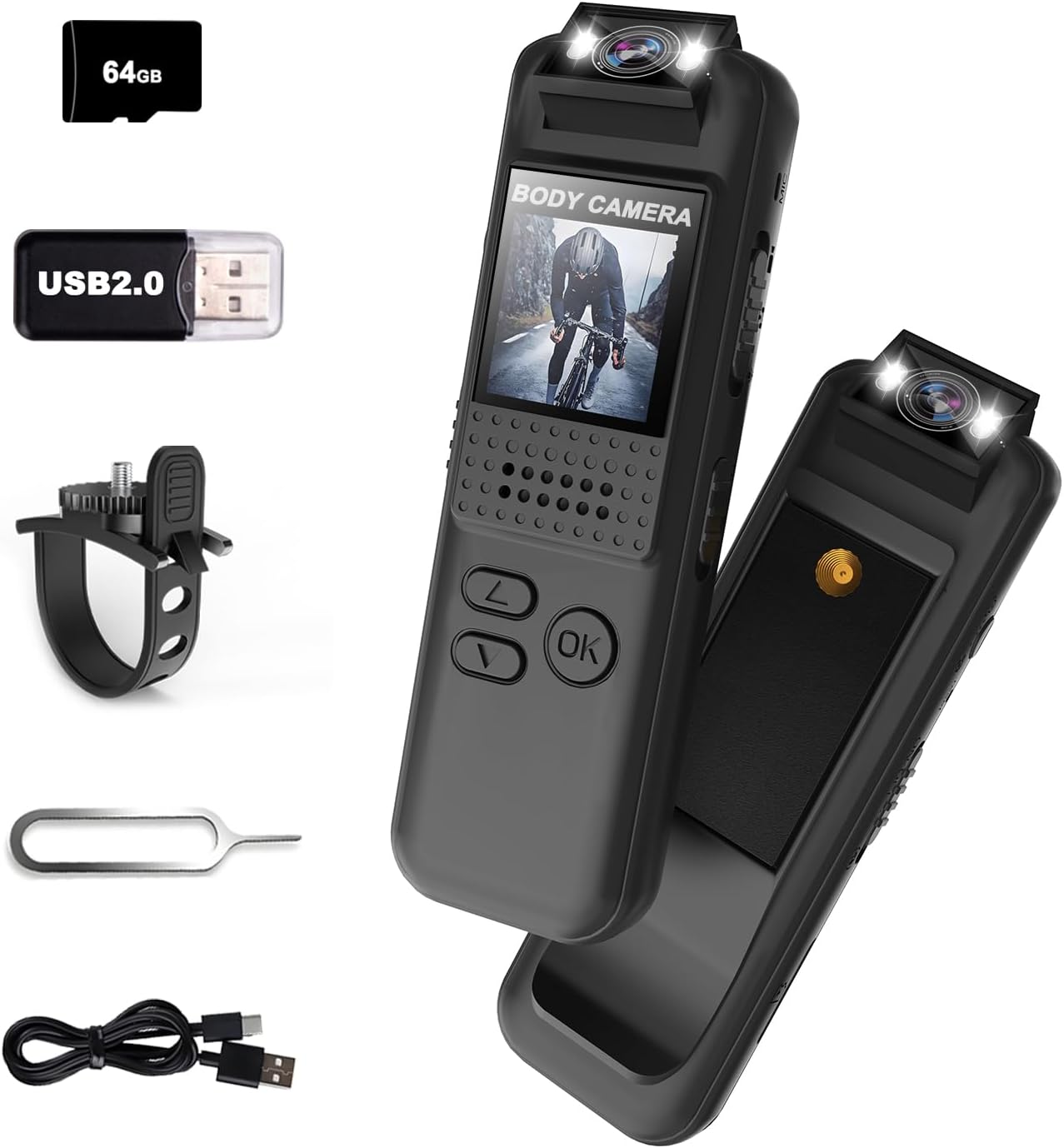
Image: The Bextgoo Mini Sports Body Camera shown with its various accessories, including the 64GB TF card, USB adapter, bike mount, reset pin, and charging cable.
Клучни карактеристики:
- 1080P Full HD Video & 12MP Photos: Captures clear video and sharp images.
- 64GB Memory Card & Smart Loop Storage: Pre-installed 64GB card with automatic overwrite for continuous recording.
- Леќа што може да се ротира за 180°: Allows adjustment of the camera angle for optimal capture.
- Instant Playback on Full-Color Screen: Review footage directly on the device without a computer.
- Built-in Fill Light & Night Vision: Enhances visibility in low-light conditions and functions as a flashlight.
- Разновидни опции за монтирање: Includes a magnetic back clip and bike mount for flexible attachment.
- Без мака File Пристап: View videos directly on the camera, computer, or via a card reader.
2. Што има во кутијата
Upon opening your Bextgoo Mini Sports Body Camera package, please verify that all the following components are included:
- 1x Bextgoo Body Camera
- 1x 64GB Memory Card (pre-installed)
- 1x Cycle Bracket (Bike Mount)
- 1x Card Reader (USB 2.0 adapter)
- 1x Ресетирај ПИН
- 1x Упатство за употреба (овој документ)
- 1x USB кабел за полнење
Видео: Распакување и повеќеview of the Bextgoo body camera, demonstrating the included accessories and initial setup steps like inserting the SD card and attaching the bike mount.
3. Распоред на уредот и контроли
Familiarize yourself with the physical components and controls of your Bextgoo Mini Sports Body Camera:

Image: A detailed diagram illustrating the location and function of all buttons, switches, and ports on the Bextgoo body camera.
- Леќа што може да се ротира за 180°: Located at the top, allows for flexible recording angles.
- Fill Lights: Positioned next to the lens for illumination in dark environments.
- LCD екран: Front-facing display for live view и репродукција.
- Копче за вклучување: On the side, for turning the device on/off.
- Photo/Flip Keys: For capturing photos and navigating menus.
- Scroll Up/Down Keys: For menu navigation and adjusting settings.
- Во ред клуч: For confirming selections.
- Video/Save/Record On Key: Dedicated button for starting/stopping video recording.
- Key to Turn On Fill Light: Activates the built-in illumination.
- Слот за микро SD картичка: Located on the side for memory card insertion.
- Дупка за ресетирање: A small pinhole for factory reset (use the included reset pin).
- USB-C порта: За полнење и пренос на податоци.
- Magnetic Back Clip: Integrated on the back for secure attachment to clothing or metal surfaces.
- Standard Camera Mount Thread: On the back, compatible with standard camera accessories like the bike mount.
4. Поставување
4.1 Полнење на уредот
Before first use, fully charge the camera. Connect the included USB charging cable to the camera's USB-C port and a standard USB power adapter (not included) or a computer's USB port. The charging indicator will show the charging status and turn off when fully charged.
4.2 Вметнување/вадење на микро SD картичка
The camera comes with a 64GB Micro SD card pre-installed. If you need to replace or remove it:
- Пронајдете го слотот за микро SD картичка на страната од камерата.
- Gently push the card inward until it clicks, then release to eject.
- За да ја вметнете, правилно порамнете ја картичката и притиснете ја во слотот додека не кликне на своето место.
4.3 Прикачување на држачи
The camera features a magnetic back clip and a standard camera mount thread for versatile attachment.
- Magnetic Back Clip: Simply attach the camera to any metal surface or clip it onto clothing, bags, or other items.
- Држач за велосипед: Use the included cycle bracket by screwing it into the standard camera mount thread on the back of the camera. Secure the bracket to your bike's handlebars or other suitable locations.

Слика: Прamples of the Bextgoo body camera being used in various hands-free scenarios, including mounted on a bike, clipped to a delivery uniform, and worn by a security guard.
4.4 Initial Power On and Date/Time Settings
After charging, slide the Power Key to the 'ON' position. The camera will power on. You may need to set the correct date and time for accurate timestamps on your recordings. Refer to the on-screen menu using the scroll and OK keys to navigate to the 'Date/Time' settings and adjust as needed. If the device becomes unresponsive, use the included reset pin to press the reset button located in the reset hole.

Image: The camera's screen displaying the date and time settings menu, alongside a sample video frame with a visible date and time overlay.
5. Упатства за работа
5.1 Вклучување/исклучување
- За вклучување: Лизнете го копчето за вклучување во положба „ВКЛУЧЕНО“.
- За исклучување: Лизнете го копчето за вклучување во положба „ИСКЛУЧЕНО“.
5.2 Снимање видео
To start and stop video recording:
- Проверете дали камерата е вклучена.
- Press the 'Video/Save/Record On' key once to begin recording. The screen will indicate recording status.
- Press the 'Video/Save/Record On' key again to stop recording. The video file ќе се зачува на Micro SD картичката.
5.3 Снимање фотографии
To take still photographs:
- Проверете дали камерата е вклучена.
- Press the 'Photo/Flip' key once to capture a photo. The image will be saved to the Micro SD card.
5.4 Аудио снимање
The camera supports audio-only recording. Locate the audio recording switch on the side of the device. Slide it to the 'ON' position to enable audio recording or 'OFF' to disable it.
5.5 Night Vision/Fill Light
To activate the built-in fill light for night vision:
- Проверете дали камерата е вклучена.
- Press the 'Key to Turn On Fill Light' button. The fill lights will illuminate.
- Press the button again to turn off the fill light.

Image: A visual comparison showing a dark environment before and after activating the camera's built-in fill light, highlighting its effectiveness for night vision.
5.6 Playback on Device
Можете повторноview recorded videos and photos directly on the camera's full-color LCD screen:
- Navigate to the playback menu using the scroll keys.
- Изберете го саканиот file using the scroll keys and press the 'OK' key to play/view.
- Use the 'Photo/Flip' key to exit playback or return to the previous menu.
5.7 Пренесување Files на компјутер
To access your recorded files на компјутер:
- Директна врска: Connect the camera to your computer using the USB-C cable. The camera will appear as a removable disk, allowing you to copy files.
- Using Card Reader: Remove the Micro SD card from the camera and insert it into the included USB card reader. Plug the card reader into your computer's USB port to access the files.

Image: The camera displaying a video on its screen, and a separate image showing the camera connected to a laptop for file transfer, illustrating easy access to footage.
6. Одржување
6.1 Чистење
- Користете мека, сува крпа за чистење на телото на фотоапаратот.
- За леќите, користете специјализирана крпа и раствор за чистење леќи за да избегнете гребнатини.
- Не користете груби хемикалии или абразивни материјали.
6.2 Складирање
- Чувајте го фотоапаратот на ладно и суво место, подалеку од директна сончева светлина и екстремни температури.
- Доколку ја складирате подолго време, осигурајте се дека батеријата е делумно наполнета (околу 50%) за да го продолжите нејзиниот век на траење.
6.3 Грижа за батерии
- Избегнувајте често целосно празнење на батеријата.
- Редовно полнете ја батеријата, дури и ако фотоапаратот не е во употреба, за да ја одржите состојбата на батеријата.
7 Смена на проблеми
If you encounter issues with your Bextgoo Mini Sports Body Camera, refer to the following common problems and solutions:
| Проблем | Можна причина | Решение |
|---|---|---|
| Камерата не се вклучува | Слаба батерија; уредот е замрзнат; | Charge the camera; use the reset pin to restart the device. |
| Не може да снима видео/фотографира | Micro SD card full or corrupted; incorrect mode selected | Избриши старо files or format the SD card; ensure sufficient space; verify correct mode is active. |
| Poor video/photo quality | Dirty lens; low light conditions; unstable mounting | Clean the lens; activate fill light/night vision; ensure camera is securely mounted. |
| Files not transferring to PC | Faulty USB cable/port; driver issues | Try a different USB cable or port; use the included card reader; ensure camera is in mass storage mode if applicable. |
| Датум/Време неточно | Settings not saved or battery depleted | Re-enter date/time settings and ensure they are saved; keep battery charged. |
If the problem persists after attempting these solutions, please contact Bextgoo customer support for further assistance.
8. Спецификации
Detailed technical specifications for the Bextgoo Mini Sports Body Camera (Model CS15-CA):
| Карактеристика | Спецификација |
|---|---|
| Име на брендот | Бекстгу |
| Број на модел | CS15-CA |
| Тежина на ставката | 1.44 унци (40.8 грама) |
| Димензии на производот | 0.55 x 1.02 x 3.35 инчи (1.4 x 2.6 x 8.5 см) |
| Батерии | 1 Потребна е батерија (вклучена) |
| Боја | Црното |
| Резолуција за снимање видео | 1080 стр |
| Технологија на фотосензор | CMOS |
| Максимална фокусна должина | 4.3 милиметри |
| Максимална решетка | 2.4 f |
| Тип на флеш меморија | Микро SD (вклучена е 64GB) |
| Формат за снимање видео | Видео |
| Поддржан аудио формат | MP3 |
| Големина на екранот | 0.9 инчи |
| Технологија за поврзување | USB |
| Посебни карактеристики | 1080P FHD Video & 12MP Photos, Built-In Flash, Vivid Color Night Vision, 180° Rotatable Lens |
9. Гаранција и поддршка
Your Bextgoo Mini Sports Body Camera is covered by a manufacturer's warranty. For specific details regarding warranty coverage, duration, and terms, please refer to the warranty information provided with your purchase or contact Bextgoo customer support.
Поддршка за корисници:
If you have any questions, require technical assistance, or need to claim warranty service, please contact Bextgoo customer support through the official channels provided at the time of purchase or on the Bextgoo website. Please have your product model number (CS15-CA) and purchase details ready when contacting support.