
1. Вовед
This manual provides comprehensive instructions for the setup, operation, maintenance, and troubleshooting of your Samsung QN43QN90FA 43-inch Neo QLED 4K Smart TV and HW-Q800F 5.1.2 Ch Soundbar. Please read this manual thoroughly before using your new products to ensure safe and optimal performance.

Image 1.1: The Samsung QN43QN90FA 43-inch Neo QLED 4K Smart TV bundled with the HW-Q800F 5.1.2 Ch Soundbar.
2. Клучни карактеристики
The Samsung QN43QN90FA TV and HW-Q800F Soundbar bundle offers advanced technology for an immersive entertainment experience:
- Процесор NQ4 AI Gen3: Utilizes AI for enhanced 4K picture quality and dynamic sound.
- 4K AI Upscaling Pro: Content is upscaled to 4K resolution for improved viewинг.
- Glare Free Display: Minimizes reflections for clear viewпри различни услови на осветлување.
- Нео Квантен HDR: Provides expanded contrast and bright visuals in 4K clarity.
- True 5.1.2Ch Sound: Delivers next-level surround sound.
- Безжичен Dolby Atmos: Offers legendary 3D sound without the need for physical cables between the TV and soundbar.
Визуелни карактеристики

Image 2.1: Illustration of 4K AI Upscaling Pro, which transforms content to sharp, smooth 4K using 128 neural networks.
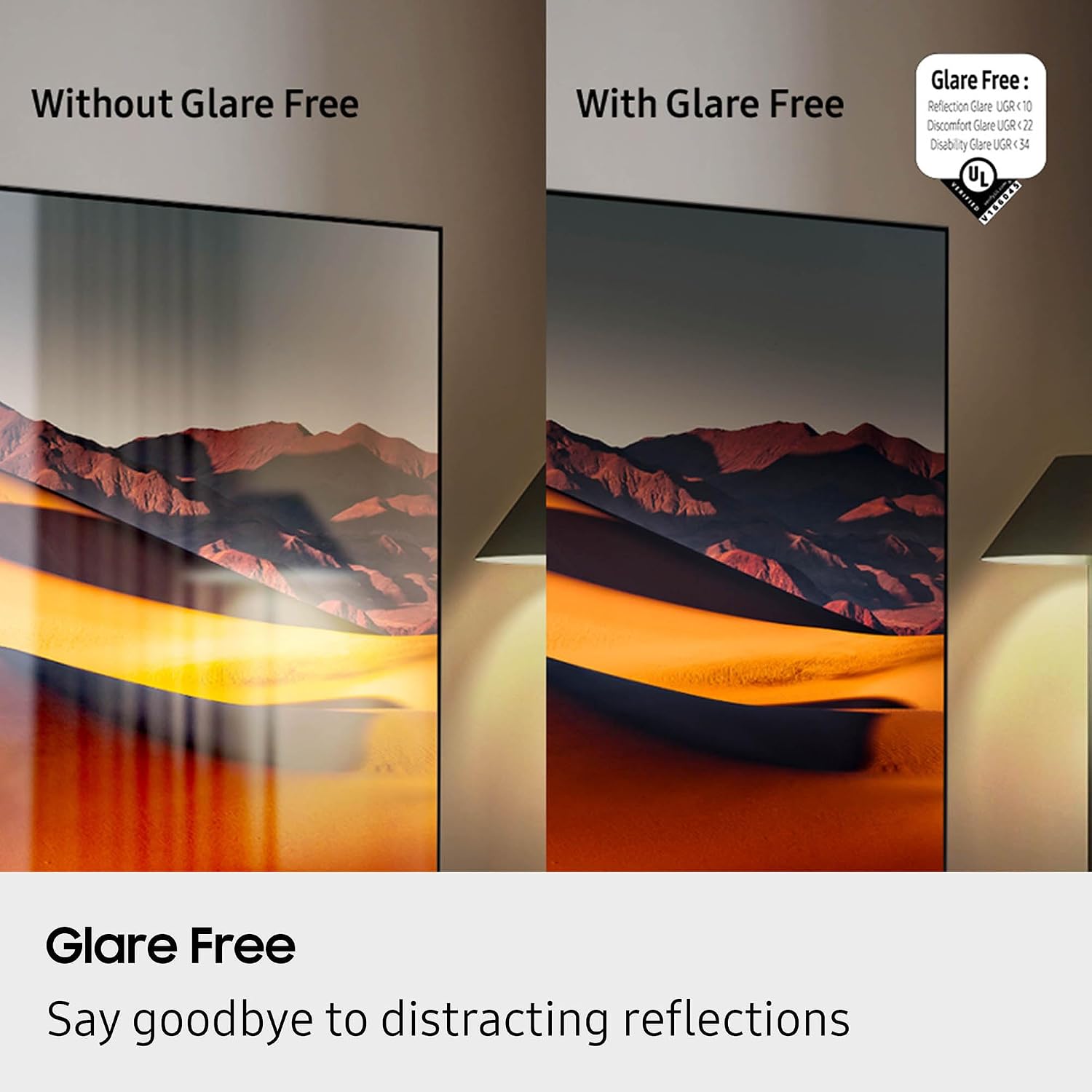
Image 2.2: Comparison showing the effectiveness of the Glare Free screen, reducing distracting reflections.
Аудио карактеристики

Image 2.3: The Samsung HW-Q800F Q Series Soundbar, subwoofer, and remote control.

Image 2.4: Visual representation of Wireless Dolby Atmos, providing immersive 3D sound from the soundbar.
Видеа со производи
Видео 2.1: Ревизија на производотview highlighting the features and performance of the Samsung QN90F Series TV.
Video 2.2: A product video showcasing the features and capabilities of the Samsung HW-Q800F Soundbar.
3. Водич за поставување
3.1 Дебоксирање
Carefully remove the TV and soundbar from their packaging. Ensure all components and accessories are present before proceeding. Retain packaging for future transport or service needs.
3.2 Поставување на телевизор
Choose a suitable location for your TV. It can be placed on a flat, stable surface using the included stand, or mounted on a wall using a compatible VESA 200mm x 200mm wall mount (sold separately). Ensure adequate ventilation around the TV.
3.3 Soundbar Placement
Position the soundbar directly in front of your TV, centered, for optimal audio alignment. The subwoofer can be placed anywhere in the room, preferably near the soundbar, for enhanced bass.
3.4 Врски
- Моќност: Connect the power cords to the TV and soundbar, then plug them into a wall outlet.
- HDMI: Connect the TV to the soundbar using an HDMI cable (HDMI ARC/eARC port recommended for best audio quality). Additional devices like gaming consoles or Blu-ray players can be connected to the TV's other HDMI ports.
- Мрежа: Connect the TV to your home network via Wi-Fi 5 or an Ethernet cable for Smart TV features and updates.
- Bluetooth аудио: For wireless audio streaming, pair Bluetooth-enabled devices with the TV or soundbar.
4. Упатства за работа
4.1 Вклучување/исклучување
Press the Power button on the remote control to turn the TV and soundbar on or off. The soundbar will typically power on/off automatically with the TV when connected via HDMI ARC/eARC.
4.2 Навигација преку Smart Hub
Access the Smart Hub by pressing the Home button on your remote. Use the directional pad to navigate through various apps (Netflix, Prime Video, Hulu, Disney+, Apple TV, YouTube, etc.) and connected devices. Select an app or input source by pressing the Enter button.
4.3 Soundbar Control
Use the TV remote or the soundbar's dedicated remote to adjust the volume. Explore different sound modes (e.g., Standard, Surround, Game) through the soundbar settings to optimize your audio experience.
5. Одржување
5.1 Чистење на екранот
To clean the TV screen, gently wipe it with a soft, dry microfiber cloth. For stubborn smudges, lightly dampen the cloth with distilled water or a specialized screen cleaner. Avoid using harsh chemicals, abrasive materials, or direct spraying onto the screen.

Image 5.1: A screen cleaning kit, including spray and microfiber cloths, suitable for maintaining your TV screen.
5.2 Soundbar Care
Wipe the soundbar and subwoofer with a soft, dry cloth to remove dust. Do not use liquid cleaners directly on the speakers. Ensure vents are clear of obstructions for proper airflow.
6 Смена на проблеми
If you encounter issues with your Samsung TV or soundbar, refer to the following common solutions:
- Без моќност: Check if the power cords are securely connected to both the device and the wall outlet. Try a different outlet.
- Нема слика: Ensure the correct input source is selected on the TV. Check HDMI cable connections.
- Нема звук: Verify the soundbar is powered on and connected correctly. Check TV audio output settings to ensure sound is routed to the soundbar. Adjust volume on both devices.
- Далечинскиот управувач не работи: Replace batteries in the remote. Ensure there are no obstructions between the remote and the device.
- Smart TV Apps Not Loading: Check your internet connection. Restart the TV by unplugging it for a few minutes and plugging it back in.
For more detailed troubleshooting, consult the full digital manual available on the Samsung support webсајт.
7. Спецификации
| Карактеристика | Спецификација |
|---|---|
| Бренд | Samsung |
| ТВ модел | QN43QN90FAFXZA |
| Модел за звучна лента | HW-Q800F |
| Големина на екранот | 43 инчи |
| Технологија на прикажување | Нео QLED |
| Резолуција | 4K |
| Стапка на освежување | 120 Hz (Up to 165Hz) |
| Процесор | Процесор NQ4 AI Gen3 |
| Канали на саундбарот | 5.1.2 гл |
| Специјални карактеристики (ТВ) | AI Motion Enhancer Pro, Glare Free, Auto HDR Remastering Pro, Wide Viewing Angle, Ultimate UHD Dimming, Real Depth Enhancer Pro, Motion Xcelerator 165Hz, Film Mode, 4K AI Upscaling Pro, Color Booster Pro, Tizen Smart TV, Multiple Voice Assistant Compatible, Samsung Health, VESA 200mm x 200mm, Wi-Fi 5, HDMI 4, 2 x USB-A, Eco Sensor, Auto Power Saving/Off, BT SolarCell Remote |
| Special Features (Soundbar) | Dolby Atmos, OTS Lite, Q-Symphony Pro, Bluetooth Audio, 360 Audio |
| Технологија за поврзување | Bluetooth, Ethernet, HDMI, RF, USB, Wi-Fi |
| Димензии на производот | 8.7" Д x 37.8" Ш x 24.4" В |
| Тежина на ставката | 29.5 фунти |
| Енергетска ефикасност | Во согласност со Energy Star |
8. Информации за гаранцијата
Samsung products are covered by a limited manufacturer's warranty. For specific details regarding the warranty period, coverage, and terms for your QN43QN90FA TV and HW-Q800F Soundbar, please refer to the warranty card included in your product packaging or visit the official Samsung support webстраница. Зачувајте го доказот за купување за гаранциски побарувања.
9. Поддршка за корисници
For technical assistance, product inquiries, or service requests, please contact Samsung Customer Support through the following channels:
- Поддршка преку Интернет: Посетете ја официјалната поддршка на Samsung webстраница за најчесто поставувани прашања, упатства за решавање проблеми и преземања на софтвер.
- Телефонска поддршка: Refer to your product documentation for regional customer service phone numbers.
- Разговор во живо: Available on the Samsung support webстраницата за време на работното време.
When contacting support, please have your TV and soundbar model numbers (QN43QN90FA, HW-Q800F) and serial numbers ready.