
Вовед
This manual provides comprehensive instructions for the setup, operation, and maintenance of your Samsung HW-Q930D/ZA 9.1.4 Channel Q-Series Soundbar System. This system is designed to deliver an immersive audio experience with wireless surround sound and advanced features like Dolby Atmos and Q-Symphony.
The Samsung HW-Q930D/ZA soundbar system features:
- 9.1.4 channel sound with true Dolby Atmos for dense, clear, and dimensional audio.
- Wireless subwoofer and up-firing rear speakers for a theater-like experience.
- Q-Symphony integration, allowing the soundbar to synchronize with compatible Samsung TV speakers for an amplified soundstage.
- Smart integration with built-in Alexa, Chromecast, and Airplay 2.
- Adaptive Sound and Game Mode Pro for optimized audio based on content.
- Active Voice Analyzer (AVA) to ensure dialogue clarity.
Што има во кутијата
Внимателно распакувајте ги сите компоненти и проверете дали се присутни следниве елементи:
- Samsung 9.1.4 Channel Q-Series Soundbar
- Безжичен сабвуфер
- 2x Wireless Rear Speakers
- Далечински управувач
- HDMI кабел
- Комплет за монтирање на Wallид
- Батерија за далечински управувач

Поставување
1 Поставување
- Звучна лента: Поставете го саундбарот централно под телевизорот. Уверете се дека никакви предмети не ги попречуваат предните или горните звучници.
- Безжичен сабвуфер: Position the subwoofer on the floor, preferably in the front corner of the room or near the soundbar for optimal bass response.
- Безжични задни звучници: Place the rear speakers behind your listening position, ideally at ear level, facing towards the main listening area. Ensure they are within range of the soundbar for wireless connection.

2. Врски
- Моќност: Connect the power cords to the soundbar, subwoofer, and each rear speaker, then plug them into a wall outlet.
- Soundbar to TV (HDMI ARC/eARC Recommended):
- Connect one end of the supplied HDMI cable to the HDMI OUT (TV-ARC/eARC) port on the soundbar.
- Connect the other end to the HDMI IN (ARC/eARC) port on your TV. This connection allows audio from your TV to be sent to the soundbar and enables control of the soundbar with your TV remote.
- Other Devices (Optional): For external devices like Blu-ray players or gaming consoles, connect them directly to the HDMI IN port on the soundbar, or connect them to your TV and ensure your TV's audio output is set to the soundbar.

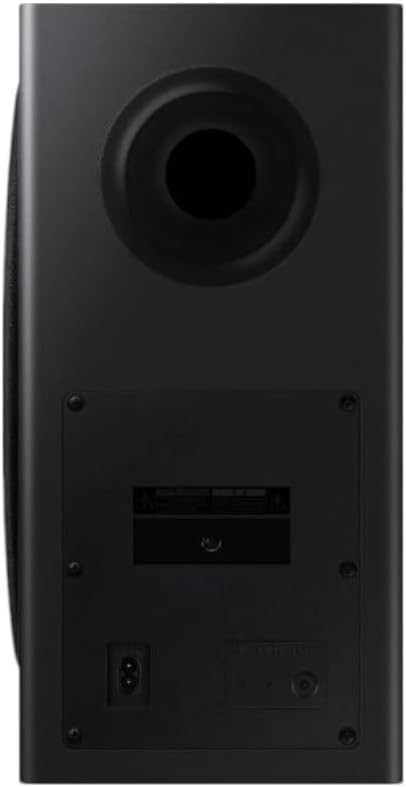
3. Wireless Pairing (Subwoofer & Rear Speakers)
The subwoofer and rear speakers should automatically pair with the soundbar upon powering on. If pairing fails:
- Ensure the soundbar and subwoofer/rear speakers are powered on.
- On the back of the subwoofer, press and hold the ID SET button until the LED indicator blinks blue.
- With the soundbar off, press and hold the Up button on the soundbar's remote control for 5-6 seconds until "ID SET" appears on the soundbar's display.
- The LED indicator on the subwoofer and rear speakers should turn solid blue, indicating successful pairing.
4. Initial Setup & Q-Symphony
Once connected, turn on your TV and the soundbar. The soundbar should automatically detect the input. For Q-Symphony functionality (with compatible Samsung TVs), ensure the Q-Symphony setting is enabled in your TV's sound settings. This allows the TV's speakers to work in conjunction with the soundbar for an enhanced audio experience.
Оперативни
Основно работење
- Вклучување/исклучување: Use the power button on the soundbar or remote control.
- Контрола на јачината на звукот: Adjust volume using the remote control or buttons on the soundbar.
- Избор на влез: Cycle through inputs (HDMI, Bluetooth, Wi-Fi) using the Source button on the remote or soundbar.

Режими на звук
- Стандард: Delivers original sound without processing.
- Адаптивен звук: Analyzes content and optimizes sound in real-time for clarity and immersion.
- Професионален режим на игра: Provides optimized 3D sound for gaming, enhancing directional audio cues.
- Опкружувачки звук: Ги проширува звуцитеtage за поимпресивно искуство.
Паметни функции и поврзување
- Вградена Алекса: Use voice commands for music playback, smart home control, and information. Follow the instructions in the Samsung SmartThings app to set up Alexa.
- Chromecast: Емитувајте аудио директно од компатибилни апликации на вашиот паметен телефон или таблет.
- Етерплеј 2: Стримувајте аудио од уреди на Apple.
- Tap Sound: Tap your compatible Samsung phone to the soundbar to instantly mirror audio playback.
- Активен анализатор на глас (AVA): Automatically detects ambient noise and adjusts dialogue volume for clear voice delivery.
Одржување
- Чистење: Користете мека, сува крпа за чистење на површините на саундбарот, сабвуферот и звучниците. Не користете течни средства за чистење или абразивни материјали.
- Вентилација: Ensure proper ventilation around all components to prevent overheating. Do not block vents.
- Циклус на напојување: If experiencing minor issues, try unplugging the power cords from all components for a few minutes, then plug them back in.
Решавање проблеми
| Проблем | Решение |
|---|---|
| Нема звук од звучната лента. |
|
| Subwoofer/Rear Speakers not connecting. |
|
| Звукот е искривен или нејасен. |
|
| Далечинскиот управувач не работи. |
|
Спецификации
| Карактеристика | Детал |
|---|---|
| Име на моделот | HW-Q930D/ZA 9.1.4 Channel Q-Series Soundbar |
| Конфигурација на каналот за опкружувачки звук | 9.1.4 |
| Тип на звучник | Soundbar, Wireless Subwoofer, Wireless Rear Speakers |
| Посебни карактеристики | Smart Integration, True Dolby Atmos Sound, Up-Firing Rear Speakers, Q-Symphony, Wireless Dolby Atmos |
| Технологија за поврзување | Bluetooth, HDMI, Wi-Fi |
| Максимална излезна моќност на звучникот | 540 вати |
| Фреквентен одговор | 20 KHz |
| Димензии на производот (Саундбар) | 4.7" Д x 43.7" Ш x 2.3" В |
| Тежина на ставката | 40 фунти (Вкупен систем) |
| Вклучени компоненти | Soundbar, Wireless Subwoofer, Rear Speakers, Remote controller, HDMI cable, Battery for remote controller, Wallmount kit |
| Боја | Црното |
| Производител | Samsung |
| UPC | 887276820132 |
Гаранција и поддршка
For warranty information, technical support, or service inquiries, please refer to the warranty card included with your product or visit the official Samsung support website. You can also find additional resources, FAQs, and software updates there.
Поддршка на Samsung Webсајт: www.samsung.com/us/support/