
1. Вовед
This manual provides detailed instructions for the installation, operation, and maintenance of your AINAVI 10-inch Touchscreen Car Stereo Radio. Please read this manual thoroughly before using the product to ensure proper functionality and safety.
2. Компатибилни модели на возила
This head unit is designed for specific vehicle models and years. Please verify your vehicle's compatibility before installation.
- For Chevy Silverado: 1500HD / 2500HD / 3500HD (2007-2014, Second Generation)
- За Шевролет: Traverse (2009-2012), Express Van (2008-2011), Avalanche (2007-2011, GMT900), HHR (SS/LT/Panel/LS) (2006-2011), Tahoe (2007-2014, Third Generation), Impala (2006-2012, Ninth Generation), Equinox (2005-2009, First Generation), Suburban (2007-2014, Tenth Generation), Monte Carlo (2006-2007, Seventh Generation)
- For HUMMER: H2 (2008-2009)
- For BUICK: Енклава (2008-2012)
- За GMC: Savana (2008-2013), Sierra (Denali) (2007-2014), Yukon (Denali) (2007-2014), Acadia (Denali) (2007-2012)
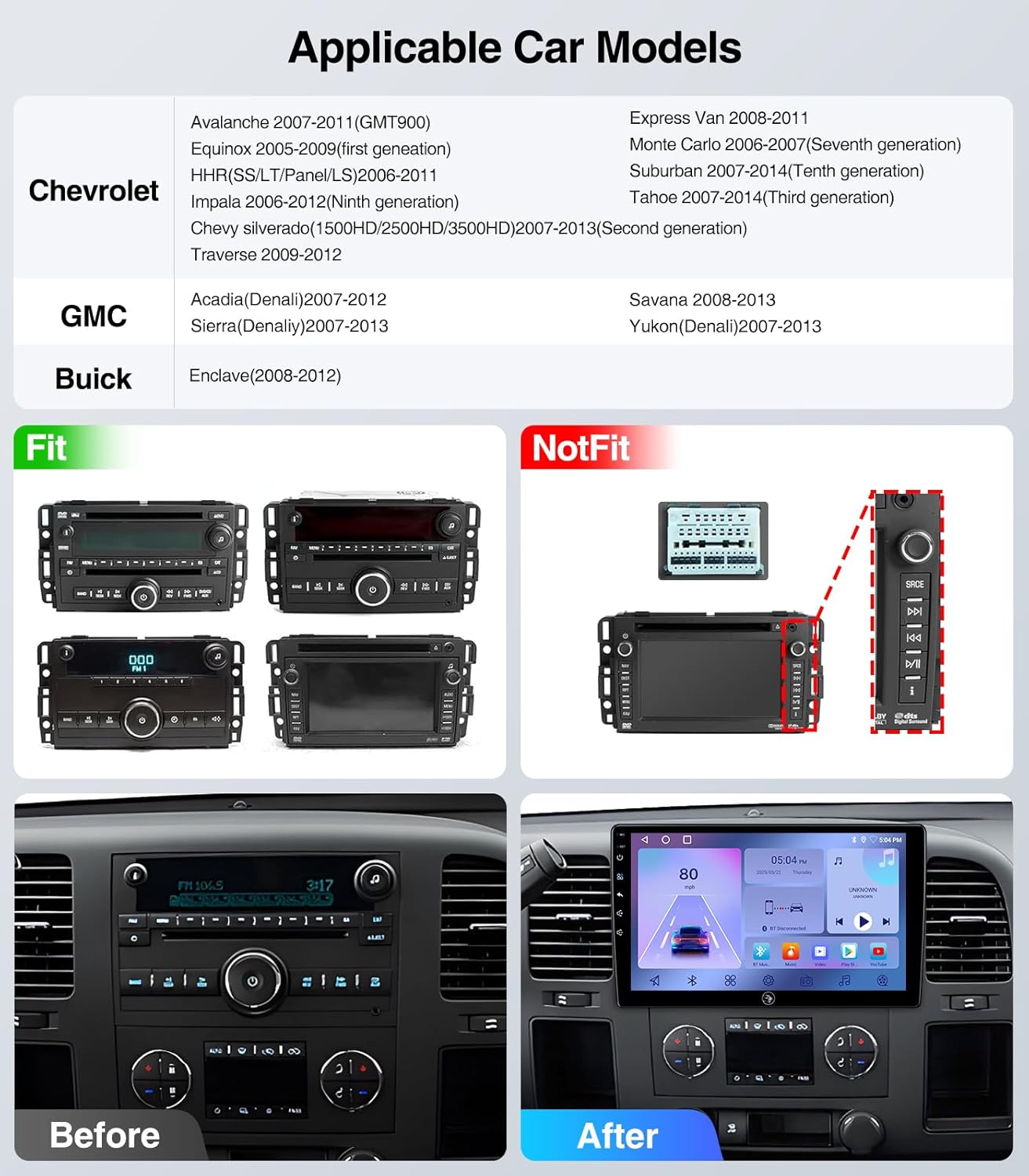
Figure 2.1: Applicable Car Models and Fitment Examples. This image illustrates various car models and their compatibility with the stereo, showing both fitting and non-fitting original radio units.
3. Што е вклучено
Пакетот ги вклучува следните компоненти:
- 10 Inch 2+64G Android Car Stereo Head Unit
- Power Cable (with CANbus for some models)
- RCA кабел
- Надворешен микрофон
- GPS модул
- USB кабел *2
- Reversing Control Cable
- 1080P Заден View Камера
- Алатка за отстранување рамки

Figure 3.1: Included Components. This image displays all the parts and cables that come with your AINAVI car stereo system.
Video 3.1: What you will get for Chevy Silverado 07-13 Cable Connection. This video demonstrates the various cables and components included in the package for Chevy Silverado 2007-2013 models.
4. Водич за инсталација
Professional installation is recommended. Ensure the vehicle's power is disconnected before beginning installation. Refer to the specific wiring diagrams for your vehicle model.

Figure 4.1: Before and After Installation. This image illustrates the visual transformation of the car's dashboard after installing the AINAVI stereo.
Video 4.1: How to install radio for Chevy Silverado 07-13 Chevrolet GMC. This video provides a step-by-step guide on installing the car stereo in compatible Chevrolet and GMC models.
Video 4.2: 4Core Car Radio installation. This video demonstrates the installation process for a 4-core car radio, which is applicable to this model.
Video 4.3: Car Radio Stereo for Chevy Chevrolet Silverado/GMC Sierra. This video provides an overview of the car radio stereo and its installation in compatible Chevy and GMC vehicles.
5. Упатства за работа
5.1. CarPlay и Android Auto
The unit supports both wireless CarPlay and Android Auto. Connect your iPhone or Android phone wirelessly to access navigation, make calls, send messages, and enjoy music safely while driving.

Figure 5.1: Wireless CarPlay & Android Auto. This image demonstrates the seamless integration of smartphone features onto the car stereo display.
Video 5.1: How to connect wireless Android Auto. This video guides you through the process of connecting your Android phone wirelessly to the car stereo.
Video 5.2: How to connect CarPlay? BT&Tlink. This video explains how to connect your iPhone to the car stereo using Bluetooth and Tlink for CarPlay functionality.
5.2. GPS навигација
The unit features built-in GPS navigation and supports online/offline maps. Connect to Wi-Fi for online map access. You can install or delete Android apps from the Application Store, similar to a smartphone.

Figure 5.2: GPS Navigation. This image shows the GPS navigation interface with options for online/offline maps and voice commands.
5.3. Bluetooth поврзување
Supports Bluetooth hands-free calls and music streaming. Equipped with a built-in mic and an external mic for clear audio quality. Pair your device via Bluetooth settings.

Figure 5.3: 5G WiFi Hotspot & BT Connection. This image highlights the unit's capabilities for internet access and Bluetooth pairing.
5.4. FM радио
Listen to real-time traffic, news, and weather forecasts with the built-in FM Radio stereo receiver. (Not compatible with Sirius XM).

Figure 5.4: AM / FM / RDS Radio. This image shows the radio interface, allowing users to tune into various stations.
5.5. Контрола на воланот
Operate all stereo functions directly from your steering wheel. Quickly adjust volume, skip tracks, and answer calls without diverting your attention from driving.

Figure 5.5: WiFi Connection and Steering Wheel Control. This image illustrates the convenience of controlling the stereo directly from the steering wheel.
5.6. Заден дел View Камера
The 1080P rear view camera provides HD reversing scenes with an astern ruler line for position information. If your car supports astern trajectory, it will also display on the screen.
Video 5.3: How to connect an aftermarket backup camera for Pickup Truck. This video demonstrates the connection process for an aftermarket backup camera in a pickup truck.
5.7. Split Screen and Screen Mirroring
The Android 13 operating system allows for split-screen functionality, enabling you to run multiple applications simultaneously. Screen mirroring is also supported.
Video 5.4: Split Screen Touchscreen Stereo Radio for Silverado 07-13. This video showcases the split-screen functionality of the touchscreen stereo.
Video 5.5: 5G-WiFi6 User Guide-Split-Screen-BT5.4. This video provides a user guide for 5G WiFi6, split-screen, and Bluetooth 5.4 features.
6. Одржување
To ensure the longevity and optimal performance of your AINAVI car stereo, follow these maintenance guidelines:
- Чистење: Use a soft, dry cloth to clean the touchscreen and surrounding areas. Avoid abrasive cleaners or solvents that may damage the screen or finish.
- Ажурирања на софтверот: Periodically check for software updates to ensure you have the latest features and bug fixes. Updates can typically be found on the manufacturer's website or through the device's settings.
- Еколошки услови: Избегнувајте изложување на уредот на екстремни температури, директна сончева светлина подолг период или прекумерна влага.
- Кабелски врски: Проверете дали сите кабли се безбедно поврзани. Лабавите врски можат да доведат до повремени проблеми.
7 Смена на проблеми
Доколку наидете на проблеми со стерео уредот во вашиот автомобил, погледнете ги следните вообичаени чекори за решавање проблеми:
- Без моќност: Проверете ги сите приклучоци за напојување и проверете дали палењето на возилото е вклучено. Проверете дали осигурувачите се исправни.
- Нема звук: Check volume levels, audio output settings, and speaker connections. Ensure the mute function is not activated.
- Проблеми со поврзувањето со Bluetooth: Проверете дали Bluetooth е овозможен и на стерео уредот и на телефонот. Избришете ги претходните спарувања и обидете се повторно да се поврзете.
- GPS не работи: Осигурајте се дека GPS антената е правилно инсталирана и има чиста view of the sky. Check GPS settings for any disabled features.
- Екранот на допир не реагира: Try restarting the unit. If the issue persists, a factory reset might be necessary (refer to the settings menu).
- CarPlay/Android Auto не се поврзува: Ensure your phone's operating system is up to date. Check the USB cable if using a wired connection, or Bluetooth/Wi-Fi for wireless.
За постојани проблеми, контактирајте ја корисничката поддршка.
8. Спецификации
| Карактеристика | Спецификација |
|---|---|
| Бренд | АИНАВИ |
| Модел | 10" 2G+64G |
| Големина на екранот | 10 инчи |
| Тип на дисплеј | QLED, Capacitive Touchscreen |
| Оперативен систем | Андроид 13 |
| Капацитет за складирање на меморија | 64 GB |
| Посебни карактеристики | Bluetooth, Touchscreen, Wired/Wireless CarPlay and Android Auto |
| Технологија за поврзување | Bluetooth, USB, Wi-Fi, Wired/Wireless CarPlay Android Auto |
| Поддржан сателитски систем за навигација | GPS (North America, Worldwide maps) |
| Режим за излез на звук | Стерео |
| Тежина на ставката | 1.45 килограми |
9. Гаранција и поддршка
Your AINAVI car stereo comes with a 12-Month Manufacturer's Guarantee.
For technical support, installation assistance, or warranty claims, please contact AINAVI customer service:
- Телефон за услуги на клиентите: +1 833 858 5016
- Работно време: 01:00 PM to 00:00 AM PST
- Е-пошта: info@ainavi.com

Figure 9.1: Customer Support Information. This image provides visual contact details for customer assistance.