
1. Вовед
Thank you for choosing the THOMSON WS902DUO Cosy Bookshelf Speakers. These active stereo speakers deliver a powerful 150W audio experience with deep bass from two 10 cm woofers. They offer versatile connectivity options including Bluetooth 5.3, Optical, HDMI (ARC), RCA, and USB playback. The included remote control and side panel adjustments provide precise control over your audio. Please read this manual carefully before use to ensure proper operation and to maximize your listening experience.

Image 1.1: THOMSON WS902DUO Bookshelf Speakers in a living space, showcasing their elegant wood finish.
2. Важни безбедносни инструкции
- Read these instructions thoroughly before operating the product.
- Чувајте ги овие упатства за идна референца.
- Внимавајте на сите предупредувања на производот и во упатството за употреба.
- Следете ги сите инструкции.
- Не користете го овој апарат во близина на вода.
- Чистете само со сува крпа.
- Не ги блокирајте отворите за вентилација. Инсталирајте во согласност со упатствата на производителот.
- Не инсталирајте во близина на извори на топлина како што се радијатори, топлински регистри, шпорети или други апарати (вклучувајќи ampлајфикатори) кои произведуваат топлина.
- Не ја нарушувајте безбедносната намена на поларизираниот или заземјувачкиот приклучок. Поларизираниот приклучок има две сечила со едно пошироко од другото. Приклучокот од типот на заземјување има две сечила и трет заземјувач. Широкото сечило или третиот жлеб се обезбедени за ваша безбедност. Ако дадениот приклучок не се вклопува во вашиот штекер, консултирајте се со електричар за замена на застарениот штекер.
- Заштитете го кабелот за напојување од одење или стискање, особено на приклучоците, приклучните приклучоци и местото каде што тие излегуваат од апаратот.
- Користете само додатоци/додатоци наведени од производителот.
- Користете го само со количка, држач, статив, држач или маса назначена од производителот или се продава со апаратот. Кога се користи количка, внимавајте кога ја преместувате комбинацијата количка/апарат за да избегнете повреда од превртување.
- Исклучете го овој апарат од струја за време на громови или кога не го користите подолг временски период.
- Целото сервисирање упатете го на квалификуван сервисен персонал. Сервисирањето е потребно кога апаратот е оштетен на кој било начин, како што е оштетен кабелот за напојување или приклучокот, течноста е истурена или предмети паднале во апаратот, апаратот бил изложен на дожд или влага, не работи нормално , или е исфрлен.
3. Содржина на пакетот
Ве молиме проверете дали сите артикли наведени подолу се вклучени во вашиот пакет:
- THOMSON WS902DUO Bookshelf Speakers (2 units)
- Далечински управувач
- Кабел за напојување
- Кабел за поврзување на звучникот
- 3.5mm Jack to RCA Adapter Cable
- Упатство за употреба (овој документ)

Image 3.1: Packaging of the THOMSON WS902DUO Bookshelf Speakers.
4. Производот завршиview
4.1. Side Control Panel (Active Speaker)
The active speaker features a side control panel for easy access to essential functions.

Image 4.1: Side control panel.
- Контрола на бас: Го прилагодува излезот со ниска фреквенција.
- Контрола на високи тонови: Го прилагодува излезот со висока фреквенција.
- Контрола на јачината на звукот: Adjusts the overall sound volume.
- Прекинувач: Ги вклучува или исклучува звучниците.
- LED индикатор: Shows the current status or selected input.
4.2. Rear Panel (Active Speaker)
The rear panel of the active speaker provides all necessary input and output connections.
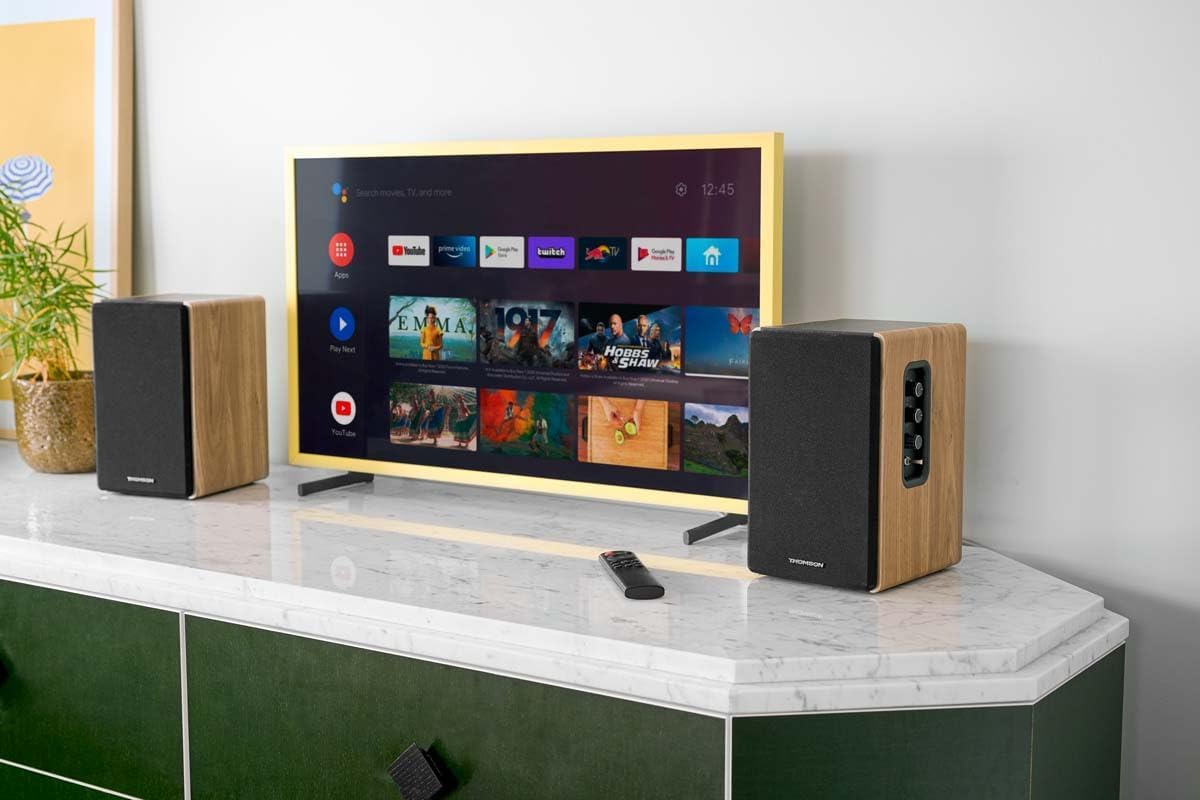
Image 4.2: Rear panel connections.
- Оптички влез: For connecting digital audio sources like TVs, game consoles, or Blu-ray players.
- Aux In (RCA): For connecting analog audio sources such as turntables, CD players, or PCs. A 3.5mm jack adapter is provided.
- TV Audio (HDMI ARC): For connecting to a TV's HDMI ARC port, allowing TV remote control of the speaker volume.
- USB репродукција: За репродукција на MP3 fileдиректно од USB флеш драјв.
- Под излез: For connecting an external active subwoofer for enhanced bass.
- Излез на звучник: Се поврзува со пасивниот звучник.
- Влез на енергија: Се поврзува со главното напојување.
4.3. Далечински управувач
The remote control provides convenient access to all speaker functions from a distance.

Image 4.3: Remote control.
- Копче за вклучување: Turns the speakers on/off.
- Нечујно копче: Го исклучува/вклучува звукот.
- Волумен +/-: Го прилагодува нивото на јачина на звук.
- Playback Controls (Play/Pause, Skip): За USB репродукција.
- Source Selection Buttons (OPT, BT, ARC, USB, LINE): Го избира изворот на аудио влез.
- EQ Mode Buttons (MOVIE, MUSIC, DIALOG): Selects preset equalization modes.
5. Поставување
5.1. Поставување звучници
Place the speakers on a stable, flat surface such as a bookshelf, desk, or speaker stands. For optimal stereo imaging, position the speakers equidistant from your listening position and at ear level. Ensure there is adequate space around the speakers for ventilation.
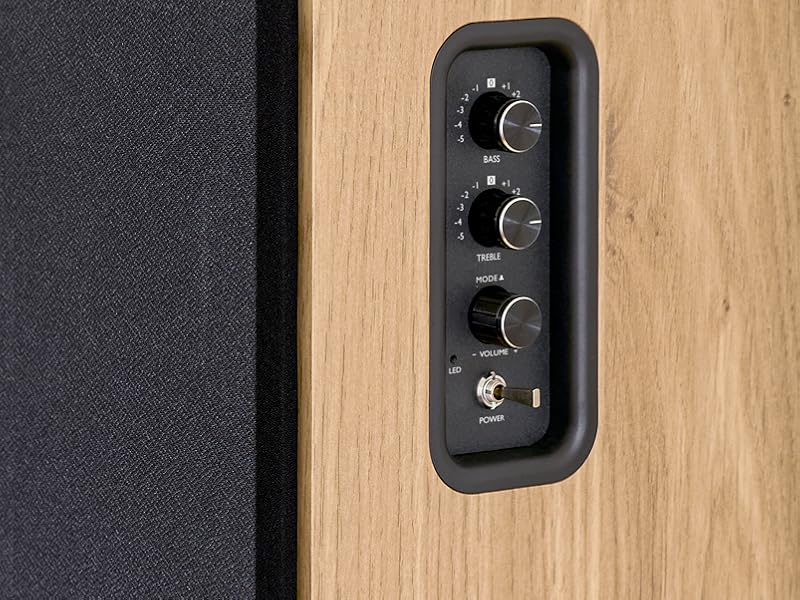
Image 5.1: Recommended speaker placement on a desk.
5.2. Поврзување на звучниците
- Identify the active speaker (with controls and inputs) and the passive speaker.
- Connect the included speaker cable from the speaker output terminals on the active speaker to the input terminals on the passive speaker. Ensure correct polarity (+ to + and - to -).
5.3. Поврзување на аудио извори
Connect your desired audio sources to the active speaker using the appropriate cables.
- Оптички влез: Use an optical cable to connect your TV, game console, or Blu-ray player to the OPTICAL IN port.
- HDMI (ARC) влез: Use an HDMI cable to connect your TV's HDMI ARC port to the TV AUDIO (HDMI) port on the speaker. This allows your TV remote to control the speaker volume.
- RCA (AUX) влез: Use an RCA cable (or the provided 3.5mm jack to RCA adapter) to connect devices like a turntable, CD player, or PC to the AUX IN (RCA) ports.
- USB влез: Вметнете USB флеш драјв што содржи MP3 files into the USB PLAY port.

Image 5.2: Speakers connected to a television via HDMI ARC.
5.4. Bluetooth спарување
- Проверете дали звучниците се вклучени.
- Press the 'BT' button on the remote control or the side panel to select Bluetooth input. The LED indicator will flash, indicating pairing mode.
- На вашиот паметен телефон, таблет или компјутер, овозможете Bluetooth и пребарајте достапни уреди.
- Select "THOMSON WS902DUO" from the list of devices.
- Once paired, the LED indicator will stop flashing and remain solid. You can now stream audio wirelessly.
5.5. Subwoofer Connection (Optional)
If you wish to enhance bass further, connect an active subwoofer to the 'Sub Out' port on the rear panel of the active speaker using an RCA cable.
6. Упатства за работа
6.1. Вклучување/исклучување
Use the power switch on the side control panel or the power button on the remote control to turn the speakers on or off.
6.2. Избор на извор
Press the corresponding source button on the remote control (OPT, BT, ARC, USB, LINE) to switch between connected audio inputs. The LED indicator will change to reflect the selected source.
6.3. Контрола на јачината на звукот
Adjust the volume using the 'Volume' knob on the side control panel or the 'VOL+/-' buttons on the remote control.
6.4. Аудио прилагодувања
Fine-tune the sound to your preference:
- Бас / високи тонови: Use the 'Bass' and 'Treble' knobs on the side control panel to adjust the low and high frequencies.
- Режими на EQ: Press the 'MOVIE', 'MUSIC', or 'DIALOG' buttons on the remote control to select preset equalization settings optimized for different content types.
6.5. Репродукција преку USB
When a USB flash drive with MP3 files is inserted and USB source is selected, the speakers will automatically begin playing. Use the playback control buttons on the remote control (Play/Pause, Skip) to manage your music.
6.6. Работа со Bluetooth
After successful pairing (see Section 5.4), you can stream audio from your Bluetooth device. Use your device's controls or the speaker's remote control for playback and volume adjustments.
7. Одржување
Правилното одржување гарантира долготрајност и перформанси на вашите звучници.
- Чистење: Wipe the speaker surfaces with a soft, dry cloth. Do not use liquid cleaners or abrasive materials.
- Вентилација: Погрижете се отворите за вентилација да не се блокирани за да се спречи прегревање.
- Складирање: If storing the speakers for an extended period, unplug them from the power outlet and store them in a cool, dry place.
- Избегнувајте влага: Keep the speakers away from water and high humidity.
8 Смена на проблеми
Ако наидете на какви било проблеми, погледнете го следниов водич за решавање проблеми:
| Проблем | Можна причина | Решение |
|---|---|---|
| Нема моќ | Power cable not connected; Power switch off; Wall outlet not working. | Ensure power cable is securely connected. Turn on the power switch. Test the wall outlet with another device. |
| Нема звук | Incorrect input source selected; Volume too low; Mute function active; Audio cable not connected properly. | Select the correct input source. Increase volume. Press Mute button on remote. Check all audio cable connections. |
| Спарувањето со Bluetooth не успеа | Speakers not in pairing mode; Device too far; Bluetooth disabled on source device. | Ensure speakers are in Bluetooth pairing mode (flashing LED). Move device closer to speakers. Enable Bluetooth on your source device. |
| Репродукцијата преку USB не работи | USB drive not formatted correctly; Files not MP3; USB drive not inserted properly. | Ensure USB drive is FAT32 formatted. Verify files are in MP3 format. Re-insert USB drive firmly. |
| Дисторзија на звукот | Volume too high; Source audio quality poor; Bass/Treble settings too extreme. | Lower the volume. Test with a different audio source. Adjust Bass and Treble controls. |
9. Спецификации
| Карактеристика | Спецификација |
|---|---|
| Бренд | ТОМСОН |
| Број на модел | WS902DUO |
| Максимална излезна моќност на звучникот | 150 вати |
| Фреквентен одговор | 60 Hz |
| Технологија за поврзување | Bluetooth, HDMI (ARC), Оптички, RCA, USB |
| Bluetooth верзија | 5.3 |
| Режим за излез на звук | Stereo (2.0 channels) |
| Влез волуменtage | 230 волти (AC) |
| Тип на монтирање | Монтирање на полицата |
| Тип на звучник | Multimedia Bookshelf |
| Посебни карактеристики | Stereo Pairing, USB Port, Sub-Out, Remote Control, EQ Modes |
| Препорачана употреба | Smartphone, Tablet, PC, TV, Game Console, DVD Player, Turntable |
| Боја | Финиш од природно дрво |
| Контролен метод | Remote Control, Side Panel Knobs |
| Големина на вуфер | 10 сантиметри |
| Димензии (В x Ш x Д) | 28 cm x 24 cm x 47 cm (approximate, per speaker) |
| Тежина | 5048 Grams (total for pair) |
| Број на артикли | 2 |
| Земја на потекло | Кина |
10. Информации за гаранцијата
This THOMSON WS902DUO product comes with a 1-годишна ограничена гаранција од датумот на купување. Оваа гаранција ги покрива производствените дефекти и изработката при нормална употреба. Не ги покрива штетите предизвикани од злоупотреба, несреќи, неовластени модификации или нормално абење. Ве молиме задржете го доказот за купување за гаранциски барања.
11. Поддршка за корисници
For technical assistance, warranty claims, or any questions regarding your THOMSON WS902DUO speakers, please contact your retailer or visit the official THOMSON support website. Please have your model number (WS902DUO) and proof of purchase ready when contacting support.
Поддршка преку Интернет: www.thomsonconsumer.com (Please check for regional support contacts)