
Вовед
This manual provides detailed instructions for the Blucalm INSIGHT 60 Wireless Headset. Learn how to set up, operate, and maintain your headset to ensure crystal-clear communication and enhanced productivity in your work environment.
Што има во кутијата
Upon unboxing your Blucalm INSIGHT 60, you should find the following components:
- Blucalm INSIGHT 60 Wireless Headset
- Smart Touchscreen Charging Dock
- Кабел за полнење USB-C до USB-C
- USB Dongle (2.4G)
- USB-A до USB-C адаптер
- Упатство за употреба
- Заштитна футрола
- Крпа за бришење

Image: All components included with the Blucalm INSIGHT 60 Wireless Headset, neatly arranged.
Поставување и поврзување
Your Blucalm INSIGHT 60 headset offers versatile connectivity options for seamless integration with your devices.
Option 1: Connect with USB Dongle
- Plug the USB Dongle into an available USB port on your PC. The dongle's indicator light will flash blue.
- On the headset, press and hold the Multi-Function Button (MFB) for 2 seconds to power it on.
- The headset will automatically connect to the dongle. A solid blue light on the dongle indicates a successful connection.

Image: Visual guide for connecting the headset to a PC using the USB dongle.
Option 2: Connect via Bluetooth (V5.4 Dual-Mode)
- On the headset, press and hold the MFB for 5 seconds to enter pairing mode (you will hear "power on + pairing").
- On your device (PC, laptop, or phone), open Bluetooth settings.
- Select "INSIGHT 60" from the list of available devices to pair.
- Гласовен потсетник ќе потврди успешна врска.
The headset supports dual connectivity, allowing you to connect to two devices simultaneously (e.g., PC and phone). Follow the pairing steps for each device. The smart dock also features a USB expansion port for your computer.
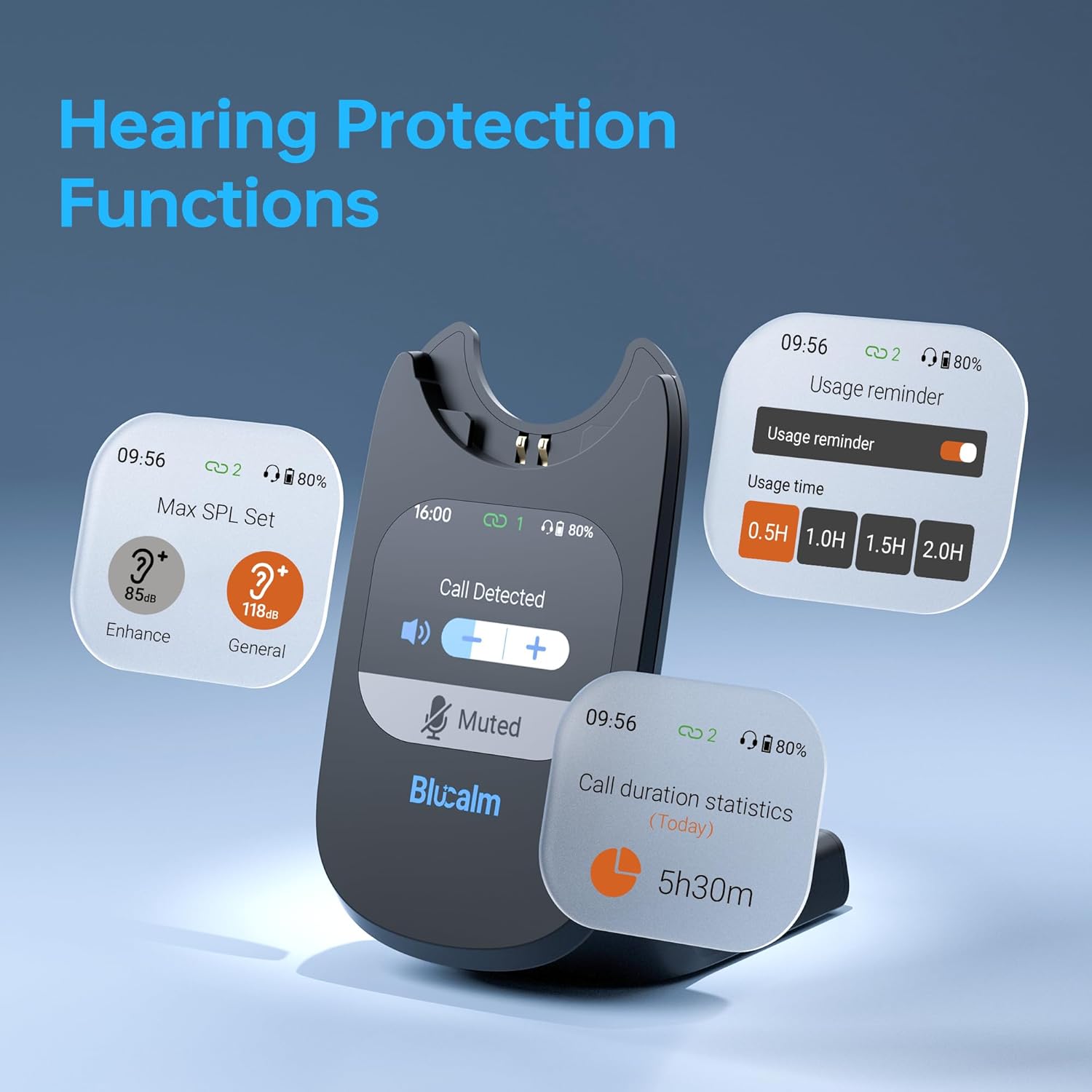
Image: The Blucalm INSIGHT 60 headset demonstrating dual connectivity with a laptop and a smartphone.
Упатства за работа
Контроли на слушалки
- Копче за повеќе функции (MFB): Power on/off (2s hold), Pairing (5s hold), Answer/End calls, Play/Pause music.
- Копчиња за јачина на звук: Прилагодете ја јачината на звукот нагоре/намалете.
- Копче за исклучување на микрофонот: Исклучете/вклучете го звукот на микрофонот.
- Busylight Indicator: Located on the earcup, it shows your call status (blue for connected, red for on a call).

Image: Close-up of the headset showing the microphone, Busylight, and control buttons.
Smart Touchscreen Dock Functions
The 2.01-inch touchscreen dock provides quick access to various features:
- Call Duration Statistics: View your daily and weekly call data.
- Usage Reminders: Set reminders for headset usage time (e.g., 0.5H, 1H, 1.5H, 2H).
- Max SPL Set: Adjust maximum sound pressure level to protect your hearing.
- Контрола на јачината на звукот: During calls, a volume interface appears for quick adjustments or muting.
- Звучни ефекти: Choose between Conventional, Voice, or Music sound modes.
- Помодоро тајмер: Utilize the built-in timer to manage work intervals and breaks.
- Придружник за вештачка интелигенција: Engage with an AI companion for interactive features.

Image: The Smart Touchscreen Dock showcasing its various features and interactive display.
Видео: Оверview of the Blucalm Wireless Headset with Mic for Work, demonstrating its features and functionality.
Полнење
The Blucalm INSIGHT 60 offers flexible charging options:
- Via Smart Dock: Place the headset on the charging dock. The dock's screen will display a charging icon and the remaining battery percentage.
- Via Type-C Cable: Connect the USB-C charging cable directly to the headset's Type-C port.
A quick 5-minute charge provides approximately 1 hour of talk time. A full charge takes about 1.5 hours.

Image: Illustration of the two charging methods for the Blucalm INSIGHT 60 headset: via the smart dock and directly with a USB-C cable.
Удобност и дизајн
Designed for all-day wear, the headset weighs only 3.2 oz (90g) and features soft ear cushions and a headband pad to reduce pressure and prevent slippage. The microphone boom is adjustable for optimal voice pickup.

Image: A user wearing the Blucalm headset, emphasizing its lightweight design and comfortable ear cushions.
Компатибилност
The Blucalm INSIGHT 60 is widely compatible with various devices and communication platforms:
- Уреди: Laptops, Desktops, Telephones.
- Платформи: Мајкрософт Тимс, Зум, Гугл Меит, WebEx, Skype, and other mainstream communication platforms.
No complex setup is needed; it's plug-and-play with the USB dongle or easy Bluetooth pairing.
Спецификации
| Име на моделот | Увид 60 |
| Технологија за поврзување | Безжичен (Bluetooth V5.4, 2.4G USB Dongle) |
| Контрола на бучава | Откажување бучава од околината (ENC) |
| Тежина на ставката | 3.2 унци (90 g) |
| Време на полнење | 1.5 часа |
| Посебни карактеристики | Lightweight, Noise Cancellation, Seamless Switching, Touchscreen Base, Busylight |
| Тип на контрола | Touch Control (on dock), Buttons (on headset) |
| Опсег на Bluetooth | 66 стапки |
Решавање проблеми
- Нема звук/Микрофонот не работи:
- Ensure the headset is powered on and successfully paired/connected (solid blue light).
- Check device's audio output/input settings to ensure "INSIGHT 60" is selected.
- Verify the microphone is not muted (check the mute button on the headset).
- Проблеми со поврзувањето:
- If using the USB dongle, try unplugging and replugging it.
- For Bluetooth, ensure the headset is in pairing mode and your device's Bluetooth is enabled. Try forgetting the device and re-pairing.
- Ensure the headset is within the 66-foot Bluetooth range.
- Проблеми со полнење:
- Verify the charging cable is securely connected to both the dock/headset and the power source.
- Ensure the headset is correctly seated on the charging dock.
- Check the battery indicator on the smart dock.
- Екранот на допир не реагира:
- Проверете дали докот е вклучен.
- Try restarting the dock by unplugging and replugging its power cable.
Гаранција и поддршка
For warranty information, technical support, or service inquiries, please refer to the contact details provided in your product packaging or visit the official Blucalm webсајт. Чувајте ја вашата потврда за купување за барања за гаранција.