1. Вовед
This manual provides instructions for the Generic Racing Steering Wheel with Pedals and Shifters. This device is designed to enhance the racing game experience across multiple platforms, including PS4, PS3, Xbox One, Xbox 360, Nintendo Switch, Android devices, and PC. Please read this manual thoroughly before use to ensure proper setup and operation.
2. Производот завршиview
The racing wheel system includes the steering wheel unit, pedal unit, and gear shifter. It features a 180-degree rotation capability and vibration feedback for an immersive gaming experience.

Слика 2.1: The complete racing steering wheel system, including the wheel, pedal unit, and integrated shifter.
2.1 Steering Wheel Unit
The steering wheel unit features a D-pad, 12 independent control buttons, and integrated paddle shifters. It also includes a "MODE" button and a "PROGRAM" button for configuration.

Слика 2.2: Detail of the steering wheel's central control panel, showing the D-pad, action buttons, and Mode/Program buttons.
Слика 2.3: Страна view of the steering wheel, highlighting the integrated gear shifter.
2.2 Pedal Unit
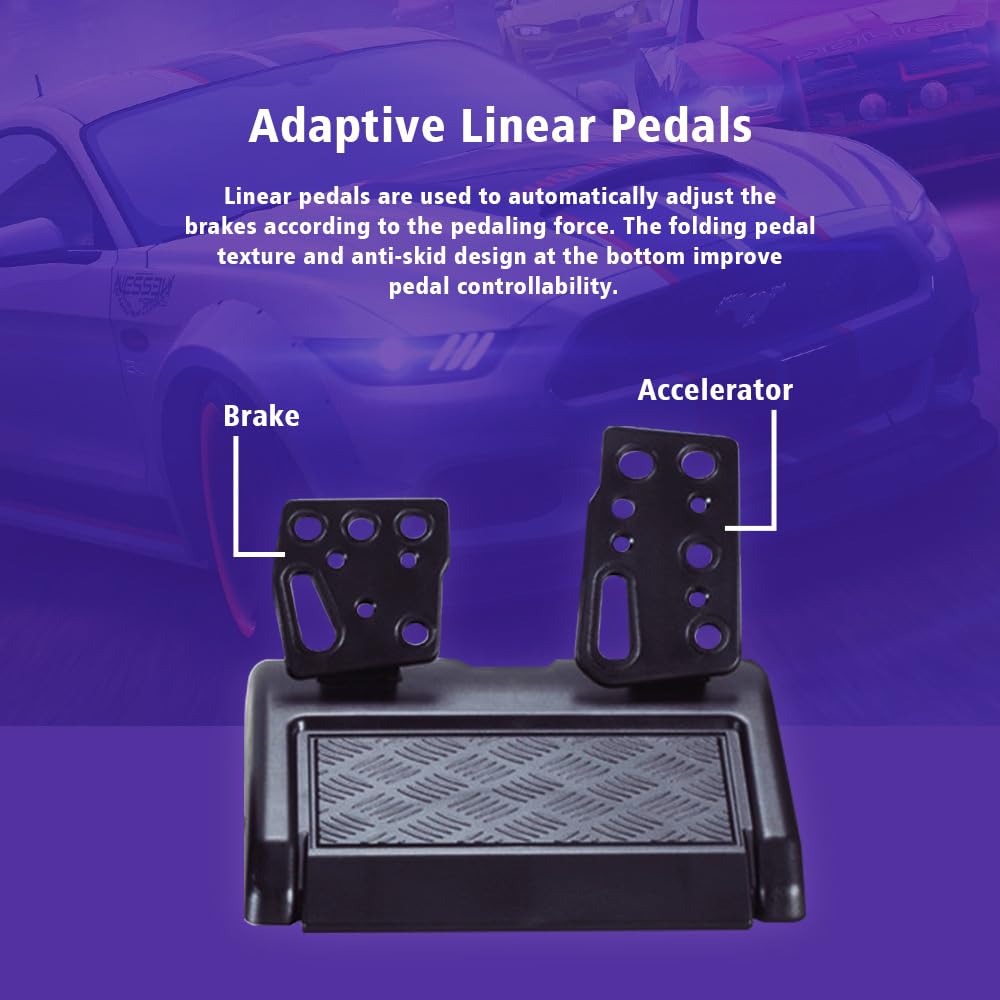
The pedal unit includes an accelerator and a brake pedal. These linear pedals are designed to automatically adjust braking force based on pedaling pressure. The unit features a folding pedal texture and an anti-skid design for improved control.

Слика 2.4: The pedal unit, showing the accelerator and brake pedals with their linear response and anti-skid design.
3. Упатства за поставување
Follow these steps to connect your racing wheel to your gaming platform.
3.1 Дијаграм за поврзување
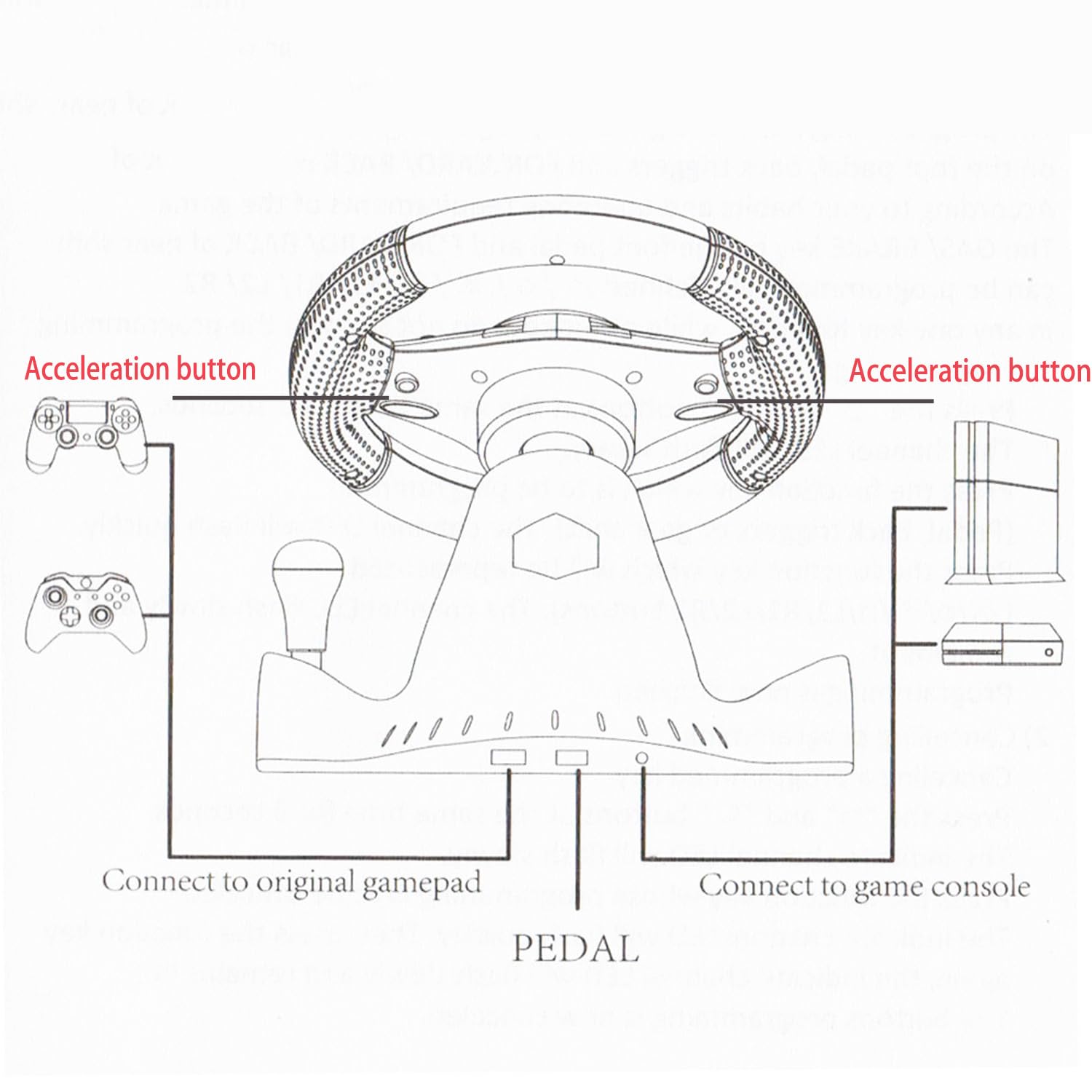
Слика 3.1: Diagram illustrating how to connect the racing wheel to a game console and an original gamepad. The pedal unit connects to the racing wheel.
3.2 General Connection Steps
- Ensure your gaming console or PC is powered off.
- Connect the pedal unit cable to the designated port on the racing steering wheel unit.
- Connect the racing steering wheel's USB cable to an available USB port on your gaming console or PC.
- For certain platforms (e.g., PS4, Xbox One), an original gamepad may need to be connected to the racing wheel's dedicated port for authentication. Refer to the diagram (Figure 3.1) for specific connections.
- Power on your console or PC. The racing wheel should be automatically detected.
- Secure the racing wheel to a stable surface using its suction cups or clamps (if included).
3.3 Platform-Specific Notes
- PS4/PS3/Xbox One/Xbox 360: An original controller may be required to be connected to the wheel for initial setup and authentication.
- Nintendo Switch: Ensure "Pro Controller Wired Communication" is enabled in the Switch system settings.
- компјутер: Drivers may be automatically installed. If not, check the manufacturer's website for specific drivers.
- Андроид: Connect via USB OTG adapter if your device supports it.
4. Упатства за работа
4.1 Основни контроли
- Волан: Provides 180-degree rotation (90 degrees left, 90 degrees right) for precise steering input.
- Педали: The right pedal is the accelerator, and the left pedal is the brake.
- Менувач: Use the integrated gear shifter for manual gear changes.
- Копчиња: The D-pad and 12 action buttons correspond to standard controller inputs.

Слика 4.1: The racing wheel demonstrating its 180-degree rotation capability (90 degrees left and 90 degrees right).
4.2 Повратна информација од вибрации
The built-in motor provides vibration feedback, simulating road conditions, collisions, and other in-game effects for a more realistic experience. This feature is automatically enabled when supported by the game.
4.3 Програмабилни функции
The racing wheel supports programmable functions for the GAS/BRAKE keys on the foot pedal and the FORWARD/BACK of the gear shift. To program a button:
- Press the "PROGRAM" button. The indicator light will flash.
- Press the button you wish to program (e.g., the gas pedal).
- Press the button you want to assign its function to (e.g., a button on the wheel).
- The indicator light will stop flashing, indicating successful programming.
- Repeat for other programmable functions as desired.
To reset programmed functions, press and hold the "PROGRAM" button for several seconds until the indicator light flashes rapidly and then turns off.
5. Одржување
- Чистење: Use a soft, dry cloth to clean the surface of the steering wheel and pedals. Do not use abrasive cleaners or solvents.
- Складирање: Чувајте го уредот на ладно и суво место, подалеку од директна сончева светлина и екстремни температури.
- Грижа за кабел: Избегнувајте прекумерно виткање или извиткување на каблите за да спречите оштетување.
6 Смена на проблеми
| Проблем | Можна причина | Решение |
|---|---|---|
| Wheel not recognized by console/PC. | Incorrect connection, missing drivers, or console settings. |
|
| Нема повратни информации од вибрации. | Game does not support vibration, or feature is disabled. |
|
| Pedals or buttons not responding. | Loose connection, incorrect programming, or game incompatibility. |
|
7. Спецификации
- Модел: B0FL2CJCTH
- Компатибилност: PS4, PS3, Xbox One, Xbox 360, Nintendo Switch, Android, PC
- Агол на ротација: 180 степени
- Контроли: 4 axes, D-pad, 12 independent control buttons, integrated gear shifter
- Повратни информации: Built-in motor for vibration feedback
- Педали: Linear accelerator and brake pedals with anti-skid design
- Поврзување: USB (wired)
- Тежина на ставката: 4 фунти (приближно 1.81 кг)
- Димензии на пакетот: 11 x 11 x 10 инчи (приближно 27.9 x 27.9 x 25.4 см)
8. Гаранција и поддршка
This product comes with a standard manufacturer's warranty. For specific warranty details, please refer to the documentation included with your purchase or contact the retailer. For technical support or further assistance, please contact the seller or manufacturer directly.
Manufacturer: DAYUPUP