
1. Вовед
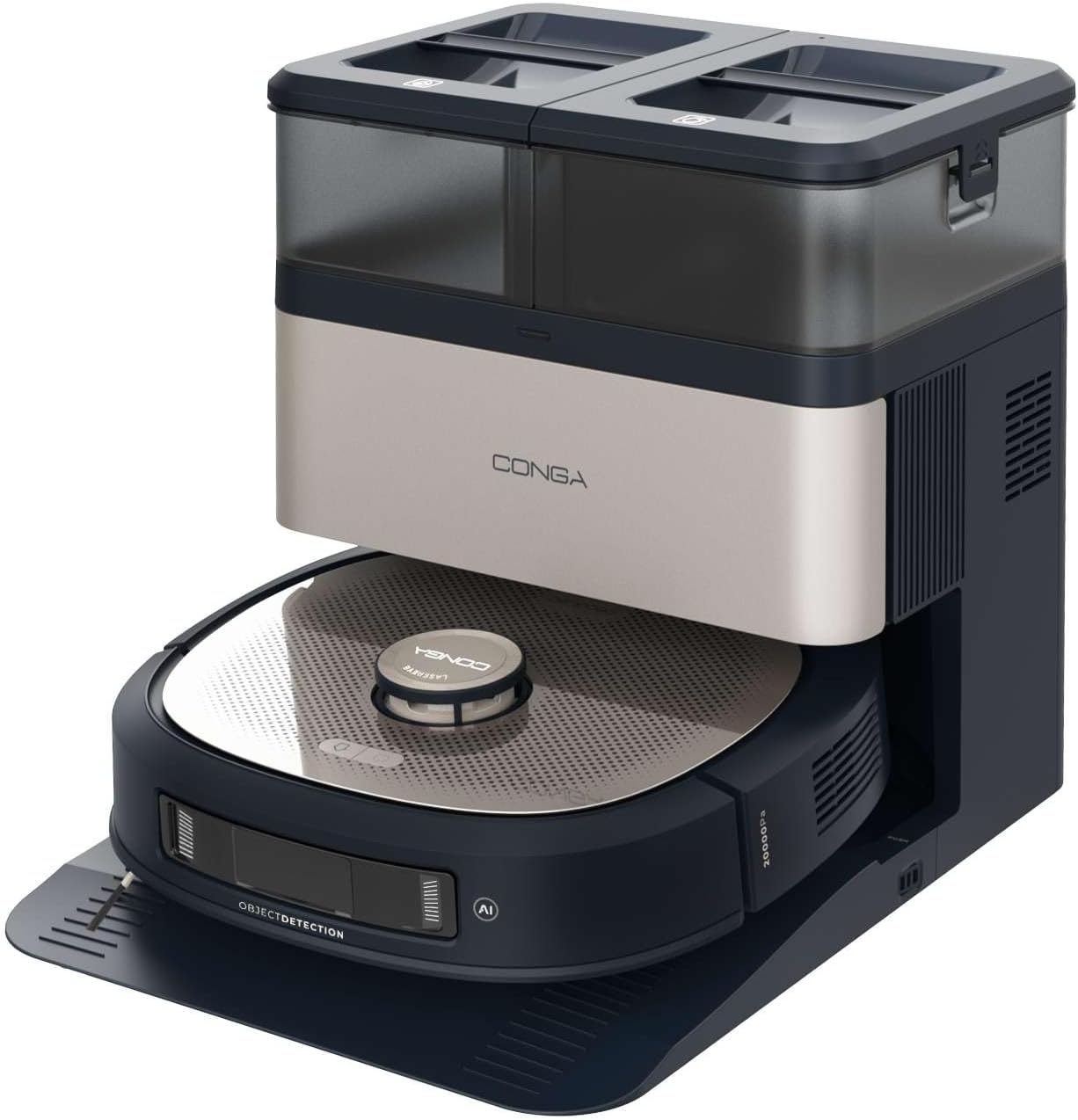
This manual provides essential instructions for the safe and efficient operation, maintenance, and troubleshooting of your Cecotec Conga Z100 X-Treme Robot Vacuum and Mop. This advanced cleaning device combines powerful vacuuming with professional mopping, intelligent navigation, and a convenient self-emptying and mop-cleaning station.
Ве молиме внимателно прочитајте го ова упатство пред да го користите производот и зачувајте го за идна референца.
2. Компоненти на производот
The Cecotec Conga Z100 X-Treme package includes the following items:
- Robot Vacuum and Mop Unit
- Self-Emptying and Mop Cleaning Station
- Адаптер за напојување
- Side Brushes (2 units)
- Main Brush (silicone)
- Bimaterial Mop Pad
- Disposable Dust Bag (pre-installed in station)
- Clean Water Tank (in station)
- Dirty Water Tank (in station)
- Упатство за употреба (овој документ)
3. Поставување
3.1 Распакување и подготовка
- Внимателно отстранете ги сите компоненти од пакувањето.
- Remove any protective films, stickers, or foam inserts from the robot and the station.
- Проверете дали сите компоненти наведени во Дел 2 се присутни и неоштетени.
3.2 Placing the Self-Emptying and Mop Cleaning Station
- Поставете ја станицата на тврда, рамна површина покрај ѕидот.
- Ensure there is at least 1 meter (3 feet) of clear space in front of the station and 0.5 meters (1.5 feet) on either side to allow the robot to dock properly.
- Keep the station away from direct sunlight, heat sources, and areas with high humidity.
- Plug the power adapter into the station and then into a wall outlet.
3.3 Полнење на резервоарот за чиста вода
- Open the lid of the clean water tank on the station.
- Fill the tank with clean tap water up to the MAX line. Do not use detergents or cleaning solutions not approved by Cecotec.
- Затворете го капакот на резервоарот безбедно.
3.4 Инсталирање на странични четки
- Свртете го роботот наопаку.
- Align the side brushes with the corresponding posts (L for left, R for right) and press them down until they click into place.
3.5 Почетно полнење
- Place the robot onto the charging contacts of the station. Ensure the charging contacts on both the robot and the station are aligned.
- Роботот ќе почне да се полни автоматски. Оставете го целосно да се наполни пред првата употреба (приближно 4-6 часа).
3.6 Mobile Application Connection
- Download the official Cecotec Conga app from your smartphone's app store.
- Follow the in-app instructions to register an account and connect your Conga Z100 X-Treme robot. This typically involves connecting to the robot's Wi-Fi network during the setup process.

4. Упатства за работа
4.1 Вклучување/исклучување
- Вклучување: Press and hold the power button on the robot until the indicator lights illuminate.
- Исклучено: Притиснете и задржете го копчето за вклучување додека индикаторските светла не се изгаснат.
4.2 Започнување на циклус на чистење
- Ensure the robot is fully charged and the clean water tank is filled (for mopping).
- Press the clean button on the robot or use the mobile app to start a cleaning cycle. The robot will automatically leave the station and begin cleaning.
- To pause cleaning, press the clean button once. Press again to resume.
- To send the robot back to the station, press the home button on the robot or use the app.
4.3 Режими на чистење
The robot offers various cleaning modes accessible via the mobile application:
- Автоматски режим: Роботот интелигентно ја чисти целата мапирана област.
- Режим на место: Чисти одредена мала површина со концентриран напор.
- Режим на раб: Чисти по должината на ѕидовите и рабовите на мебелот.
- Чистење на зоната: Allows you to define specific areas on the map for cleaning.
4.4 AI Navigation and Obstacle Avoidance
The Conga Z100 X-Treme utilizes AI with LaserEye technology for precise navigation. It identifies small objects, different floor types, and dirt levels, adapting its cleaning strategy accordingly. This allows it to navigate complex environments and avoid obstacles effectively.

4.5 AquaCycle Professional Mopping
The AquaCycle system ensures continuous mopping with clean water. The robot wets the bimaterial mop with clean water and wrings out dirty water into a separate tank, providing efficient and hygienic floor cleaning.

4.6 Wet&Protect Technology
The robot's intelligent mopping adapts to different surfaces. Its bimaterial mop provides deep cleaning with a super-absorbent side. When a carpet is detected, the robot activates CarpetCare mode and uses the smooth side of the mop to protect the carpet from moisture.

4.7 Моќност на вшмукување
With an Ungravity motor providing 20000 Pa of suction power, the robot effectively cleans hidden dirt, even from high-pile carpets and deep tile grout.

5. Одржување
Regular maintenance ensures optimal performance and extends the lifespan of your robot vacuum and mop.
5.1 Self-Emptying Station Maintenance
- Замена на кеси за прав: The station automatically empties the robot's dust bin into a disposable dust bag. Replace the dust bag when the indicator light on the station signals it is full (approximately every 12 weeks, depending on usage).
- Резервоар за чиста вода: Refill with clean water before each mopping cycle.
- Резервоар за валкана вода: Empty and rinse the dirty water tank after each mopping cycle to prevent odors and bacterial growth.
- Сушење со крпа: The station dries the mop with hot air after cleaning. Ensure the mop is properly positioned for effective drying.

5.2 Чистење на компонентите на роботот
- Главна четка: Regularly remove hair and debris from the main silicone brush. Use the cleaning tool provided.
- Странични четки: Check for tangled hair or debris and clean as needed. Replace if worn or damaged.
- Bimaterial Mop Pad: Remove the mop pad after each mopping cycle and wash it thoroughly. It can be hand-washed or machine-washed (follow care instructions).
- Сензори: Wipe the cliff sensors, wall sensors, and charging contacts with a clean, dry cloth to ensure proper function.
- Тркала: Исчистете ја секоја коса или отпад од тркалата на роботот.

6 Смена на проблеми
If you encounter issues with your Conga Z100 X-Treme, refer to the following common problems and solutions:
| Проблем | Можна причина | Решение |
|---|---|---|
| Роботот не се вклучува. | Слаба батерија; копчето за вклучување не е правилно притиснато. | Place robot on charging station; press and hold power button for 3 seconds. |
| Роботот не може да најде станица за полнење. | Station obstructed; robot too far from station. | Ensure clear space around station; manually place robot closer to station. |
| Лоши перформанси на чистење. | Brushes or filters dirty/worn; dust bin full. | Clean/replace brushes and filters; empty dust bin. |
| Роботот често се заглавува. | Obstacles (cables, small objects); uneven surfaces. | Clear the cleaning area of obstacles; use virtual walls/no-go zones in app. |
| Проблеми со поврзувањето на апликацијата. | Incorrect Wi-Fi password; router too far; app outdated. | Verify Wi-Fi credentials; move robot closer to router; update app; reset robot's Wi-Fi. |
| Бришењето остава линии или е неефикасно. | Mop pad dirty/worn; clean water tank empty; dirty water tank full. | Clean/replace mop pad; refill clean water tank; empty dirty water tank. |
| Грешка во пумпата за вода. | Pump malfunction; blockage in water lines. | Check for blockages; contact customer support if issue persists. |
For persistent issues not covered here, please refer to the official Cecotec support channels.
7. Спецификации
| Карактеристика | Детал |
|---|---|
| Бренд | Цекотек |
| Име на моделот | Conga Z100 X-Treme |
| Број на модел | A01_EU01_119672 |
| Моќ на вшмукување | 20000 Па |
| Капацитет на батеријата | 5200 mAh |
| Технологија за навигација | AI with LaserEye |
| Систем за бришење | AquaCycle Professional Mopping, Wet&Protect Technology, Bimaterial XXL Mop |
| Самопразнечка станица | Yes, with hot air mop drying |
| Капацитет на вреќа за прашина | 3 литри |
| Капацитет на резервоар за чиста вода | 3 литри |
| Капацитет на резервоар за валкана вода | 3 литри |
| Димензии на роботот (Д x Ш x В) | 35.2 x 35.2 x 10.5 cm |
| Тежина на роботот | 4.92 кг |
| Voltage | 240 волти |
| Тип на контрола | Контрола на апликацијата |
8. Гаранција и поддршка
Your Cecotec Conga Z100 X-Treme Robot Vacuum and Mop is covered by a manufacturer's warranty. Please refer to the warranty card included in your product packaging for specific terms and conditions, including the warranty period and coverage details.
For technical support, service, or to inquire about replacement parts and consumables, please contact Cecotec customer service through their official webлокација или контакт информациите наведени во вашата гарантна документација.
Always ensure you have your product model number (A01_EU01_119672) and proof of purchase available when contacting support.