
Laxasfit LF-01
Упатство за користење на паметниот часовник Laxasfit LF-01
Модел: LF-01
1. Вовед
Welcome to the user manual for your Laxasfit LF-01 Smart Watch. This guide provides essential information on setting up, operating, and maintaining your device to ensure optimal performance and a seamless user experience. Please read this manual thoroughly before using your smart watch.
1.1 Што има во кутијата
- Паметен часовник
- Кабел за полнење
- Упатство за употреба
2. Поставување
2.1 Полнење на уредот
Before initial use, fully charge your Laxasfit LF-01 Smart Watch. Connect the provided charging cable to the charging port on the back of the watch and plug the USB end into a standard USB power adapter (not included) or a computer's USB port. The watch display will indicate charging status. A full charge typically takes approximately 2 hours.
2.2 Инсталација на апликација
To unlock the full potential of your smart watch, download and install the companion application on your smartphone. The application allows for data synchronization, notification management, and watch face customization.
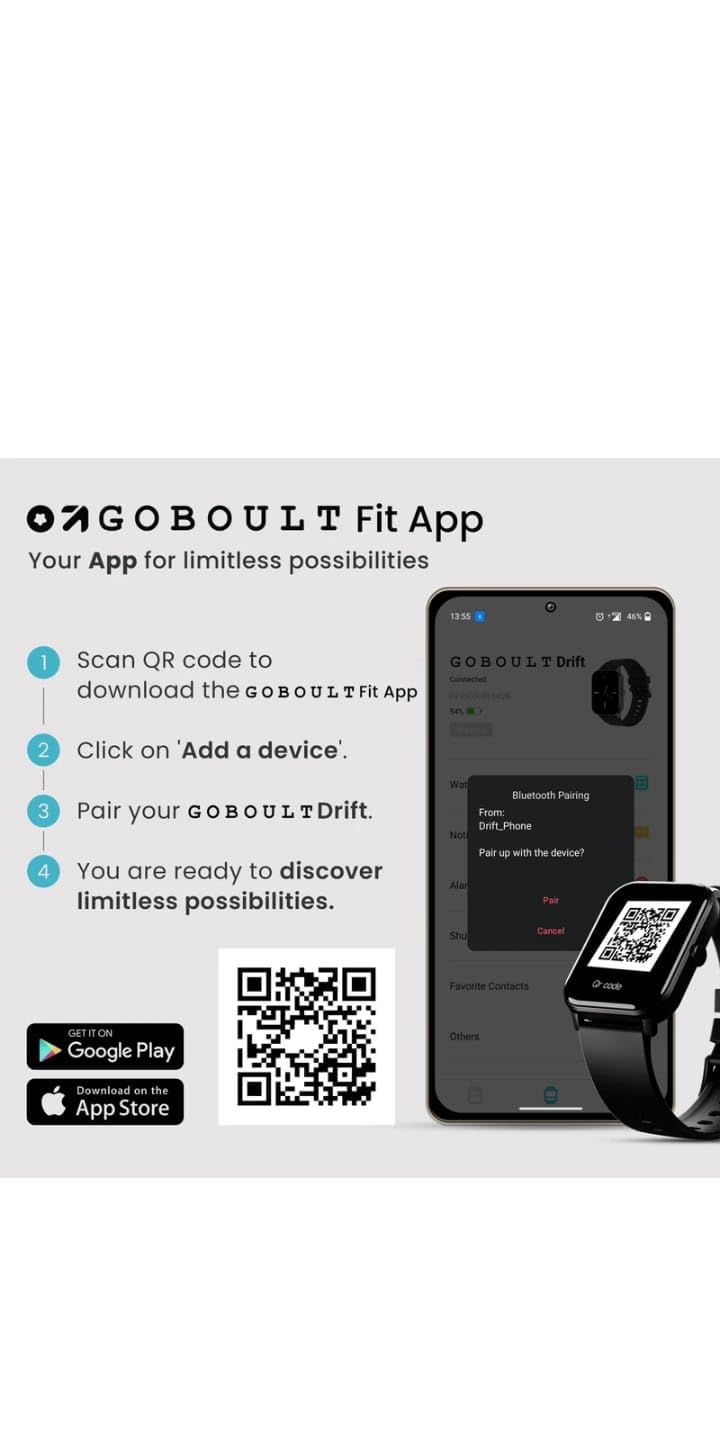
- Scan the QR code provided in the image below or search for "Boult Fit App" in your smartphone's app store (Google Play Store for Android, Apple App Store for iOS).
- Инсталирајте ја апликацијата.
- Open the application and follow the on-screen instructions to create an account or log in.

Опис на сликата: This image displays a smartphone screen with instructions for downloading and pairing the companion app. It shows four steps: "Scan QR code to download the Boult Fit App", "Click on 'Add a device'", "Pair your Boult Drift", and "You are ready to discover limitless possibilities." Below these steps are QR codes for both Google Play and the App Store, along with their respective logos. The right side of the image shows a smartwatch display and a phone screen demonstrating the Bluetooth pairing process within the app.
Download the Boult Fit App: https://app.moyoung.com/app-download/BoultFit
2.3 Спарување со вашиот паметен телефон
After installing the app, follow these steps to pair your smart watch:
- Проверете дали Bluetooth е овозможен на вашиот паметен телефон.
- Open the companion app and navigate to the "Add Device" or "Pair Device" section.
- The app will search for available devices. Select "Laxasfit LF-01" or a similar device name from the list.
- Потврдете го барањето за спарување и на вашиот паметен телефон и на паметниот часовник доколку се побара.
- Once paired, the watch will synchronize data with your phone.
3. Клучни карактеристики
The Laxasfit LF-01 Smart Watch offers a range of features designed to enhance your daily life and fitness tracking.
3.1 Мониторинг на здравјето
Monitor your vital health parameters directly from your wrist.
- Монитор за отчукувањата на срцето: Го следи вашиот пулс во текот на целиот ден.
- Следење на спиење: Ги анализира вашите навики на спиење, вклучувајќи длабок сон, лесен сон и време на будење.
- Следење активност: Ги евидентира чекорите, растојанието и согорените калории.

Опис на сликата: This image shows a collage of smartwatch features. Prominently featured is a smartwatch display showing a heart rate monitor with a graph and current heart rate (108 bpm). Other elements include icons for 7-day battery life, IP68 water resistance, 60 sports modes, mini games, 1.69" HD display, Bluetooth calling, and multiple watch faces.
3.2 спортски режими
The watch supports over 60 workout modes to accurately track various physical activities.
- Track specific metrics for activities like running, cycling, walking, and more.
- View real-time data such as duration, calories burned, and heart rate during workouts.

Опис на сликата: A man is shown performing an exercise with a battle rope, wearing a smartwatch on his wrist. The image highlights the watch's capability to track over 60 workout modes. An overlay shows a smartwatch display with fitness metrics: "Steps 25969", "Distance 10.56 km", and "Calories 2982 Kcal".
3.3 Повикување преку Bluetooth
With its built-in speaker and microphone, the Laxasfit LF-01 allows you to manage calls directly from your wrist when connected to your smartphone via Bluetooth.
- Receive incoming call notifications.
- Answer or reject calls.
- Make calls using the watch's interface (requires phone connection).
Опис на сликата: This image shows a smartwatch worn on a wrist, displaying an incoming call notification. The screen shows "Mom" as the caller, along with green (answer) and red (decline) call icons. Text above the watch states "Manage calls, the smart way." and "Bluetooth calling" with "Dedicated Speaker & Microphone" below.
3.4 Екран и екрани на часовникот
- Тип на приказ: LCD touchscreen for clear visibility and easy interaction.
- Приспособливи лица на часовникот: Choose from over 140 watch faces via the companion app to personalize your device.
4. Операција
4.1 Основна навигација
- Екран на допир: Повлечете лево/десно, горе/долу за да се движите низ менијата и функциите. Допрете за да изберете.
- Странично копче: Typically used to wake the screen, return to the home screen, or access the app menu. Refer to the on-screen prompts for specific functions.
4.2 Using Fitness Tracking
To start a workout:
- Swipe on the watch face to find the "Workout" or "Sports Modes" icon.
- Tap to select your desired activity (e.g., Running, Cycling).
- Tap "Start" to begin tracking.
- During the workout, you can view податоци во реално време.
- Tap "Pause" or "End" to stop the workout. Data will sync with the app.
4.3 Managing Notifications
Once paired with your smartphone, the watch will display notifications for calls, messages, and other app alerts.
- Повлечете надолу од екранот на часовникот за да view неодамнешни известувања.
- Tap on a notification to read the full message (if supported).
- Notifications can be managed and filtered through the companion app settings.
5. Одржување
5.1 Чистење на вашиот паметен часовник
- Редовно бришете го екранот и ременот на часовникот со мека, дamp крпа.
- Избегнувајте употреба на груби хемикалии или абразивни материјали, бидејќи тие можат да го оштетат уредот.
- Пред полнење, проверете дали контактите за полнење се чисти и суви.
5.2 Грижа за батерии
- Избегнувајте изложување на часовникот на екстремни температури.
- Не го оставајте часовникот целосно празен подолг временски период.
- For optimal battery life, charge the device before it completely runs out of power.
6 Смена на проблеми
If you encounter issues with your Laxasfit LF-01 Smart Watch, refer to the following common solutions:
- Часовникот не се вклучува: Проверете дали часовникот е целосно наполнет. Поврзете го со полначот најмалку 30 минути.
- Не може да се спари со паметен телефон:
- Проверете дали Bluetooth е овозможен на вашиот телефон.
- Проверете дали часовникот е во домет на вашиот телефон.
- Рестартирајте го и телефонот и паметниот часовник.
- Обидете се да го распарите и повторно да го спарите уредот преку апликацијата.
- Неточни податоци за фитнес:
- Уверете се дека часовникот е цврсто носен на вашиот зглоб, на ширина од околу еден прст над коската на зглобот.
- Calibrate the device through the app if an option is available.
- Известувањата не се појавуваат:
- Check app notification settings on your phone and within the companion app.
- Проверете дали часовникот е правилно поврзан преку Bluetooth.
- Екранот не реагира: Restart the watch by pressing and holding the side button (if applicable) or by connecting it to the charger.
If problems persist, consult the companion app's help section or contact customer support.
7. Технички спецификации
| Карактеристика | Спецификација |
|---|---|
| Модел | LF-01 |
| Тип на дисплеј | LCD екран |
| Поврзување | Bluetooth |
| Оперативен систем | Сопствен оперативен систем |
| Капацитет за складирање на меморија | 32 GB |
| Посебни карактеристики | Fitness Tracking, Heart Rate Monitor, Notifications, Sleep Tracking |
| Компатибилни уреди | Паметен телефон, таблет |
| Време на полнење | 2 часа |
| Материјал | Пластика, силикон |
| Тежина на ставката | 200 гр |
| Земја на потекло | Кина |
8. Гаранција и поддршка
8.1 Информации за гаранцијата
Your Laxasfit LF-01 Smart Watch typically comes with a standard warranty. Please refer to your purchase documentation for specific warranty terms and conditions. A 10-day replacement policy may apply, and extended warranty options might be available for purchase.
8.2 Поддршка за корисници
For further assistance, technical support, or warranty claims, please refer to the contact information provided with your product packaging or visit the official Laxasfit website (if available). You may also contact the seller directly for support.
Ask a question about this manual
Ask about setup, troubleshooting, compatibility, parts, safety, or missing instructions. Manuals+ will review the question and use this page’s manual context to help answer it.