
1. Во текотview
The Element 32-inch 720p HD Xumo Smart TV offers reliable performance and smart functionality in a compact design. Ideal for smaller spaces such as kitchens, dorm rooms, guest rooms, or offices, this television combines a clear HD display with a versatile smart platform and modern connectivity options.
Key features include a 720p resolution display, a 120Hz effective refresh rate for smooth motion, and the integrated Xumo OS for access to numerous streaming applications and free live channels. Connectivity is robust with multiple HDMI ports, USB, LAN, Bluetooth, and Apple AirPlay support. The TV also comes with a voice remote for convenient navigation.
2. Што има во кутијата
Upon unboxing your Element 32-inch Xumo Smart TV, please ensure all the following components are present:
- 32-inch Element Xumo TV
- Voice Remote + 2 AAA batteries
- TV Stand & Screws
- Водич за брз почеток

Image: The contents of the TV box, showing the 32-inch television, its remote control, two stand feet, and a bag of screws for assembly. Dimensions of the TV are also displayed.
3. Поставување
3.1 Прикачување на држачот за телевизор
- Внимателно поставете го екранот на телевизорот со свртен надолу на мека, чиста површина за да спречите гребнатини.
- Align each stand foot with the corresponding screw holes on the bottom of the TV.
- Secure each stand foot using the provided screws. Ensure they are tightened firmly but do not overtighten.
- Внимателно подигнете го телевизорот и поставете го на стабилна, рамна површина.
Alternatively, the TV supports VESA mounting for wall installation (wall mount hardware sold separately).
3.2 Поврзување за напојување
Connect the power cord to the TV's power input and then plug it into a standard electrical outlet. A pilot light on the TV will indicate that it is receiving power.
3.3 Initial Setup (Xumo OS)
При првото вклучување, телевизорот ќе ве води низ процесот на почетно поставување. Ова вклучува:
- Избор на јазик: Изберете го саканиот јазик.
- Мрежна конекција: Connect the TV to your home Wi-Fi network or via an Ethernet cable.
- Xumo OS Account Setup: Follow on-screen prompts to set up or log in to your Xumo OS account. This is necessary to access smart features and apps.
- Скенирање канали: If connecting an antenna, the TV will scan for available channels.

Image: The Element 32-inch Xumo Smart TV is shown on a wooden TV stand, displaying its smart interface with various streaming app icons.
4. Врски
The Element Xumo Smart TV provides a variety of ports for connecting external devices:
- HDMI порти (3): Connect high-definition devices such as Blu-ray players, gaming consoles, or cable/satellite boxes. One HDMI port supports eARC (enhanced Audio Return Channel) for simplified audio connections to compatible soundbars or AV receivers.
- USB порт (1): Поврзете USB уреди за складирање со view фотографии, пуштајте музика или гледајте видеа.
- LAN (Етернет) порт: За жична интернет конекција.
- Audio Out (Optical) / Headphone Jack: За поврзување на надворешни аудио системи или слушалки.
- Composite Input / Analog Tuner: For connecting older devices or an antenna.
5. Ракување со вашиот телевизор
Далечински управувач 5.1
The included voice remote allows for intuitive control of your TV. It features dedicated buttons for popular streaming services and a microphone for voice commands.
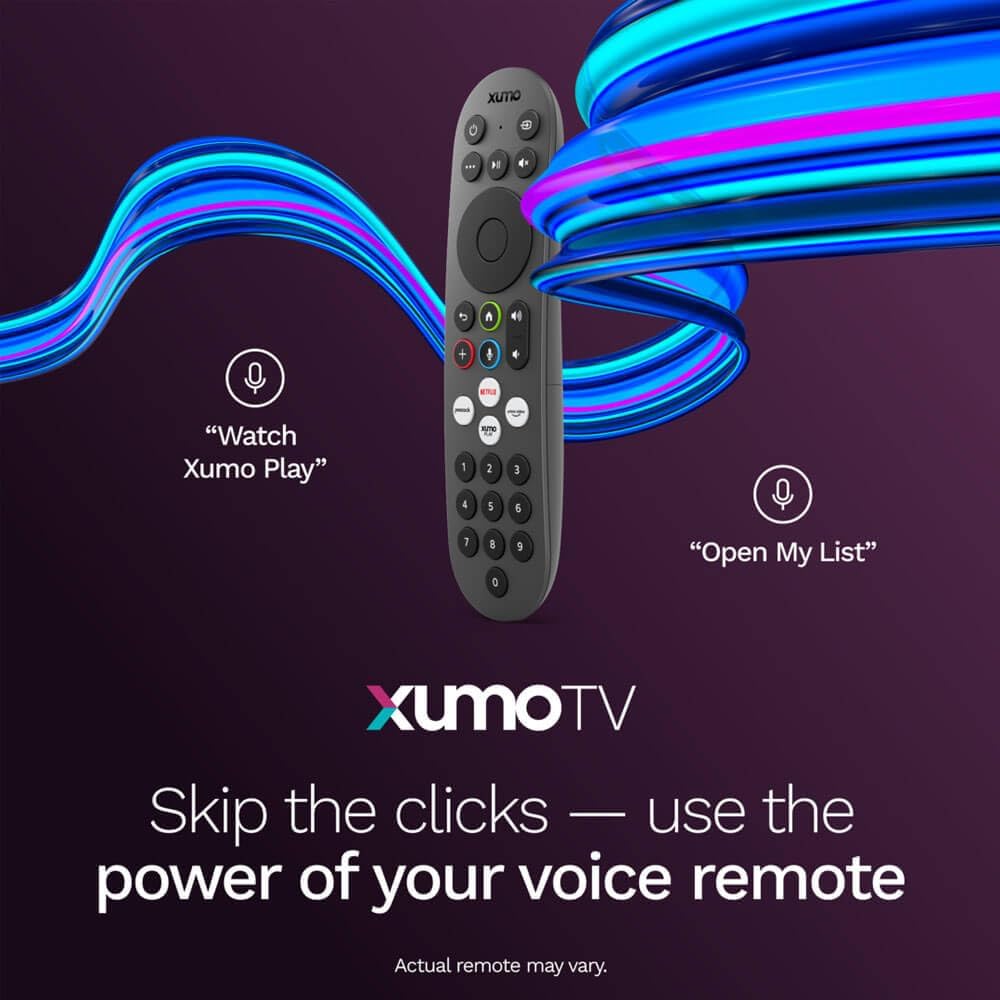
Image: A close-up of the Element Xumo Smart TV voice remote, highlighting its various buttons including a microphone for voice commands and quick access buttons for streaming services.
5.2 Smart Features & Streaming (Xumo OS)
The Xumo OS provides access to over 250 preloaded apps and more than 750 free live channels. You can:
- Search Content: Use the unified search function to find content across all your installed apps.
- Мојата листа: Curate your personal watchlist for easy access to your favorite shows and movies.
- Free On-Demand Libraries: Explore a wide selection of free on-demand content.
- Гласовна контрола: Use the voice remote to navigate, search, and control your TV hands-free.

Image: The Xumo TV interface showing a selection of popular streaming applications and content recommendations.
5.3 Поставки за слика и звук
Your TV delivers a crisp 720p HD display with a 120Hz effective refresh rate, minimizing motion blur for clear visuals. Dolby Audio processing enhances the sound experience. You can adjust picture and sound settings via the TV's menu to suit your preferences.
- Режими на слика: Select from various preset picture modes (e.g., Standard, Vivid, Movie, Sports) or customize settings like brightness, contrast, and color.
- Режими на звук: Choose from different sound modes (e.g., Standard, Music, Movie, Speech) or adjust bass and treble levels.
5.4 Apple AirPlay & Home Support
Seamlessly stream content or mirror your screen from your iPhone, iPad, or Mac directly to your Element TV using Apple AirPlay. With Apple Home support, you can integrate your TV into your Apple smart home ecosystem for convenient control.
6. Одржување
To ensure the longevity and optimal performance of your Element Xumo Smart TV, follow these maintenance guidelines:
- Чистење на екранот: Нежно избришете го екранот со мека, сува крпа што не остава влакненца. За тврдокорни дамки, лесно избришете гоampИзбришете ја крпата со вода или со раствор за чистење специфичен за екранот (никогаш не прскајте директно врз екранот).
- Чистење на кабинетот: Користете мека, сува крпа за чистење на куќиштето на телевизорот. Избегнувајте употреба на абразивни средства за чистење или растворувачи.
- Вентилација: Осигурајте се дека отворите за вентилација на задната страна од телевизорот не се блокирани за да спречите прегревање.
- Исклучување кога не се користи: Исклучете го телевизорот кога не го користите за да заштедите енергија и да го продолжите неговиот век на траење.
7 Смена на проблеми
If you encounter any issues with your Element Xumo Smart TV, refer to the following common troubleshooting tips:
- Без моќност: Проверете дали кабелот за напојување е безбедно вклучен и во телевизорот и во електричниот штекер. Проверете дали штекерот е функционален.
- Нема слика/звук: Verify that the correct input source is selected. Check all cable connections (HDMI, antenna, etc.) for secure fit.
- Далечинскиот управувач не работи: Заменете ги AAA батериите во далечинскиот управувач. Уверете се дека нема пречки помеѓу далечинскиот управувач и IR сензорот на телевизорот.
- Проблеми со мрежната конекција: Restart your Wi-Fi router. Check the TV's network settings to ensure it's connected to the correct network and the password is entered correctly.
- Smart App Problems: Try restarting the app. If the issue persists, clear the app's cache or reinstall it. Ensure your TV's software is up to date.
For persistent issues, please contact Element customer support.
8. Спецификации
| Карактеристика | Спецификација |
|---|---|
| Број на модел | E300AE32C |
| Големина на екранот | 32 инчи |
| Резолуција на екранот | 720p (1366x768) |
| Стапка на освежување | 60 Hz (120Hz Effective) |
| Сооднос на аспект | 1.78:1 |
| Оперативен систем | Xumo OS |
| Поврзување | 3x HDMI (1x eARC), 1x USB, LAN (Ethernet), Optical Audio Out, Headphone Jack, Composite Input, Wi-Fi, Bluetooth |
| Посебни карактеристики | Bezel-Less Design, Built-In Speaker, Voice Remote, Apple AirPlay & Home Support |
| TV with Stand Dimensions (W x H x D) | 28.8" x 19.2" x 7.0" |
| TV without Stand Dimensions (W x H x D) | 28.8" x 17.0" x 2.7" |
| Тежина на ставката | 8.8 фунти |
9. Гаранција и поддршка
The Element 32-inch 720p HD Xumo Smart TV comes standard with a 2-годишна гаранција на производителотОваа гаранција ги покрива дефектите во материјалите и изработката при нормална употреба. Ве молиме задржете го доказот за купување за гаранциски барања.
For technical support, warranty inquiries, or further assistance, please refer to the contact information provided in your Quick Start Guide or visit the official Element Electronics webсајт.