
1. Вовед
This manual provides comprehensive instructions for the proper use and care of your Casio W220H Illuminator Digital Watch. Please read this manual thoroughly to ensure optimal performance and longevity of your timepiece. Keep this manual for future reference.
2. Производот завршиview
The Casio W220H is a durable digital watch designed for everyday use, featuring an Illuminator backlight, stopwatch, alarm functions, and water resistance. Its robust resin construction ensures reliability.
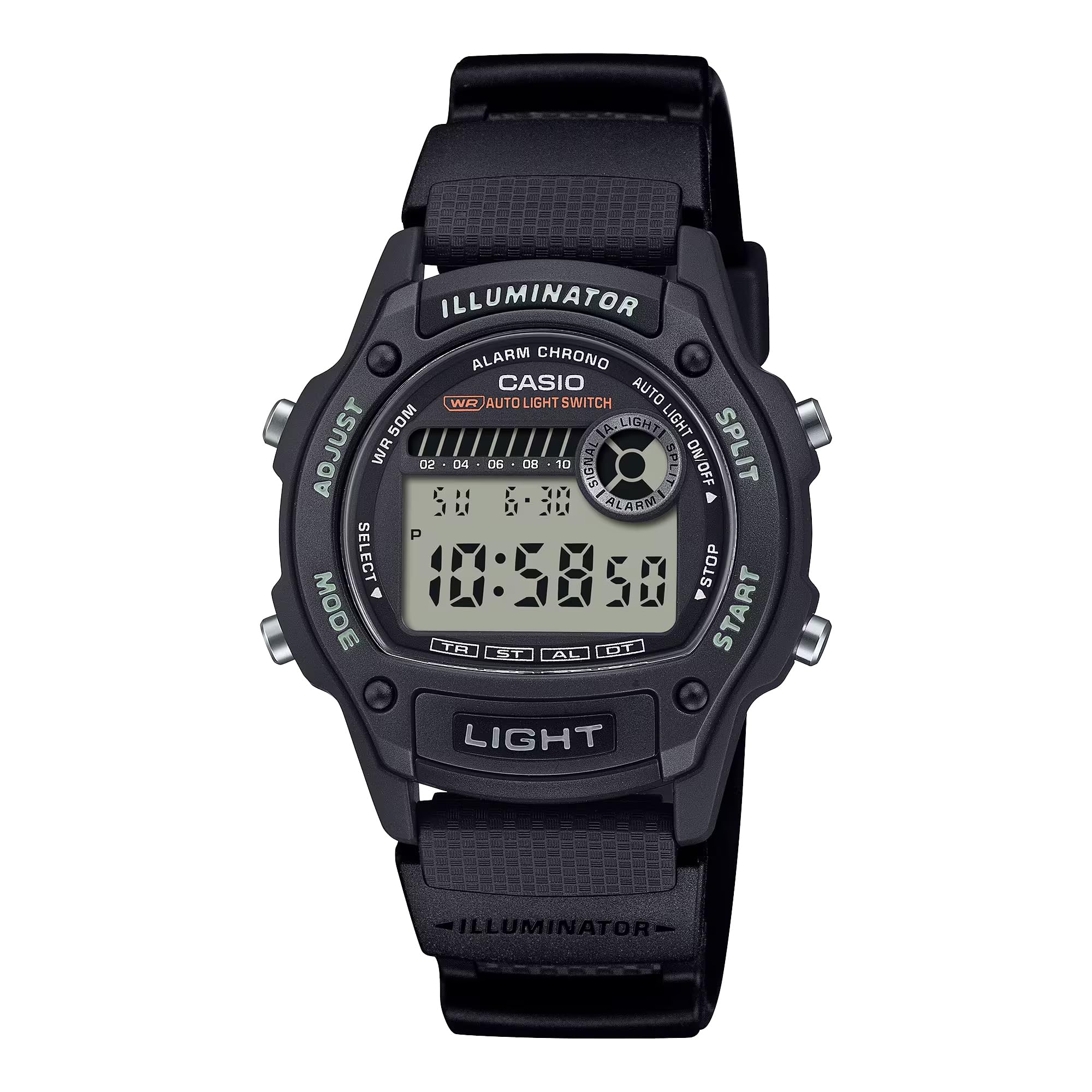
Слика 2.1: Предна страна view of the Casio W220H Illuminator Digital Watch. The watch features a black resin case and band, with a clear digital display showing time and date. Buttons are visible on both sides of the case.
Функции на копчињата:
- Копче ADJUST (горе лево): Се користи за влегување и излегување од режимите на поставки и за потврдување на изборите.
- Копче РЕЖИМ (долу лево): Cycles through different watch modes (Timekeeping, Stopwatch, Countdown Timer, Alarm, Dual Time).
- LIGHT Button (Bottom Front): Го активира позадинското осветлување на осветлувачот.
- Копче СТАРТ (долу десно): Used to start/stop stopwatch or timer, and to change settings in setting modes.
- SPLIT Button (Top Right): Used for split times in stopwatch mode, and to change settings in setting modes.
3. Почетно поставување
3.1 Setting the Time and Date:
- Во режим на мерење на времето, притиснете и држете го ПРИЛАГОДИ копчето додека цифрите за секунди не почнат да трепкаат, означувајќи го екранот за поставки.
- Притиснете го РЕЖИМ копче за кружно менување на поставките: Секунди → Час → Минута → Година → Месец → Ден.
- Користете го СТАРТ or ПОДЕЛИ копчиња за зголемување или намалување на трепкачката вредност.
- Откако сите поставки ќе бидат точни, притиснете го копчето ПРИЛАГОДИ копче за излез од режимот на поставување.
3.2 Auto Light Switch:
The watch features an auto light switch that illuminates the display when you angle the watch towards your face. This feature can be toggled on or off.
- Во режим на мерење на времето, притиснете и држете го СВЕТЛИНА копчето приближно три секунди.
- An indicator (e.g., "AUTO LIGHT ON") will appear or disappear on the display to confirm the change.
- Note that the auto light switch automatically disables after approximately three hours to conserve battery life.
4. Упатства за работа
This section details the various modes and functions of your Casio W220H watch.
4.1 Mode Navigation:
Притиснете го РЕЖИМ копче за да се движите низ следните режими:
- Режим на одржување време
- Режим на стоперката
- Режим на одбројување на тајмерот
- Режим на аларм
- Режим на двојно време
4.2 Stopwatch/Chronograph:
The stopwatch measures elapsed time, split times, and two finishes. It has a 1/100-second accuracy and can measure up to 23 hours, 59 minutes, 59.99 seconds.
- Влезете во режим на штоперица со притискање на копчето РЕЖИМ копче.
- Притиснете го СТАРТ копче за да започнете со мерење на времето.
- Притиснете го СТАРТ копчето повторно за да го запрете мерењето на времето.
- Притиснете го ПРИЛАГОДИ копче за да ја ресетирате штоперицата на нула.
- За да снимите поделено време, притиснете го копчето ПОДЕЛИ button while the stopwatch is running. The display will show the split time while the internal timer continues. Press ПОДЕЛИ повторно за да се вратите на изминатото време.
4.3 Daily Alarm & Hourly Временски сигнал:
Часовникот има дневен аларм и хоум.urly временски сигнал.
- Влезете во режим на аларм со притискање на копчето РЕЖИМ копче.
- Притиснете го ПРИЛАГОДИ копчето за да влезете во режимот за поставување аларм. Цифрите за часот ќе трепкаат.
- Користете го СТАРТ or ПОДЕЛИ копчиња за поставување на часот.
- Притиснете го РЕЖИМ button to move to the minute digits, then use СТАРТ or ПОДЕЛИ за да ги постави записниците.
- Притиснете го ПРИЛАГОДИ копче за да излезете од режимот за поставување аларм.
- To toggle the alarm or hourly time signal on/off, press the СТАРТ button in Alarm Mode (without holding ПРИЛАГОДИ).
4.4 Illuminator Backlight:
The Illuminator backlight provides easy readability in low-light conditions.
- Притиснете го СВЕТЛИНА копче за осветлување на екранот.
- The light will stay on for a few seconds.
Video 4.1: A demonstration of the Casio W220H Illuminator backlight function. The video shows the watch display lighting up with an orange glow when the light button is pressed, enhancing visibility in dark environments.
Видео 4.2: Детален прегледview of the Casio W220H Series watch, demonstrating various functions including time setting, mode navigation, and the Illuminator backlight. This video provides a comprehensive guide to operating the watch.
5. Клучни карактеристики
- Illuminator Backlight: Fully automatic LED backlight for clear visibility in any lighting condition.
- Долг век на батеријата: Approximately 3 years with the included CR1616 battery.
- Stopwatch/Chronograph: 1/100-second stopwatch functions for precise time measurement.
- Дневен аларм и Хоurly Временски сигнал: Convenient alerts and time markers.
- Отпорност на вода од 50M: Погодно за пливање и туширање, но не и за нуркање.
- Целосен автоматски календар: Pre-programmed calendar up to the year 2099, automatically adjusting for month lengths and leap years.
6. Одржување
6.1 Водоотпорност:
The Casio W220H is water resistant to 50 meters. This means it is suitable for everyday use and can withstand splashes, rain, and brief immersion in water. However, it is not recommended for prolonged underwater use or high-pressure water activities like diving. Do not operate buttons while the watch is wet or submerged.
6.2 Чистење:
За чистење на часовникот, избришете го со мека, сува крпа. За тврдокорна нечистотија, користете мека крпаampened with water and a mild neutral detergent, then wipe dry. Avoid using volatile agents like thinner, benzine, or alcohol, as they may damage the resin components.
6.3 Замена на батерија:
The watch uses a CR1616 battery. When the display becomes dim or functions become erratic, it is time to replace the battery. Battery replacement should ideally be performed by a qualified technician to ensure proper sealing and water resistance.
7 Смена на проблеми
- Екранот е празен или затемнет: Батеријата може да е празна или празна. Заменете ја батеријата.
- Времето е неточно: Re-set the time and date as described in the "Setting the Time and Date" section. Ensure the correct AM/PM setting is selected.
- Алармот не се огласува: Check if the alarm is enabled in Alarm Mode. Ensure the volume is not muted if applicable (this model does not have volume control, but general advice).
- Вода во часовникот: Immediately take the watch to an authorized service center. Do not attempt to open or dry the watch yourself, as this may cause further damage.
8. Спецификации
| Карактеристика | Детал |
|---|---|
| Број на модел | W220H-1AV |
| Тип на дисплеј | Дигитален |
| Тип на движење | Кварц |
| Материјал на случајот | Смола |
| Материјал за бенд | Најлон |
| Дијаметар на куќиштето | 36.6 милиметри |
| Дебелина на куќиштето | 10.9 милиметри |
| Длабочина на водоотпорност | 50 метри |
| Извор на енергија | Battery Powered (CR1616) |
| Приближно траење на батеријата | 3 години |
| Карактеристики | Illuminator Backlight, 1/100-Second Stopwatch, Daily Alarm, Hourly Time Signal, Full Auto-Calendar |
9. Гаранција и поддршка
Your Casio W220H watch comes with a limited warranty. For specific warranty terms and conditions, please refer to the warranty card included with your product or visit the official Casio webсајт.
For technical support, service, or inquiries regarding your watch, please contact Casio customer service through their official webстраницата или информациите за контакт наведени во пакувањето на вашиот производ.
Официјален Касио Webсајт: www.casio.com