1. Важни безбедносни информации
Read all instructions before operating the drone. Failure to follow instructions may result in injury or property damage.
- Препорака за возраст: This drone is intended for users aged 14 and older. It is not a toy for children.
- Опкружување на летот: Управувајте со дронот на отворени, чисти места, подалеку од луѓе, животни, згради и далноводи. Избегнувајте летање при силни ветрови или неповолни временски услови.
- Безбедност на батеријата: Use only the provided batteries and charging cables. Do not overcharge or puncture batteries. Dispose of batteries properly.
- Безбедност на пропелерите: Keep hands, face, and loose clothing away from rotating propellers. Always power off the drone before handling propellers.
- Линија на погледот: Секогаш одржувајте визуелна линија на вид со дронот за време на летот.
- Почитувајте ја приватноста: Be mindful of privacy laws when using the camera features.
2. Содржина на пакетот
Проверете дали сите артикли се присутни во пакувањето:
- E99 Pro Foldable Drone
- Далечински управувач
- Rechargeable Drone Batteries (Quantity: 2)
- USB кабел за полнење
- Резервни пропелери
- Шрафцигер
- Торбичка за носење
- Упатство за употреба (овој документ)

Image: Contents of the E99 Pro Foldable Drone package, including the drone, remote, and carrying case.
3. Идентификација на компоненти
3.1 Компоненти на дрон
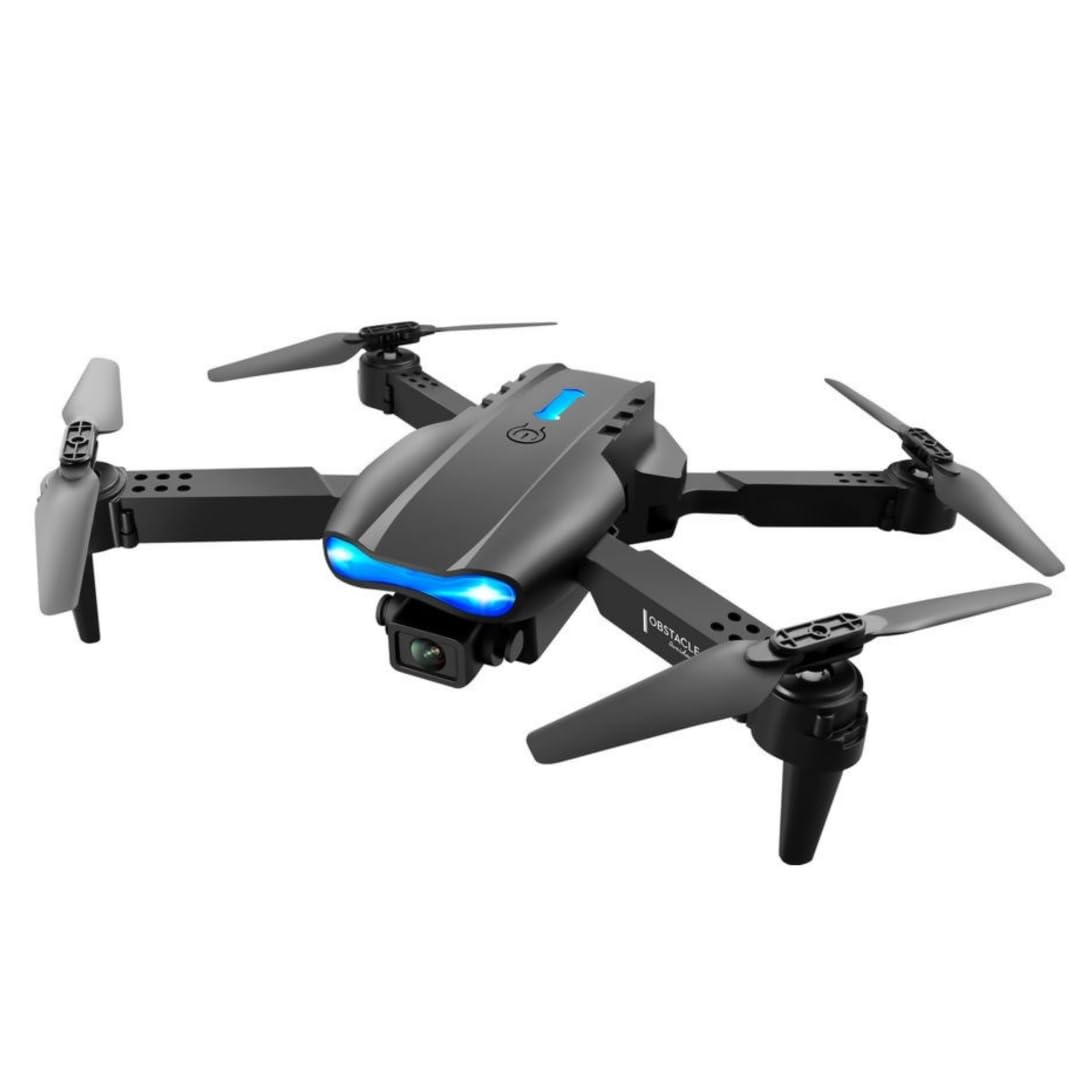
Image: The E99 Pro drone in its unfolded state, showing the main body, propellers, and front camera.
- Предна камера: Main 4K HD camera for aerial photography and video.
- Bottom Camera: Secondary 4K HD camera for alternative perspectives and optical flow positioning.
- Пропелери: Four rotating blades for flight.
- Моторни рачки: Foldable arms holding the motors and propellers.
- Оддел за батерии: Се наоѓа на долната страна од дронот.
- Копче за вклучување: За вклучување/исклучување на дронот.
3.2 Компоненти на далечинското управување

Image: Detailed diagram of the remote control with labels for each button and joystick function.
- Рачка за гас (лев џојстик): Ја контролира надморската височина (горе/долу) и ротацијата (лево/десно).
- Steering Rod (Right Joystick): Контролира движење напред/назад и лево/десно.
- One Key Up/Landing Button: Иницира автоматско полетување или слетување.
- Headless Mode / Return Home (Long Press): Activates headless mode or initiates return to home.
- One Key Correction: За фино подесување на стабилноста на летот.
- 3D Roll: Activates 360-degree flip function.
- Left Fly Fine Tuning: Adjusts left/right drift.
- Right Fly Fine Tuning: Adjusts left/right drift.
- Forward Fine-tuning: Adjusts forward/backward drift.
- Backward Fine-tuning: Adjusts forward/backward drift.
- Прекинувач: Го вклучува/исклучува далечинскиот управувач.
- Држач за телефон: Extends to hold a smartphone for FPV viewинг.
4. Поставување
4.1 Drone Battery Installation and Charging
- Insert the fully charged drone battery into the battery compartment on the drone's underside. Ensure it clicks securely into place.
- To charge, connect the drone battery to the USB charging cable, then plug the USB cable into a 5V/1A USB adapter (not included). The charging indicator will show charging status.
- Времето на полнење е приближно 60-80 минути по батерија.
4.2 Инсталација на батеријата на далечинскиот управувач
- Отворете го капакот на батеријата на задниот дел од далечинскиот управувач.
- Вметнете 3 AA батерии (не се вклучени) според ознаките за поларитет.
- Добро затворете го капакот на батеријата.
4.3 Расклопување на дронот
- Gently unfold the front motor arms first, then the rear motor arms, until they are fully extended and locked into position.
- Ensure all arms are securely locked before flight.
4.4 App Download and Connection (FPV)
- Scan the QR code in the manual (or search your app store) for the recommended FPV application.
- Инсталирајте ја апликацијата на вашиот паметен телефон.
- Вклучете го дронот и далечинскиот управувач.
- On your smartphone, connect to the drone's Wi-Fi network (usually named 'WIFI-XXXXXX').
- Open the FPV application to view the live camera feed and access additional controls.
5. Упатства за работа
5.1 Вклучување/исклучување и спарување
- Притиснете и задржете го копчето за вклучување на дронот додека не се вклучат индикаторските светла.
- Press the power switch on the remote control. The remote will beep.
- Push the left joystick (throttle) fully up, then fully down. The remote will beep, and the drone lights will become solid, indicating successful pairing.
5.2 Калибрација на жироскоп
- After pairing, place the drone on a flat, level surface.
- Push both joysticks down and to the bottom-left corner simultaneously for 2-3 seconds. The drone lights will flash rapidly and then become solid, indicating successful calibration.
5.3 Полетување и слетување
- Полетување со еден клуч: Press the 'One Key Up/Landing' button once. The drone will automatically ascend to a stable hovering height.
- Рачно полетување: Push both joysticks down and to the bottom-right corner to unlock the motors. Then, slowly push the left joystick (throttle) up to ascend.
- Слетување со еден клуч: Press the 'One Key Up/Landing' button once. The drone will automatically descend and land.
- Рачно слетување: Slowly pull the left joystick (throttle) down until the drone lands. Once landed, pull both joysticks down and to the bottom-right corner to stop the motors.
5.4 Основни контроли за летање
- Висина: Притиснете го левиот џојстик нагоре за да се искачите, повлечете го надолу за да се спуштите.
- Ротација: Притиснете го левиот џојстик налево за да ротирате спротивно од стрелките на часовникот, а притиснете надесно за да ротирате надесно.
- Напред/наназад: Притиснете го десниот џојстик нагоре за да летате напред, повлечете го надолу за да летате назад.
- Left/Right Sideways Flight: Притиснете го десниот џојстик налево за да летате налево, притиснете надесно за да летате надесно.
5.5 Напредни функции за лет
- Режими на брзина: Press the speed button on the remote to cycle through 3 different speed settings (low, medium, high).
- Режим без глава: Press the 'Headless Mode' button. In this mode, the drone's orientation is relative to the pilot, regardless of the drone's front direction. Press again to exit.
- Превртувања од 360°: Fly the drone to a height of at least 3 meters. Press the '3D Roll' button, then push the right joystick in any direction to perform a flip.
- Отпорност на ветер: The drone is designed with upgraded motors for stable flight in light wind conditions. Avoid flying in strong winds.

Image: The E99 Pro drone demonstrating its wind-resistant capabilities during flight.
5.6 Работа со камерата

Image: Diagram illustrating the E99 Pro's dual camera system, showing the main lens, 90-degree adjustment, and 120-degree wide angle view.
- Фото: While connected to the FPV app, tap the photo icon to capture still images.
- Видео: While connected to the FPV app, tap the video icon to start recording. Tap again to stop.
- FPV Live Video: The FPV app provides a real-time view from the drone's camera to your smartphone.
- Camera Switching: Use the app to switch between the front and bottom 4K HD cameras.
6. Одржување
- Чистење: Користете мека, сува крпа за чистење на дронот и далечинскиот управувач. Не користете вода или растворувачи.
- Замена на пропелер: If a propeller is damaged, use the provided screwdriver to remove the screw, replace the propeller with a spare, and re-secure the screw. Ensure correct propeller (A or B) is installed on the corresponding motor arm.
- Нега на батеријата: Store batteries in a cool, dry place. Do not store fully charged or fully depleted for extended periods. Charge them to about 50% for long-term storage.
- Складирање: Fold the drone arms and store the drone and remote in the carrying case when not in use to protect them from damage.
7 Смена на проблеми
| Проблем | Можна причина | Решение |
|---|---|---|
| Дронот не реагира на далечинското. | Не е спарено; слаба батерија; пречки. | Re-pair drone and remote; charge batteries; move to an area with less interference. |
| Дронот лета неправилно или лебди на земја. | Not calibrated; damaged propeller; uneven surface for takeoff. | Perform gyroscope calibration; replace damaged propellers; take off from a flat surface. |
| FPV app shows no image or disconnects. | Wi-Fi not connected; app error; weak signal. | Ensure phone is connected to drone's Wi-Fi; restart app and drone; fly closer to the drone. |
| Дронот не полетува. | Motors not unlocked; low battery. | Unlock motors (joysticks down-right); charge drone battery. |
8. Спецификации
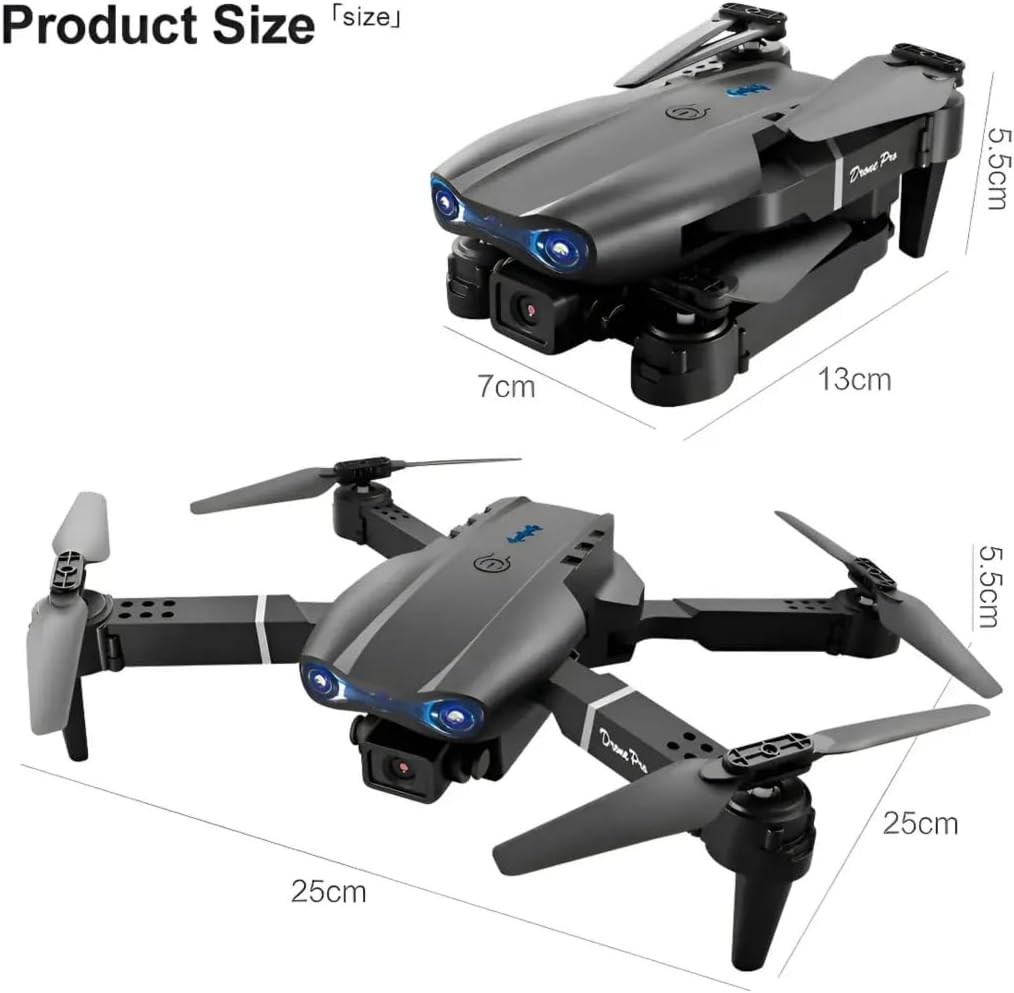
Image: Dimensions of the E99 Pro drone in both folded and unfolded states.
| Карактеристика | Детал |
|---|---|
| Име на моделот | Е99 |
| Бренд | Генерички |
| Резолуција за снимање видео | 4K |
| Ефективна сепак резолуција | 8 MP |
| Технологија за поврзување | Bluetooth, WiFi |
| Ниво на вештина | Сите |
| Тежина на ставката | 340 грама (12 унци) |
| Капацитет на батеријата на дрон | 1800 милиониamp Часови (по батерија) |
| Тип на контрола | Далечински управувач |
| Материјал | Пластика |
| Димензии на производот (расклопени) | 9.84"Д x 9.84"Ш x 2.17"В (25 см x 25 см x 5.5 см) |
| Батерии за далечински управувач | 3 AA батерии (не се вклучени) |
9. Гаранција и поддршка
За информации за гаранцијата или техничка поддршка, ве молиме погледнете ги контакт информациите што ги обезбедил вашиот продавач или официјален претставник на производителот. webсајт.
Зачувајте ја сметката како доказ за купување за какви било гаранциски побарувања.


