
Вовед
Thank you for choosing the Digitus DA-70919 USB-C 8K 12-Port Docking Station. This device is designed to expand the connectivity of your USB-C enabled laptop or computer, providing a comprehensive solution for video output, data transfer, network access, and power delivery. Please read this manual carefully to ensure proper installation and operation.
Производот завршиview
The Digitus DA-70919 docking station offers 12 essential ports to enhance your workspace. It supports high-resolution video output, fast data transfer, and efficient power delivery to your host device.

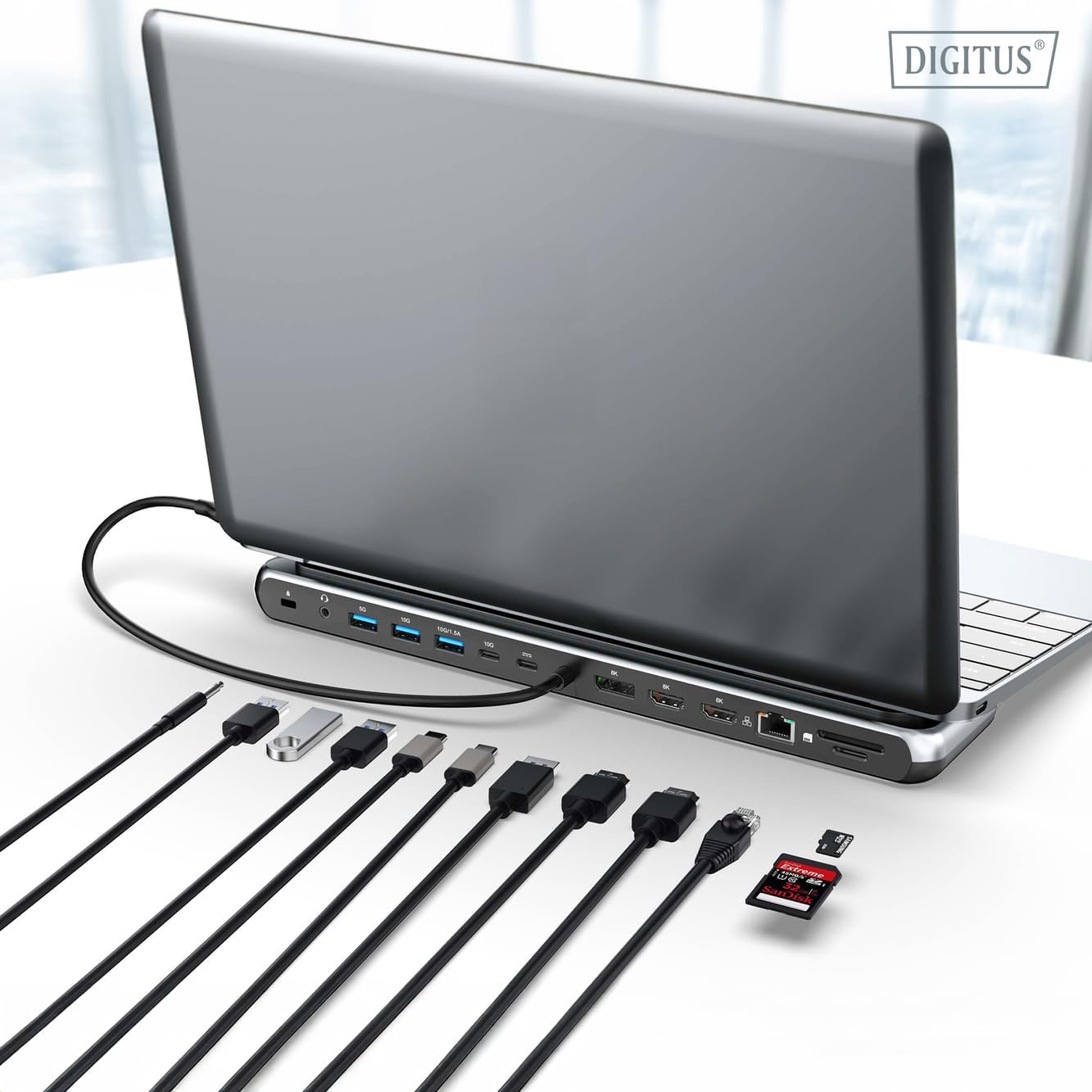
Слика 1: Detailed diagram of the Digitus DA-70919 docking station ports and their functions. This diagram labels each of the 12 ports on the docking station, including Audio Jack, USB-A, USB-C, USB-C PD, DisplayPort, HDMI, RJ45 Gigabit Ethernet, and SD/MicroSD card slots, along with anti-theft protection.

Слика 2: Предна страна view of the Digitus DA-70919 docking station showing all accessible ports. A clear view of the docking station's front panel, displaying the various input and output ports including USB-A, USB-C, HDMI, DisplayPort, Ethernet, and card readers.
Клучни карактеристики:
- Видео излез: 2x HDMI, 1x DisplayPort (DP) supporting up to 8K/30Hz for single display, or multi-display configurations.
- USB порти за податоци: 2x USB-A 3.2 Gen 2 (10Gbps), 1x USB-A 3.2 Gen 1 (5Gbps), 1x USB-C 3.2 Gen 2 (10Gbps).
- Испорака на енергија (PD): USB-C PD 3.0 port for charging your host laptop (up to 85W output).
- Мрежа: Gigabit Ethernet (RJ45) for stable wired internet connection.
- Читачи на картички: SD and MicroSD card slots with 104 MBps transfer speed.
- Аудио: 3.5mm audio jack for headphones or speakers.
Инструкции за поставување
Follow these steps to set up your Digitus DA-70919 docking station:
- Check Host USB-C Port Compatibility: Ensure your laptop's USB-C port supports DisplayPort Alternate Mode (DP Alt Mode) for video output and Power Delivery for charging. Without DP Alt Mode, video output will not function.

Слика 3: Guide to USB-C port compatibility for DisplayPort Alternate Mode. This graphic explains which types of USB-C ports on your laptop support the full functionality of the docking station, specifically highlighting the requirement for DisplayPort Alternate Mode (DP Alt Mode) for video output.
- Поврзете се со домаќинскиот уред: Connect the integrated USB-C cable from the docking station to the USB-C port on your laptop.
- Поврзете го адаптерот за напојување (опционално, но препорачливо): If you wish to charge your laptop via the docking station or power high-demand peripherals, connect a USB-C Power Delivery adapter (not included, up to 100W recommended) to the USB-C PD input port on the docking station.
- Поврзување на надворешни екрани: Connect your monitors to the HDMI and/or DisplayPort outputs on the docking station using appropriate cables.
- Поврзете периферни уреди: Plug in your USB devices (keyboard, mouse, external drives), Ethernet cable, SD/MicroSD cards, and audio devices to the corresponding ports on the docking station.
- Инсталација на драјвери: In most cases, the docking station is plug-and-play and does not require additional drivers. If prompted, allow your operating system to install any necessary drivers automatically.
Упатства за работа
Режими на прикажување
Докинг станицата поддржува различни конфигурации на екранот:
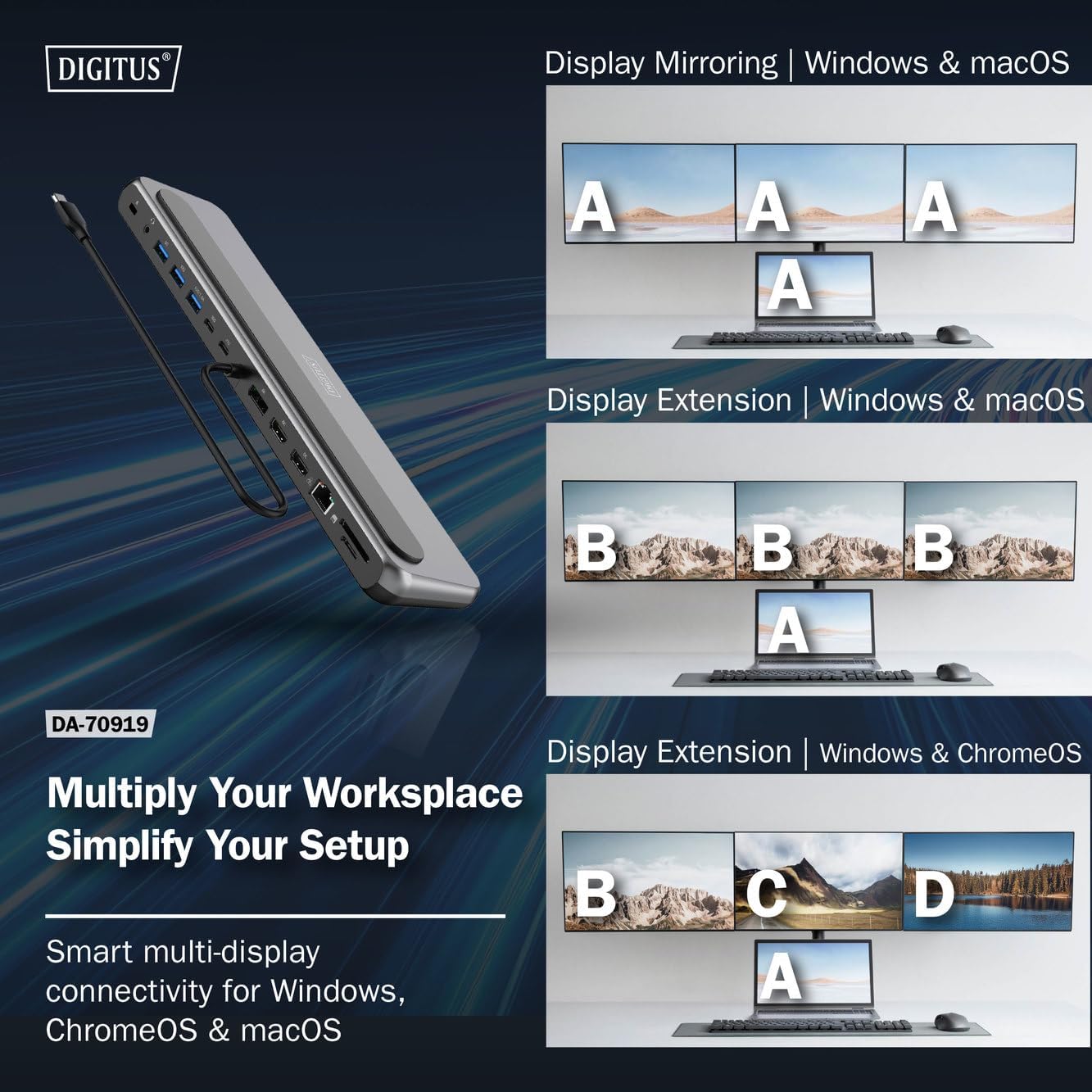
Слика 4: Diagram showing display mirroring and extension modes for Windows, macOS, and ChromeOS. This image illustrates the various display configurations supported by the docking station, including mirroring your screen or extending it across multiple external monitors on Windows, macOS, and ChromeOS.
- Режим на огледало: Duplicates your laptop's display onto the external monitors.
- Extend Mode (Windows/ChromeOS): Extends your desktop across multiple external monitors, allowing for a multi-tasking environment. Supports dual monitors (2x 4K/60Hz) and triple monitors (1x 4K/60Hz + 2x 4K/30Hz) in MST (Multi Stream Transport) mode.
- Extend Mode (macOS): macOS typically supports extended desktop to one external monitor, with other external monitors mirroring each other.
To configure display settings, access your operating system's display settings (e.g., Windows Display Settings, macOS System Preferences > Displays).
Пренос на податоци
Utilize the USB-A and USB-C data ports for connecting external storage devices, keyboards, mice, and other USB peripherals. The USB 3.2 Gen 2 ports offer speeds up to 10Gbps, while the USB 3.2 Gen 1 port offers speeds up to 5Gbps.
Испорака на енергија
When a compatible USB-C PD power adapter is connected to the docking station's PD input port, the docking station can deliver up to 85W of power to charge your connected laptop. This allows you to power your laptop and peripherals through a single USB-C connection.
Слика 5: Illustration of the docking station's fast charging capability via USB-C Power Delivery. This image demonstrates the Power Delivery function, showing a 100W input to the docking station and an 85W output to charge the connected laptop.
Мрежна врска
Connect an Ethernet cable to the RJ45 port for a stable and high-speed wired network connection (10/100/1000 Mbps Gigabit Ethernet).
Читачи на картички
Insert SD or MicroSD cards into the dedicated slots for quick access to photos, videos, and other files. The card readers support transfer speeds up to 104 MBps.
Аудио излез
Connect your headphones or speakers to the 3.5mm audio jack for audio output.
Одржување
- Чистење: Use a soft, dry cloth to clean the surface of the docking station. Avoid using liquid cleaners or solvents.
- Складирање: Чувајте ја приклучната станица на ладно и суво место, подалеку од директна сончева светлина и екстремни температури.
- Ракување: Avoid dropping or subjecting the device to strong impacts. Do not attempt to disassemble the docking station.
Решавање проблеми
Доколку наидете на проблеми со вашата приклучна станица, погледнете ги следниве вообичаени решенија:
- Нема излез за прикажување:
- Проверете дали USB-C-портата на вашиот лаптоп поддржува алтернативен режим на DisplayPort.
- Check all video cables (HDMI/DP) are securely connected to both the docking station and the monitor.
- Verify that the monitor is powered on and set to the correct input source.
- Обидете се да поврзете еден по еден монитор за да го изолирате проблемот.
- Ажурирајте ги драјверите за графичка картичка на вашиот лаптоп.
- Нема довод на енергија до лаптопот:
- Ensure a compatible USB-C PD power adapter (up to 100W) is connected to the docking station's PD input port.
- Проверете дали USB-C-портата на вашиот лаптоп поддржува испорака на напојување.
- Проверете го адаптерот за напојување и кабелот за оштетување.
- USB уредите не се препознаваат:
- Повторно поврзете го USB-уредот на друг порт на приклучната станица.
- Ensure the docking station is properly connected to the host laptop.
- If using a high-power USB device, ensure the docking station is connected to an external power adapter.
- Проблеми со етернет конекцијата:
- Проверете ја врската на етернет кабелот и со док-станицата и со вашиот рутер/модем.
- Проверете ги мрежните поставки на вашиот лаптоп.
- Рестартирајте го вашиот рутер/модем и лаптоп.
- Читачот на картички не работи:
- Ensure the SD/MicroSD card is inserted correctly and fully.
- Test the card with another device to confirm it is not damaged.
Спецификации
| Карактеристика | Спецификација |
|---|---|
| Модел | DA-70919 |
| Поврзување на домаќинот | USB-C (интегриран кабел) |
| Видео излез | 2x HDMI, 1x DisplayPort (DP) |
| Max. Single Display Resolution | 8K (7680x4320) @ 30Hz |
| Max. Dual Display Resolution (MST) | 2x 4K (3840x2160) @ 60Hz |
| Max. Triple Display Resolution (MST) | 1x 4K@60Hz + 2x 4K@30Hz |
| USB-A податочни порти | 2x USB 3.2 Gen 2 (10Gbps), 1x USB 3.2 Gen 1 (5Gbps) |
| Податочна порта USB-C | 1x USB 3.2 Gen 2 (10Gbps) |
| Power Delivery (PD) Input | USB-C PD 3.0 (up to 100W) |
| Power Delivery (PD) Output to Host | До 85 W |
| Етернет | RJ45 Gigabit (10/100/1000 Mbps) |
| Читачи на картички | SD, MicroSD (104 MBps) |
| Аудио | 1 x 3.5 мм аудио приклучок |
| Компатибилност | Windows, macOS, ChromeOS |
| Работна температура | 0°C до 45°C (32°F до 113°F) |
| Температура на складирање | -10°C до 70°C (14°F до 158°F) |
Гаранција и поддршка
The Digitus DA-70919 USB-C 8K 12-Port Docking Station comes with a 2 година гаранција од датумот на купување. Оваа гаранција ги покрива производствените дефекти и гарантира дека производот функционира како што е опишано при нормална употреба.
For technical support, warranty claims, or further assistance, please contact your retailer or visit the official Digitus website for contact information. Please have your product model number (DA-70919) and proof of purchase ready when seeking support.