
1. Вовед
This manual provides detailed instructions for the safe and efficient use of your Surfans F20 Pro Android Hi-Res Music Player. Please read this manual thoroughly before operating the device and retain it for future reference.
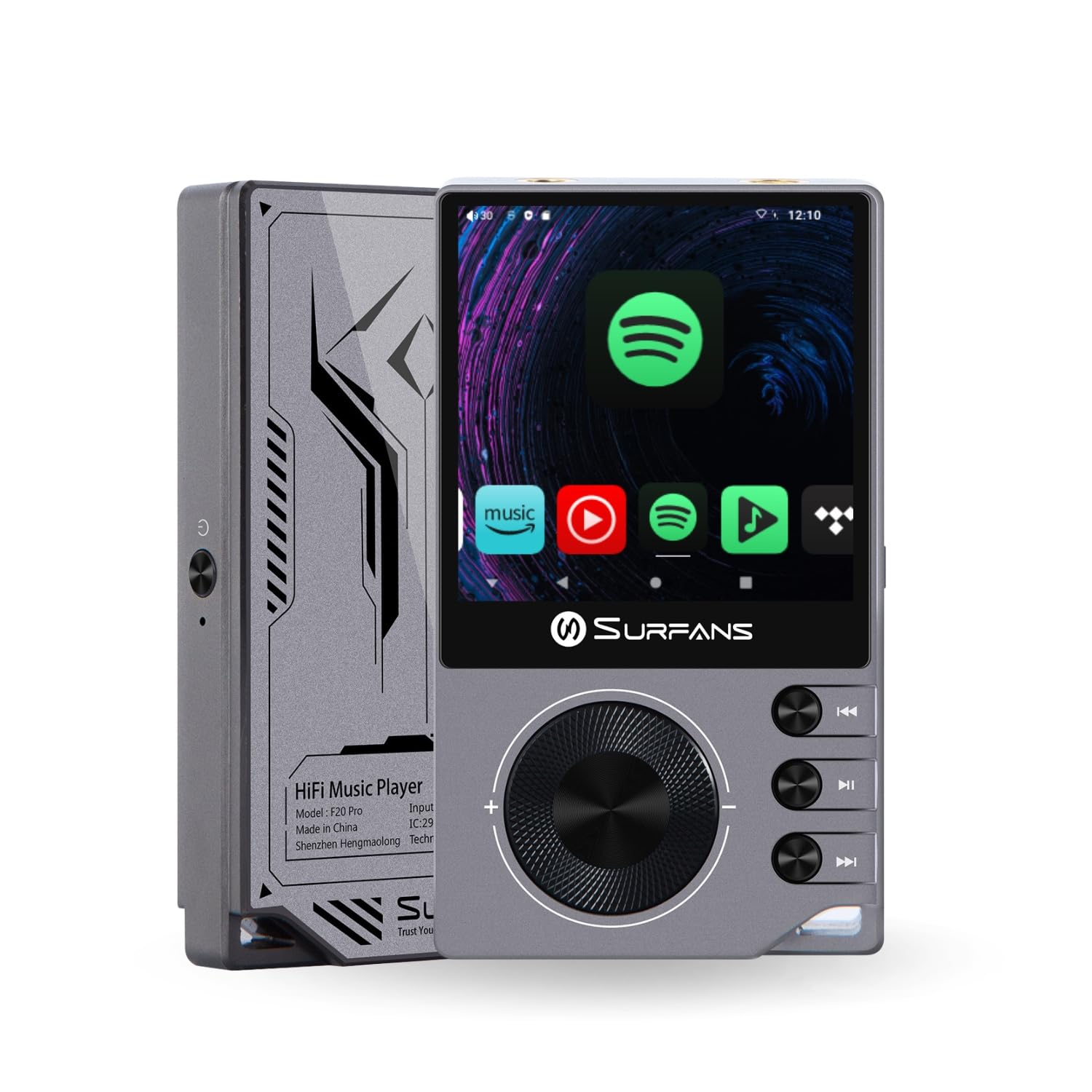
The Surfans F20 Pro Hi-Res Music Player, showcasing неговиот компактен дизајн и интерфејс на екран на допир.
2. Содржина на пакетот
Проверете дали сите артикли се присутни во пакувањето:
- Surfans F20 Pro Hi-Res Music Player
- Кабел за USB Type-C
- 32 GB MicroSD Memory Card (pre-installed or separate)
- Заштитна футрола
- Упатство за употреба (овој документ)
3. Уредот завршиview
Familiarize yourself with the physical components and ports of your F20 Pro player.

Напред и назад view of the Surfans F20 Pro, highlighting its robust CNC metal chassis and button layout.
3.1. Клучни карактеристики
- Dual ESS9018Q2M DACs: For high-fidelity audio processing.
- Octa-Core Android 12 System: Enables streaming app compatibility and smooth operation.
- 3.5mm Single-Ended & 4.4mm Balanced Outputs: Versatile headphone connectivity.
- Bluetooth 5.0 со LDAC: High-quality wireless audio transmission.
- Двоен опсег Wi-Fi (2.4 GHz и 5 GHz): For stable internet connectivity.
- Проширен простор за складирање: Supports up to 1TB via MicroSD card.
- 2.7-инчен екран на допир: Интуитивен кориснички интерфејс.
4. Поставување
4.1. Полнење на уредот
Before first use, fully charge the F20 Pro. Connect the included USB Type-C cable to the device's charging port and a compatible USB power adapter (not included) or computer USB port. The charging indicator will show the charging status.
4.2. Вметнување на MicroSD картичка
The F20 Pro supports MicroSD cards up to 1TB for expanded storage. Locate the MicroSD card slot on the side of the device. Gently insert the card until it clicks into place. To remove, push the card in again until it springs out.
4.3. Првично вклучување
Press and hold the power button until the screen illuminates. Follow the on-screen prompts to complete the initial setup, including language selection and Wi-Fi connection.
4.4. Поврзување на Wi-Fi
Одете до Поставки > Мрежа и интернет > Wi-Fi. Select your desired network and enter the password if prompted. The F20 Pro supports both 2.4GHz and 5GHz Wi-Fi bands.

The Surfans F20 Pro demonstrating its dual-band Wi-Fi capability for fast and stable connections.
4.5. Bluetooth спарување
За поврзување на Bluetooth слушалки или звучници:
- Проверете дали вашиот Bluetooth уред е во режим на спарување.
- On the F20 Pro, go to Поставки > Поврзани уреди > Спари нов уред.
- Select your device from the list and confirm pairing.

An illustration of the Bluetooth 5.0 chip, indicating support for high-resolution wireless audio codecs like LDAC.
5. Ракување со уредот
5.1. Основна навигација
The F20 Pro features a 2.7-inch touchscreen for navigation. Swipe to scroll, tap to select, and use the physical buttons for quick controls:
- Копче за вклучување: Power on/off, screen on/off.
- Волуменско тркало: Ја прилагодува јачината на звукот на излезниот аудио сигнал.
- Контролни копчиња за репродукција: Пушти/Пауза, Следна песна, Претходна песна.
5.2. Репродукција на музика
The F20 Pro supports various audio formats including DSD512, 192kHz/24bit, FLAC, WAV, WMA, M4A, MP3, MP2, and AAC.
5.2.1. Локално Files
Префрлете музика files to the device's internal storage or MicroSD card via USB connection to a computer. Use the pre-installed music player application to browse and play your library.
5.2.2. Стриминг апликации
The Android 12 operating system allows installation of streaming apps like Spotify, Apple Music, Tidal, or YouTube. Connect to Wi-Fi and download apps from the Google Play Store or other compatible sources.

The Surfans F20 Pro's screen showing various streaming application icons, demonstrating its Android capabilities.
5.3. Headphone Connections
The device offers both single-ended and balanced audio outputs.
- Едностран излез од 3.5 mm: Standard headphone jack (125mW/32Ω).
- Балансиран излез од 4.4 мм: For enhanced audio performance with compatible headphones (500mW/32Ω).

Одблиску view of the 3.5mm single-ended and 4.4mm balanced audio output ports on the Surfans F20 Pro.
6. Одржување
6.1. Чистење
Use a soft, dry, lint-free cloth to clean the device. Avoid using abrasive cleaners or solvents, which may damage the surface.
6.2. Софтверски ажурирања
Periodically check for software updates to ensure optimal performance and access to new features. Updates can typically be found in Поставки > Систем > Ажурирање на системот.
6.3. Нега на батерии
To prolong battery life, avoid fully discharging the device frequently. Store the device in a cool, dry place when not in use for extended periods.

Внатрешна view of battery cells, representing the long-lasting battery capacity of the F20 Pro.
7 Смена на проблеми
If you encounter issues with your F20 Pro, refer to the following common problems and solutions:
| Проблем | Можна причина | Решение |
|---|---|---|
| Уредот не се вклучува | Слаба батерија; Пад на системот | Наполнете го уредот; Притиснете го и држете го копчето за вклучување 10-15 секунди за да го рестартирате. |
| Нема излез на звук | Volume too low; Incorrect output selected; Faulty headphones | Increase volume; Check headphone connection; Test with different headphones. |
| Не може да се поврзе на Wi-Fi | Incorrect password; Out of range; Router issue | Verify password; Move closer to router; Restart router. |
| Slow performance/App crashes | Премногу апликации работат; Малку простор за складирање; Застарен софтвер | Close background apps; Free up storage; Check for system updates. |
8. Спецификации
Detailed technical specifications for the Surfans F20 Pro:
| Карактеристика | Детал |
|---|---|
| Бренд | Surfans |
| Име на моделот | F20 PRO |
| DAC Chips | Dual ESS9018Q2M |
| оп-Amps | Dual OPA1612 |
| Оперативен систем | Андроид 12 |
| RAM меморија | 3 GB |
| Внатрешно складирање | 32 GB |
| Складирање што може да се прошири | До 1TB преку MicroSD картичка |
| Големина на екранот | 2.73 инчи |
| Поврзување | Aux, Bluetooth 5.0 (LDAC), USB Type-C, Wi-Fi (2.4GHz & 5GHz) |
| Аудио излези | 3.5mm Single-Ended (125mW/32Ω), 4.4mm Balanced (500mW/32Ω) |
| Поддржани аудио формати | DSD512, 192kHz/24bit, FLAC, WAV, WMA, M4A, MP3, MP2, AAC |
| Боја | Греј |

An illustration of the dual ESS9018K2M DAC chips, central to the F20 Pro's high-resolution audio capabilities.
9. Информации за гаранцијата
The Surfans F20 Pro comes with a 1-годишна гаранција од датумот на купување. Оваа гаранција ги покрива производствените дефекти и изработката при нормална употреба. Не ги покрива штетите предизвикани од злоупотреба, несреќи, неовластени модификации или нормално абење. Ве молиме задржете го доказот за купување за гаранциски барања.
10. Поддршка за корисници
For further assistance, technical support, or warranty inquiries, please contact Surfans customer service through the official website or your retailer. You may also find additional resources and FAQs online.