
1. Вовед
The Niarrfi Bluetooth 6.0 Receiver (Model M6R) is designed to upgrade traditional audio equipment with wireless Bluetooth capabilities. This adapter allows you to stream audio from your Bluetooth-enabled devices, such as smartphones, tablets, and laptops, to non-Bluetooth home stereos, speakers, wired headphones, and car audio systems. It features Bluetooth 6.0 technology for stable connections, multiple audio output options, USB playback, and a microphone input for karaoke functions.
2. Карактеристики на производот
- Технологија Bluetooth 6.0: Enhances compatibility and connection stability, offering a longer transmission distance and stronger anti-interference capabilities.
- Врска со двоен уред: Connects two smartphones simultaneously, allowing effortless switching between devices for music playback.
- Multi-Interface Expansion: Equipped with 3.5mm AUX/RCA output ports, a 6.5mm microphone port, and a Type-C charging port.
- Репродукција на USB: Supports direct playback from USB flash drives, compatible with multiple lossless audio formats for high-fidelity sound.
- Влез за микрофон: Features a 6.5mm external microphone jack for wired/wireless microphones, enabling instant karaoke functionality.
- Инфрацрвен далечински управувач: Provides convenient access to volume adjustment, playback control, and mode switching from a distance.
- Автоматско повторно поврзување: Automatically reconnects to the last paired Bluetooth device when powered on, eliminating the need for re-pairing.
- Надворешно напојување: Designed without a battery; automatically powers on when connected to an external power source.
- Широка компатибилност: Works seamlessly with iOS, Android, and Windows systems, compatible with various audio devices.
3. Што има во кутијата
Ве молиме проверете ја содржината на пакувањето при отпакувањето:
- Niarrfi Bluetooth Audio Adapter (M6R)
- Аудио кабел од 3.5 мм AUX
- Аудио кабел RCA
- Кабел за полнење Type-C
- Инфрацрвено далечинско управување
- Упатство за употреба

Image: Package contents of the Niarrfi Bluetooth 6.0 Receiver, showing the main unit, remote, 3.5mm AUX cable, RCA cable, and USB-C power cable.
4. Производот завршиview
Запознајте се со портите и контролите на уредот:

Image: Rear panel of the receiver with DC 5V, AUX, RCA outputs, and remote control probe.

Слика: Напред и назад view of the Niarrfi Bluetooth 6.0 Receiver, showing all ports and controls.
5. Упатства за поставување
Follow these steps to set up your Niarrfi Bluetooth 6.0 Receiver:
- Поврзување за напојување: Connect the provided Type-C charging cable to the receiver's Type-C port and plug the other end into a 5V USB power adapter (not included) or a USB port on your audio device. The receiver will automatically power on.
- Аудио излезна врска: Choose one of the following methods to connect the receiver to your audio system:
- 3.5 мм AUX излез: Use the 3.5mm AUX audio cable to connect the receiver's AUX output port to the AUX input of your speakers, home stereo, or wired headphones.
- Излез на RCA: Use the RCA audio cable to connect the receiver's RCA L/R output ports to the corresponding RCA input ports on your home stereo or ampживописен.
- Инсталација на антена: Ensure the external 2.4G Bluetooth antenna is securely attached to the designated port on the receiver for optimal signal reception.
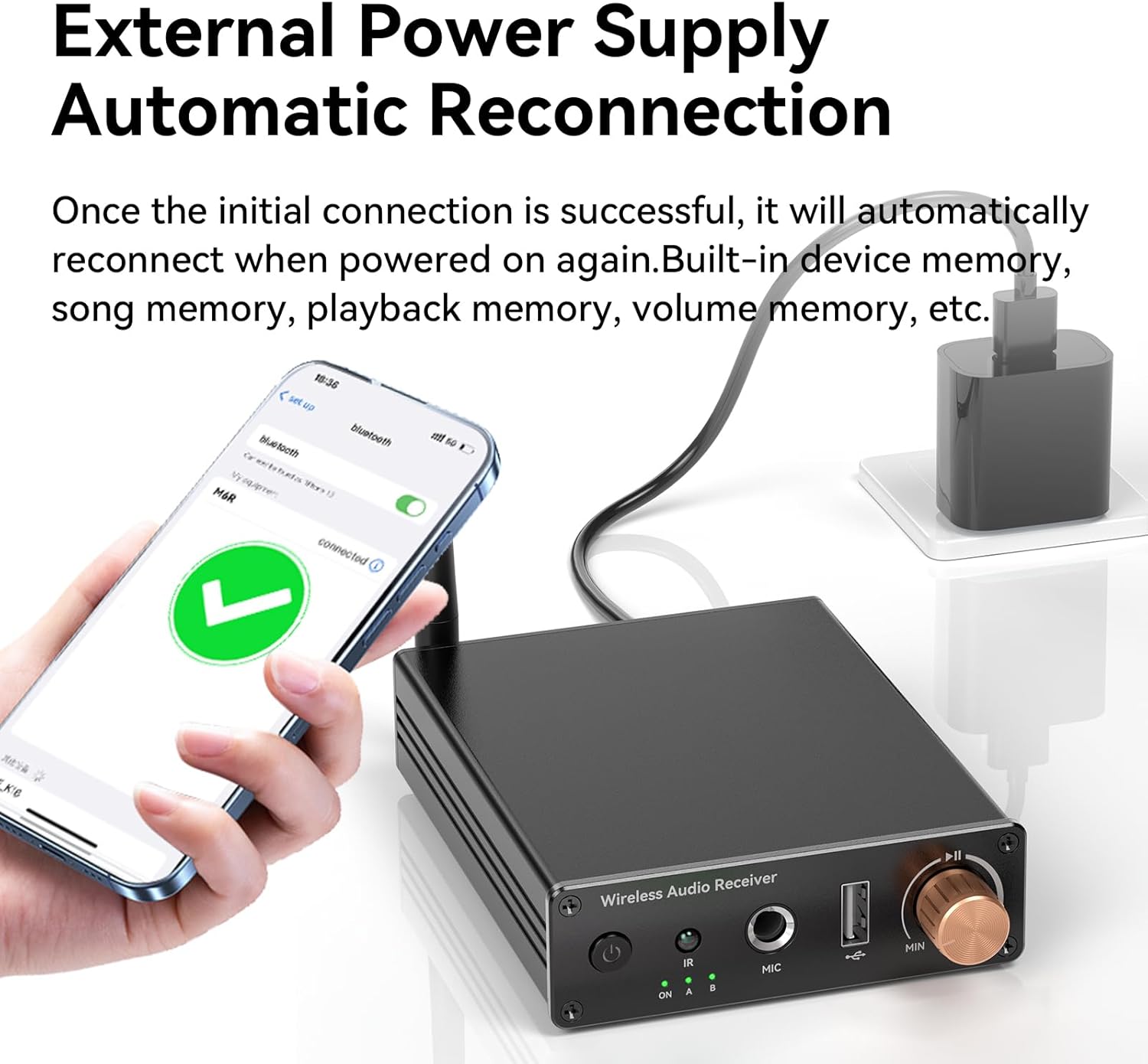
Image: The Bluetooth receiver connected to a traditional stereo system, enabling wireless audio.

Image: The receiver connected to an external power supply, indicating automatic power-on and reconnection.
6. Упатства за работа
6.1. Bluetooth спарување
- After connecting the power, the receiver will automatically turn on and enter pairing mode. The Bluetooth indicator light will flash.
- На вашиот паметен телефон, таблет или друг уред со Bluetooth, одете во поставките за Bluetooth.
- Пребарај за available devices and select "M6R" from the list.
- Once connected, the Bluetooth indicator light on the receiver will remain solid. You can now stream audio wirelessly.
6.2. Поврзување со два уреди
The M6R supports simultaneous connection of two Bluetooth devices:
- Pair the first device following the steps in 6.1 Спарување преку Bluetooth.
- After the first device is connected, disable Bluetooth on the first device. The M6R will re-enter pairing mode.
- Pair the second device with the M6R.
- Re-enable Bluetooth on the first device. Both devices should now be connected to the M6R.
- You can switch between the two connected devices by pausing playback on one and starting playback on the other.

Image: The receiver connected to two mobile phones, allowing seamless switching between audio sources.
6.3. USB Flash Drive Playback
To play audio directly from a USB flash drive:
- Вметнете USB флеш-уред што содржи аудио files into the USB port on the front of the receiver.
- The receiver will automatically detect the USB drive and begin playing compatible audio formats.
- Use the remote control to navigate tracks, adjust volume, and control playback.

Image: A USB flash drive inserted into the receiver for direct audio playback.
6.4. Функција на микрофон (караоке)
To use the microphone input for karaoke or voice ampоживување:
- Connect a wired or wireless microphone (not included) to the 6.5mm MIC input jack on the front of the receiver.
- Ensure your audio system is powered on and set to the correct input source (AUX or RCA).
- Adjust the microphone volume and reverb effects using the remote control or the physical volume knob on the receiver.

Image: A user enjoying karaoke with a microphone connected to the receiver.
6.5. Работа со далечински управувач
The included infrared remote control allows for convenient operation:
- Копче за вклучување: Turns the unit on/off (when connected to power).
- Волумен +/-: Ја прилагодува излезната јачина на звук.
- Пушти/Пауза: Ја контролира репродукцијата на аудио.
- Претходна/Следна песна: Skips between tracks during Bluetooth or USB playback.
- Копче за режим: Switches between Bluetooth and USB playback modes.
- Контроли на микрофонот: Adjusts microphone volume and reverb (if applicable).
6.6. Автоматско повторно поврзување
The receiver is designed to automatically reconnect to the last paired Bluetooth device when it is powered on again. This feature ensures a seamless user experience without the need for manual re-pairing each time.
7. Одржување
To ensure the longevity and optimal performance of your Niarrfi Bluetooth 6.0 Receiver, follow these maintenance guidelines:
- Чистење: Use a soft, dry cloth to wipe the exterior of the device. Avoid using liquid cleaners, aerosols, or solvents, as they may damage the finish or internal components.
- Складирање: Store the device in a cool, dry place away from direct sunlight, extreme temperatures, and high humidity when not in use for extended periods.
- Ракување: Ракувајте со уредот внимателно. Избегнувајте да го испуштате или да го изложувате на силни удари, што може да предизвика внатрешно оштетување.
- Вентилација: Ensure the device has adequate ventilation and is not covered, especially during operation, to prevent overheating.
8 Смена на проблеми
If you encounter issues with your Niarrfi Bluetooth 6.0 Receiver, refer to the following troubleshooting tips:
| Проблем | Можна причина | Решение |
|---|---|---|
| Уредот не се вклучува. | Нема напојување или кабелот е неисправен. | Ensure the Type-C cable is securely connected to both the receiver and a working 5V USB power source. Try a different cable or power adapter. |
| Не може да се спари со уред со Bluetooth. | Receiver not in pairing mode; Bluetooth disabled on source device; too many paired devices. | Ensure the receiver's Bluetooth indicator is flashing. Enable Bluetooth on your source device. Forget previous Bluetooth connections on your source device and try pairing again. Move closer to the receiver. |
| No sound after successful pairing. | Incorrect audio input selected on stereo; volume too low; incorrect cable connection. | Verify your stereo/speaker is set to the correct input (AUX or RCA). Increase volume on both the receiver and your source device. Check that audio cables are securely connected to the correct ports. |
| Audio drops out or skips. | Interference; distance too far; obstacles; low signal strength. | Move your Bluetooth source device closer to the receiver. Ensure there are no major obstacles (walls, large metal objects) between the devices. Avoid placing the receiver near other wireless devices that may cause interference. |
| Далечинскиот управувач не работи. | Battery depleted; line of sight blocked. | Replace the remote control battery. Ensure there is a clear line of sight between the remote and the receiver's IR sensor. |
| USB репродукцијата не работи. | Некомпатибилни file format; faulty USB drive. | Обезбедете аудио files are in a compatible format (e.g., MP3, WAV, FLAC). Try a different USB flash drive. |
9. Спецификации
| Карактеристика | Детал |
|---|---|
| Бренд | Niarrfi |
| Број на модел | M6R |
| Технологија за поврзување | Помошен, Bluetooth |
| Bluetooth верзија | 6.0 |
| Тип на аудио излез | Bluetooth, Headphones (3.5mm AUX), RCA |
| Режим за излез на звук | Стерео |
| Конфигурација на каналот за опкружувачки звук | 5.1 |
| Тип на контролер | Инфрацрвена |
| Компатибилни уреди | Smartphone, Tablet, Smart TV, Laptop, Speaker, Car Stereo |
| Димензии на производот (Д x Ш x В) | 2.3" x 2" x 2" |
| Боја | Црното |
| UPC | 627179305509 |
10. Информации за гаранцијата
This product does not come with an explicit manufacturer's warranty as per the provided information. Please refer to the retailer's return policy for details on returns or exchanges.
11. Поддршка
For further assistance or inquiries regarding your Niarrfi Bluetooth 6.0 Receiver, please contact the retailer or refer to their customer support channels. Keep your purchase receipt for any potential support needs.