
1. Вовед
This manual provides detailed instructions for the installation, operation, and maintenance of your Mars Gaming MC-3TCORELCDM Micro-ATX Gaming Case. This case features an integrated 7.2-inch IPS screen, triple tempered glass panels, and a dual-chamber structure designed to optimize airflow and provide a clean aesthetic for your PC build.
2. Поставување и инсталација
Before beginning installation, ensure all components are compatible with the MC-3TCORELCDM case. This case supports Micro-ATX and Mini-ITX motherboards.
2.1. Internal Component Installation
The MC-3TCORELCDM case offers optimized internal space for various components:
- Компатибилност со матична плоча: Микро-АТХ, Мини-ИТХ
- VGA (Graphics Card) Support: Up to 415mm length, 150mm width
- Висина на ладилникот на процесорот: До 160 мм
- Слотови за проширување: 5
- Погони за возење: 2x 3.5" HDD / 3x 2.5" SSD (refer to diagram for specific locations)
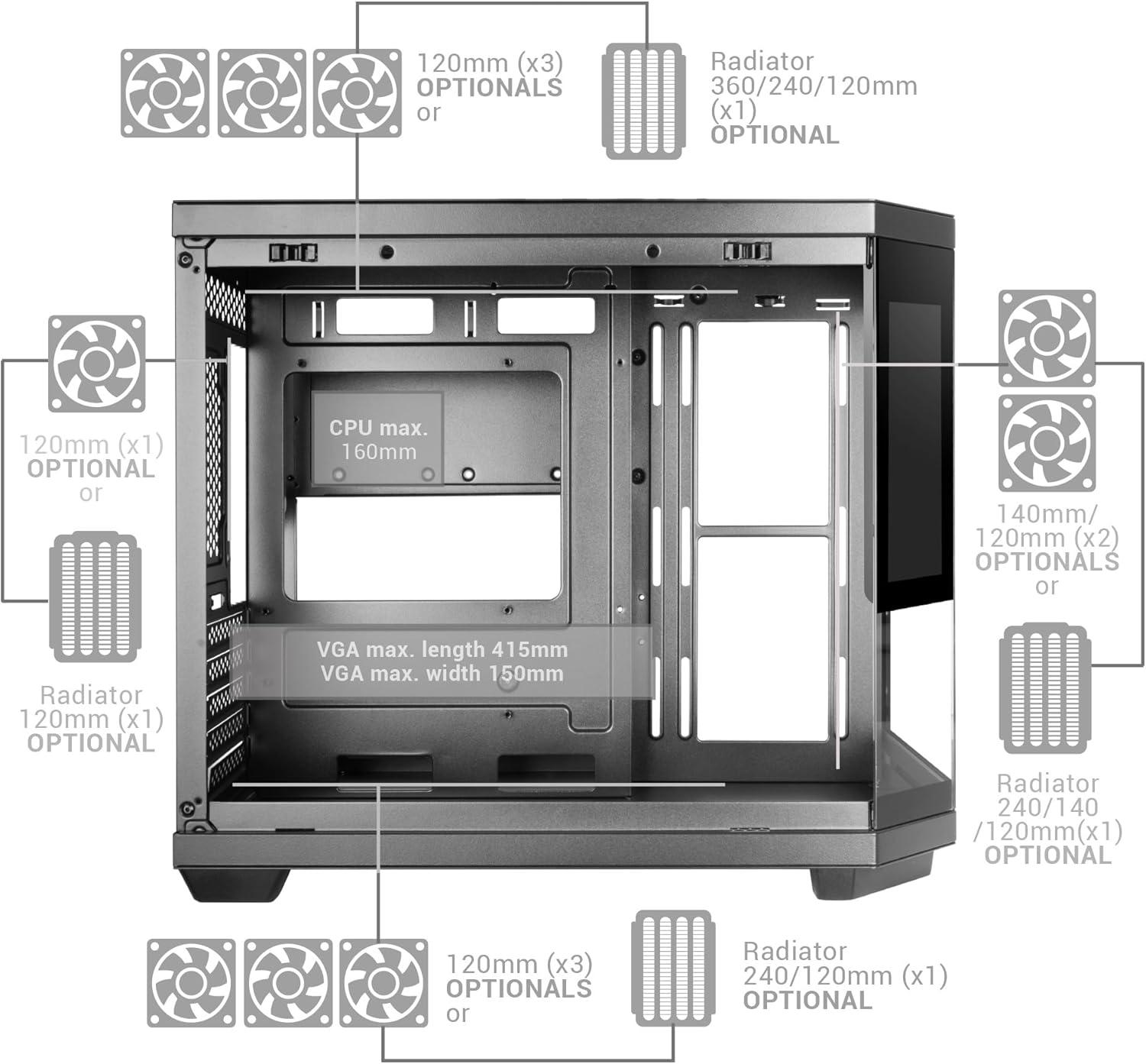
Figure 1: Internal layout diagram with component dimensions and optional cooling placements.
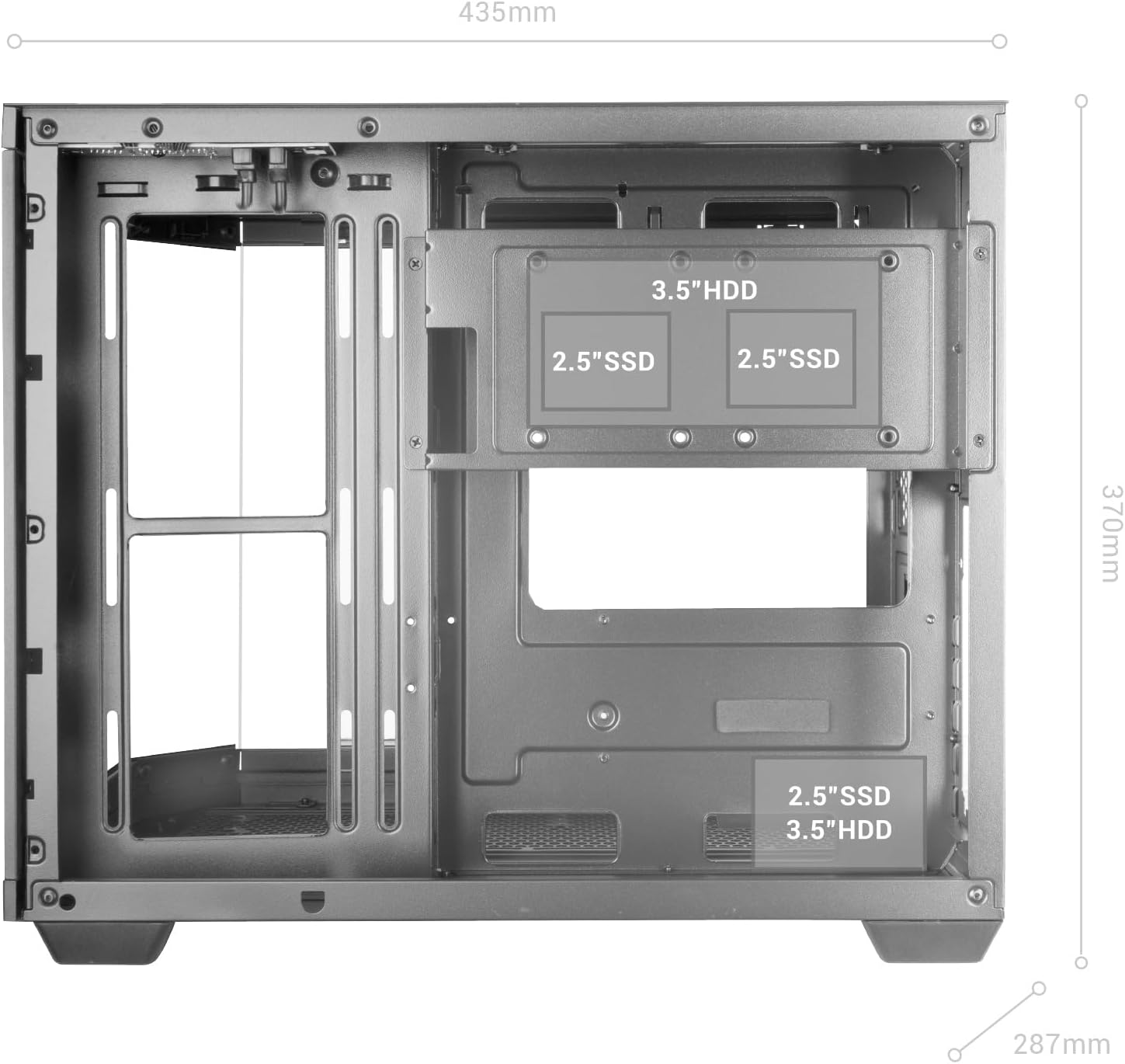
Слика 2: Детално view of internal drive bay locations for 3.5" HDDs and 2.5" SSDs.
2.2. Инсталација на системот за ладење
The case supports extensive cooling configurations:
- Капацитет на вентилаторот: Up to 9x 120mm fans or 2x 140mm + 6x 120mm fans.
- Поддршка за течно ладење: Up to 360mm radiators.

Слика 3: Прample of liquid cooling installation within the MC-3TCORELCDM case, supporting up to 360mm radiators and multiple fans.
2.3. Dual Chamber Structure
The dual-chamber design separates the power supply unit (PSU) and cables from the main hardware components, improving airflow and cable management.

Слика 4: View of the double side chamber, illustrating space for cable routing and rear motherboard connectors.
3. Упатства за работа
3.1. Integrated 7.2" IPS Screen
The MC-3TCORELCDM features a 7.2-inch IPS screen integrated into the central tempered glass panel. This screen can display system telemetry (temperatures, usage), custom images, animations, or videos using its dedicated control software.

Figure 5: The 7.2-inch IPS display showing real-time system information such as memory, CPU, disk, and GPU temperatures.
3.2. Top Panel Connectivity
The top panel provides convenient access to various ports for immediate connection of peripherals.
- 1x USB-C порти
- 1x USB 3.0 приклучок
- 1x USB 2.0 приклучок
- HD Audio + Microphone Jacks

Figure 6: Top panel connectivity options for easy access to peripherals.
4. Одржување
Редовното одржување обезбедува оптимални перформанси и долготрајност на куќиштето на вашиот компјутер.
4.1. Филтри за прашина
The MC-3TCORELCDM case includes magnetic dust filters on the top and bottom panels. Periodically remove and clean these filters to prevent dust buildup and maintain efficient airflow.
4.2. Tempered Glass Panels
The triple tempered glass panels can be cleaned with a soft, lint-free cloth and a mild glass cleaner. Avoid abrasive materials or harsh chemicals that could scratch or damage the glass.

Слика 7: Панорамска view of the case highlighting the triple tempered glass panels.
5 Смена на проблеми
If you encounter issues with your MC-3TCORELCDM case, consider the following general troubleshooting steps:
- Проблеми со моќноста: Ensure all power cables are securely connected to the power supply, motherboard, and components. Verify the power supply switch is in the 'ON' position.
- Перформанси на ладење: Check that all fans are spinning correctly and are free from obstructions. Ensure dust filters are clean. Verify liquid cooling pumps are operational if installed.
- Поврзување: If USB or audio ports are not functioning, ensure the internal headers are correctly connected to the motherboard.
- IPS екран: If the IPS screen is not displaying correctly, check its power and data connections. Refer to the dedicated control software for display settings and troubleshooting.
- Компонентен состав: Double-check that all components are installed according to the specified dimensions and clearances.
For specific component-related issues, refer to the respective component manuals (e.g., motherboard, GPU, PSU).
6. Спецификации
| Карактеристика | Детал |
|---|---|
| Бренд | Марс Гејминг |
| Име на моделот | MC3TCORELCDMW |
| Тип на случај | Кула |
| Компатибилност со матична плоча | Micro ATX, Mini ITX |
| Материјал | Калено стакло |
| Боја | Бело |
| Димензии на ставката (Д x Ш x В) | 17.13" Д x 11.3" Ш x 14.57" В |
| Тежина на ставката | 5.88 килограми |
| VGA Max. Length | 415 мм |
| VGA Max. Width | 150 мм |
| CPU Cooler Max. Height | 160 мм |
| Капацитет на вентилаторот | Up to 9x 120mm or 2x 140mm + 6x 120mm |
| Поддршка за течно ладење | До 360 мм |
| Внатрешни заливи | 2x 3.5" HDD / 3x 2.5" SSD |
| Total USB 3.0 Ports | 1 |
| Other Special Features | Dust Filter, Integrated 7.2" IPS Screen |
7. Гаранција и поддршка
Mars Gaming products are designed for reliability and performance. For warranty information, technical support, or service inquiries, please visit the official Mars Gaming webстраницата или директно контактирајте ја нивната корисничка поддршка. Зачувајте го доказот за купување за гаранциски барања.