Вовед
Thank you for choosing the Bextgoo 2026 Pro Spy Pen Camera. This device is designed for discreet video recording and photo capture in 1080P Full HD. This manual provides detailed instructions to help you get started and utilize all features effectively.
Што има во кутијата
Проверете ја содржината на пакувањето за да се осигурате дека сите артикли се присутни:
- 1 x Bextgoo Pen Camera
- 1 x 64GB мемориска картичка (претходно инсталирана)
- 5 x Replacement Refills
- 1 x шрафцигер
- 1 x USB кабел
- 1 x Читач на картички
- 1 x Ресетирај игла
- 1 x Camera Instruction Manual (this document)

Производот завршиview
The Bextgoo 2026 Pro Spy Pen Camera integrates a writing pen with a hidden camera, offering 1080P HD video and photo capabilities. It features a simple one-button operation and includes a 64GB memory card for immediate use.
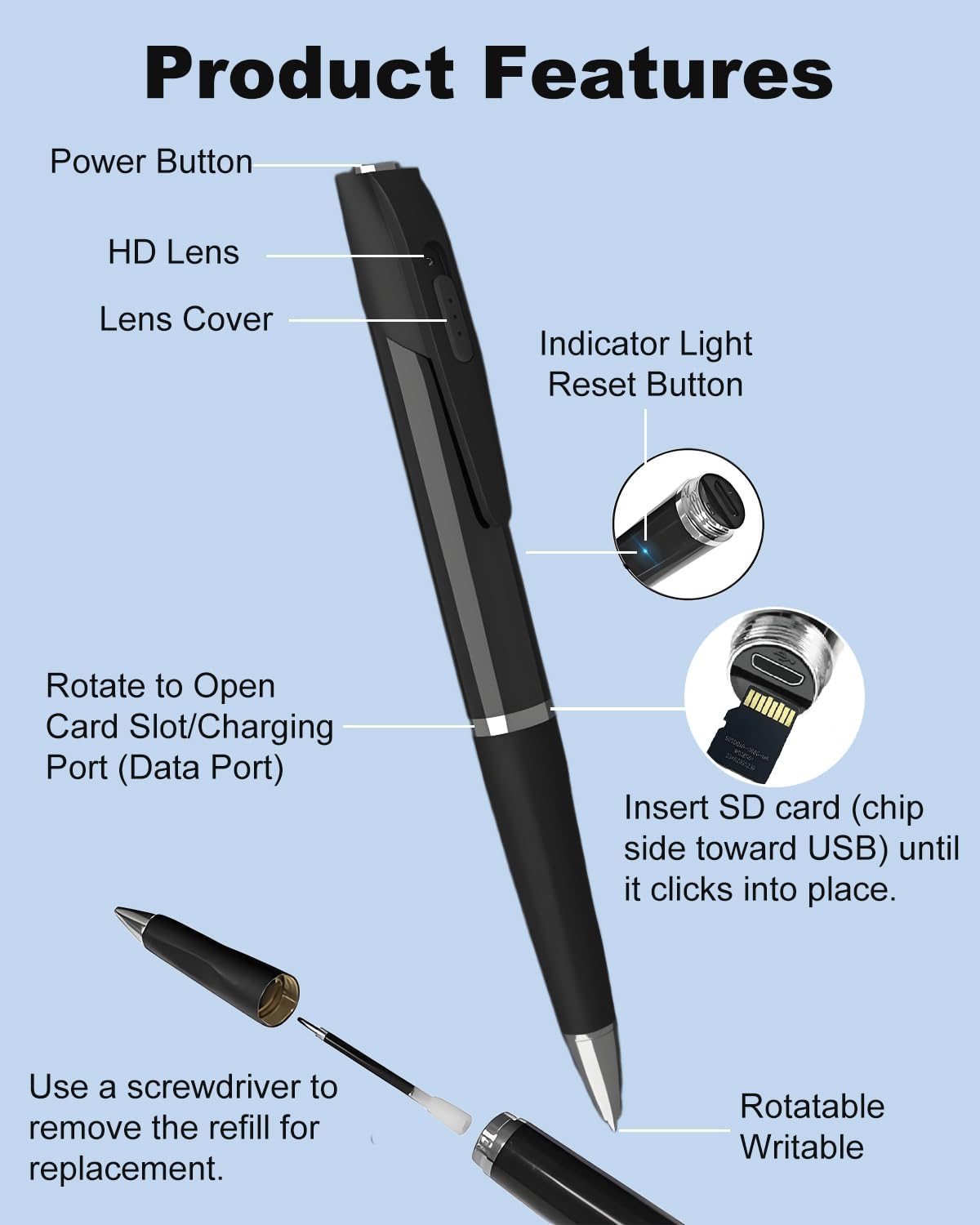
- Копче за вклучување: Controls power on/off, video recording, and photo capture.
- HD леќа: Captures 1080P video and photos.
- Капак на објективот: Protects the camera lens.
- Индикаторско светло: Provides status feedback (e.g., recording, charging).
- Копче за ресетирање: Се користи за ресетирање на уредот ако не реагира.
- Card Slot/Charging Port: Houses the microSD card and serves as the charging/data transfer port.
- Rotatable Writable Tip: Standard pen functionality.

Поставување
1. Полнење на уредот
Before first use, fully charge the pen camera. Connect the pen to a USB power source (e.g., computer USB port or USB wall adapter) using the provided USB cable. The indicator light will show charging status and turn off when fully charged.

2. Вметнување на мемориската картичка
The 64GB memory card is typically pre-installed. If not, or if you are replacing it, rotate the pen to expose the card slot. Insert the microSD card with the chip side facing towards the USB port until it clicks into place. The device supports up to 128GB microSD cards.

3. Setting Date and Time Stamp
To set the correct date and time stamp for your recordings:
- Connect the pen camera to your computer using the USB cable.
- Open the removable disk drive that appears.
- Направете нов текст file named "time.txt" in the root directory of the memory card.
- Open "time.txt" and enter the current date and time in the format: ГГГГ-ММ-ДД Ч:ММ:СС (e.g., 2026-02-12 14:30:00).
- Зачувај го file and safely eject the pen camera from your computer.
- Времето свamp will be updated the next time the camera is powered on.
Упатства за работа
The Bextgoo pen camera features a simple one-button operation. The LED indicator light will guide you through different modes, but it turns off during recording to ensure discretion.

Вклучување/исклучување
- Вклучување: Long press the power button until the indicator light turns on (e.g., blue light).
- Исклучено: Long press the power button again until the indicator light turns off. The device will save any active recording before powering down.
Снимање видео
- While the device is powered on, press the power button еднаш.
- The indicator light will flash (e.g., blue light flashes then turns off) to indicate that video recording has started.
- To stop recording, press the power button еднаш again. The indicator light will turn back on, and the video file ќе се зачува автоматски.
Фотографирање
- While the device is powered on, press the power button двапати брзо.
- The indicator light will flash briefly to indicate a photo has been taken and saved.
File Управување
Пристапување Files
На view or transfer your recorded videos and photos:
- Преку USB кабел: Connect the pen camera to your computer using the provided USB cable. The device will appear as a removable disk. You can then copy fileи директно.
- Via Card Reader: Remove the microSD card from the pen camera and insert it into the provided card reader. Connect the card reader to your computer's USB port. The card will appear as a removable disk.
Снимање на јамка
The pen camera supports loop recording. When the memory card is full, the oldest files will be automatically overwritten by new recordings. This ensures continuous operation without manual deletion of old files.
Automatic Save on Low Battery
The device is equipped with an auto-save function. If the battery runs low during recording, the current file will be saved automatically before the device powers off, preventing data loss.
Одржување
Replacing Ink Refills
To replace the ink refill:
- Unscrew the pen tip counter-clockwise.
- Use the provided screwdriver to gently remove the old refill.
- Insert a new refill and screw the pen tip back on clockwise.
Чистење
Wipe the pen camera with a soft, dry cloth. Avoid using liquid cleaners or abrasive materials, as they may damage the device or lens.
Решавање проблеми
| Проблем | Можна причина | Решение |
|---|---|---|
| Уредот не се вклучува. | Слаба батерија. | Наполнете го уредот целосно. |
| Уредот не реагира. | Падот на системот. | Use the reset pin to press the reset button. |
| Не може да снима видео/фотографира. | Мемориската картичка е полна или не е правилно вметната. | Проверете ја вметнатата мемориска картичка. Префрлете. files to free up space or replace the card. |
| Квалитетот на видеото е слаб. | Недоволно осветлување; валкана леќа. | Ensure adequate lighting. Clean the camera lens gently. |
| Неточен датум/времеamp. | Time not set or file расипани. | Follow the "Setting Date and Time Stamp" instructions. |
Спецификации
- Број на модел: WSV16
- Резолуција за снимање видео: 1080p full HD
- Тип на медиум: Micro SD Card (64GB included, supports up to 128GB)
- Батерија: 500mAh rechargeable (1 A battery included)
- Continuous Video Recording Time: До 75 минути
- Total Working Time: Up to 150 minutes (depending on usage)
- Димензии на производот: 5.8 x 0.61 x 0.61 инчи
- Тежина на ставката: 4.2 унци
- Боја: Црното
- Тип на контрола на експозицијата: Автоматски
- Режими на снимање: Night (implied by product description, though not a distinct mode button)
Гаранција и поддршка
Bextgoo is committed to providing high-quality products. For any questions, technical support, or warranty inquiries, please contact Bextgoo customer service through the retailer's platform or visit the official Bextgoo store page on Amazon.
Страница на продавницата на Амазон: Bextgoo Official Store