Вовед
Ви благодарам за купувањетоasing the ROCAM CR1030DAB Solar DAB+/FM Emergency Radio. This portable radio is designed for reliable communication and power in various situations, from daily use to outdoor adventures and emergencies. It features DAB+/FM radio reception, Bluetooth connectivity, multiple charging options including solar and hand crank, a powerful 12000 mAh battery, and integrated lighting functions. Please read this manual thoroughly before use to ensure proper operation and to maximize the product's lifespan.
Инструкции за безбедност
- Не го изложувајте уредот на екстремни температури, директна сончева светлина подолг период (надвор од полнењето) или висока влажност.
- Избегнувајте испуштање или изложување на радиото на силни удари.
- Не расклопувајте го и не обидувајте се сами да го поправите уредот. За сите сервиси обратете се на квалификуван персонал.
- Keep the device away from water and other liquids, except for its IPX6 water resistance which protects against strong jets of water. Do not submerge.
- Ensure the USB-C port cover is securely closed when not in use, especially in wet conditions.
- When using the hand crank, turn it at a steady, moderate pace. Excessive force or speed can damage the mechanism.
- The SOS alarm is very loud. Avoid activating it unnecessarily or near sensitive ears.
- Фрлете ги батериите според локалните прописи.
Содржина на пакетот
Проверете дали сите артикли се присутни во пакувањето:
- 1 × ROCAM CR1030DAB Radio
- 1 × USB-C кабел за полнење
- 1 × Portable Strap
- 1 × Упатство за употреба
Производот завршиview
Запознајте се со компонентите и контролите на радиото.

Слика: Предна страна view of the ROCAM CR1030DAB radio, highlighting its display, control buttons, and extended antenna. The radio is shown in an outdoor setting, emphasizing its portable and robust design.
Клучни компоненти:
- 2.4-инчен екран во боја: Shows station information, battery level, time, and menu options.
- Контролни копчиња: Power, Mode, Menu, Scan, Volume, Navigation (Up/Down/Left/Right/OK), SOS.
- Телескопска антена: For optimal DAB+/FM signal reception.
- Соларен панел: Се наоѓа на врвот за полнење на сончева енергија.
- Рачна рачка: On the side for manual power generation.
- Фенерче: Integrated LED light on one end.
- Читајќи Лamp: Foldable panel with 12 LEDs.
- USB-C влезен/излезен порт: For charging the radio and charging external devices.
- Приклучок за слушалки (3.5 мм): За приватно слушање.
- Оддел за батерии: For AAA backup batteries.

Слика: Детален view of the radio's 2.4-inch color display, illustrating its clarity and the information presented, such as station name and signal strength.
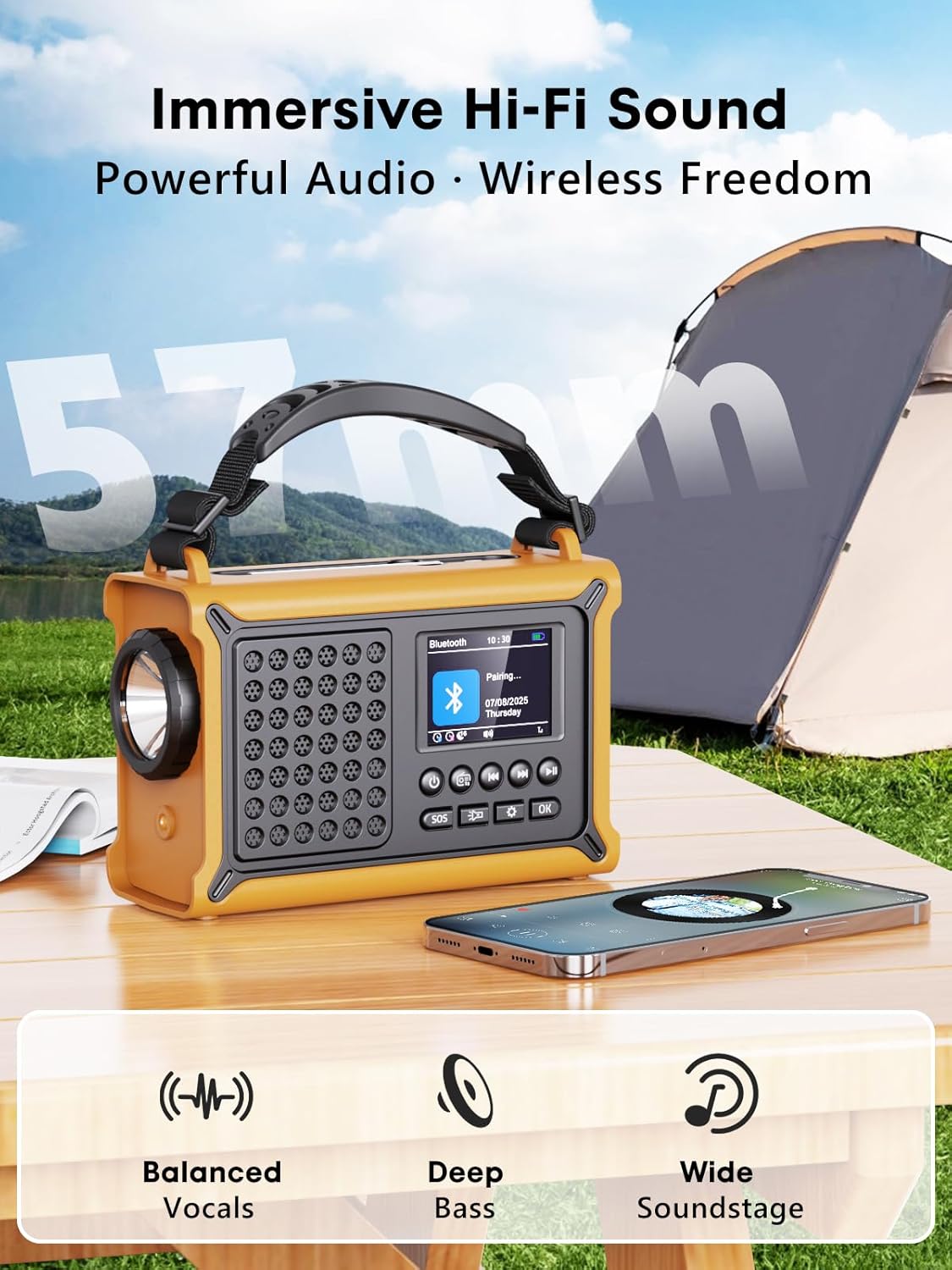
Слика: The radio highlighting its audio capabilities, featuring 57mm speakers designed for clear, powerful sound with balanced vocals and deep bass.

Слика: The radio held in hand, illustrating its ultra-portable design and compact dimensions (17.3 cm length, 12.1 cm height, 7.4 cm width), along with its IPX6 water resistance.
Поставување
1. Почетно полнење
Before first use, it is recommended to fully charge the radio's internal 12000 mAh battery using the supplied USB-C cable. Connect the USB-C cable to the radio's USB-C input port and the other end to a standard USB power adapter (not included) or a computer USB port. The charging indicator on the display will show the charging status. A full charge ensures maximum battery life and optimal performance.
2. Inserting AAA Batteries (Optional Backup)
For an additional power backup, you can insert 3 AAA batteries (not included) into the battery compartment. This provides an alternative power source if the internal rechargeable battery is depleted and other charging methods are unavailable.
3. Вклучување и избор на јазик
Притиснете и задржете го Моќ button to turn on the radio. Upon first power-on, you may be prompted to select your preferred language from the 12 available options. Use the navigation buttons to select and the OK копче за потврда.
Упатства за работа
Вклучување/исклучување
- За вклучување: Притиснете и држете го Моќ копче.
- За исклучување: Притиснете и држете го Моќ копчето повторно.
DAB+/FM Radio Operation
- Изберете режим: Притиснете го Режим копче за префрлување помеѓу режимите DAB+ и FM радио.
- Проширете ја антената: Целосно извлечете ја телескопската антена за најдобар прием.
- Автоматско скенирање: Во DAB+ или FM режим, притиснете го Скенирајте button to automatically search for available stations. The radio will store up to 40 DAB+ and 40 FM stations.
- Рачно подесување/избор на станица: Користете го Горе/Надолу navigation buttons to browse through scanned stations or manually tune frequencies.
- Контрола на јачината на звукот: Користете го Волумен +/- копчиња за прилагодување на нивото на звукот.
- Претходно поставени мемории: За да зачувате станица, наместете ја саканата станица, потоа притиснете и држете го копчето OK button. Use navigation buttons to select a preset number and press OK to save. To recall a preset, briefly press the OK button, then use navigation to select the preset.
Bluetooth поврзување
- Влезете во режим на Bluetooth: Притиснете го Режим button until "Bluetooth" appears on the display. The radio will enter pairing mode, indicated by a blinking Bluetooth icon.
- Спарување: On your smartphone or other Bluetooth device, enable Bluetooth and search for available devices. Select "ROCAM CR1030DAB" from the list.
- Поврзано: Once paired, the radio will emit a confirmation sound, and the Bluetooth icon will stop blinking. You can now play audio from your device through the radio.
Полнење на радиото
The radio offers multiple charging methods for its internal 12000 mAh battery:

Слика: The radio demonstrating its versatile charging capabilities, including the solar panel, USB-C input, hand crank, and the option for AAA batteries.
- Полнење USB-C: Connect the supplied USB-C cable to a 5V/2A (or higher) USB power source. This is the fastest charging method.
- Соларно полнење: Place the radio with the solar panel facing direct sunlight. The solar charging indicator will illuminate. This method is ideal for maintaining charge or slow charging in emergencies. The 8500 mm² panel provides 350 mA.
- Полнење на рачна рачка: Rotate the hand crank clockwise or counter-clockwise at a steady pace (approx. 120-150 RPM). Cranking for 1 minute can provide several minutes of radio playback. The hand crank generates 650 mA.
- ААА батерии: If the internal battery is depleted, the radio can operate using 3 AAA batteries (not included) inserted into the battery compartment.
External Device Charging (Power Bank Function)
The radio can act as a power bank to charge external devices like smartphones. Connect your device's charging cable to the radio's USB-C output port. The radio's 12000 mAh battery provides a 5V/1A output.
Функции на осветлување

Слика: A composite image illustrating the radio's versatile lighting options: a powerful 5W flashlight, the SOS red flashing light, and a soft 12-LED reading lamp.
- Фенерче: Притиснете го Фенерче button once to turn on the 5W LED flashlight. Press again to cycle through brightness levels (if available) or turn off.
- Читајќи Лamp: Подигнете го отчитувањето lamp panel. Press the Читајќи Лamp button (often combined with flashlight button or a separate one) to activate the 12-LED reading lamp. Press again to cycle through brightness levels or turn off.
Функција за SOS аларм
Во итен случај, притиснете и држете го СОС button. The radio will emit a loud 120 dB siren and flash a red light to attract attention. Press the СОС повторно притиснете го копчето за да го деактивирате алармот.
Одржување
- Чистење: Избришете го радиото со мека, гamp крпа. Не користете абразивни средства за чистење или растворувачи.
- Складирање: When not in use for extended periods, store the radio in a cool, dry place. It is recommended to fully charge the internal battery every 3-6 months to maintain its health.
- Нега на батеријата: Avoid completely draining the internal battery frequently. Recharge it as soon as possible when the low battery indicator appears.
Решавање проблеми
| Проблем | Можна причина | Решение |
|---|---|---|
| Радиото не се вклучува. | Батеријата е испразнета. | Charge the radio via USB-C, solar, or hand crank. Ensure AAA batteries are inserted correctly if using them. |
| Лош радио прием. | Антената не е продолжена, слаба сигнална област, пречки. | Fully extend the telescopic antenna. Reposition the radio to a location with better signal. Perform an auto scan again. |
| Bluetooth уредот не може да се поврзе. | Radio not in pairing mode, device too far, already connected to another device. | Ensure the radio is in Bluetooth pairing mode. Move the device closer to the radio. Disconnect from other Bluetooth devices. |
| Надворешниот уред не се полни. | Radio battery too low, incorrect cable, device not compatible. | Ensure the radio has sufficient charge. Use a compatible USB-C cable. Some devices may draw too much power. |
| Рачната курбла е вкочанета или не се полни. | Mechanism obstruction, incorrect cranking speed. | Check for any obstructions. Rotate the crank at a steady, moderate pace. Do not force it. |
Спецификации
| Модел | CR1030DAB |
| Радио бендови | DAB+, FM |
| Bluetooth верзија | 5.0 |
| Капацитет на батеријата | 12000 mAh (Lithium) |
| Методи за полнење | USB-C, Solar, Hand Crank, 3x AAA Batteries (backup) |
| Големина на соларни панели | 8500 mm² (350 mA output) |
| Hand Crank Output | 650 mA |
| USB излез | 5V/1A |
| Приказ | 2.4-инчен LCD екран во боја |
| Претходно поставувања | 80 (40 DAB+, 40 FM) |
| Отпорност на вода | IPX6 |
| СОС аларм | 120 dB |
| Фенерче | LED 5W |
| Читајќи Лamp | 12-ЛЕР |
| Димензии | 12Д x 17.2Ш x 7.3В см (приближно) |
| Тежина | 820 грама (приближно) |

Слика: A comparison chart detailing the specifications of the ROCAM CR1030DAB against generic alternatives, emphasizing its advanced features like a larger color display, higher battery capacity, and more efficient charging.
Гаранција и поддршка
ROCAM products are designed for reliability and performance. This product comes with a standard manufacturer's warranty. For specific warranty details, please refer to the documentation provided with your purchase or contact ROCAM customer support.
If you encounter any issues or have questions regarding the operation or maintenance of your ROCAM CR1030DAB radio, please contact our customer support team.
- Поддршка за корисници: Refer to your product packaging or the ROCAM official webсајт за информации за контакт.
- Онлајн ресурси: Visit the ROCAM webстраница за често поставувани прашања, регистрација на производи и дополнителни материјали за поддршка.