1. Вовед
This manual provides comprehensive instructions for the setup, operation, and maintenance of your YZ LED Electronic Scoreboard with Watch Control and Tripod. This portable digital scoreboard is designed for various sports, offering clear scorekeeping with multiple control options.
Главните карактеристики вклучуваат:
- Multi-sport scoring modes (Normal and Tennis).
- Watch control and remote control for convenient operation.
- Bright LED display with adjustable brightness for indoor and outdoor visibility.
- Portable design with multiple mounting options, including a tripod.

Image: The YZ LED Electronic Scoreboard is versatile for various sports activities.
2. Што има во кутијата
Ве молиме проверете дали сите компоненти се присутни во вашето пакување:
- Scoreboard x1
- Статив x1
- Далечински управувач x1
- Watch Control x1
- Упатство за употреба
- Charger/Type-C Cable
- Стенд за маса
- Accessories (screws, hooks)

Image: All items included in the YZ LED Electronic Scoreboard package.
Video: An unboxing demonstration of the YZ Scoreboard with Watch Control, showing all included components.
3. Поставување
3.1 Powering the Scoreboard
The scoreboard can be powered by 3x 18650 button-top batteries (not included) or directly via the included Type-C cable and charger.
- Инсталација на батерија: Open the battery compartment on the back of the scoreboard and insert three 18650 button-top batteries, ensuring correct polarity.
- Надворешна моќност: Connect the Type-C cable to the scoreboard and the charger to a power outlet.

Image: The scoreboard's rear panel, highlighting the battery compartment and power connection.

Слика: Детална view of the power switch, battery slot, and USB-C port on the scoreboard.
3.2 Опции за монтирање
The scoreboard offers flexible mounting solutions:
- Стенд за маса: Attach the included table stand to the bottom of the scoreboard for stable placement on flat surfaces.
- Инсталација на статив: The scoreboard can be mounted on the included tripod for adjustable height and positioning.
- Поставен на ѕид: Use the provided hooks to hang the scoreboard on a wall.
- Net-Hanging: The hooks also allow for hanging the scoreboard on a tennis or volleyball net.

Image: Multiple ways to position the scoreboard for different game environments.

Image: The scoreboard displayed on its adjustable tripod, illustrating its compact size.
Video: A step-by-step guide on how to install the YZ Scoreboard onto its tripod.
4. Упатства за работа
4.1 Вклучување/исклучување
Locate the power switch on the side of the scoreboard to turn it on or off.
4.2 Switching Scoring Modes
The scoreboard supports two main scoring modes: Normal Mode and Tennis Mode. Use the 'Ball' button on the scoreboard's control panel or the remote to switch between modes.
- Нормален режим: Scores change from 1 to 99. Match score changes from 0-9.
- Тениски режим: Scores change as 15, 30, 40. Match score automatically increments by 1.

Image: The scoreboard displaying scores in both Tennis Mode and Normal Mode.
4.3 Score Adjustment (Watch Control)
The watch controls allow for easy score adjustments for both Home and Guest teams.
- Press the '+' button to increase the score.
- Press the '-' button to decrease the score.
- Long press the 'Reset' button to reset the score for that team.
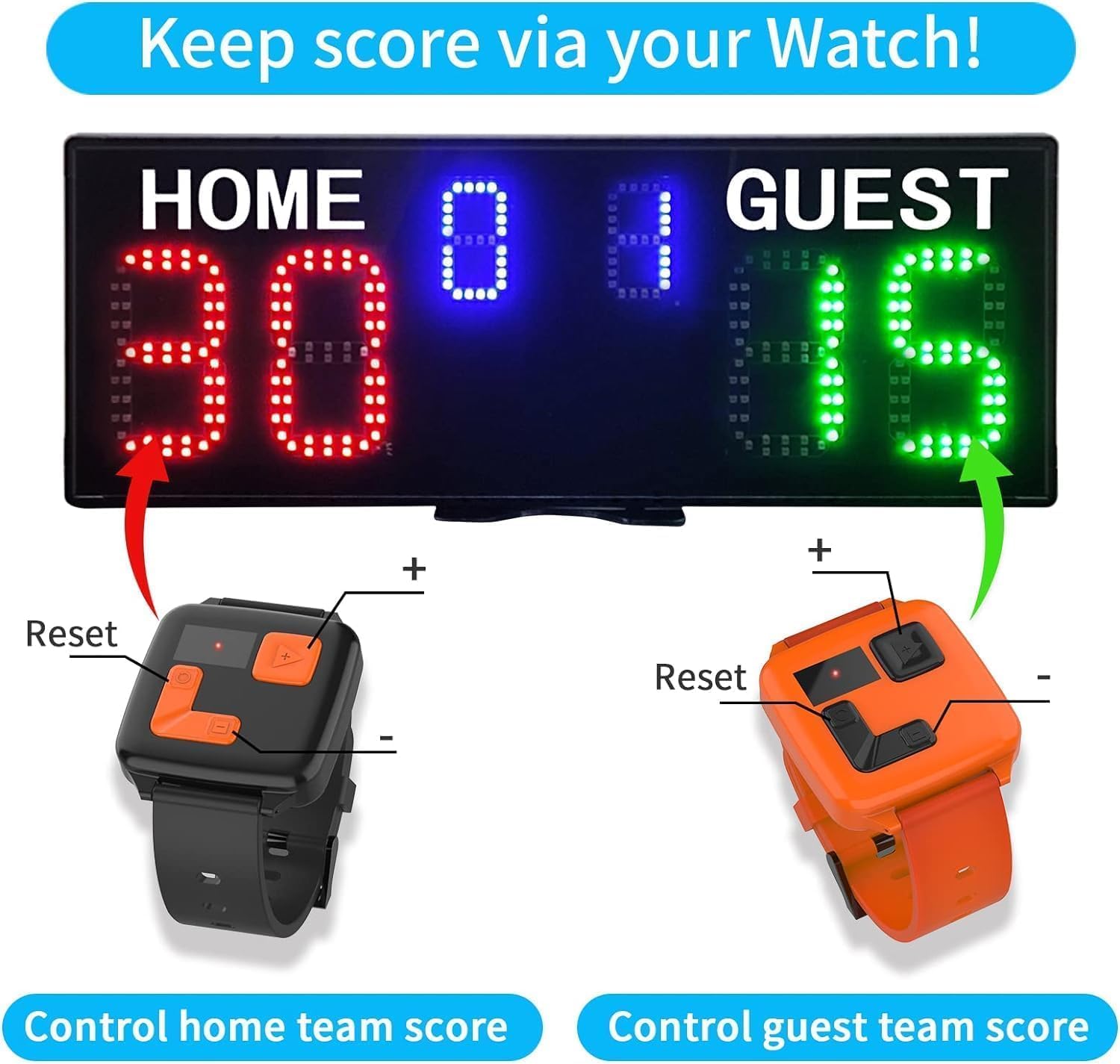
Image: Watch controls for managing Home and Guest scores.
Video: Demonstration of how to use the watch control for scoring in different modes.
Video: Various usage scenarios for the watch control with the scoreboard.
Video: Detailed explanation of the YZ Scoreboard's watch control functions.
4.4 Score Adjustment (Remote Control)
The remote control provides a wider range of functions, including score adjustment, mode switching, and settings control.
- Use the dedicated buttons for Home/Guest score adjustment (+/-).
- Use the 'EDIT' button to enter settings for mode changes (P-11 for Tennis, P-12 for Normal).
- The remote offers a 100ft super long control range.

Image: The remote control and watch controls for the scoreboard.
4.5 Прилагодување на осветленоста
The scoreboard features 5 levels of brightness. Adjust the brightness using the remote control to suit indoor or outdoor conditions.

Image: Visual representation of the scoreboard's adjustable brightness settings.
4.6 Контрола на звук
The scoreboard includes an audible beep for score changes. This sound can be adjusted or muted via the remote control.

Image: Illustration of the scoreboard's sound adjustment feature.
5. Одржување
- Чистење: Use a soft, dry cloth to clean the scoreboard display and casing. Избегнувајте абразивни средства за чистење или растворувачи.
- Складирање: When not in use, store the scoreboard in a dry, cool place, away from direct sunlight and extreme temperatures. Remove batteries if storing for extended periods.
- Нега на батеријата: Ensure 18650 batteries are charged regularly if using battery power. Replace remote control batteries (2x AAA, not included) as needed.
6 Смена на проблеми
- Scoreboard not turning on: Check battery installation (polarity, charge level) or ensure the Type-C cable is securely connected to a power source. Verify the power switch is in the 'ON' position.
- Remote/Watch control not responding: Ensure the scoreboard is powered on. Check batteries in the remote (2x AAA) and watch controls. Ensure line of sight for remote control and that watch controls are within effective range.
- Екранот е затемнет: Adjust the brightness settings using the remote control. Ensure the scoreboard is not in direct, strong sunlight if outdoor visibility is an issue.
- Incorrect scoring mode: Use the 'EDIT' button on the remote or the 'Ball' button on the scoreboard to switch to the desired mode (P-11 for Tennis, P-12 for Normal).
7. Спецификации
| Карактеристика | Детал |
|---|---|
| Име на моделот | YZ-A30B6D+WB+TR |
| Димензии на пакетот со ставки (Д x Ш x В) | 19.8 x 12.6 x 4.2 инчи |
| Димензии на производот (Д x Ш x В) | 18.9 x 7 x 0.9 инчи |
| Тежина на пакетот | 2.45 килограми |
| Материјал | Пластика |
| Боја | Black (Red & Green & Blue LED) |
| LED осветленост | 3000CD (5 adjustable levels) |
| Visual Range | 70 стапки |
| Контролен опсег | 100ft (Remote Control) |
| Извор на енергија | 3x 18650 batteries (not included) or plugged in via Type-C |
| Вклучени компоненти | Scoreboard, Tripod, Remote Control, Watch Control, User manual |
8. Гаранција и поддршка
8.1 Информации за гаранцијата
Овој производ доаѓа со а 1 години гаранција од датумот на купување. Оваа гаранција ги покрива производствените дефекти и неисправности при нормална употреба. Не ги покрива штетите предизвикани од злоупотреба, несреќи, неовластени модификации или неправилна инсталација.
8.2 Политика за враќање
The standard return policy allows for returns within 30 дена for a refund or replacement, subject to the retailer's terms and conditions.
8.3 Поддршка за корисници
For any questions, technical assistance, or warranty claims, please contact the manufacturer or your retailer. Refer to the contact information provided in your product packaging or on the official YZ webсајт.