
1. Во текотview
The Ulefone Tab A9 Pro is an 8.68-inch kids learning tablet designed for children aged 3-12. It features an 8.68" TÜV SÜD Eye Comfort Display, runs on Android 15 with a MediaTek G91 Octa-Core processor, and includes 8GB RAM and 128GB storage (expandable up to 2TB). This tablet is equipped with built-in learning apps, parental controls, and dual SIM support for connectivity on the go. It comes with a durable, shockproof EVA case and a DIY creativity kit.
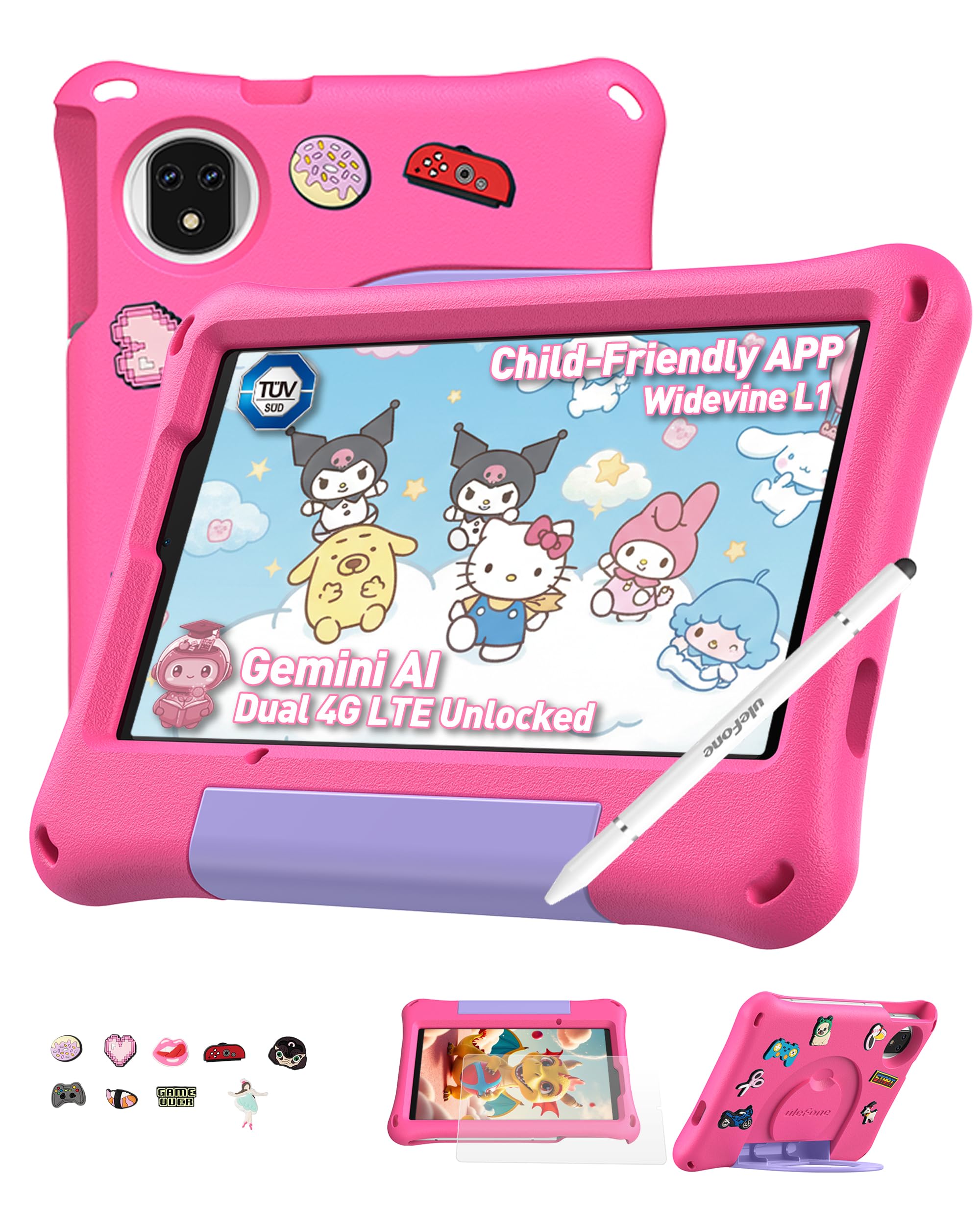
Figure 1: Ulefone Tab A9 Pro Kids Learning Tablet (Pink Edition) with its protective case and various features highlighted.
2. Што е вклучено
The Ulefone Tab A9 Pro package contains the following items:
- 1x Ulefone Tab A9 Pro Tablet
- 1x Type-C to Type-C Charging Cable (1M)
- 1x Tempered Glass Screen Protector (pre-applied)
- 1x Cartoon Decor Kit (15 random accessories)
- 1x EVA Protective Case with adjustable stand
- 1x Capacitive Stylus
- 1x SIM игла
- 1x полнач за наизменична струја
- 1x Safety Prompt Statement
- 1x Charging Instruction Card
- 1x повеќејазично упатство за употреба

Figure 2: All items included in the Ulefone Tab A9 Pro Kids Learning Tablet package.
Видео 1: Распакување и сè другоview of the Ulefone Tab A9 Pro Kids Learning Tablet, demonstrating its components and initial setup.
3. Клучни карактеристики
- Zero Subscription & Parental Controls: The tablet provides a safe digital environment with no monthly fees. Advanced parental controls allow content filtering, screen time limits, and a secure space for children. It comes preloaded with GMS-certified educational apps.

Figure 3: The tablet features built-in parental control mode for a supervised experience.
Video 2: Demonstration of the advanced parental control features available on the Ulefone Tab A9 Pro Kids Tablet.
- Powerful Android 15 Performance: Equipped with Android 15 OS and a MediaTek G91 Octa-Core processor, 8GB RAM (4+4GB), and 128GB storage (expandable to 2TB). It includes Google Gemini AI for instant answers and supports demanding educational games and 3D applications.
- Eye-Protection Screen: The 8.68-inch IPS display features a 90Hz refresh rate and TÜV SÜD low blue light certification to reduce eye strain. Widevine L1 certification allows streaming HD content from platforms like Disney+ and Netflix.

Figure 4: The 8.68-inch 90Hz display with TÜV SÜD low blue light certification for eye comfort.
- Durable Case & DIY Gift Set: Comes with a rugged, shockproof EVA case with an adjustable stand. The DIY Creativity Kit includes 15 random cartoon accessories for case decoration and a stylus pen for interactive use.

Figure 5: The tablet's double protection with a pre-applied tempered glass screen protector and a soft silicone protective case.
- Основни работи за патување: Features Dual SIM support and Dual-band Wi-Fi for connectivity. A 5040mAh battery provides extended use. Includes 12MP+13MP rear cameras and an 8MP front camera with Face Unlock.

Figure 6: The tablet is designed for use at home and on-the-go, with dual SIM and Wi-Fi capabilities.

Figure 7: The tablet is equipped with 12MP + 13MP rear cameras and an 8MP front camera.
4. Водич за поставување
4.1 Почетно вклучување
- Ensure the tablet is fully charged using the provided Type-C cable and AC power charger.
- Press and hold the Power button (usually located on the side) until the Ulefone logo appears on the screen.
- Следете ги упатствата на екранот за да го изберете вашиот јазик, регион и да се согласите со условите и одредбите.
4.2 Поврзување на Wi-Fi
- During initial setup or via Settings, navigate to "Network & internet".
- Вклучи/исклучи Wi-Fi.
- Изберете ја саканата Wi-Fi мрежа од листата.
- Внесете ја лозинката за Wi-Fi ако ви биде побарано и допрете „Поврзи се“.
4.3 Поставување на родителски контроли
The Ulefone Tab A9 Pro includes robust parental control features to manage your child's usage:
- Access the dedicated "Kids Mode" application or navigate to "Settings > Digital Wellbeing & parental controls".
- Создадете професионален детеfile and set up a parental password.
- Configure screen time limits, content restrictions, and app access permissions.
- Monitor activity and adjust settings as needed to ensure a safe and educational experience.
5. Ракување со вашиот таблет
5.1 Навигација низ интерфејсот
- Почетен екран: Swipe left or right to access different pages of apps.
- Известувања: Повлечете надолу од горниот дел на екранот до view известувања и брзи поставки.
- Неодамнешни апликации: Tap the square icon (or swipe up and hold from the bottom) to see recently used applications.
- Назад: Tap the triangle icon (or swipe from the left/right edge) to go back to the previous screen.
5.2 Користење на пенкалото
The included capacitive stylus can be used for drawing, writing, and precise navigation. Simply touch the stylus tip to the screen as you would with your finger. The stylus has two ends for versatile use.
5.3 Инсталирање и управување со апликации
- Претходно вчитани апликации: The tablet comes with various educational and entertainment apps.
- Google Play Store: Access the Google Play Store to download additional apps, games, and content. Ensure parental controls are configured to manage downloads.
- Деинсталирање апликации: To remove an app, long-press its icon on the home screen or app drawer, then drag it to the "Uninstall" option, or go to "Settings > Apps > See all apps" and select the app to uninstall.
6. Одржување и грижа
- Чистење: Користете мека крпа што не остава влакненца за чистење на екранот и куќиштето. Избегнувајте груби хемикалии или абразивни материјали.
- Нега на батеријата: To prolong battery life, avoid extreme temperatures. Charge the tablet regularly, but do not leave it plugged in for extended periods after it's fully charged.
- Складирање: Store the tablet in a cool, dry place. When not in use, keep it in its protective EVA case.
- Ажурирања на софтверот: Periodically check for system updates in "Settings > System > System update" to ensure optimal performance and security.
7. Решавање на вообичаени проблеми
| Проблем | Решение |
|---|---|
| Таблетот не се вклучува. | Проверете дали батеријата е наполнета. Поврзете го полначот и почекајте неколку минути пред повторно да се обидете да го вклучите. Доколку не реагира, извршете присилно рестартирање со држење на копчето за вклучување 10-15 секунди. |
| Екранот не реагира. | Рестартирајте го таблетот. Ако проблемот продолжи, проверете дали екранот е чист и без остатоци. |
| Проблеми со Wi-Fi конекција. | Check if Wi-Fi is enabled in settings. Restart your router and the tablet. Ensure you are within range of the Wi-Fi signal. |
| Апликациите се уриваат или бавно работат. | Close background apps. Clear the cache of the problematic app (Settings > Apps > [App Name] > Storage & cache > Clear cache). Ensure sufficient storage space is available. Restart the tablet. |
| Родителските контроли не работат како што се очекуваше. | Verify that the parental control settings are correctly configured in the Kids Mode app or system settings. Ensure the parental password is secure and not shared. |
8. Спецификации на производот
| Карактеристика | Спецификација |
|---|---|
| Бренд | Улефоне |
| Име на моделот | Ulefone A9 Pro Kids Tablet Pink |
| Капацитет за складирање на меморија | 128 GB (може да се прошири до 2TB) |
| Големина на екранот | 8.68 инчи |
| Максимална резолуција на екранот | 800×1340 |
| Оперативен систем | Андроид 15 |
| Процесор | MediaTek G91 Octa-Core |
| Инсталирана RAM меморија | 8 GB (4+4 GB) |
| Капацитет на батеријата | 5040 милиониampпред час (mAh) |
| Задни камери | 12 MP + 13 MP |
| Предна камера | 8MP (with Face Unlock) |
| Безжична технологија | Bluetooth, Dual-band Wi-Fi |
| Мобилна технологија | 4G (Note: Not compatible with AT&T or Cricket) |
| Џек за слушалки | 3.5 мм |
| Димензии на ставката (Д x Ш x Дебелина) | 8.37"Д x 0.31"Ш x 4.93"Т |
9. Гаранција и корисничка поддршка
Улефон обезбедува 2 година гаранција for non-human damage. For any questions or support regarding your Ulefone Tab A9 Pro Kids Learning Tablet, please contact customer service via email at: support@ulefone.com.
Ве молиме чувајте го вашиот доказ за купување за барањата за гаранција.