
Ulefone RugKing Pad Pro
Ulefone RugKing Pad Pro Android 16 Rugged Tablet User Manual
Model: RugKing Pad Pro | Brand: Ulefone
1. Вовед
This manual provides essential instructions for setting up, operating, and maintaining your Ulefone RugKing Pad Pro rugged tablet. Please read this manual thoroughly before using the device to ensure proper function and longevity.
2. Содржина на пакетот
Проверете дали сите артикли се присутни во пакувањето на вашиот производ:
- Ulefone RugKing Pad Pro Tablet x 1
- AC Charger (100~240V) x 1
- Type-C Data Cable (100 cm) x 1
- Protective Film (Pre-installed) x 1
- Metal Pry Opener x 1
- Portable Strap x 1
- Завртки x 2
- Повеќејазично упатство за користење x 1
- Charging Instruction Card x 1
- Safety Warning Declaration x 1

Figure 2.1: Contents of the Ulefone RugKing Pad Pro package.
3. Производот завршиview
The Ulefone RugKing Pad Pro is a rugged tablet designed for durability and performance. Familiarize yourself with its physical components.
3.1 Физички компоненти
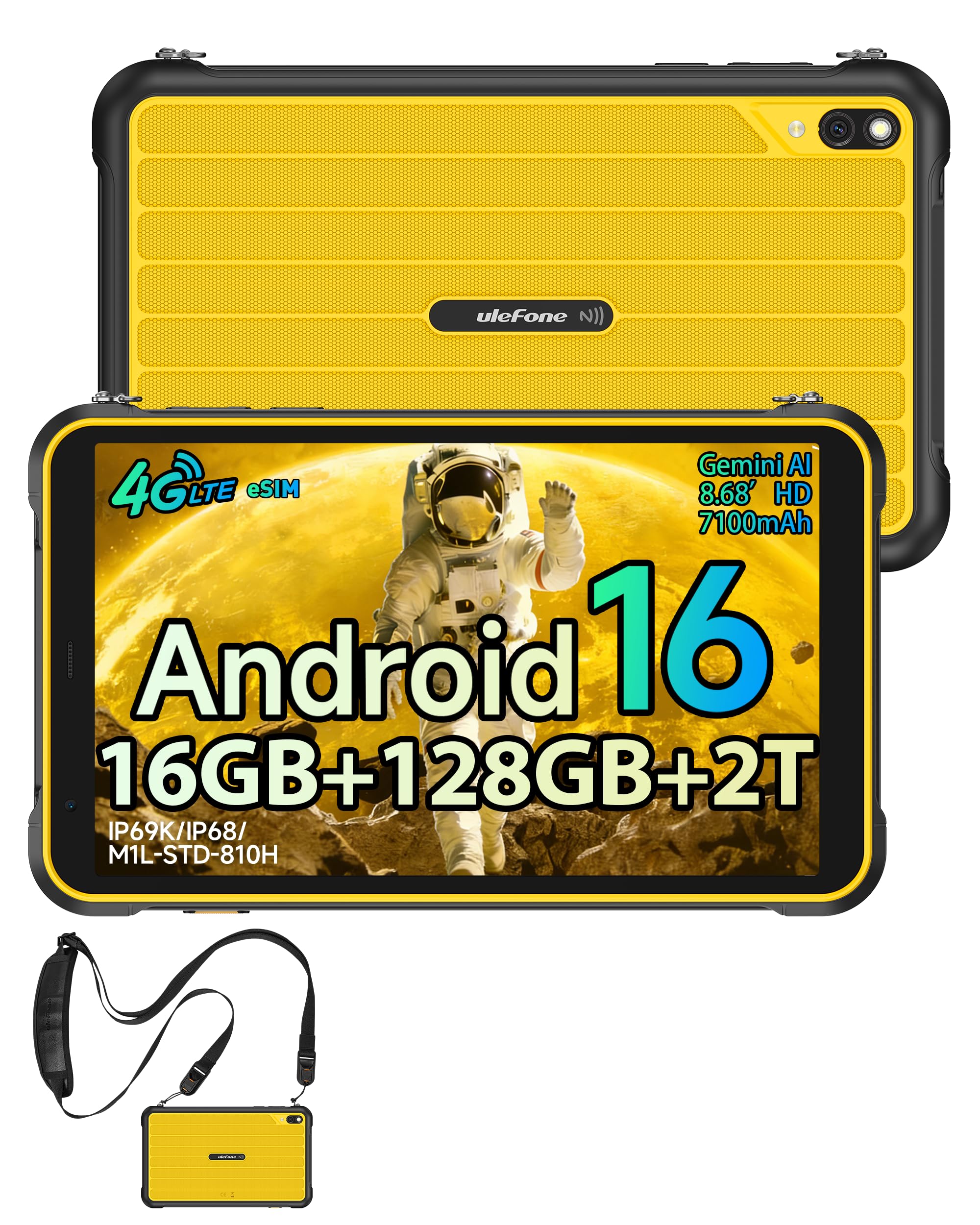
Слика 3.1: Предна страна view of the Ulefone RugKing Pad Pro.

Слика 3.2: Страна view со копчиња и порти.
- Прикажи: 8.68-inch, 90Hz refresh rate, Corning Gorilla Glass.
- Копче за вклучување: Се наоѓа на страна, се користи за вклучување/исклучување или будење/мирување на уредот.
- Копчиња за јачина на звук: Прилагодете ги нивоата на аудио.
- Приклучок за USB Type-C: За полнење и пренос на податоци.
- Решетки за звучници: Двојни стерео звучници за аудио излез.
- Камера: Задна камера од 16 мегапиксели, предна камера од 8 мегапиксели.
- Фенерче: Integrated 133 lumen Super Torch.
- Слот за SIM/MicroSD картичка: Supports dual SIM and up to 2TB microSD expansion.
- uSmart конектор за проширување: For compatible peripherals like endoscopes.
- 3.5 мм приклучок за слушалки: За аудио додатоци.
4. Поставување
4.1 Почетно вклучување
- Притиснете и задржете го Копче за напојување until the Ulefone logo appears.
- Следете ги упатствата на екранот за да го изберете вашиот јазик, регион и да се поврзете на Wi-Fi мрежа.
- Најавете се со вашата сметка на Google или креирајте нова за да пристапите до Google Play Store и други услуги.
4.2 SIM Card and eSIM Setup
The RugKing Pad Pro supports dual physical SIM cards and eSIM functionality for 4G LTE connectivity.

Figure 4.1: Triple card slot for SIM and MicroSD.
4.2.1 Physical SIM Card Installation
- Пронајдете го лежиштето за SIM-картичка на страната од таблетот.
- Use the provided metal pry opener to eject the tray.
- Place your Nano-SIM cards into the designated slots.
- Внимателно вратете ја фиоката во таблетот.
4.2.2 Активирање на eSIM
To activate eSIM, navigate to Поставки > Мрежа и интернет > SIM-картички and follow the instructions to add a new mobile plan. You will typically need a QR code or activation code from your network provider.

Figure 4.2: eSIM connectivity feature.
5. Упатства за работа
5.1 Оперативен систем Android 16
The RugKing Pad Pro runs on Android 16, offering a dynamic and fluid user interface with enhanced security and usability features. Enjoy desktop-like window views for multitasking and smarter notification management.

Слика 5.1: Кориснички интерфејс на Android 16.
5.2 Приказ и интеракција
The 8.68-inch display with a 90Hz refresh rate provides smooth navigation and streaming. With 860 nits peak brightness, the screen is readable even in bright sunlight. Corning Gorilla Glass offers enhanced scratch resistance.

Figure 5.2: Display features including 90Hz refresh rate and Gorilla Glass.
5.2.1 Режим на ракавица
For use in cold environments or industrial settings, enable Glove Mode in settings to allow touch input while wearing gloves. Note that some leather gloves may not be compatible due to material differences.

Figure 5.3: Tablet operation with gloves enabled.
5.3 Camera and Flashlight
The tablet features a 16MP rear camera for clear photos and document scanning, and an 8MP front camera for video calls. The integrated 133 lumen Super Torch provides bright illumination in low-light conditions.

Figure 5.4: Camera and Super Torch features.
5.4 Поврзување и навигација
- 4G LTE: Stay connected with dual SIM or eSIM.
- NFC: Supports Google Pay and other NFC functions for identification and authentication.
- GPS: Integrated GPS, GLONASS, BeiDou, and Galileo for accurate navigation.
- Wi-Fi: Supports 802.11b/g/n standards.
- Bluetooth: За поврзување на безжични додатоци.

Figure 5.5: NFC enabled device for various applications.

Figure 5.6: GPS navigation in a vehicle.
5.5 Посебни карактеристики
- Приспособен клуч: Assign specific functions to a programmable key for quick access.
- ID на лице: Отклучете го уредот со помош на препознавање на лице.
- ФМ радио: Listen to FM radio without headphones.
- uSmart конектор за проширување: Connect compatible external peripherals such as endoscopes (uSmart E01, E02) or digital microscopes (uSmart C01).

Figure 5.7: uSmart expansion connector and peripherals.
6. Карактеристики на издржливост
The RugKing Pad Pro is built to withstand extreme conditions, certified with IP68, IP69K, and MIL-STD-810H standards.
- IP68: Dustproof and resistant to continuous immersion in water up to 2 meters for 30 minutes.
- IP69K: Заштитено од млазно прскање под висок притисок и висока температура.
- MIL-STD-810H: Military-grade standard ensuring reliable resistance to shocks, vibrations, and extreme temperatures.

Figure 6.1: Rugged design and certifications.

Figure 6.2: Dust, water, and drop resistance tests.
7. Управување со батерии
The RugKing Pad Pro is equipped with a 7100 mAh battery, offering extended usage. It supports 492 hours of standby time or 10 hours of video playback on a single charge.
7.1 Полнење
- Стандардно полнење: Connect the provided Type-C cable and AC charger to the tablet.
- Полнење на Pogo Pin: The tablet is compatible with Pogo Pin charging docks (sold separately) for convenient charging.
- Обратно полнење (OTG): Use the tablet as a power bank to charge other devices via an OTG cable (sold separately).

Figure 7.1: Battery capacity and charging methods.
8. Складирање и перформанси
Powered by an Unisoc T7250 Octa-core processor, the RugKing Pad Pro handles complex applications and demanding tasks efficiently. It comes with 16GB RAM (8GB physical + 8GB virtual) and 128GB internal storage, expandable up to 2TB via microSD card.

Figure 8.1: Octa-core processor for uninterrupted flow.

Figure 8.2: Memory and storage specifications.
*MicroSD card is sold separately for storage expansion. Dynamic RAM activation is user-configurable in Settings.
9. Одржување
9.1 Чистење на уредот
- Користете мека крпа без влакненца за чистење на екранот и куќиштето.
- За тврдокорна нечистотија, малку дampИзмијте ја крпата со вода. Избегнувајте груби хемикалии или абразивни материјали.
- Пред чистење со течности, проверете дали сите капаци на отворите се безбедно затворени за да се одржи водоотпорноста.
9.2 Ажурирања на софтверот
Regularly check for software updates to ensure optimal performance, security, and access to new features. Navigate to Поставки > Систем > Ажурирање на системот за проверка и инсталирање на достапни ажурирања.
9.3 Управување со складирање
Периодично повторноview вашите складирани files and applications. Delete unnecessary data to free up space and maintain device speed. Utilize the microSD card slot for large media files.
10 Смена на проблеми
| Проблем | Решение |
|---|---|
| Уредот не се вклучува. | Проверете дали батеријата е наполнета. Поврзете го полначот и почекајте неколку минути пред повторно да се обидете да го вклучите. |
| Екранот не реагира. | Perform a forced restart by holding the Power button for 10-15 seconds. If the issue persists, ensure Glove Mode is not causing interference if not needed. |
| Не може да се поврзе на Wi-Fi. | Проверете дали Wi-Fi е овозможен во поставките. Рестартирајте го рутерот и таблетот. Потврдете ја лозинката за Wi-Fi. |
| SIM-картичката не е откриена. | Ensure the SIM card is correctly inserted into the tray. Restart the tablet. Check if the SIM card is active with your carrier. |
| Батеријата брзо се троши. | Reduce screen brightness, close unused apps, disable unnecessary connectivity features (Bluetooth, GPS, Wi-Fi) when not in use. Check for background app activity. |
11. Спецификации
| Карактеристика | Детал |
|---|---|
| Име на моделот | Ulefone RugKing Pad Pro |
| Оперативен систем | Андроид 16 |
| Процесор | Unisoc T7250 со осум јадра |
| RAM меморија | 16 GB (8 GB physical + 8 GB virtual) |
| Внатрешно складирање | 128 GB |
| Складирање што може да се прошири | До 2 TB преку microSD |
| Големина на приказ | 8.68 инчи |
| Резолуција на екранот | 1400x800 пиксели (HD+) |
| Стапка на освежување | 90 Hz |
| Заштита на екранот | Corning Gorilla Glass |
| Задна камера | 16 MP |
| Предна камера | 8 MP |
| Снимање видео | FHD 1080p |
| Капацитет на батеријата | 7100 mAh (литиумски полимер) |
| Живот на батеријата (просечно) | 13 Days (standby), 10 Hours (video playback) |
| Поврзување | 4G LTE (Dual SIM, eSIM), Wi-Fi (802.11b/g/n), Bluetooth, NFC |
| Навигација | GPS, GLONASS, BeiDou, Galileo |
| Оценки за издржливост | IP68, IP69K, MIL-STD-810H |
| Безбедносни карактеристики | Лице ID |
| Димензии (Д x Ш x В) | 20 x 10 x 1 cm |
| Тежина | 450 грама |
12. Гаранција и поддршка
12.1 Информации за гаранцијата
The Ulefone RugKing Pad Pro comes with a 2-годишна гаранција од производителотОваа гаранција ги покрива дефектите во материјалите и изработката при нормална употреба. Ве молиме задржете го доказот за купување за гаранциски барања.


Figure 12.1: Ulefone brand and 2-year warranty indication.
12.2 Поддршка за корисници
For technical assistance, warranty claims, or further inquiries, please contact Ulefone customer support. A service center is available in Europe.
- Refer to the official Ulefone webсајт за детали за контакт.
- Consult the "Multilingual User Manual" included in your package for additional information.
- The tablet includes a "Service Center 2.0" application for intelligent support.
Поврзани документи - RugKing Pad Pro
 |
Упатство за користење на Ulefone Armor Pad 4 Ultra и Armor Pad 4 Ultra Thermal Сеопфатно упатство за корисникот за Ulefone Armor Pad 4 Ultra и Armor Pad 4 Ultra Thermal таблетите, кое опфаќа безбедносни упатства, компоненти на уредот, поставување, спецификации и регулаторни информации. |
 |
Упатство за користење и упатство за безбедност за Ulefone Armor Pad од серијата 5 Официјално упатство за корисникот за таблетот Ulefone Armor Pad од серијата 5, кое опфаќа поставување, карактеристики, мрежни спецификации, безбедносни мерки на претпазливост и информации за усогласеност. |
 |
Ulefone TAB A9 Pro (Kids) - Instrukcja Obsługi i Bezpieczeństwa Kompleksowa instrukcja obsługi tabletu Ulefone TAB A9 Pro (Kids), zawierająca informacje o instalacji karty SIM, podstawowej obsłudze, funkcjach telefonu, wiadomościach, zdjęciach oraz kluczowe zasady bezpieczeństwa. |
 |
Упатство за корисникот за Ulefone TAB A9 PRO Упатство за корисникот за таблетот Ulefone TAB A9 PRO. Ова упатство дава упатства за поставување, управување со картичка, полнење, работа со напојување, гарантни услови и усогласеност со ЕУ. Достапно е на повеќе јазици, со англиски како примарен јазик. |
 |
Ulefone RugKing Pad 2 Pro User Manual This user manual provides comprehensive instructions for the Ulefone RugKing Pad 2 Pro tablet, covering device layout, setup, charging, network bands, safety precautions, and regulatory compliance information. |
 |
Ulefone RugOne Xever 7 Pro User Manual Comprehensive user manual for the Ulefone RugOne Xever 7 Pro rugged smartphone. Includes setup instructions, thermal camera operation, safety guidelines, and technical specifications. |
Ask a question about this manual
Ask about setup, troubleshooting, compatibility, parts, safety, or missing instructions. Manuals+ will review the question and use this page’s manual context to help answer it.