
1. Вовед
Thank you for choosing the Tyler TM710-14 14-inch Portable LCD HD TV. This device is designed for versatility, serving as a portable television, a monitor for various devices, or a display for security cameras. Its compact size makes it ideal for use in RVs, kitchens, campers, bathrooms, and bedrooms. This manual provides essential information for the safe and efficient operation of your new portable TV.
Клучни карактеристики:
- Елегантен и компактен дизајн: 14-inch widescreen LED HDTV, optimized for small spaces.
- Разновидно поврзување: HDMI, USB, SD/MMC inputs for external audio/video playback.
- Интегриран аудио: Built-in speakers and headphone jack.
- Дигитален ТВ приемник: Full band digital TV tuner (ATSC, NTSC compatible).
- Опции за напојување: AC/DC power compatibility, includes car charger.
- Convenient Stand: Built-in stand for easy placement.
- Широка компатибилност: Connects with streaming sticks (Roku, Fire Stick, Apple TV), gaming consoles, computers, and security cameras.
2. Информации за безбедност
Внимателно прочитајте ги сите безбедносни упатства пред да го користите овој производ. Зачувајте го ова упатство за во иднина.
- Не го изложувајте уредот на дожд или влага за да спречите пожар или електричен удар.
- Не отворајте го кабинетот. Поставете го сервисирањето само на квалификуван персонал.
- Избегнувајте поставување на уредот во близина на извори на топлина како што се радијатори, грејни тела, шпорети или други апарати (вклучувајќи ampлајфикатори) кои произведуваат топлина.
- Заштитете го кабелот за напојување од одење или стискање, особено на приклучоците, приклучните приклучоци и местото каде што тие излегуваат од апаратот.
- Користете само додатоци/додатоци наведени од производителот.
- Исклучете го овој апарат од струја за време на громови или кога не го користите подолг временски период.
- Чистете само со сува крпа.
- Обезбедете соодветна вентилација; не блокирајте никакви отвори за вентилација.
3. Што има во кутијата
Проверете дали сите предмети се присутни во пакувањето:
- Tyler TM710-14 Portable TV
- Кабел за напојување (AC адаптер)
- Далечински управувач
- Вграден штанд
- Антена
- Car Charger (DC Adapter)
- RCA адаптер
4. Производот завршиview
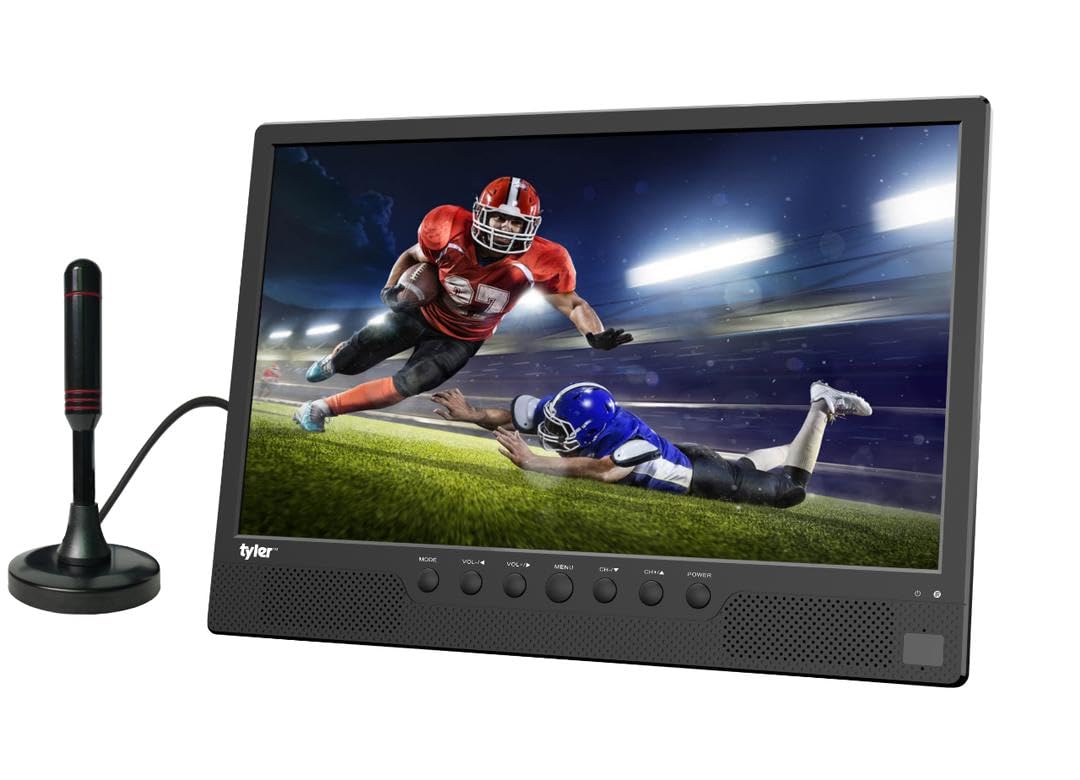
Слика 4.1: Предна страна view of the Tyler TM710-14 portable TV, showing the screen, control buttons, and an attached antenna.

Слика 4.2: Заден дел view of the TV with the built-in stand extended, showing the DC 12V input, AV-OUT, AV-IN, HDMI input, and ANT input on the right side, and USB, SD/MMC input on the left.

Слика 4.3: Детален заден дел view of the TV, illustrating the location of the DC 12V input, AV-OUT, AV-IN, HDMI input, ANT input, USB port, and SD/MMC card slot.
Control Buttons (Front Panel):
- МОД: Switches between input sources (TV, AV, HDMI, USB, SD/MMC).
- VOL-/VOL+: Adjusts volume down/up.
- МЕНИ: Пристапува до менито на екранот.
- CH-/CH+: Менува канали или се движи низ опциите на менито.
- МОЌНОСТ: Го вклучува/исклучува телевизорот.
5. Поставување
5.1 Прицврстување на држачот
The TM710-14 features a built-in stand. Gently pull the stand out from the back of the unit until it locks into position. Ensure the TV is placed on a stable, flat surface.
5.2 Поврзување напојување
- AC напојување: Connect the provided AC power adapter to the "DC 12V" input port on the back of the TV, then plug the adapter into a standard wall outlet.
- DC Power (Car Charger): For portable use, connect the car charger to the "DC 12V" input port and plug the other end into your vehicle's 12V power socket.
5.3 Connecting an Antenna
For receiving over-the-air broadcast channels, connect the included antenna to the "ANT" input port on the back of the TV. Position the antenna for optimal signal reception.
5.4 Почетно вклучување
Притиснете го МОЌ button on the front panel or the remote control to turn on the TV. The first time you power on, the TV may guide you through an initial setup process, including language selection and channel scanning.
6. Упатства за работа
6.1 Избор на влезен извор
Притиснете го РЕЖИМ button on the TV or the ИЗВОР button on the remote control to cycle through available input sources: TV (Antenna), AV, HDMI, USB, SD/MMC.
6.2 TV Mode (Antenna)
- Select "TV" as the input source.
- Пристапете до МЕНИ and navigate to "Channel Setup" or "Auto Scan".
- Initiate an auto scan to find available digital (ATSC) and analog (NTSC) channels.
- Користете CH-/CH+ копчиња за промена на канали.
6.3 Поврзување на надворешни уреди
- HDMI: Connect a streaming stick (Roku, Fire Stick, Apple TV), gaming console, or computer to the HDMI влез port. Select "HDMI" as the input source.
- AV влез: Use the RCA adapter to connect older devices like DVD players to the AV-IN port. Select "AV" as the input source.
- USB/SD/MMC: Insert a USB flash drive or SD/MMC card into the respective slots. Select "USB" or "SD/MMC" as the input source to browse and play compatible media files (AVI, MOV, MPEG, MP4, MP3, JPEG, etc.).
6.4 Аудио излез
The TV has built-in speakers. For private listening, connect headphones to the headphone jack (AV-OUT port can also function as audio out with appropriate adapter).
7. Одржување
7.1 Чистење на екранот
Нежно избришете го екранот со мека крпа што не остава влакненца. За тврдокорни дамки, малку избришете гоampen the cloth with water or a screen-cleaning solution specifically designed for LCD/LED displays. Do not spray liquid directly onto the screen.
7.2 Чистење на кабинетот
Избришете ја надворешноста на телевизорот со мека, сува крпа. Избегнувајте употреба на абразивни средства за чистење или растворувачи.
7.3 Складирање
If storing the TV for an extended period, unplug it from the power source and store it in a cool, dry place, away from direct sunlight and extreme temperatures.
8 Смена на проблеми
| Проблем | Можна причина | Решение |
|---|---|---|
| Нема моќ | Power cable not connected; outlet not working; power adapter faulty. | Ensure power cable is securely connected. Test the outlet with another device. Try a different power adapter if available. |
| Нема слика/Нема сигнал | Incorrect input source selected; antenna not connected/positioned correctly; external device not powered on or connected properly. | Притиснете РЕЖИМ/ИЗВОР to select the correct input. Adjust antenna position or rescan channels. Check connections and power for external devices. |
| Нема звук | Volume too low or muted; external device audio settings. | Притиснете VOL+ or unmute the TV. Check audio settings on connected external devices. |
| Далечинскиот управувач не работи | Batteries depleted or inserted incorrectly; obstruction between remote and TV; remote sensor blocked. | Replace batteries. Ensure correct polarity. Remove any obstructions. Clean the remote sensor on the TV. |
9. Спецификации
| Карактеристика | Детал |
|---|---|
| Број на модел | TM710-14 |
| Големина на екранот | 14 инчи |
| Технологија на прикажување | LCD екран |
| Резолуција | 1080 стр |
| Стапка на освежување | 120 Hz |
| Сооднос на аспект | 16:9 |
| Поврзување | HDMI (1), USB (1), AV, Antenna |
| Репродукција на медиуми | USB, SD/MMC (AVI, MOV, MPEG 1/2/3/4, XVID, AVC, MP4, H.264, HEVC(H.265), FLV, MKV, MP3, JPEG, WMV, RMVB, MKY, 3GP) |
| Аудио | Built-in speakers (2.0 channels), Headphone Jack (AV-OUT) |
| Напојување | AC/DC (12V DC input) |
| Димензии на производот (Д x Ш x В) | 1" Д x 14" Ш x 11" В |
| Боја | Црното |
10. Информации за гаранцијата
The Tyler TM710-14 Portable LCD HD TV comes with a 1-годишна Ограничена гаранција from the date of purchase. This warranty covers manufacturing defects in materials and workmanship under normal use. It does not cover damage caused by misuse, accidents, unauthorized modifications, or external causes.
Please retain your proof of purchase for warranty claims. For detailed warranty terms and conditions, refer to the documentation included with your product or contact customer support.
11. Поддршка за корисници
If you encounter any issues or have questions regarding your Tyler TM710-14 Portable LCD HD TV that are not addressed in this manual, please contact Tyler customer support.
- Webсајт: Visit the official Tyler webстраница за често поставувани прашања и ресурси за поддршка.
- Е-пошта: Погледнете го пакувањето на производот или гарантната картичка за е-пошта за поддршка.
- Телефон: Refer to your product packaging or warranty card for customer service phone number.
When contacting support, please have your model number (TM710-14) and proof of purchase ready.