PowerA Advantage Wireless Controller for Nintendo Switch 2 - Mario & Yoshi
Model: NSGP0569-01V
Вовед
This manual provides comprehensive instructions for the PowerA Advantage Wireless Controller, designed for use with the Nintendo Switch family of devices. It covers setup, operation, maintenance, and troubleshooting to ensure optimal performance and longevity of your controller.
Клучни карактеристики
Hall Effect Modules: Equipped with contact-free magnetic sensors in the thumbsticks to prevent stick drift, offering smoother control, enhanced precision, and increased longevity.
Advanced Gaming Buttons: Two mappable buttons can be programmed on the fly during gameplay without needing to access system settings.
Intuitive Motion Controls: Experience fluid and responsive motion controls for aiming, steering, flying, and other in-game actions.
Копче C: Provides quick access to GameChat features.
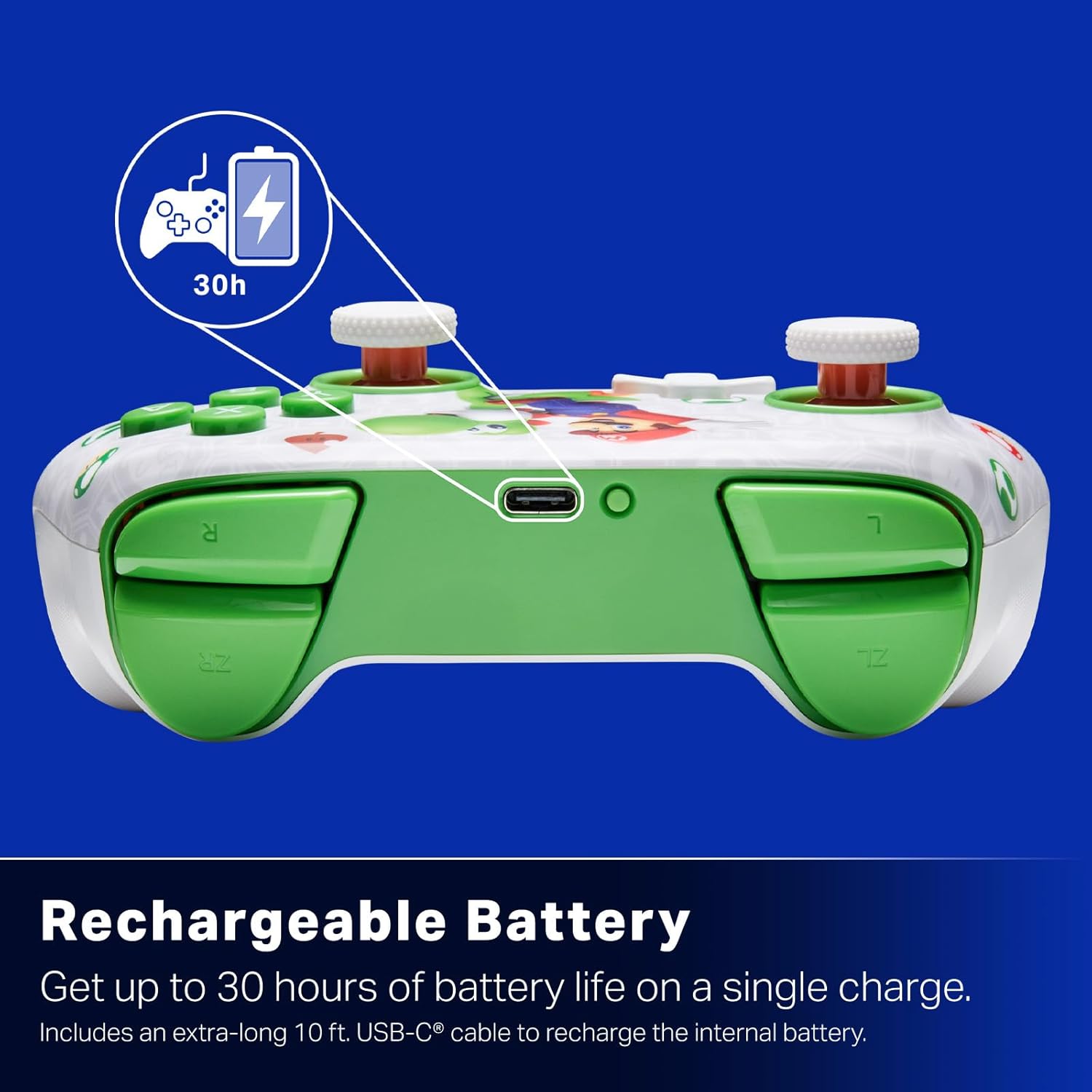
Батерија на полнење: Offers up to 30 hours of gameplay on a single charge. Includes a 10 ft. (3m) USB-C cable for recharging.
Ергономски дизајн: Crafted for comfort during extended gaming sessions, utilizing cutting-edge ergonomics and high-quality materials.
Nintendo Family Compatibility: Compatible with Nintendo Switch 2, Nintendo Switch, Nintendo Switch – OLED Model, and Nintendo Switch Lite.
Официјално лиценциран: PowerA products undergo rigorous testing by Nintendo to ensure compatibility and quality.
Инструкции за поставување
1. Почетно полнење
Before first use, fully charge your PowerA Advantage Wireless Controller. Connect the included 10 ft. (3m) USB-C cable to the controller's USB-C port and the other end to a powered USB port on your Nintendo Switch dock or a USB wall adapter.
Figure 1: Controller connected via USB-C for charging, highlighting the rechargeable battery feature.
2. Спарување со Nintendo Switch
Осигурајте се дека вашата конзола Nintendo Switch е вклучена и ажурирана со најновиот системски софтвер.
Од менито HOME, изберете Контролори, тогаш Променете го зафат/нарачка.
On the PowerA Advantage Wireless Controller, press and hold the Копче SYNC located on the top edge of the controller for at least three seconds. The player indicator LEDs on the bottom of the controller will begin to flash.
Once the controller successfully pairs, the player indicator LED(s) corresponding to the controller number will remain lit.
Притиснете го Копче to confirm and exit the pairing screen.
For subsequent uses, simply press the HOME button on the controller to wake it up and automatically reconnect to your Switch console.
Упатства за работа
Основни контроли
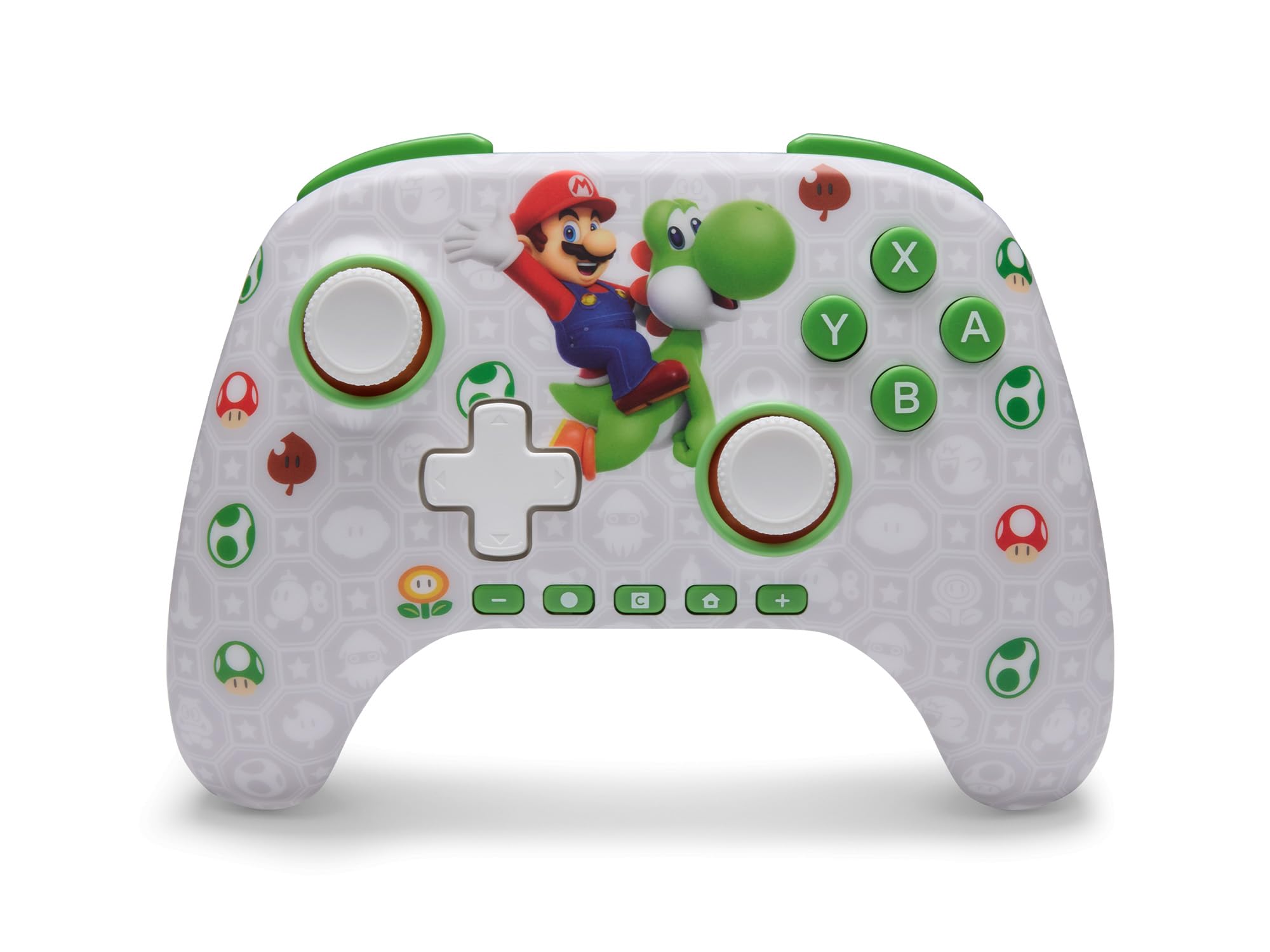
PowerA Advantage Wireless Controller features standard Nintendo Switch button layouts, including A, B, X, Y buttons, L/R and ZL/ZR shoulder buttons, a D-pad, and dual analog sticks. Familiarize yourself with these controls for general gameplay.
Слика 2: Предна страна view of the PowerA Advantage Wireless Controller, highlighting the Mario and Yoshi design and button layout.
Advanced Gaming Buttons (AGB)
The controller includes two mappable Advanced Gaming Buttons (AGR and AGL) on the back. These buttons can be assigned to replicate any other button on the controller for quick access during gameplay.
Притиснете го Program Button (PRGM) on the back of the controller. The Program LED will flash.
Притиснете го Advanced Gaming Button (AGR or AGL) you wish to map. The Program LED will flash rapidly.
Притиснете го копче you want to assign to the Advanced Gaming Button (e.g., A, B, X, Y, L, R, ZL, ZR, D-pad directions). The Program LED will stop flashing, indicating successful mapping.
To clear a mapped button, repeat steps 1-2, then press the Копче за програми повторно.
Figure 3: Advanced Gaming Buttons (AGB) on the back of the controller, with an illustration of mappable functions.
Контроли на движење
The controller supports motion controls, allowing for intuitive interaction in compatible games. These controls are automatically enabled when supported by the game.
Figure 4: Controller demonstrating motion control capabilities through tilting.
C Button (GameChat)
The dedicated C Button provides quick access to GameChat features in supported titles, enhancing your multiplayer experience.
Figure 5: The 'C' button, used for GameChat features.
Одржување
Чистење: Користете мека, сува крпа за чистење на контролерот. Избегнувајте употреба на груби хемикалии или абразивни материјали.
Складирање: Чувајте го контролерот на ладно и суво место, подалеку од директна сончева светлина и екстремни температури.
Нега на батеријата: За да го продолжите животниот век на батеријата, избегнувајте често целосно празнење на контролерот. Полнете го редовно, дури и ако не е во постојана употреба.
Грижа за кабел: Handle the USB-C charging cable with care. Avoid bending or twisting it excessively.
Решавање проблеми
Контролерот не се поврзува/спарува
Осигурајте се дека контролерот е целосно наполнет.
Verify the Nintendo Switch console is updated to the latest system software.
Repeat the pairing process (see "Pairing with Nintendo Switch" in Setup Instructions).
If issues persist, try restarting both the controller and the Nintendo Switch console.
Stick Drift
PowerA Advantage Controller features Hall Effect modules designed to prevent stick drift. If you experience any unintended input, ensure the controller's firmware is up to date (check PowerA's official webстраница за ажурирања).
Recalibrate the joysticks through the Nintendo Switch system settings if necessary (System Settings > Controllers and Sensors > Calibrate Control Sticks).
Краток век на батеријата
Пред секоја употреба, проверете дали контролерот е целосно наполнет.
Battery life can vary based on game usage and features enabled.
Користете го испорачаниот USB-C кабел за оптимално полнење.
Спецификации
Карактеристика
Детал
Број на модел
NSGP0569-01V
Поврзување
Wireless (Bluetooth), USB-C (for charging)
Компатибилни уреди
Nintendo Switch 2, Nintendo Switch, Nintendo Switch – OLED Model, Nintendo Switch Lite
Траење на батеријата
До 30 часа (вари во зависност од употребата)
Должина на кабелот
10 ft. (3m) USB-C
Димензии
5.88 x 4.21 x 2.36 инчи
Тежина
0.66 фунти
Посебни карактеристики
Hall Effect Thumbsticks, Mappable Advanced Gaming Buttons, Motion Controls, C Button
Гаранција и поддршка
PowerA Advantage Wireless Controller comes with a Двегодишна ограничена гаранција. For detailed warranty information, product support, or to register your product, please visit the official PowerA webсајт на PowerA.com/Поддршка.
Figure 6: Official Nintendo Licensed Product badge, ensuring quality and compatibility.
Ask a question about this manual
Ask about setup, troubleshooting, compatibility, parts, safety, or missing instructions. Manuals+ will review the question and use this page’s manual context to help answer it.