
1. Во текотview
The Philips TAZ2200 is a versatile portable sound machine designed for enjoying various audio formats. It features a top-loading CD player, a front-loading cassette player, FM radio, Bluetooth 6.0 connectivity, USB playback, and a 3.5mm audio input. Equipped with dynamic bass boost and 6W stereo speakers, it delivers rich sound. The unit can be powered by AC mains or batteries and includes a carrying handle for portability.
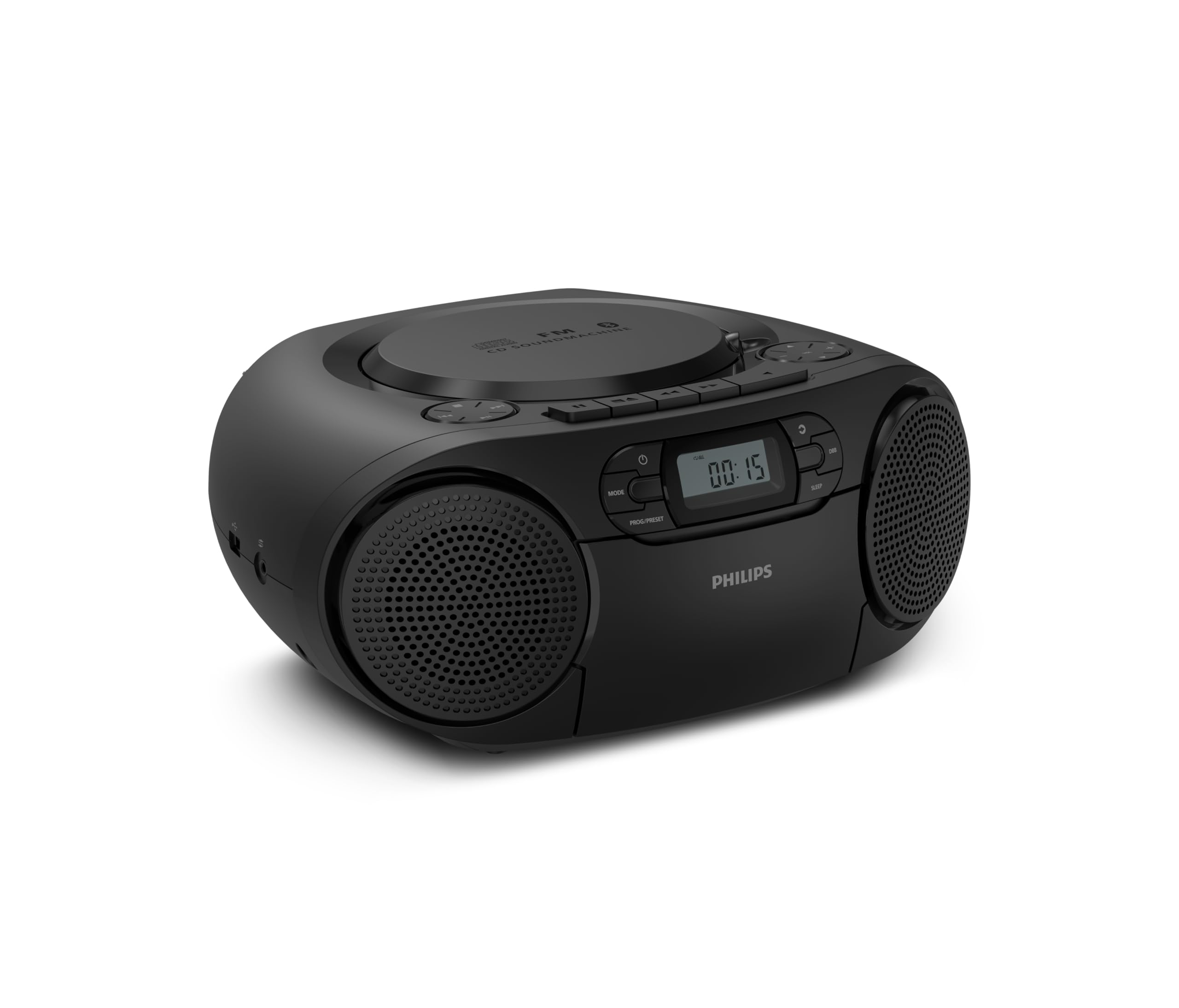
Предна страна view of the Philips TAZ2200 CD Soundmachine, showing the main display and control buttons.
2. Информации за безбедност
Please read these safety instructions carefully before using your device and keep them for future reference. Incorrect use may result in hazards.
- Извор на енергија: Користете само наведениот адаптер за напојување или батерии. Осигурајте се дека јачината на звукотtage одговара на барањата на единицата.
- Вода и влага: Не го изложувајте уредот на дожд, влага, капење или прскање. Не ставајте предмети полни со течности, како што се вазни, врз уредот.
- Вентилација: Ensure adequate ventilation. Do not block any ventilation openings. Maintain a minimum distance around the unit for sufficient ventilation.
- Топлина: Не го поставувајте уредот во близина на извори на топлина како што се радијатори, грејни тела, шпорети или други апарати (вклучувајќи ampлајфикатори) кои произведуваат топлина.
- Батерии: Follow correct polarity when inserting batteries. Do not mix old and new batteries, or different types of batteries. Remove batteries if the unit is not used for a long period.
- Чистење: Исклучете го уредот од штекерот пред чистење. Користете мека, сува крпа. Не користете течни средства за чистење или аеросолни средства за чистење.
- Сервисирање: Не обидувајте се сами да го сервисирате овој производ. Пренесете ги сите сервиси на квалификуван сервисен персонал.
3. Што има во кутијата
При распакување, проверете дали се присутни сите предмети наведени подолу:
- Philips TAZ2200 CD Soundmachine
- Кабел за напојување
- Водич за брз почеток
- Гарантна книшка
- Безбедносен лист
4. Контроли и врски
Контроли на предниот панел
The front panel features the main display, power button, mode selection, program/preset buttons, and dynamic bass boost (DBB) control. Playback controls for CD and USB are also located here.

Детална предна страна view showing the display, power, mode, program/preset, and DBB buttons.
Странични и задни врски
The side of the unit provides a USB port for digital audio playback and a 3.5mm audio input jack for connecting external devices.

Страна view illustrating the USB port and Audio Input jack.
The top of the unit houses the CD compartment and additional playback controls, while the rear features the AC power input and the FM antenna.

Врвот view showing the CD compartment and associated controls.

Заден дел view displaying the AC power input and the telescopic FM antenna.
5. Поставување
5.1 Напојување
AC напојување
- Проверете дали уредот е исклучен.
- Connect the supplied power cable to the AC IN socket on the rear of the sound machine.
- Plug the other end of the power cable into a wall power outlet.
Напојување од батеријата
For portable use, the unit can operate on 6 x C-type batteries (not included).
- Отворете го капакот на одделот за батерии што се наоѓа на дното на уредот.
- Insert 6 C-type batteries, ensuring correct polarity (+/-) as indicated inside the compartment.
- Добро затворете го капакот на преградата за батерии.
5.2 Прилагодување на антената
For optimal FM radio reception, fully extend the telescopic antenna located at the rear of the unit. Adjust its position and angle to achieve the clearest signal.
6. Упатства за работа
6.1 Општа операција
- Вклучување/исклучување: Притиснете го МОЌ копче за вклучување или исклучување на уредот.
- Контрола на јачината на звукот: Користете го VOL+ or ВОЛУМЕН - копчиња за прилагодување на нивото на јачина на звук.
- Динамичко засилување на басот (DBB): Притиснете го ДББ button to activate or deactivate the dynamic bass boost feature for enhanced bass sound.
- Избор на режим: Притиснете го РЕЖИМ button repeatedly to switch between CD, Cassette, FM Radio, Bluetooth, USB, and Audio Input modes.
6.2 Репродукција на ЦД
- Open the CD compartment cover on top of the unit.
- Place a CD (CD, CD-R, or CD-RW) with the label side facing up onto the spindle.
- Затворете го капакот на преградата за ЦД.
- Притиснете го РЕЖИМ копче за да изберете CD режим.
- Притиснете го PLAY/PAUSE копче за да започнете со репродукција.
- Користете го ПРЕСКОКНЕТЕ копчиња (|< or >> |) за прескокнување песни.
- Притиснете и задржете |< or >> | to search within a track.
- Притиснете го СТОП копче за запирање на репродукцијата.
6.3 Репродукција на касети
- Open the cassette compartment door on the front of the unit.
- Вметнете касетна лента со отворениот раб свртен нагоре.
- Затворете ја вратата од преградата за касети.
- Притиснете го РЕЖИМ копче за да изберете режим на касета.
- Притиснете го ИГРАЈ копче за да започнете со репродукција.
- Користете го БРЗО НАПРЕД or ВРАТИ НАЗАД buttons to quickly advance or rewind the tape.
- Притиснете го СТОП копче за запирање на репродукцијата.
6.4 FM радио
- Притиснете го РЕЖИМ копче за да изберете режим на FM радио.
- Автоматско скенирање: Притиснете и задржете го ПРОГ/ПРЕДМЕТИРАНО копче за автоматско скенирање и складирање на достапните FM станици.
- Рачно подесување: Притиснете го ТУНИНГ копчиња (|< or >> |) to manually tune to a desired frequency.
- Зачувување поставки: After tuning to a station, press ПРОГ/ПРЕДМЕТИРАНО once, then use |< or >> | за да изберете претходно поставен број и притиснете ПРОГ/ПРЕДМЕТИРАНО повторно да се потврди.
- Потсетување на мемории за поставување: Во режимот FM, притиснете ПРОГ/ПРЕДМЕТИРАНО repeatedly to cycle through saved preset stations.
6.5 Репродукција преку Bluetooth
- Притиснете го РЕЖИМ button to select Bluetooth mode. The display will show 'BT' and flash, indicating it's in pairing mode.
- На вашиот уред со Bluetooth (паметен телефон, таблет), овозможете Bluetooth и пребарајте достапни уреди.
- Select "Philips TAZ2200" from the list of devices.
- Once paired, the unit will emit a confirmation sound, and 'BT' will stop flashing.
- Start playing audio on your connected device. The sound will be streamed to the sound machine.
6.6 USB репродукција
- Insert a USB flash drive into the USB port on the side of the unit.
- Притиснете го РЕЖИМ копче за да изберете USB режим.
- Уредот автоматски ќе го детектира и ќе почне да репродуцира компатибилен аудио files (MP3, WAV, WMA).
- Користете ги контролите за репродукција (PLAY/PAUSE, ПРЕСКОКНЕТЕ, СТОП) as you would for CD playback.
6.7 Аудио влез (AUX)
- Connect one end of a 3.5mm audio cable (not included) to the AUDIO IN jack on the side of the sound machine.
- Connect the other end of the audio cable to the headphone jack or audio output of your external device (e.g., MP3 player, turntable).
- Притиснете го РЕЖИМ button to select Audio Input mode.
- Start playing audio on your external device. The sound will be played through the sound machine.
7. Одржување
- Чистење на единицата: Избришете ја надворешноста на уредот со мека, малку влажна крпа.amp крпа. Не користете абразивни средства за чистење или растворувачи.
- Грижа за CD плеер: Keep the CD compartment clean. If the lens is dirty, use a specialized CD lens cleaner. Avoid touching the lens.
- Грижа за касетофон: Периодично чистете ги главите на лентите и лесно стиснете ги ролерите со памукче.ampобложена со изопропил алкохол.
- Замена на батерија: If using batteries, replace all 6 C-type batteries when the unit's performance diminishes or if the unit will not be used for an extended period.
- Складирање: Кога не е во употреба, чувајте го уредот на чисто и суво место, подалеку од директна сончева светлина и екстремни температури.
8 Смена на проблеми
If you encounter any issues with your Philips TAZ2200, please refer to the table below for common problems and solutions.
| Проблем | Можна причина | Решение |
|---|---|---|
| Нема моќ | Кабелот за напојување не е поврзан; Батериите се испразнети или неправилно вметнати. | Check AC power connection; Replace batteries or ensure correct polarity. |
| Нема звук | Јачината на звукот е прениска; Избран е неточен режим; Поврзани се слушалки. | Increase volume; Select the correct source mode (CD, FM, BT, etc.); Disconnect headphones. |
| ЦД-то не се репродуцира | CD inserted incorrectly; CD is dirty or scratched; CD format not supported. | Insert CD with label side up; Clean or replace CD; Ensure CD is CD-R/RW compatible. |
| Касетата не свири | Cassette inserted incorrectly; Tape is damaged. | Insert cassette correctly; Try a different cassette. |
| Лош FM прием | Антената не е правилно продолжена или позиционирана; Слаб сигнал. | Целосно извлечете ја и прилагодете ја телескопската антена; обидете се да го преместите уредот на друга локација. |
| Bluetooth не се поврзува | Unit not in pairing mode; Bluetooth device too far; Device already paired with another unit. | Ensure unit is in Bluetooth mode and flashing; Move device closer; Disconnect from other devices. |
| Проблеми со репродукција преку USB | USB-уредот не е правилно вметнат; Некомпатибилен file формат; USB-уредот е оштетен. | Повторно вметнете го USB-уредот; осигурајте се дека files are MP3, WAV, or WMA; Try a different USB drive. |
9. Спецификации
| Карактеристика | Спецификација |
|---|---|
| Бренд | ФИЛИПС |
| Број на модел | ТАЗ2200/10 |
| Технологија за поврзување | Bluetooth 6.0, USB, Audio Input (3.5mm) |
| Тип на звучник | Stereo (2 speakers) |
| Излезна моќност | 6 вати (максимум) |
| Поддржани медиуми | CD, CD-R, CD-RW, Cassette, USB (MP3, WAV, WMA) |
| Радио тјунер | Digital FM with 20 presets |
| Извор на енергија | AC (wired), 6 x C-type batteries (not included) |
| Димензии (ДxШxВ) | 24.5 x 28.5 x 12.5 cm |
| Тежина | 1.35 килограми |
| Боја | Сребрена |
10. Гаранција и поддршка
10.1 Гаранција за производот
This Philips TAZ2200 CD Soundmachine comes with a 2 година гаранција од датумот на купување. Ве молиме зачувајте го доказот за купување за гаранциски барања. Гаранцијата ги покрива производствените дефекти и неисправностите под нормални услови на употреба.
10.2 Поддршка за корисници
For technical assistance, troubleshooting beyond this manual, or warranty service, please refer to the contact information provided in the warranty booklet included with your product. You can also visit the official Philips support website for your region for further assistance and FAQs.


