1. Вовед
This manual provides detailed instructions for the proper use and care of your RCA CC6393 VHS-C AutoShot Camcorder. Please read this manual thoroughly before operating the device to ensure optimal performance and longevity. The RCA CC6393 is designed for recording video onto VHS-C tapes and capturing still images, offering a compact and user-friendly experience.
2. Производот завршиview и Карактеристики
The RCA CC6393 VHS-C AutoShot Camcorder combines ease of use with versatile recording capabilities. Key features include:
- VHS-C Format: Records onto compact VHS-C tapes, which can be played back in any standard VHS VCR using the included cassette adapter.
- Компактен и лесен дизајн: Weighing approximately 1.9 pounds, it is highly portable for travel and everyday use.
- 3-inch LCD ColorView Екран: A rotatable (270 degrees) color monitor allows for easy framing and playback.
- AutoShot Feature: Automatically adjusts focus and exposure to available light for simplified recording.
- Steady Pix Image Stabilization: Minimizes camera shake, particularly useful when zooming or recording while moving.
- Digital Still Camera Capability: Capture still images and transfer them to a PC using the included cable and software (compatible with Windows 95/98).
- Зумирајте: Features 16x optical zoom and 400x digital zoom for capturing distant subjects.
- Creative Recording Modes: Includes fade-in/out, wide-format 16:9 mode, animation mode, and time-lapse recording.

Слика 2.1: напред view of the RCA CC6393 camcorder with its LCD screen open, displaying an image.
3. Содржина на пакетот
Проверете дали сите од следниве ставки се вклучени во вашиот пакет:
- RCA CC6393 VHS-C AutoShot Camcorder
- Батерија на полнење
- AC адаптер и полнач
- Ремен за рамо
- VHS-C Cassette Adapter
- Cassette Adapter Battery
- Clock Cell
- Software CD-ROM (for still image transfer)
- PC Connection Cable (USB)
- Упатство за употреба (овој документ)

Image 3.1: Included accessories for the RCA CC6393 camcorder, featuring the VHS-C cassette adapter, AC adapter/charger, software CD, and shoulder strap.
4. Поставување
4.1 Полнење на батеријата
- Connect the AC adapter to the camcorder's DC input jack.
- Приклучете го AC адаптерот во стандарден електричен штекер.
- Allow the battery to charge fully before first use. The charging indicator light will typically show the charging status.
4.2 Вметнување на батеријата
- Open the battery compartment cover on the camcorder.
- Insert the charged battery pack, ensuring it clicks into place securely.
- Затворете го капакот на преградата за батерии.
4.3 Inserting a VHS-C Tape
- Отворете го капакот на преградата за лента.
- Insert a VHS-C tape with the window facing outwards, ensuring it is correctly oriented.
- Gently close the tape compartment cover until it latches.

Слика 4.1: Десна страна view of the RCA CC6393 camcorder, highlighting the tape compartment and various control buttons.
5. Упатства за работа
5.1 Основно снимање
- Вклучете ја камерата.
- Open the LCD ColorView screen or use the viewпронаоѓач за рамка на вашата снимка.
- На AutoShot feature will automatically adjust focus and exposure.
- Притиснете го Снимајте button to start recording. Press it again to stop.
5.2 Користење на LCD мониторот
The 3-inch LCD monitor can rotate 270 degrees, allowing for flexible viewing angles during recording and playback. Adjust it to your preferred position for comfortable operation.
5.3 Функција за зумирање
Use the zoom controls (typically a rocker switch) to zoom in (telephoto) or zoom out (wide-angle) on your subject. The Steady Pix feature helps stabilize images during zooming.
5.4 Special Recording Modes
- Fade-in/Fade-out: Adds professional transitions to your recordings. Consult the on-screen menu or dedicated buttons for activation.
- Wide-format 16:9 Mode: Records video in a widescreen aspect ratio.
- Animation Mode: Creates the illusion of movement by recording a series of slightly different poses.
- Снимање со пропуст на време: Programs the camcorder to record at preset time intervals, ideal for observing subtle changes over time (e.g., plant growth, cloud formations).
- Five-second Recording: An option for quick scene transitions.
5.5 Репродукција
To play back your recordings:
- Префрлете ја камерата во режим на репродукција.
- Use the playback controls (Play, Stop, Pause, Fast Forward, Rewind) to navigate your tape.
- Playback options include visual search, stop-action pause, time counter, tracking, and time base corrector.
5.6 Digital Still Camera Function
The camcorder can capture still images. To transfer these images to a PC:
- Connect the camcorder to your PC using the provided PC connection cable (USB).
- Install the included software CD-ROM on your Windows 95 or 98 operating system.
- Follow the software instructions to transfer and manage your still images.
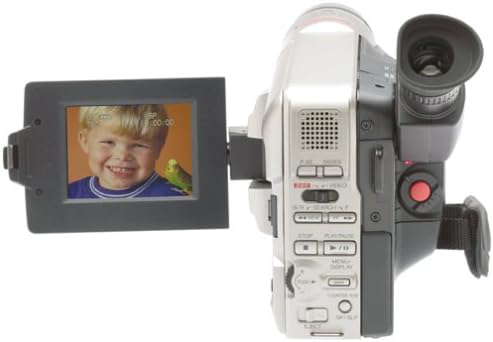
Слика 5.1: Задна страна view of the RCA CC6393 camcorder, displaying the control panel and battery compartment.
6. Одржување
6.1 Чистење на видеокамерата
- Користете мека, сува крпа за чистење на надворешноста на видеокамерата.
- За леќите, користете специјализирана крпа и раствор за чистење леќи. Избегнувајте допирање на леќите со прстите.
- Не користете груби хемикалии или абразивни средства за чистење.
6.2 Грижа за батерии
- Чувајте ја батеријата на ладно и суво место кога не ја користите.
- Избегнувајте често целосно празнење на батеријата за да го продолжите нејзиниот век на траење.
- If the camcorder will not be used for an extended period, remove the battery.
7 Смена на проблеми
Доколку наидете на проблеми со вашата видеокамера, погледнете ги следните вообичаени проблеми и решенија:
- Без моќност: Ensure the battery is charged and correctly inserted, or connect the AC adapter.
- Не може да се снима: Check if a tape is inserted correctly and if the tape's write-protect tab is not engaged. Ensure sufficient battery power.
- Лош квалитет на сликата: Clean the camcorder lens. Ensure adequate lighting for your recording environment. If playing back, ensure the tape heads are clean (professional cleaning may be required).
- Still Images Not Transferring: Verify the PC connection cable is securely connected to both the camcorder and the computer. Ensure the software is correctly installed and compatible with your operating system (Windows 95/98).
- LCD екранот не се прикажува: Check if the screen is properly opened and rotated. Ensure the camcorder is powered on.
For persistent issues, please contact RCA customer support.
8. Спецификации
| Карактеристика | Спецификација |
|---|---|
| Број на модел | 1001B3 |
| Формат за снимање | VHS-C |
| Големина на LCD екран | 3 Inches (ColorView) |
| Оптички зум | 16x |
| Дигитален зум | 400x |
| Стабилизација на слика | Steady Pix |
| Still Camera Capability | Да |
| Поврзување | USB (for PC connection) |
| Тежина | Approx. 1.9 pounds (camcorder only) |
| Извор на енергија | Rechargeable Battery, AC Adapter |
9. Гаранција и поддршка
За информации за гаранцијата и поддршка на клиентите, ве молиме погледнете ја гарантната картичка вклучена во вашиот производ или посетете ја официјалната RCA страница. webлокација. Чувајте ја сметката за купување како доказ за какви било гаранциски побарувања.
For technical assistance or service inquiries, please contact RCA customer service through their official channels.


