Вовед
This manual provides instructions for the setup, operation, maintenance, and troubleshooting of your Microsoft Wireless Optical Mouse Blue, Model K80-00004. Please read this manual thoroughly before using your device.
Што има во кутијата
Проверете дали сите артикли се присутни во пакувањето:
- Microsoft Wireless Optical Mouse
- Безжичен ресивер
- 2 AA батерии (претходно инсталирани или вклучени одделно)
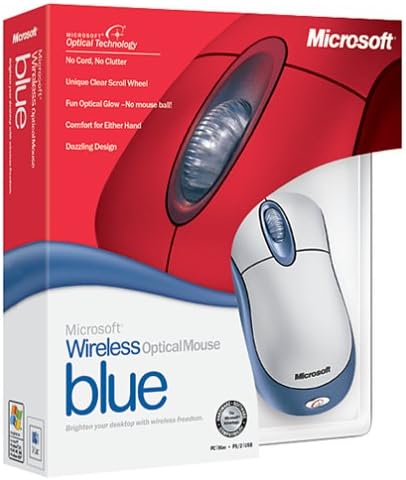
Image: Retail packaging of the Microsoft Wireless Optical Mouse Blue, showing the mouse and receiver.
Поставување
1. Инсталирајте ги батериите
- Пронајдете ја преградата за батерии на долната страна на глувчето.
- Отворете го капакот на преградата за батерии.
- Вметнете ги двете AA батерии, внимавајќи на точниот поларитет (+/-).
- Затворете го капакот на преградата за батерии.

Слика: напред view of the Microsoft Wireless Optical Mouse Blue, showing the top buttons and scroll wheel. The battery compartment is on the underside.
2. Connect the Wireless Receiver
- Вклучете го USB безжичниот приемник во слободен USB порт на вашиот компјутер.
- Allow your operating system to detect and install the necessary drivers. This process is usually automatic.
- For optimal performance, ensure the receiver is placed at least 12 inches away from other wireless devices or large metal objects.
3. Optional Software Installation (IntelliPoint)
- While not required for basic functionality, installing Microsoft IntelliPoint software provides advanced customization options for your mouse buttons and scroll wheel.
- Refer to the Microsoft support website for the latest IntelliPoint software compatible with your operating system.
4. Set Orientation (Calibration)
- After initial setup, it is recommended to perform an "Orientation Set" or calibration if available through the IntelliPoint software or your operating system's mouse settings. This helps optimize tracking performance.
Упатства за работа
The Microsoft Wireless Optical Mouse Blue is designed for comfortable and precise navigation.
Основни функции
- Лев клик: Главно копче за избирање ставки, отворање files, и интеракција со софтвер.
- Десен клик: Секундарно копче за пристап до контекстуални менија и дополнителни опции.
- Тркало за лизгање: Вртете го тркалото нагоре или надолу за да скролувате низ документите и web pages. The scroll wheel may also function as a clickable button for additional commands, depending on software configuration.
Безжична работа
- The mouse operates wirelessly up to 6 feet (approximately 1.8 meters) from its receiver.
- Optical technology scans the desktop surface for precise cursor movement without the need for a mouse pad on most surfaces.
- The mouse is designed for comfortable use with either the right or left hand.

Слика: Под агол view of the Microsoft Wireless Optical Mouse Blue, highlighting its ergonomic shape and blue/silver design.
Одржување
Замена на батеријата
- The mouse requires two AA batteries.
- When battery power is low, your computer may display a notification (if IntelliPoint software is installed) or mouse performance may degrade.
- Replace batteries as described in the "Install Batteries" section under Setup.
- Секогаш користете свежи, висококвалитетни батерии за оптимални перформанси.
Чистење
- To clean the mouse, gently wipe the surface with a soft, damp крпа.
- Избегнувајте употреба на груби хемикалии или абразивни средства за чистење, бидејќи тие можат да го оштетат финишот.
- Уверете се дека течноста не навлегува во внатрешните компоненти на глувчето.
Travel Considerations
- The Microsoft Wireless Optical Mouse is a transmitting device. When traveling by air, it is recommended to remove the batteries from the mouse before boarding to comply with airline regulations regarding electronic devices.
Решавање проблеми
Mouse Not Responding or Lagging
- Проверете ги батериите: Проверете дали батериите се правилно инсталирани и имаат доволно полнење. Заменете ги доколку е потребно.
- Check Receiver Connection: Ensure the wireless receiver is securely plugged into a functioning USB port. Try a different USB port.
- Близина: Ensure the mouse is within 6 feet of the receiver. Reduce obstacles between the mouse and receiver.
- Пречки: Other wireless devices (e.g., Wi-Fi routers, cordless phones) can cause interference. Move the receiver away from such devices.
- Површина: Ensure the mouse is used on a suitable surface. Highly reflective or transparent surfaces may affect optical tracking.
- Повторно синхронизирај: Some wireless mice have a re-sync button on both the mouse and receiver. Consult the full product manual or Microsoft support for specific re-sync procedures for this model if issues persist.
Clicking Issues
- If clicks are not registering or require multiple presses, check for physical obstructions or debris around the buttons.
- Проверете дали глувчето е вклучено и поврзано.
Софтверска компатибилност
- The IntelliPoint software may have specific operating system requirements. For example, older versions may not be compatible with newer operating systems like Windows Vista or later.
- Always download the latest software from the official Microsoft support webстраница за вашиот специфичен оперативен систем.
Спецификации
| Карактеристика | Детал |
|---|---|
| Број на модел | K80-00004 |
| Бренд | Мајкрософт |
| Технологија за поврзување | Безжичен |
| Детекција на движење | Оптички |
| Боја | Blue / Silver |
| Батерии | 2 AA батерии (вклучени) |
| Тежина на ставката | 13.6 унци (приближно 385.5 грама) |
| Димензии на производот | 9.3 x 8.9 x 2.1 инчи (приближно 23.6 x 22.6 x 5.3 см) |
| Прво достапен датум | 1 август 2002 година |
Информации за гаранцијата
According to the legal disclaimer, this product is sold without a warranty. Please refer to your point of purchase for any return or exchange policies.
Поддршка
For further assistance, driver downloads, or updated information regarding your Microsoft Wireless Optical Mouse Blue, please visit the official Microsoft support webсајт.
You can typically find support resources by searching for "Microsoft support" and your product model number (K80-00004).