1. Вовед
Welcome to the instruction manual for your Canon EOS 10D Digital SLR camera. This manual provides essential information for the safe and effective use of your camera. The EOS 10D is designed for photographers seeking superior performance and advanced features, equipped with a 6.3-megapixel CMOS sensor and Canon's DIGIC technology for enhanced image quality and speed.
Главните карактеристики вклучуваат:
- 6.3-megapixel CMOS image sensor for high-resolution images.
- Durable magnesium alloy body construction.
- Simultaneous RAW and JPEG image saving.
- High-speed 7-point AF system.
- Continuous shooting at 3 frames per second (fps) for up to 9 shots.
- Selectable Adobe RGB and sRGB color spaces.
- ISO speed range from 100 to 3200.
- Direct printing capabilities with compatible Canon printers.
Please read this manual thoroughly before using your camera and keep it handy for future reference.
2. Поставување
2.1. Инсталирање на батеријата
The Canon EOS 10D uses a rechargeable lithium-ion battery (BP-511). Ensure the battery is fully charged before first use.
- Отворете го капакот на преградата за батерии што се наоѓа на дното од камерата.
- Insert the charged battery pack firmly until it locks into place.
- Добро затворете го капакот на преградата за батерии.

Слика: Долу view of the Canon EOS 10D, showing the battery compartment and tripod mount.
2.2. Inserting a CompactFlash Card
The camera supports CompactFlash Type I and II cards. A memory card is not included with the camera body.
- Open the CompactFlash card slot cover on the side of the camera.
- Вметнете ја CompactFlash картичката со точна ориентација додека не кликне на своето место.
- Затворете го капакот на слотот за картичка безбедно.
2.3. Прикачување на објектив
The EOS 10D is compatible with Canon EF lenses.
- Отстранете го капачето на телото од фотоапаратот и задното капаче на објективот од објективот.
- Порамнете ја црвената индексна ознака на објективот со црвената индексна ознака на телото на фотоапаратот.
- Свртете го објективот во насока на стрелките на часовникот додека не кликне на своето место.
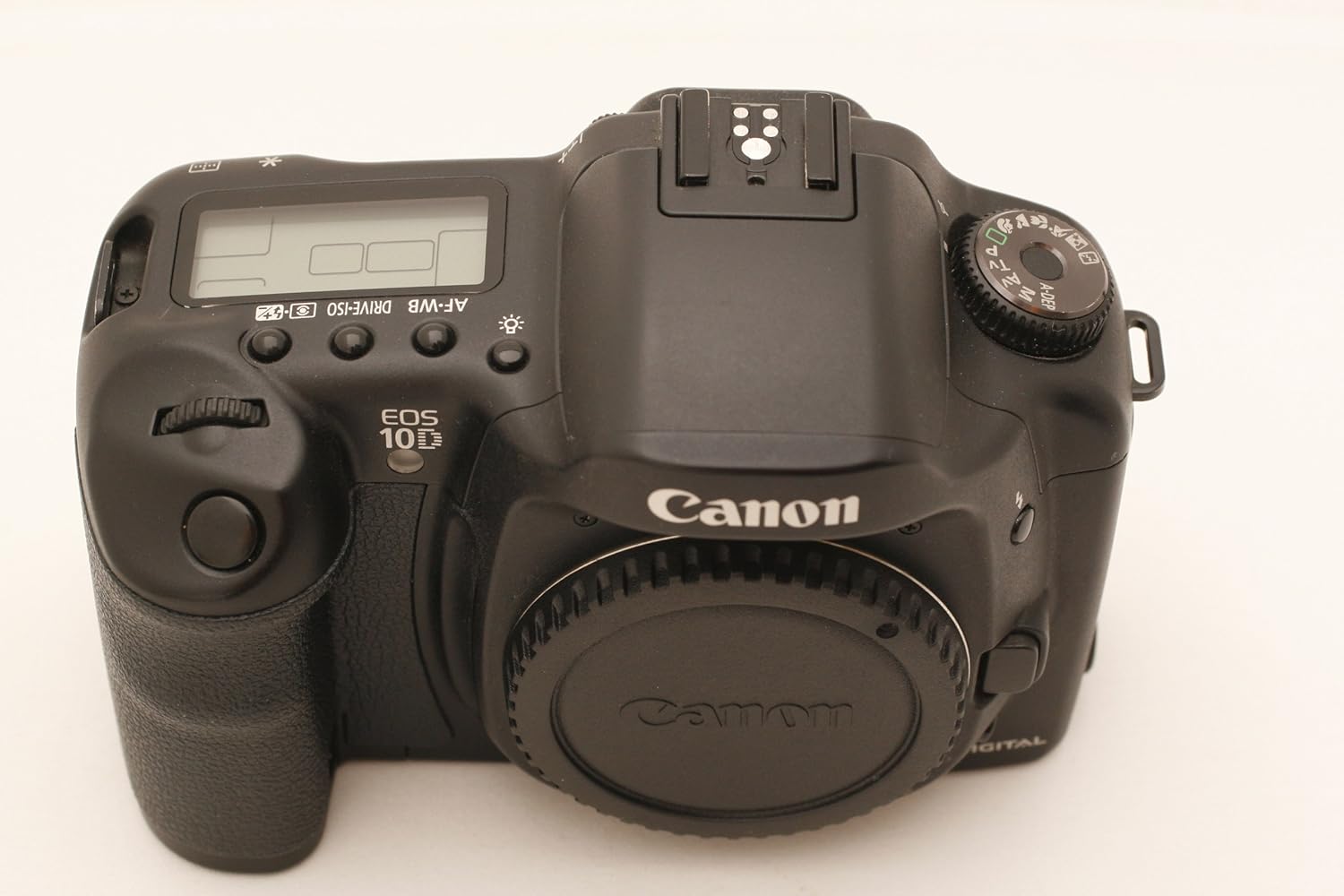
Слика: напред view of the Canon EOS 10D camera body, showing the lens mount and various controls.
2.4. Првично вклучување
After installing the battery and memory card, turn the camera on using the power switch.

Слика: Заден дел view of the Canon EOS 10D, showing the LCD screen and control buttons.
Set the date, time, and language as prompted on the LCD screen.
3. Операција
3.1. Режими на фотографирање
The EOS 10D offers various shooting modes to suit different photographic situations. Select your desired mode using the Mode Dial.
- Целосно автоматско: Camera automatically sets all parameters.
- Програма AE (P): Camera sets aperture and shutter speed, but you can shift the combination.
- AE со приоритет на блендата (Tv): Вие ја поставувате брзината на блендата, фотоапаратот ја поставува блендата.
- AE со приоритет на отворот на блендата (Av): Вие ја поставувате блендата, камерата ја поставува брзината на блендата.
- Прирачник (М): Ги поставувате и блендата и брзината на блендата.
- Depth-of-field AE (A-DEP): Camera automatically sets aperture to achieve maximum depth of field.
- Режими на сцена: Close-up, Flash Off, Landscape, Night Portrait, Portrait, Sports.
3.2. Фокусирање
The camera features a 7-point AF system for precise focusing.
- Автоматски фокус (AF): Half-press the shutter button to activate autofocus. The selected AF point will illuminate.
- Рачен фокус (MF): Set the lens to MF and rotate the focusing ring on the lens.
- AF Point Selection: You can manually select an AF point using the multi-controller or allow the camera to select automatically.
3.3. Контрола на експозиција
Control the brightness of your images using various settings.
- ISO брзина: Adjust sensitivity to light. Available settings: 100, 200, 400, 800, 1600, 3200. Auto ISO is available in certain modes.
- Режими на мерење: Evaluative, Partial, Spot, Center-weighted average. Select the mode appropriate for your scene.
- Надомест на експозиција: Adjust exposure manually to make images brighter or darker.
3.4. Баланс на бела боја
Adjust white balance to ensure accurate color reproduction under different lighting conditions.
- Automatic White Balance (AWB): Camera automatically sets the optimal white balance.
- Preset White Balance: Daylight, Shade, Cloudy, Tungsten, Fluorescent, Flash.
- Прилагоден баланс на белата боја: Manually set white balance using a white or gray object.
- Температура на боја: Set Kelvin values from 2800K to 10000K in 100K increments.
- Групирање на балансот на белата боја: Capture three images with different white balance settings with a single shot.
3.5. Image Quality and Recording
Choose your preferred image quality and file формат.
- JPEG: Standard image format with various compression levels (Fine, Normal). Ideal for sharing and smaller file големини.
- RAW: Unprocessed image data for maximum post-processing flexibility.
- RAW + JPEG: Record both RAW and JPEG images simultaneously.
3.6. Континуирано пукање
For capturing fast-moving subjects, the EOS 10D can shoot continuously at approximately 3 frames per second (fps) for up to 9 shots.
- Set the drive mode to continuous shooting.
- Press and hold the shutter button completely down.
3.7. Користење на вградениот блиц
The camera features a built-in flash for low-light situations or to fill in shadows.
- In Full Auto mode, the flash may pop up automatically.
- In creative modes, you can manually raise the flash using the flash button.
- Flash modes include E-TTL for automatic flash exposure.
3.8. Image Playback and Review
Review your captured images on the camera's 1.8-inch LCD screen.
- Притиснете го ИГРАЈ копче за да влезете во режим на репродукција.
- Use the directional buttons to navigate through images.
- Enlarge images up to 10x in 15 steps for detailed analysis.
- Scroll horizontally and vertically within enlarged images.
- View nine images simultaneously in the reduced view.
3.9. Директно печатење
You can print images directly from the EOS 10D to compatible Canon photo printers.
- Connect the camera to a compatible Canon photo printer using a USB cable.
- Follow the on-screen instructions on the camera's LCD to select images and print settings.
4. Одржување
4.1. Чистење на камерата
- Тело на камерата: Use a soft, dry cloth to wipe dust and smudges. For stubborn dirt, lightly dampmk крпата со вода или благ раствор за чистење.
- Објектив: Use a lens blower to remove dust, then a lens brush. For smudges, use a lens cleaning solution and a microfiber cloth. Avoid touching the lens surface with your fingers.
- CMOS сензор: Sensor cleaning should be performed with extreme care. It is recommended to have this done by a professional Canon service center to avoid damage.
- LCD екран: Use a soft, dry cloth. Avoid harsh chemicals.
4.2. Нега на батерии
- Always use genuine Canon battery packs and chargers.
- Чувајте ги батериите на ладно и суво место кога не ги користите.
- Не изложувајте ги батериите на екстремни температури или директна сончева светлина.
- Доколку камерата не се користи подолг временски период, извадете ја батеријата.
4.3. Складирање
- Store the camera in a dry, well-ventilated area, away from dust and humidity.
- Use a desiccant (silica gel) in the camera bag or storage container to absorb moisture.
- Remove the battery and memory card before long-term storage.
- Attach the body cap and lens caps to protect the sensor and lens elements.
5 Смена на проблеми
If you encounter issues with your Canon EOS 10D, refer to the following common problems and solutions:
5.1. Камерата не се вклучува
- Осигурајте се дека батеријата е целосно наполнета и правилно вметната.
- Проверете дали капакот на преградата за батерии е безбедно затворен.
- Обидете се да користите друга, целосно наполнета батерија доколку е достапна.
5.2. Cannot Take Pictures
- Check if a CompactFlash card is inserted and has sufficient free space.
- Ensure the lens is properly attached and the lens cap is removed.
- Verify that the camera is not in playback mode.
- If the flash is set to forced off, it may prevent shooting in very dark conditions.
5.3. Сликите се заматени
- Check if the lens is set to autofocus (AF) or if manual focus is correctly adjusted.
- Ensure the shutter speed is fast enough to prevent camera shake, especially in low light or with long lenses.
- Clean the lens if it is smudged or dirty.
5.4. Flash Does Not Fire
- Check if the flash is raised (if applicable for built-in flash).
- Ensure the flash mode is not set to "Flash Off".
- The flash may not fire if the battery level is low.
5.5. Пораки за грешка
If an error message appears on the LCD, refer to the camera's on-screen help or consult the Canon support website for specific error code meanings.
6. Спецификации
Below are the key technical specifications for the Canon EOS 10D DSLR camera:
| Карактеристика | Спецификација |
|---|---|
| Име на моделот | 10Д |
| Сензор за слика | 6.3 MP CMOS (APS-C size) |
| Ефективна сепак резолуција | 6.3 MP |
| Максимална големина на слика | 3072 пиксели |
| Компатибилни монтирања | Канон ЕФ |
| Поддржано File Формат | JPEG, RAW |
| ISO опсег на брзина | 100 - 3200 (проширено) |
| Точки за автофокус | 7 |
| Континуирана брзина на снимање | 3 fps |
| Брзина на блендата | 30 секунди до 1/4000 секунди |
| Големина на LCD екран | 1.8 инчи |
| Медиуми за складирање | Компактен блиц |
| Поврзување | USB |
| Извор на енергија | Rechargeable Lithium-ion Battery (BP-511) |
| Материјал за тело | Легура на магнезиум |
| Тежина на ставката | 1.9 фунти |
| Број на модел | 8363A002 |
| UPC | 750845811339, 013803023787 |
7. Гаранција и поддршка
7.1. Информации за гаранцијата
This Canon EOS 10D camera body comes with:
- A full 14-day satisfaction guarantee.
- A full 90-day parts and labor warranty.
Ве молиме зачувајте го доказот за купување за гаранциски барања. Гаранцијата ги покрива дефектите во материјалите и изработката при нормална употреба.
7.2. Поддршка за корисници
For technical assistance, service, or further inquiries, please contact Canon customer support. You can find contact information on the official Canon website or through your local Canon service center.
Before contacting support, please have your camera's model number (10D) and serial number ready.


