1. Вовед
Thank you for choosing the Citizen SDC 8430te professional desktop calculator. This manual provides essential information for the proper setup, operation, and maintenance of your calculator. Please read it thoroughly before use and keep it for future reference.
2. Информации за безбедност
- Do not expose the calculator to extreme temperatures, direct sunlight for prolonged periods (beyond normal operation), or high humidity.
- Avoid dropping the calculator or subjecting it to strong impacts.
- Do not attempt to disassemble or modify the calculator. This may void the warranty and cause damage.
- Keep the calculator away from liquids.
- Користете мека, сува крпа за чистење. Не користете абразивни средства за чистење или растворувачи.
3. Производот завршиview
The Citizen SDC 8430te is a professional desktop calculator designed for efficiency and ease of use. Key features include:
- Тип: Professional desktop/display calculator
- Извор на енергија: Напојува со соларна енергија
- Прикажи: Inclined display for improved visibility
- Printing Functionality: бр
- Материјал: Пластична вasing
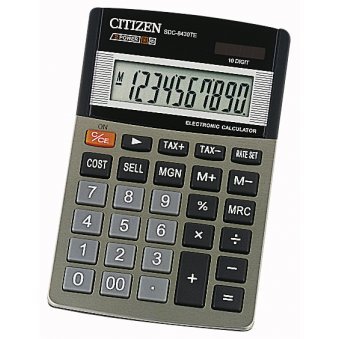
Слика што ја прикажува предната страна view of the Citizen SDC 8430te calculator, highlighting its display and keypad.
4. Поставување
The Citizen SDC 8430te calculator is solar-powered and requires no external power source or batteries for typical operation. To begin using your calculator:
- Отпакувај: Carefully remove the calculator from its packaging.
- Изложеност на светлина: Place the calculator in a well-lit area. The solar panel, typically located above the display, will convert light into power. The display should activate automatically.
- Првична проверка: Притиснете го ВКЛУЧЕНО/АС button (if present) or any number key to ensure the display is functioning correctly.
5. Упатства за работа
This section covers basic operations of your calculator.
5.1 Основни пресметки
- Додаток: Внесете го првиот број, притиснете +, внесете го вториот број, притиснете =.
- Одземање: Внесете го првиот број, притиснете -, внесете го вториот број, притиснете =.
- Множење: Внесете го првиот број, притиснете x, внесете го вториот број, притиснете =.
- Поделба: Внесете го првиот број, притиснете ÷, внесете го вториот број, притиснете =.
5.2 Clearing Entries
- Притиснете AC (All Clear) to clear all entries and reset the calculator.
- Притиснете CE (Clear Entry) to clear the last entered number without affecting previous calculations.
5.3 Мемориски функции
Your calculator may include memory functions (M+, M-, MR, MC). Refer to the key labels on your specific unit for exact functionality.
- М+: Ја додава прикажаната вредност во меморијата.
- М-: Ја одзема прикажаната вредност од меморијата.
- МР: Ја повикува вредноста зачувана во меморијата на екранот.
- MC: Ја прочистува меморијата.
6. Одржување
- Чистење: Избришете го калкулаторот со мека, сува крпа. За тврдокорна нечистотија, малкуampen the cloth with water and then wipe dry immediately. Do not use chemical cleaners.
- Складирање: When not in use for extended periods, store the calculator in a cool, dry place away from direct sunlight and extreme temperatures.
- Соларен панел: Ensure the solar panel remains clean and unobstructed for optimal performance.
7 Смена на проблеми
| Проблем | Можна причина | Решение |
|---|---|---|
| Екранот е празен или затемнет. | Insufficient light for the solar panel. | Move the calculator to a brighter area. Allow a few moments for it to power up. |
| Неточни резултати од пресметката. | Incorrect key input or sequence. | Притиснете AC to clear all entries and restart the calculation. Double-check your input. |
| Копчињата не реагираат. | Calculator may be in a low power state or a temporary malfunction. | Ensure adequate light. If the problem persists, try pressing AC. |
8. Спецификации
- Модел: SDC 8430te
- Бренд: Граѓанин
- Производител: Граѓанин
- Извор на енергија: Соларна енергија
- Материјал: Пластика
- Прикажи: Наклонет
- Функција за печатење: бр
- GTIN (Global Trade Item Number): 04966006706215
- ASIN: B000E13GSS
9. Гаранција и поддршка
For warranty information and customer support, please refer to the documentation included with your purchase or visit the official Citizen webстраница. Зачувајте го доказот за купување за гаранциски побарувања.
If you encounter issues not covered in this manual, please contact Citizen customer service for assistance.
Службен Webсајт: www.citizen-systems.co.jp/english/calculator/


