1. Вовед
The Extech EX310 is a compact, manual-ranging digital multimeter designed for a variety of electrical measurements. It features an extra-large 2000-count LCD and a built-in Non-Contact AC Voltage Detector (NCV) for enhanced safety. This device is capable of measuring AC/DC Voltage, AC/DC Current, Resistance, Diode, and Continuity, and includes a battery test function for 1.5V and 9V batteries. Its robust design, including a protective rubber holster and tilt stand, makes it suitable for field use.
2. Информации за безбедност
Always adhere to safety precautions when using any electrical testing equipment. Failure to do so may result in injury or damage to the meter or equipment under test.
- The Extech EX310 is UL listed with a CAT III – 600 Volt safety rating.
- Не применувајте повеќе од оценетиот томtage, како што е означено на мерачот, помеѓу терминалите или помеѓу кој било терминал и заземјување.
- Секогаш проверувајте ги мерните сонди за оштетување пред употреба. Заменете ги ако изолацијата е оштетена.
- Бидете исклучително внимателни кога работите со електрични кола во живо.
- Use the Non-Contact Voltage (NCV) detector as a preliminary check for live AC voltage, but always verify with direct contact measurements when possible.
- Пред да правите мерења, проверете дали прекинувачот за функција е поставен на точниот опсег.
3. Карактеристики на производот
- 9-Function Manual-Ranging DMM: Мери AC/DC voltage, AC/DC current (up to 10 A), resistance, diode, continuity, plus 1.5 V/9 V battery tests.
- Бесконтактно волtage (NCV) Detector: Built-in NCV with red LED and audible beeper alerts to the presence of live AC (100-600 VAC) without probes.
- Extra-Large 2000-Count Display: Clear, easy-to-read 1-inch digits on a high-count LCD ensure readability.
- Rugged, Portable Design: Compact meter (5.7 × 2.9 × 1.6 in, 9 oz) with protective rubber holster, tilt stand, and low-battery indicator.
- Reliable Safety & Accuracy: 0.5% basic accuracy. Designed to UL/CAT II-1000 V & CAT III-600 V safety standards.
4. Содржина на пакетот
The Extech EX310 package includes the following items:
- Extech EX310 Mini Digital Multimeter
- Тест води
- Батерија од 9 волти
- Држач за навалување
5. Производот завршиview (Controls and Display)
Familiarize yourself with the components of your EX310 multimeter:

Слика: напред view of the Extech EX310 Mini Digital Multimeter, showing the large LCD display, function dial, NCV button, and input jacks.
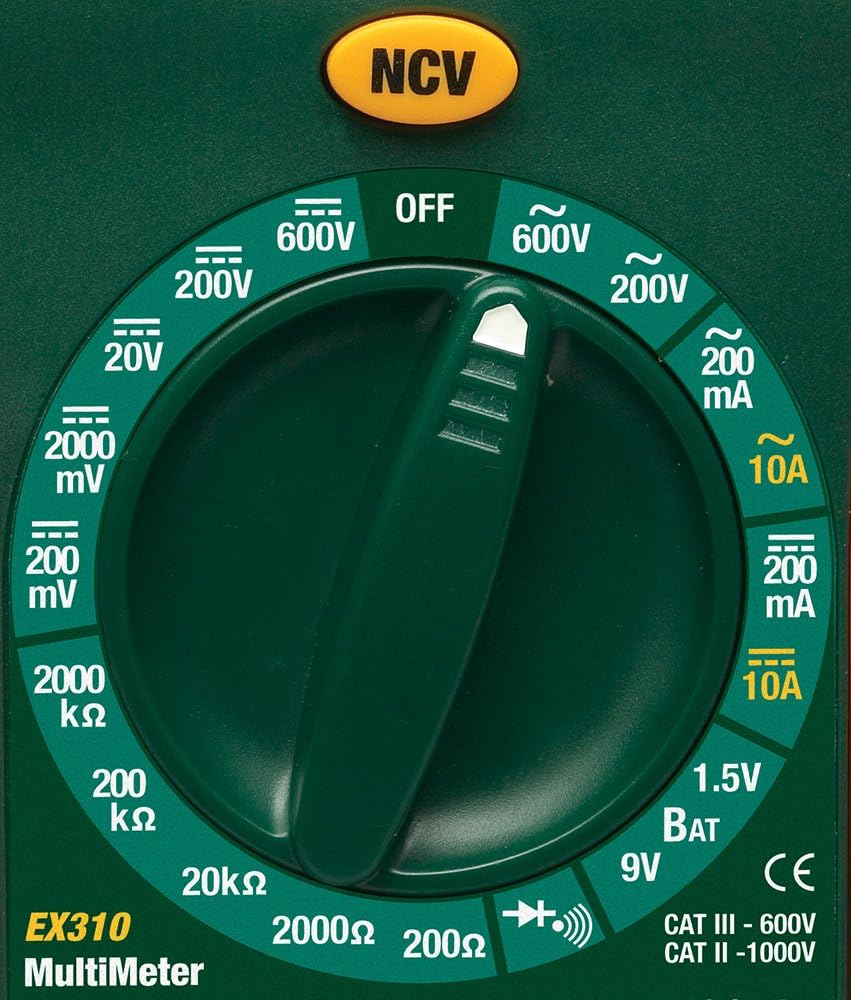
Image: Close-up of the Extech EX310's function dial, illustrating the various measurement ranges and functions such as voltage, current, resistance, diode, continuity, and battery test.
- LCD дисплеј: Ги прикажува отчитувањата на мерењата, единиците и индикаторите за функции.
- Прекинувач на функции: Rotary dial to select the desired measurement function and range.
- NCV Button: Activates the Non-Contact Voltage detection feature.
- Влезни дигалки: Терминали за поврзување на мерни сонди (COM, VΩmA, 10A).
6. Поставување
6.1. Инсталација на батерија
- Осигурајте се дека мултиметарот е исклучен.
- Пронајдете го капакот на преградата за батерии на задниот дел од мерачот.
- Одвртете ги завртките за прицврстување и извадете го капакот.
- Вметнете нова батерија од 9V, почитувајќи го правилниот поларитет.
- Replace the cover and secure with the screw(s).
A low battery indicator will appear on the display when the battery needs replacement.
6.2. Поврзување на тест кабли
Поврзете ги тест каблите со соодветните влезни приклучоци:
- Вметнете го црниот тест одвод во COM (обичен) џек.
- За повеќето мерења (вол.tage, Resistance, Diode, Continuity, mA Current), insert the red test lead into the VΩmA џек.
- За мерења на висока струја (до 10A), вметнете ја црвената мерна сонда во 10 А џек.
7. Упатства за работа
Before making any measurement, ensure the test leads are correctly connected and the function switch is set to the desired range.
7.1. AC/DC Voltagд Мерење
- Set the function switch to the desired ACV (~) or DCV (---) range (e.g., 200V, 600V).
- Connect the red test lead to the VΩmA jack and the black test lead to the COM jack.
- Допрете ги тест сондите до точките на колото каде што волуменот еtagе да се мери.
- Прочитајте го томtage вредност на LCD-екранот.
7.2. Мерење на струјата со наизменична/директна струја
Внимание: Never attempt to measure current on a circuit with voltage present across the current terminals. This can blow the fuse or damage the meter.
- Исклучете го напојувањето на колото.
- Set the function switch to the desired ACA (~) or DCA (---) range (e.g., 200mA, 10A).
- Connect the red test lead to the appropriate current jack (VΩmA for mA, 10A for 10A) and the black test lead to the COM jack.
- Отворете го колото каде што треба да се мери струјата и поврзете го мерачот сериски.
- Вклучете го струјното коло во струја и прочитајте ја струјата на LCD-екранот.
7.3. Мерење на отпор
- Осигурајте се дека колото или компонентата се исклучени од напон.
- Set the function switch to the desired Resistance (Ω) range (e.g., 200Ω, 20kΩ).
- Connect the red test lead to the VΩmA jack and the black test lead to the COM jack.
- Допрете ги тест сондите преку компонентата или колото што треба да се мери.
- Прочитајте ја вредноста на отпорот на LCD-екранот.

Image: The Extech EX310 Multimeter displaying a reading while test leads are connected to a circuit board, demonstrating a typical measurement scenario.
7.4. Тест на диоди
- Ensure the component is de-energized.
- Set the function switch to the Diode (→|) position.
- Connect the red test lead to the VΩmA jack and the black test lead to the COM jack.
- Touch the red probe to the anode and the black probe to the cathode of the diode.
- Прочитајте го напред томtage drop on the LCD. Reverse the probes to check for an open circuit (OL).
7.5. Тест за континуитет
- Осигурајте се дека колото или компонентата се исклучени од напон.
- Set the function switch to the Continuity (→))) position.
- Connect the red test lead to the VΩmA jack and the black test lead to the COM jack.
- Допрете ги тест сондите преку колото или компонентата.
- An audible tone will sound if continuity exists (resistance below approximately 30Ω).

Слика: Крупен план view of the Extech EX310 Multimeter with its test leads connected to an internal electronic circuit, demonstrating precise measurement capabilities.
7.6. Бесконтактен томtage (NCV) Откривање
- Поставете го функцискиот прекинувач на која било позиција.
- Press and hold the NCV button.
- Move the top of the meter (where the NCV sensor is located) close to the suspected AC voltage source (e.g., wire, outlet).
- A red LED will illuminate and an audible beeper will sound, increasing in intensity as the meter gets closer to the live AC voltage.

Image: A hand holding the Extech EX310 Multimeter near an electrical wall outlet, demonstrating the use of the Non-Contact Voltage (NCV) detection feature to identify live circuits.
7.7. Battery Test (1.5V/9V)
- Set the function switch to the 1.5V BAT or 9V BAT position.
- Connect the red test lead to the VΩmA jack and the black test lead to the COM jack.
- Touch the red probe to the positive terminal and the black probe to the negative terminal of the battery.
- Прочитајте ја батеријата волtage на LCD -екранот.
8. Одржување
8.1. Замена на батеријата
Refer to Section 6.1 for detailed instructions on replacing the 9V battery when the low battery indicator appears.
8.2. Замена на осигурувачите
If the current measurement functions cease to operate, the internal fuse(s) may need replacement. The fuses are typically located beneath the battery compartment. Refer to the full product manual for specific fuse ratings and replacement procedures. Always replace with fuses of the identical type and rating.
8.3. Чистење
Периодично бришете го куќиштето со рекламаamp крпа и благ детергент. Не користете абразивни средства или растворувачи. Пред употреба, проверете дали мерачот е целосно сув.
9 Смена на проблеми
- Нема приказ: Check the 9V battery. Ensure it is correctly installed and has sufficient charge.
- Неточни читања: Verify that the function switch is set to the correct measurement type and range. Ensure test leads are properly connected and making good contact with the circuit.
- Мерењето на струјата не работи: Check the internal fuse(s). Refer to the Maintenance section for fuse replacement.
- NCV не открива: Ensure the NCV button is pressed and held. Confirm the presence of AC voltage (100-600 VAC) in the area being tested.
10. Спецификации
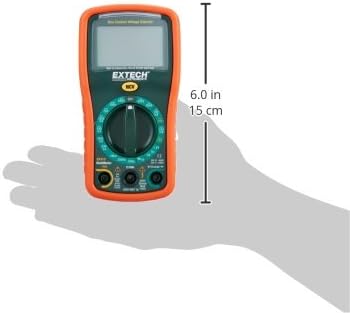
Image: Diagram illustrating the physical dimensions of the Extech EX310 Multimeter, showing a length of 6.0 inches (15 cm).
| Спецификација | Вредност |
|---|---|
| Бренд | Extech |
| Број на модел | EX310 |
| Тип на мерење | Мултиметар |
| Стил | Рачно рангирање |
| Основна точност | +/-0.5% |
| Приказ | 2000-Count LCD |
| Оценка за безбедност | UL listed CAT III - 600V, CAT II - 1000V |
| Извор на енергија | 9V батерија |
| Димензии на ставката (Д x Ш x В) | 5.7 x 1.6 x 2.9 инчи (14.5 x 4.1 x 7.4 см) |
| Тежина на ставката | 0.704 унци (0.02 килограми) |
| Вклучени компоненти | Test leads, 9 Volt battery, tilt stand |
11. Информации за гаранцијата
The Extech EX310 Mini Digital Multimeter is covered by a 1 години гаранција за делови и работна сила from the date of purchase. Please retain your proof of purchase for warranty claims. This warranty covers manufacturing defects and workmanship under normal use.
12. Поддршка за корисници
For technical assistance, troubleshooting beyond this manual, or warranty service, please contact Extech customer support. Refer to the official Extech webлокација или пакување на производот за најактуелните информации за контакт.


