Вовед
The RCA DRC8052N DVD Recorder is designed for recording and playing back video content on DVD discs. This device allows you to record from various sources such as a television, camcorder, or other video devices, and archive your favorite movies and shows. It features an HDMI output for a high-quality digital connection and upconversion to high-definition resolution, enhancing your viewing experience. The unit also supports DivX playback and includes convenient front audio/video input jacks for easy connectivity.
Поставување
Follow these steps to set up your RCA DRC8052N DVD Recorder:
- Отпакување: Carefully remove the DVD recorder and all accessories from the packaging. Ensure all components are present.
- Поврзување за напојување: Connect the power cord to the DC IN 9V port on the rear of the unit and then plug it into a standard electrical outlet.
- Видео излезна врска:
- For optimal picture quality, connect an HDMI cable from the HDMI OUT port on the DVD recorder to an HDMI ВО порт на вашиот телевизор.
- Alternatively, use composite video (yellow) and stereo audio (red/white) cables to connect the ВИДЕО и АУДИО ИЗЛЕЗ (Д/Л) ports on the DVD recorder to corresponding input ports on your television.
- Video Input Connection (for recording):
- To record from a camcorder, connect it to the DV-Input port on the front panel. This digital connection is ideal for transferring digital video.
- For other video sources (e.g., VCR, cable box), use the AUDIO IN (R/L) и ВИДЕО ВО jacks on the rear panel, or the convenient Front Audio/Video Input Jacks.
- Батерии за далечински управувач: Insert two AA batteries into the remote control unit, observing the correct polarity. The remote control is essential for full functionality.
- Почетно вклучување: Притиснете го МОЌ button on the unit or remote control to turn on the DVD recorder. Follow any on-screen prompts for initial setup.
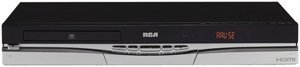
Слика 1: Предна страна view of the RCA DRC8052N DVD Recorder, showing the disc tray and control buttons.
Упатства за работа
This section details the basic operation of your DVD recorder.
Репродукција на DVD
- Ensure the DVD recorder is powered on and your TV is set to the correct input source (e.g., HDMI 1, AV1).
- Притиснете го ОТВОРИ/ЗАТВОРИ копче за отворање на фиоката за диск.
- Ставете DVD диск на фиоката со страната со етикетата свртена нагоре.
- Притиснете го ОТВОРИ/ЗАТВОРИ button again to close the tray. The disc will load automatically.
- Користете го ИГРАЈ, ПАУЗА, СТОП, and navigation buttons on the remote control to manage playback.
Recording to DVD
The RCA DRC8052N supports recording to DVD+R/+RW and DVD-R/-RW discs.
- Insert a blank recordable DVD disc into the disc tray.
- Select the input source you wish to record from (e.g., DV-Input, AV-Input) using the remote control.
- Ensure the source device is playing or transmitting the content you want to record.
- Притиснете го РЕКОРД button on the remote control or the unit to begin recording.
- Притиснете го СТОП копче за завршување на снимањето.
- Finalize the disc if necessary, following the on-screen instructions, to ensure it can be played on other DVD players.
HDMI with HD Upconversion
When connected via HDMI, the DVD recorder can upconvert standard DVD images to high-definition resolution (up to 1080i), providing a clearer and more detailed picture on compatible HD televisions.
DivX Playback
This unit is DivX certified, allowing playback of DivX video files stored on compatible discs. Insert a disc containing DivX files, and the interactive user interface will guide you through selecting and playing the content.
Одржување
Proper care ensures the longevity and optimal performance of your DVD recorder.
- Чистење на единицата: Use a soft, dry cloth to clean the exterior of the unit. Do not use liquid cleaners or abrasive materials, as they may damage the finish.
- Грижа за дискови: Држете ги дисковите за рабовите за да избегнете отпечатоци од прсти и гребнатини. Чувајте ги дисковите во нивните кутии кога не се во употреба. Чистете ги валканите дискови со мека крпа без влакненца, бришејќи од центарот кон надвор.
- Вентилација: Ensure the unit has adequate ventilation. Do not block any ventilation openings on the top, sides, or bottom of the recorder. Avoid placing the unit in an enclosed space or on soft surfaces that may obstruct airflow.
- Исклучено: Кога не го користите уредот подолг период, се препорачува да го исклучите од штекерот.
Решавање проблеми
If you encounter issues with your RCA DRC8052N DVD Recorder, refer to the following common solutions:
| Проблем | Можна причина / решение |
|---|---|
| Уредот не се вклучува. | Ensure the power cord is securely connected to both the unit and a working electrical outlet. |
| No picture or sound on TV. | Check all video and audio cable connections (HDMI, composite). Ensure your TV is set to the correct input source (e.g., HDMI 1, AV1). |
| Дискот не игра. | Ensure the disc is inserted correctly with the label side up. Check if the disc is clean and free of scratches. Verify the disc format is compatible with the player (e.g., DVD-Video, DivX). Some discs may be region-coded and not compatible. |
| Не може да се снима. | Ensure a blank, recordable DVD disc (DVD+R/+RW or DVD-R/-RW) is inserted. Verify the input source is correctly selected and providing a signal. Check if the disc has sufficient free space. |
| Далечинскиот управувач не работи. | Check and replace the batteries (2 AA batteries required). Ensure there are no obstructions between the remote and the unit's sensor. The remote control is necessary for full operation. |
| Unit takes a long time to start up. | A brief startup sequence (approximately 20 seconds) is normal for this device before it fully responds to commands. |
Спецификации
- Бренд: RCA
- Број на модел: DRC8052N
- Димензии на производот: 16.9 x 11 x 2.6 инчи
- Тежина на ставката: 10.1 фунти
- Батерии: Потребни се 2 AA батерии (за далечинско управување)
- Посебни карактеристики: Компактен дизајн
- Тип на медиум: DVD (+R/+RW, -R/-RW)
- Резолуција: Up to 1920x1080 (via HDMI upconversion)
- Тип на конектор: RCA, HDMI
- Технологија за поврзување: HDMI, RCA
- Режим за излез на звук: Стерео
- Поддржан аудио формат: Dolby Digital, DTS, PCM
- Вкупно HDMI порти: 1
Гаранција и поддршка
For detailed warranty information, please refer to the warranty card included with your product or visit the official RCA website. For technical support or service inquiries, please contact RCA customer service through their official channels.


