1. Вовед
The Mitsubishi HC1500 is a high-definition 720p DLP home theater projector designed to deliver clear and vibrant images. This manual provides essential information for the proper setup, operation, and maintenance of your projector, ensuring optimal performance and longevity.
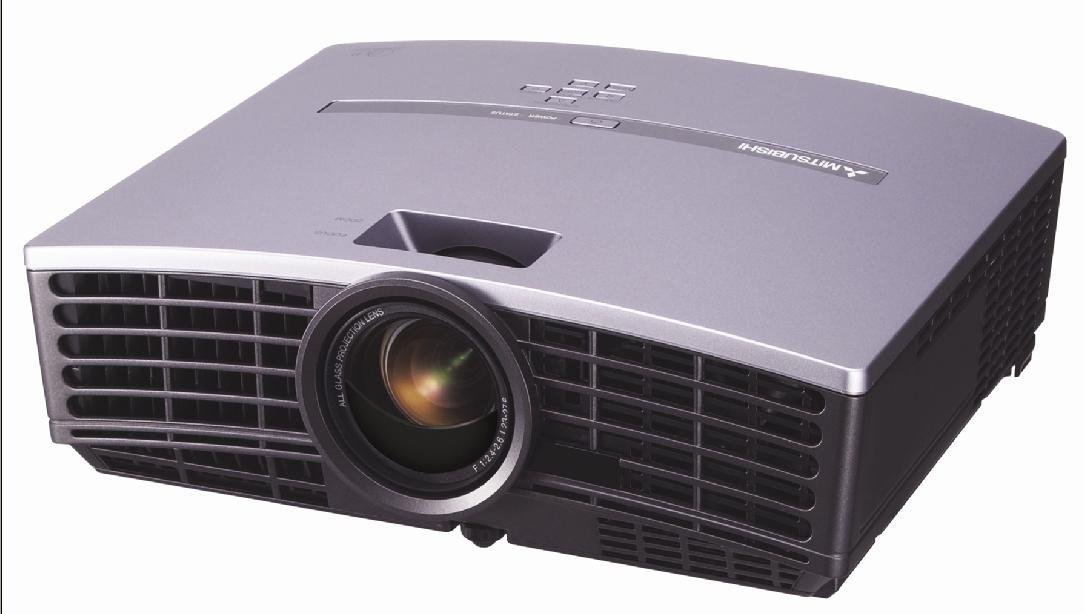
Слика 1: Предна страна view of the Mitsubishi HC1500 projector. This image displays the projector's front panel, featuring the central projection lens and the prominent ventilation grilles on both sides, designed for efficient heat dissipation.
2. Информации за безбедност
Please read all safety instructions before operating the projector. Failure to follow these instructions may result in electric shock, fire, or damage to the projector.
- Не ги блокирајте отворите за вентилација. Обезбедете доволен простор околу проекторот за правилен проток на воздух.
- Не гледајте директно во објективот на проекторот кога lamp е вклучено, бидејќи силната светлина може да предизвика оштетување на очите.
- Не ставајте го проекторот на нестабилна количка, држач или маса.
- Исклучете го проекторот од штекер пред чистење или кога не го користите подолг период.
- Целото сервисирање упатете го на квалификуван сервисен персонал.
3. Што има во кутијата
Проверете дали сите артикли наведени подолу се вклучени во вашиот пакет:
- Mitsubishi HC1500 Projector
- AC кабел за напојување
- RGB кабел
- Кабел RS-232C
- Remote Unit with Battery
- Light Shade Cover
- Картичка за брз почеток
- Упатство за употреба (овој документ)
- Прирачник за безбедност
4. Поставување
4.1 Поставување
Position the projector on a stable surface or mount it to the ceiling. Ensure the projector is placed at an appropriate distance from the screen to achieve the desired image size. The HC1500 can project an image from 40 inches to 275 inches diagonally. Maintain clear space around the projector for ventilation.
4.2 Врски
Connect your video sources to the projector using the appropriate cables.
- HDMI: For high-definition digital video and audio signals. Use an HDMI 1.2 compatible cable for optimal performance.
- Компонента: For high-definition analog video signals.
- RS-232C: За контрола на проекторот преку компјутер или контролен систем.
- 12-Volt Trigger: To control a compatible motorized screen.
4.3 Вклучување/исклучување
- Connect the AC power cable to the projector and a power outlet.
- Притиснете го копчето за вклучување на проекторот или на далечинскиот управувач за да го вклучите уредот. Индикаторското светло за напојување ќе светне.
- To turn off the projector, press the power button again. Confirm shutdown if prompted. The projector will enter a cooling cycle before fully powering down.
5. Ракување со проекторот
Далечински управувач 5.1
The included remote control allows for convenient operation of all projector functions, including power, input selection, menu navigation, and image adjustments. The remote features backlit buttons for use in dark environments.
5.2 Избор на влез
Press the 'Input' or 'Source' button on the remote control or projector control panel to cycle through available input sources (e.g., HDMI, Component, RGB). Select the input corresponding to your connected device.
5.3 Прилагодување на сликата
- Фокус прстен: Rotate the focus ring on the projector lens to sharpen the image.
- Прстен за зумирање: Adjust the zoom ring to change the image size without moving the projector.
- Корекција на клучниот камен: Use the digital keystone correction feature (vertical and horizontal) via the on-screen menu to correct trapezoidal image distortion if the projector is not perfectly perpendicular to the screen.
5.4 лamp Режими
The projector offers different lamp modes to balance brightness and lamp живот:
- Светло режим: Provides maximum brightness (1600 ANSI lumens) for well-lit environments. Lamp life is approximately 2000 hours.
- Низок режим: Reduces brightness for darker environments, extending lamp life to approximately 3000 hours and reducing fan noise (25dBA).
6. Одржување
6.1 лamp Замена
The projector features a convenient side-loading lamp дизајн за лесна замена. Кога лamp life is nearing its end, a warning message will appear on the screen. Always use a genuine Mitsubishi replacement lamp. Refer to the detailed instructions in the full user manual for the lamp постапка за замена.
6.2 Чистење
- Надворешност: Избришете го проекторот casinсо мека, сува крпа. За тврдокорна нечистотија, користете малку дamp крпата со благ детергент, а потоа избришете ја на суво.
- Објектив: Use a lens cleaning cloth and lens cleaning solution specifically designed for optical surfaces. Do not use abrasive cleaners.
- Вентилација: Ensure the ventilation grilles are free from dust and obstructions. Use a soft brush or compressed air to gently clean the grilles.
7 Смена на проблеми
Доколку наидете на проблеми со вашиот проектор, погледнете ги следните вообичаени проблеми и решенија:
| Проблем | Можна причина | Решение |
|---|---|---|
| Нема прикажана слика | Power cable disconnected; incorrect input source selected; source device not powered on. | Check power connections; select correct input source; ensure source device is on. |
| Сликата е матна | Lens out of focus; projector too close/far from screen. | Adjust the focus ring on the lens; reposition the projector or adjust the zoom. |
| Сликата е трапезоидна | Проекторот не е нормален на екранот. | Use keystone correction in the projector menu or adjust projector angle. |
| Нема звук | No internal speaker; external audio system not connected or muted. | The HC1500 does not have an internal speaker. Connect an external audio system to your source device. |
| Проекторот се прегрева или се исклучува | Blocked ventilation; high ambient temperature. | Ensure ventilation openings are clear; operate in a well-ventilated area. |
8. Спецификации
- Модел: HC1500
- Технологија на прикажување: DLP (дигитална обработка на светлина)
- Матична резолуција: 1280 x 720 (720 p)
- Осветленост: 1600 ANSI лумени
- Сооднос на контраст: 2500:1
- Lamp Животот: Up to 3000 hours (Low Mode), 2000 hours (Bright Mode)
- Ниво на бучава: 25dBA (Low Mode)
- Поврзување: HDMI, Component, RS-232C, 12-Volt Trigger
- Големина на проекција: 40 до 275 инчи (дијагонала)
- Корекција на клучниот камен: Vertical and Horizontal Digital
- Димензии: Приближно 16.3 x 13.9 x 14 инчи
- Тежина: Приближно 6.39 килограми
9. Гаранција и поддршка
9.1 Информации за гаранцијата
The Mitsubishi HC1500 projector is backed by a 1-годишна ограничена гаранција за делови и работна сила. The projector lamp is covered by a separate 90-day lamp гаранцијаВе молиме задржете го доказот за купување за гаранциски барања.
9.2 Поддршка за корисници
For technical assistance, troubleshooting beyond this manual, or warranty service, please contact Mitsubishi customer support. Refer to the official Mitsubishi website or the quick start guide for current contact information.


