Вовед
Ви благодарам за купувањетоasing the Technics SL-PD807 MASH 5 Disc CD Player. This manual provides detailed instructions for the proper setup, operation, and maintenance of your new audio component. Please read this manual thoroughly before using the unit to ensure optimal performance and longevity.
The SL-PD807 features a 5-disc carousel changer, allowing for extended playback without interruption, and incorporates MASH (Multi-stage Noise Shaping) D/A conversion for high-quality audio reproduction.
Важни безбедносни информации
- Извор на енергија: Ensure the unit is connected to an AC 120V, 60Hz power supply.
- Вентилација: Не ги блокирајте отворите за вентилација. Оставете доволно простор околу уредот за правилен проток на воздух за да се спречи прегревање.
- Влага: Не го изложувајте уредот на дожд или влага. Не ставајте предмети полни со течности, како што се вазни, врз уредот.
- Чистење: Исклучете го уредот од штекерот пред чистење. Користете сува крпа за чистење.
- Сервисирање: Не обидувајте се сами да го сервисирате овој уред. Сите сервиси обратете се на квалификуван сервисен персонал.
Содржина на пакетот
Проверете дали сите артикли се присутни во пакетот:
- Technics SL-PD807 MASH 5 Disc CD Player
- Кабел за напојување
- RCA аудио кабли
Note: A remote control is not included with this unit.
Поставување
1. Отпакување
Carefully remove the CD player and all accessories from the packaging. Retain the packaging materials for future transport or storage.
2 Поставување
Place the CD player on a stable, level surface away from direct sunlight, heat sources, and excessive dust or vibrations. Ensure there is sufficient space around the unit for proper ventilation.

Слика 1: Предна страна view of the Technics SL-PD807 CD Player with included RCA cables.
3. Врски
Connect the CD player to your amplifier or receiver using the supplied RCA audio cables.
- Connect one end of the RCA audio cables (red and white plugs) to the 'LINE OUT' jacks on the rear of the SL-PD807.
- Connect the other end of the RCA audio cables to an available 'CD IN' or 'AUX IN' input on your amplifier/receiver. Match the red plug to the 'R' (right) input and the white plug to the 'L' (left) input.
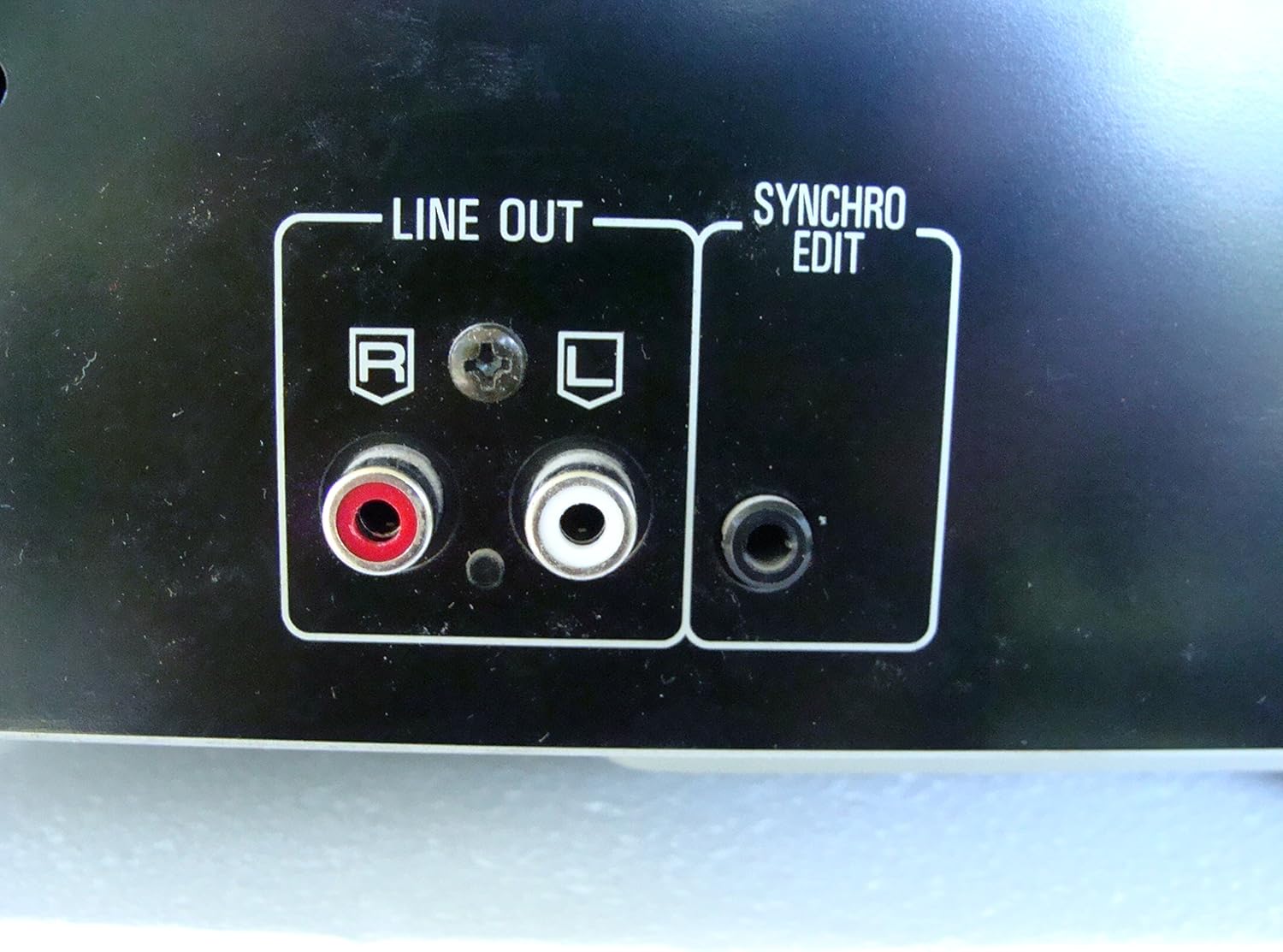
Слика 2: Rear panel connections, highlighting the 'LINE OUT' (RCA) and 'SYNCHRO EDIT' ports.
- Plug the power cord into the AC inlet on the rear of the CD player, then plug the other end into a standard AC wall outlet.
Упатства за работа
1. Вклучување/исклучување
Притиснете го МОЌ button located on the front left of the unit to turn the CD player on or off.
2. Вчитување дискови
The SL-PD807 features a 5-disc carousel. Press the ОТВОРИ/ЗАТВОРИ button to open the disc tray. Place up to five CDs onto the numbered disc slots with the label side facing up. Press ОТВОРИ/ЗАТВОРИ повторно да се затвори фиоката.

Слика 3: Front panel controls including disc tray, display, and playback buttons.
3. Основна репродукција
- Играј: Притиснете го ИГРАЈ копчето (►) за да започнете со репродукција.
- Пауза: Притиснете го ПАУЗА button (⏸) to temporarily stop playback. Press again to resume.
- Стоп: Притиснете го СТОП копче (■) за да ја запрете репродукцијата.
- Прескокни ги патеките: Притиснете го ПРЕСКОКНЕТЕ buttons (⏭︎ / ⏮︎) to skip to the next or previous track.
- Пребарување: Држете го ПРЕБАРУВАЊЕ buttons (⏪︎ / ⏩︎) to fast forward or rewind within a track.
4. Disc Exchange
You can exchange discs while another disc is playing. Press the ДИСК СПИСНУВАЕ button to rotate the carousel to an empty slot or a disc you wish to remove/replace. The currently playing disc will continue to play until you select a new disc to play.
5. Режими на репродукција
- Случајно играње: Притиснете го СЛУЧАЈНИ button to play tracks on the current disc or all loaded discs in a random order.
- Репродукција на програмата: Користете го ПРОГРАМА button to create a custom playback sequence of tracks from the loaded discs. Refer to the on-screen display for programming steps.
- Повторете ја репродукцијата: Притиснете го ПОВТОРИ button to repeat the current track, current disc, or all discs.
Одржување
1. Чистење на уредот
Избришете ја надворешноста на уредот со мека, сува крпа. За тврдокорни дамки, малкуampen the cloth with water and a mild detergent, then wipe dry. Do not use abrasive cleaners, benzene, thinner, or alcohol, as these can damage the finish.

Слика 4: Top surface of the unit, illustrating areas that may require cleaning or show wear.
2. Грижа за дискови
- Држете ги дисковите за нивните рабови за да избегнете отпечатоци од прсти на површината за репродукција.
- Keep discs clean. Wipe from the center outwards with a soft, lint-free cloth if necessary.
- Store discs in their cases to protect them from dust and scratches.
Решавање проблеми
If you experience problems with your CD player, please consult the following table before seeking service.
| Проблем | Можна причина | Решение |
|---|---|---|
| Нема моќ | Кабелот за напојување не е безбедно поврзан. | Проверете го поврзувањето на кабелот за напојување со уредот и ѕидниот штекер. |
| Нема звук | RCA audio cables not connected correctly. AmpВлезот за ладилник/приемник не е избран. | Ensure RCA cables are securely connected to both the CD player and ampлифирач. Изберете го точниот влез на вашиот ampлафикатор/приемник. |
| Disc does not play / Skipping | Дискот е валкан или изгребан. Дискот е вметнат неправилно. | Clean the disc with a soft, lint-free cloth. Ensure the disc is placed label-side up in the tray. Try another disc. |
| Carousel does not rotate | Obstruction in the disc tray. | Ensure no foreign objects are obstructing the carousel mechanism. |
Спецификации
The following are the technical specifications for the Technics SL-PD807 MASH 5 Disc CD Player:
| Карактеристика | Спецификација |
|---|---|
| Име на моделот | SL-PD807 |
| Производител | Техника |
| Капацитет на дискот | 5 дискови |
| Барања за моќност | AC 120V, 60Hz, 13W |
| Димензии на пакетот | 17 x 17 x 5 инчи |
| Тежина на ставката | 15.02 фунти |
| Технологија за поврзување | Auxiliary, Infrared |
| Специјална карактеристика | Заштита против прескокнување |

Слика 5: Product label displaying model number and power specifications.
Гаранција и поддршка
For information regarding warranty coverage and customer support for your Technics SL-PD807 CD Player, please refer to the warranty card included with your purchase or visit the official Technics website. If you require further assistance, please contact Technics customer service.


