Вовед
This manual provides comprehensive instructions for the installation, setup, operation, and maintenance of your Schlage FE575 CAM 619 ACC Camelot Keypad Lock with Accent Lever. This electronic keyless entry system offers enhanced security and convenience for your home or office. Please read these instructions carefully before installation and use to ensure proper function and safety.
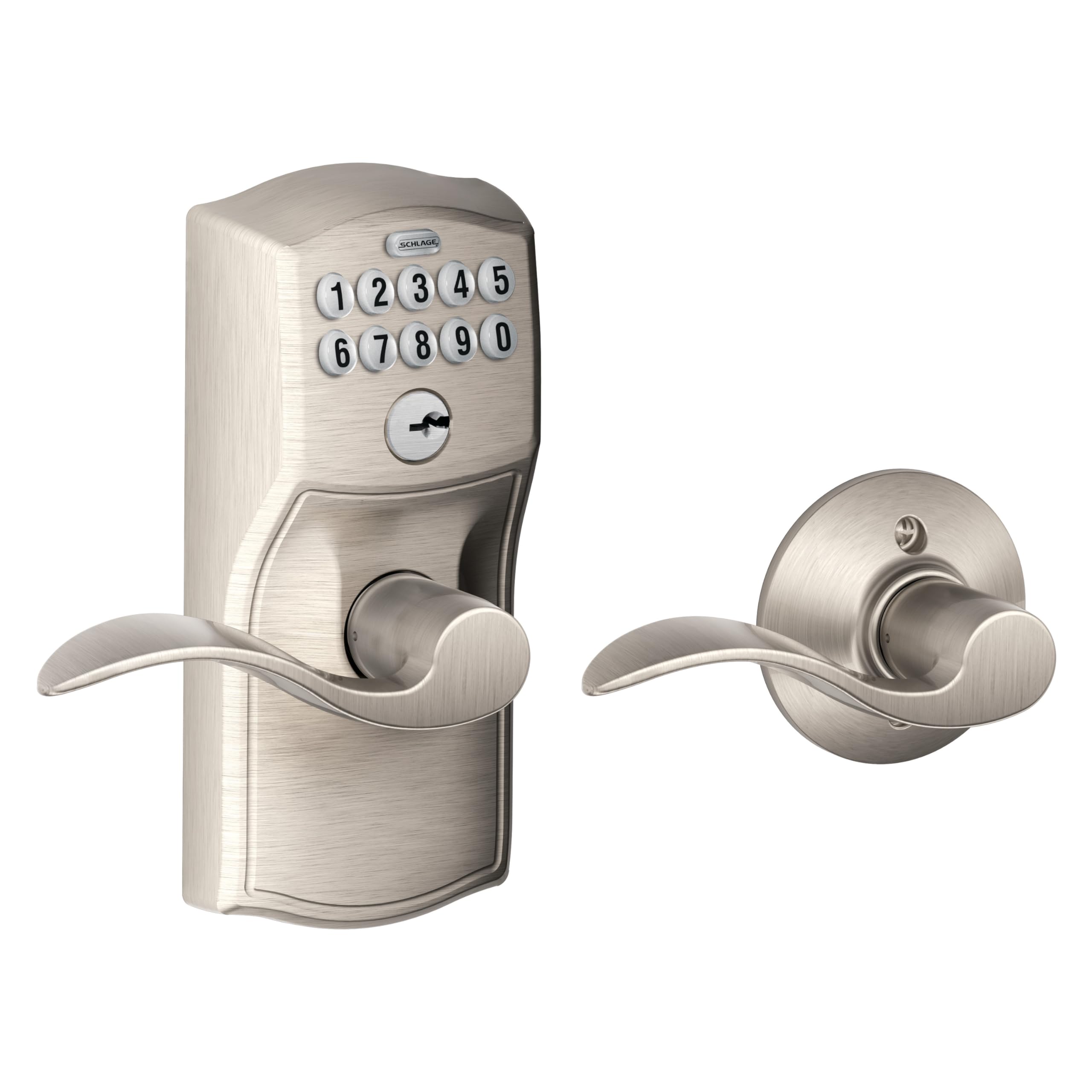
Figure 1: Schlage FE575 CAM 619 ACC Camelot Keypad Lock with Accent Lever, Satin Nickel finish. This image displays the complete lock assembly, including the exterior keypad and lever, and the interior lever and thumbturn.
Информации за безбедност
Always follow basic safety precautions when installing and using this product to reduce the risk of injury, fire, or electric shock. Keep all components out of reach of children. Do not attempt to disassemble or modify the lock beyond the instructions provided. Use only the specified 9V alkaline battery for operation.
Содржина на пакетот
Проверете дали сите компоненти се присутни пред да започнете со инсталацијата:
- Exterior Keypad Assembly with Accent Lever
- Внатрешен склоп на рачката
- Завртка за бравата
- Ударна плоча
- Завртки за монтирање
- 9V алкална батерија
- Инструкции за инсталација (овој документ)
- Клучеви (2)

Слика 2: Експлодирано view of the Schlage FE575 CAM 619 ACC Keypad Lock components, including the exterior keypad, interior lever, latch, and mounting hardware.
Инсталација
The Schlage FE575 CAM 619 ACC Keypad Lock is designed for easy installation, typically requiring only a screwdriver. It is suitable for standard door preparations and can replace most existing levers or knobs in approximately 30 minutes without hardwiring.
Чекори за инсталација:
- Подгответе ја вратата: Ensure your door has standard bore holes. If replacing an existing lock, remove it first.
- Инсталирајте го бравата: Insert the latch bolt into the door edge and secure it with screws. Ensure the latch is oriented correctly for your door's swing.
- Инсталирајте го надворешниот склоп: Place the exterior keypad assembly onto the door, aligning the spindle with the latch mechanism.
- Инсталирајте го внатрешниот склоп: Attach the interior lever assembly, connecting it to the exterior unit and securing it with the provided screws.
- Инсталирајте ја батеријата: Insert the 9V alkaline battery into the designated compartment within the interior assembly.
- Тест операција: Close the door and test the lock's functionality using the pre-programmed codes and the key.
Video 1: An official Schlage video titled "Trust your home to Schlage," demonstrating the brand's commitment to security and showing various lock installations and usage scenarios, including keyless entry systems.
Setup & Programming User Codes
Your Schlage Keypad Lock comes with two pre-programmed user codes for immediate use. You can easily add, change, or delete up to 19 user codes directly from the keypad.
Карактеристики на тастатурата:
- Pre-programmed Codes: Two codes are ready for use out of the box.
- Капацитет на кориснички код: Store up to 19 unique 4-digit user codes.
- Привремени кодови: Easily create and delete temporary codes for guests or service providers.
- Keypad Illumination: The keypad numbers illuminate when pressed, making it easy to enter codes in low-light conditions.
Програмски чекори:
Refer to the detailed programming guide included in your package for specific instructions on adding, changing, or deleting user codes. Generally, this involves entering a programming code followed by the desired user code and confirmation.
Упатства за работа
Unlocking with a Code:
- Внесете го вашиот 4-цифрен кориснички код на тастатурата.
- The Schlage button will flash green, indicating a correct code.
- Turn the lever to open the door.
Функција за автоматско заклучување:
The auto-lock feature automatically re-locks your door approximately 5 seconds after a valid code is entered and the door is closed. This provides peace of mind, ensuring your door is always secured.
Manual Locking/Unlocking (Interior):
From the interior side of the door, the lock can be manually controlled:
- Отклучена позиција: When the thumbturn is in the vertical position, the door is unlocked and can be opened without a code.
- Заклучена позиција: When the thumbturn is in the horizontal position, the door is locked from the outside. Entry from the outside requires a valid code or key.
Отфрлање на клучот:
In case of battery depletion or if you prefer, the lock can always be opened using the physical key provided. Insert the key into the keyhole below the keypad and turn to unlock.
Одржување
Замена на батерија:
The lock operates on one 9V alkaline battery, which is included. With typical use, the battery life can extend up to 2 years. A dedicated low-battery indicator will alert you when replacement is needed. To replace the battery, access the battery compartment on the interior assembly, typically by removing a cover or a few screws.
Чистење:
Чистете ги површините на тастатурата и рачките со мека, дamp крпа. Избегнувајте абразивни средства за чистење или растворувачи кои би можеле да ја оштетат завршната обработка или електронските компоненти.
Решавање проблеми
- Заклучувањето не реагира: Check the battery level. Replace the 9V battery if the low-battery indicator is on or if the keypad does not light up.
- Кодот не работи: Ensure you are entering the correct 4-digit code. Try re-entering the code slowly and deliberately. If issues persist, refer to the programming guide to verify or reprogram user codes.
- Lever is stiff: Ensure the lock is properly lubricated and free from debris. Check for any obstructions in the door frame or latch mechanism.
- Автоматското заклучување не се вклучува: Verify that the door closes completely and the latch bolt fully extends into the strike plate.
Спецификации
| Карактеристика | Детал |
|---|---|
| Бренд | РАБОТА |
| Име на моделот | Camelot Keypad Lock with Accent Lever |
| Број на модел на ставка | FE575CAM619ACC |
| Тип на заклучување | Тастатура |
| Посебни карактеристики | Battery Indicator, Auto-Lock |
| Материјал | Premium metal construction |
| Боја | Сатен никел |
| Димензии на ставката (Д x Ш x В) | 3.01 x 2.75 x 6.84 инчи |
| Тежина на ставката | 1.5 фунти |
| Тип на батерија | 1 x 9V алкален (вклучен) |
| Употреба | Back door, Entrance door, Front door |
| UPC | 043156892082 |
Гаранција и поддршка
Schlage locks are backed by a limited lifetime mechanical and finish warranty, and a limited three-year electronics warranty. For full details regarding your warranty coverage and to access customer support, please refer to the official Schlage webлокација или контактирајте го нивниот оддел за корисничка поддршка. Зачувајте го доказот за купување за гаранциски барања.


