Вовед
This manual provides essential information for the safe and efficient installation, operation, and maintenance of your HP ATX 300W Power Supply, Model 366505-001. This power supply is designed to provide reliable power to compatible personal computer systems.
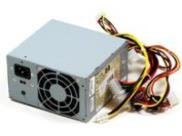
Слика 1: напред view of the HP ATX 300W Power Supply. This image displays the compact form factor and primary connectors of the power supply unit.
Ве молиме внимателно прочитајте го ова упатство пред да се обидете со каква било инсталација или работа. Зачувајте го ова упатство за во иднина.
Информации за безбедност
- Електрична опасност: Power supplies contain high voltagкомпоненти. Не го отворајте напојувањето casing. Risk of electric shock.
- Вентилација: Ensure adequate ventilation around the power supply. Do not block air vents. Overheating can cause damage or fire.
- Заземјување: Always connect the power supply to a properly grounded electrical outlet.
- Влага: Не го изложувајте напојувањето на вода или прекумерна влага.
- Професионална инсталација: Доколку не сте сигурни во врска со процесот на инсталација, побарајте помош од квалификуван техничар.
- Компатибилност: Use only with compatible personal computer systems as specified.
Поставување и инсталација
Follow these steps for proper installation of the HP ATX 300W Power Supply into your personal computer system:
- Подготовка:
- Turn off and unplug your computer from the wall outlet.
- Open the computer case according to your computer's manufacturer instructions.
- Испразнете го статичкиот електрицитет со допирање на заземјен метален предмет пред да ракувате со компонентите.
- Отстранете го старото напојување (доколку е применливо):
- Disconnect all cables from the existing power supply to the motherboard, graphics card, hard drives, and other components.
- Unscrew the old power supply from the computer case and carefully remove it.
- Инсталирајте ново напојување:
- Carefully place the HP ATX 300W Power Supply into the designated power supply bay in your computer case.
- Secure the power supply to the case using the appropriate screws.
- Поврзете кабли:
- Connect the main 20+4 pin ATX connector to the motherboard.
- Поврзете го 4-пинскиот или 8-пинскиот конектор за напојување на процесорот со матичната плоча.
- Connect SATA power connectors to hard drives, SSDs, and optical drives.
- Connect any necessary PCIe power connectors to graphics cards (if applicable).
- Осигурајте се дека сите врски се цврсти и правилно поставени.
- Завршни чекори:
- Organize cables to improve airflow and prevent interference.
- Затворете го куќиштето на компјутерот.
- Plug the computer's power cord into the power supply and then into a grounded wall outlet.
Операција
Once installed, the HP ATX 300W Power Supply operates automatically with your computer system. When you power on your computer, the power supply will deliver stable and consistent power to all connected components.
- Вклучување/исклучување: The power supply is controlled by your computer's power button. Ensure the main power switch on the back of the power supply (if present) is in the 'ON' position before powering on the computer.
- Ладење: The integrated air cooling system will activate automatically to maintain optimal operating temperatures. Ensure the fan intake and exhaust are not obstructed.
- Излезна моќност: This unit provides a maximum output of 300 Watts. Ensure your system's total power requirements do not exceed this limit for stable operation.
Одржување
Редовното одржување помага да се обезбеди долготрајност и оптимални перформанси на вашето напојување:
- Чистење: Periodically clean the exterior of the power supply and its fan vents to prevent dust buildup. Use compressed air to gently clear dust from the fan and internal components (with the computer powered off and unplugged).
- Инспекција: Occasionally inspect power cables for any signs of wear, fraying, or damage. Replace damaged cables immediately.
- Животна средина: Operate the computer in a clean, dry, and well-ventilated environment to prevent dust accumulation and overheating.
Решавање проблеми
Доколку наидете на проблеми со напојувањето, разгледајте ги следниве вообичаени чекори за решавање проблеми:
- Без моќност:
- Check if the power cord is securely plugged into both the power supply and the wall outlet.
- Ensure the main power switch on the power supply is in the 'ON' position.
- Проверете дали штекерот во ѕидот е функционален со вклучување на друг уред.
- Check all internal power connections (motherboard, CPU, peripherals) are firmly seated.
- Повремена нестабилност на напојувањето/системот:
- Ensure the power supply's wattage (300W) is sufficient for all your computer components. Upgrading components may require a higher wattagд напојување.
- Check for overheating. Ensure proper airflow and clean any dust from the power supply fan.
- Inspect for loose cable connections.
- Невообичаени звуци:
- A grinding or loud fan noise may indicate a failing fan. Consider professional inspection or replacement.
If problems persist after attempting these steps, contact HP customer support or a qualified computer technician.
Спецификации
| Бренд | HP |
| Име / број на модел | 366505-001 |
| Форма фактор | ATX |
| Излезен Ватtage | 300 вати |
| Тип на конектор | ATX |
| Компатибилни уреди | Личен компјутер |
| Метод на ладење | Воздух |
| Димензии на производот (Д x Ш x В) | 9.5 x 12 x 4 инчи |
| Тежина на ставката | 5.59 фунти (2.54 килограми) |
| ASIN | B001U0ICS6 |
| Датум прв на располагање | 16 август 2010 година |
Гаранција и поддршка
For information regarding the warranty coverage for your HP ATX 300W Power Supply, please refer to the warranty documentation provided with your original computer system or contact HP customer support directly. Warranty terms and conditions may vary based on region and purchase date.
For technical support, service, or further inquiries, please visit the official HP support website or contact their customer service department. Have your product model number (366505-001) and serial number (if applicable) ready when contacting support.
Поддршка на HP Webсајт: www.hp.com/support