Вовед
This manual provides detailed instructions for the proper use and maintenance of your Royal DM2070 Electronic Organizer. Please read this manual thoroughly before operating the device to ensure safe and efficient use. Keep this manual for future reference.
Информации за безбедност
- Не го изложувајте уредот на екстремни температури, директна сончева светлина или висока влажност.
- Избегнувајте да го испуштате уредот или да го изложувате на силни удари.
- Не обидувајте се сами да го расклопите или поправите уредот. За сите сервиси обратете се на квалификуван персонал.
- Чувајте го уредот подалеку од вода и други течности.
- Користете само наведениот тип на батерија за замена.
Содржина на пакетот
Проверете дали сите артикли се присутни во вашиот пакет:
- Royal DM2070 Electronic Organizer
- Stylus (if applicable)
- Водич за брз почеток
- Гарантна картичка
Поставување
1. Инсталација на батерија
The Royal DM2070 requires batteries for operation. Follow these steps to install them:
- Пронајдете го капакот на преградата за батерии на задната страна од уредот.
- Лизнете го или подигнете го капакот за да ја отворите преградата.
- Insert the required batteries, ensuring correct polarity (+ and -) as indicated inside the compartment.
- Добро заменете го капакот на преградата за батерии.
2. Првично вклучување и поставки
After installing batteries, power on your device and configure basic settings:
- Притиснете и задржете го МОЌ копчето додека не се осветли екранот.
- The device may prompt you to set the date and time. Use the navigation buttons or stylus to enter the correct information.
- Потврдете ги вашите поставки за да го завршите почетното поставување.
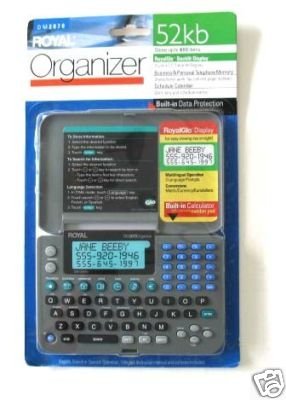
Image: Royal DM2070 Electronic Organizer. This image displays the device's front view, highlighting its screen and keypad, essential for navigation and data entry.
Упатства за работа
1. Навигација
The DM2070 features a keypad and potentially a stylus for navigation. Use the arrow keys to move between menu options and press ENTER or a designated selection button to confirm.
2. Entering Data
To enter information such as contacts, appointments, or notes:
- Navigate to the desired application (e.g., 'Contacts', 'Calendar', 'Notes').
- Select 'New Entry' or a similar option.
- Use the alphanumeric keypad to input text. Some models may offer an on-screen keyboard via stylus.
- Save your entry before exiting the application.
3. Using Applications
The DM2070 includes various applications:
- Календар: View daily, weekly, or monthly schedules. Add and edit appointments.
- Контакти: Store names, phone numbers, addresses, and email information.
- Забелешки: Create and manage text notes or memos.
- Калкулатор: Извршете основни аритметички пресметки.
- Конвертор на валути: Convert between different currencies (requires manual update of exchange rates on some models).
Одржување
1. Чистење на уредот
To keep your DM2070 in optimal condition:
- Избришете го екранот и вasing with a soft, dry, lint-free cloth.
- За тврдокорни траги, малку дampИзмијте ја крпата со вода; избегнувајте јаки хемикалии или абразивни средства за чистење.
- Ensure no moisture enters openings.
2. Нега на батерии
- Веднаш заменете ги батериите кога ќе се појави индикаторот за слаба батерија.
- Отстранете ги батериите ако уредот нема да се користи подолг период за да спречите протекување.
Решавање проблеми
If you encounter issues with your Royal DM2070, refer to the following common solutions:
| Проблем | Можна причина | Решение |
|---|---|---|
| Уредот не се вклучува. | Мртви или неправилно инсталирани батерии. | Заменете ги батериите со нови, обезбедувајќи правилен поларитет. |
| Екранот е празен или замрзнат. | Софтверски дефект или слаба батерија. | Try a soft reset (refer to Quick Start Guide for specific button combination) or replace batteries. |
| Data loss. | Battery depletion or improper shutdown. | Ensure batteries are fresh. Always save data before powering off. |
| Тастатурата не реагира. | Dust/debris under keys or internal issue. | Clean keypad gently. If problem persists, contact support. |
Спецификации
Key technical specifications for the Royal DM2070 Electronic Organizer:
| Карактеристика | Детал |
|---|---|
| Бренд | КРАЛСКИ |
| Број на модел | DM2070 |
| Материјал за покривање | Кожа |
| Формат | Организатор |
| Тежина на ставката | 181 гр |
| Димензии на ставката (ДxШxВ) | 24.4 x 14.5 x 1 сантиметри |
| Целна публика | Возрасен |
Гаранција и поддршка
The Royal DM2070 Electronic Organizer comes with a standard manufacturer's warranty. Please refer to the warranty card included in your package for specific terms and conditions. For technical support, service, or inquiries, please contact Royal customer service through the contact information provided on the warranty card or the official Royal webсајт.


